
MINISFORUM G1 Pro Mini PC
4.6Editor score
RTX 5060 Dedicated GPU
Ryzen 9 8945HX CPU
Quad 4K Output Options
This guide compares the top 10 gaming mini PCs for Cyberpunk and other demanding titles to help you find the right balance of power and portability.
Finding a gaming mini PC for Cyberpunk requires balancing raw graphical power with compact design and thermal management. You need hardware capable of handling ray tracing and high frame rates without overheating in a small chassis.
We evaluated ten real mini PCs based on processor strength, graphics capabilities, memory bandwidth, and cooling efficiency. Our analysis focuses on systems that can deliver smooth performance in Cyberpunk 2077 and similar AAA open-world titles.
Each pick highlights specific strengths like Oculink support, dedicated GPU options, or AI acceleration. Keep in mind that availability and stock levels can change rapidly, so verify current details before finalizing your purchase decision.
4.6Editor score

4.6Editor score
4.4Editor score
The following table provides a side-by-side comparison of the top ten gaming mini PCs. It highlights key specifications including processors, graphics solutions, memory capacity, and storage options to help you compare performance potential at a glance.


The ACEMAGICIAN S3A Gaming Mini PC stands out as a balanced choice for players who want desktop-class performance in a compact form factor. With a 4.6 rating from users, it delivers solid multitasking and gaming capabilities powered by the Ryzen 7 H 255 processor.
We may earn a commission when you buy through this link, at no additional cost to you.
Its Radeon 780M graphics provide enough power to handle modern titles like Cyberpunk on medium to high settings at 1080p. The triple 4K display support allows for immersive setups, and the adjustable performance modes let you tune fan noise versus throughput.
Trade-offs include the lack of a dedicated GPU and limited RAM compared to higher-end models. However, the expandable storage up to 4TB and efficient cooling system make it a reliable daily driver for most gaming scenarios.
Buyers seeking a compact mini PC that handles both productivity and gaming should consider this model. It is especially suitable for those who prioritize silence and versatility over raw frame rates in ultra-high settings.
Three adjustable modes let you choose between silent operation, balanced multitasking, or maximum processing power depending on your current workload.
Tool-free storage design allows you to upgrade to 4TB for additional game libraries without needing extra tools or technical expertise.
We may earn a commission when you buy through this link, at no additional cost to you.
The MINISFORUM G1 Pro Mini PC delivers elite-tier gaming performance with a dedicated RTX 5060 GPU and Ryzen 9 8945HX processor. This combination ensures ultra-smooth gameplay and high frame rates for demanding AAA titles like Cyberpunk.
We may earn a commission when you buy through this link, at no additional cost to you.
Its 245W total performance release is managed by a third-generation glacier cooling system that keeps temperatures stable under heavy load. Quad 4K output and Wi-Fi 7 ensure future-ready connectivity and visual fidelity for multi-monitor setups.
The trade-off is a higher price point compared to integrated graphics solutions. Additionally, the chassis is larger than most mini PCs, though it remains compact relative to traditional desktop towers.
Gaming enthusiasts and creators who need desktop-level graphics power in a small form factor should choose this model. It is ideal for those who want to push high settings without compromising on visual quality or system stability.
Full-power RTX 5060 graphics offer approximately 25% higher overall performance compared to RTX 4060 systems for AAA gaming and GPU-intensive workloads.
Wi-Fi 7 and 5GbE networking provide extremely fast data transfer speeds and low latency for online gaming and large file transfers.
We may earn a commission when you buy through this link, at no additional cost to you.
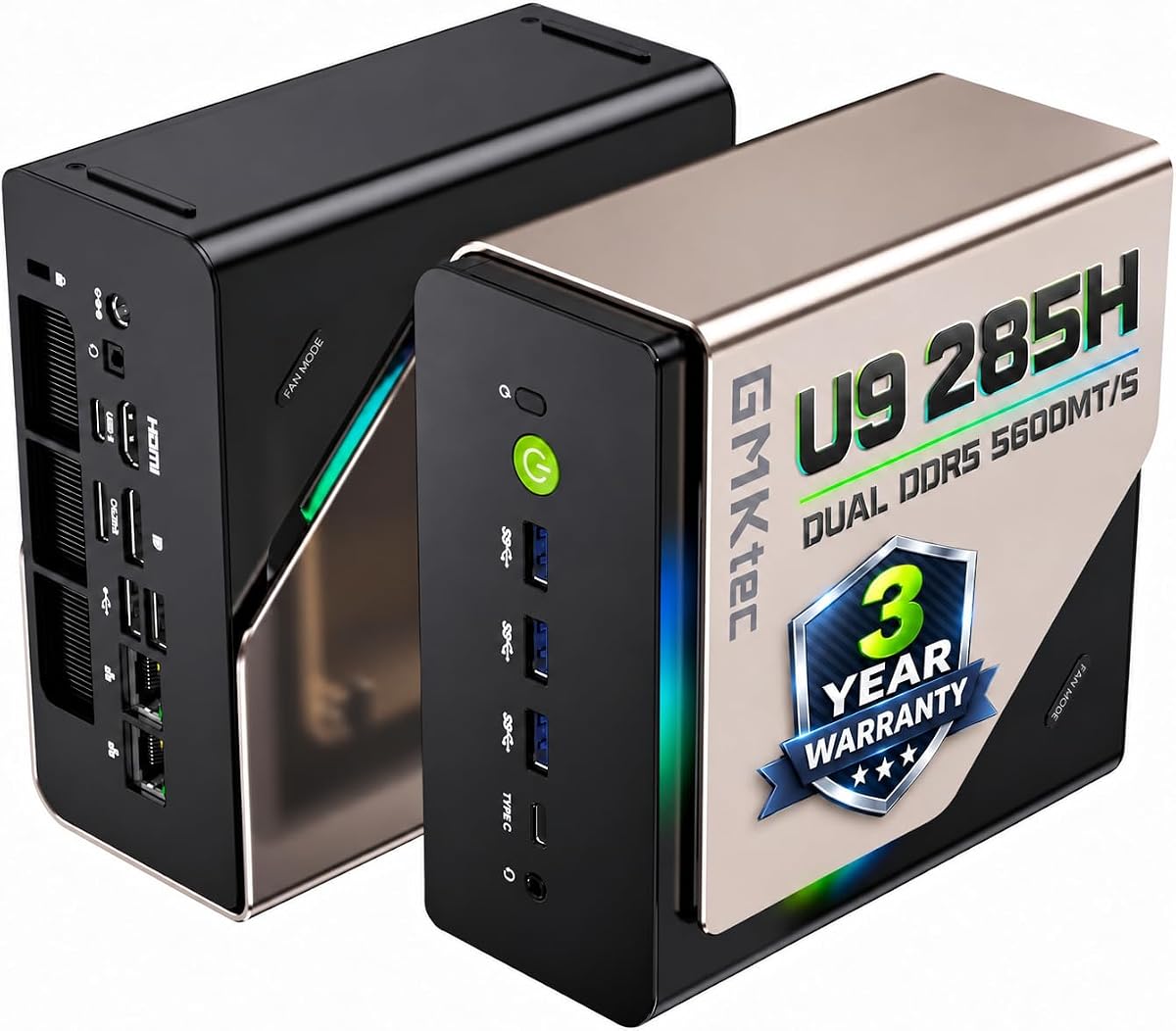
The GMKtec T1 AI Mini PC offers compelling value with its Intel Ultra 9 285H processor and dedicated AI NPU. It brings next-generation computing power to a compact chassis, making it suitable for both gaming and creative workflows.
We may earn a commission when you buy through this link, at no additional cost to you.
Its Oculink port enables external GPU connections for expanded gaming performance, while quad 8K display support accommodates high-resolution monitors. The system includes 32GB of DDR5 RAM and supports up to 12TB of storage expansion.
Users should note that the integrated GPU limits ultra settings gaming without an external solution. AI acceleration also requires compatible applications to leverage the NPU fully. These are acceptable trade-offs for the price.
Creators and gamers looking for future-proof AI capabilities and expandability should consider this model. It is especially appealing for those who plan to connect an eGPU later for increased graphical horsepower.
Capable of up to 13 TOPS for INT8 calculations, the AI Boost NPU is designed to accelerate tasks like generative AI and creative workflows.
Oculink port operates at PCIe x4 speeds for better frame rates and lower lag compared to Thunderbolt for eGPU setups.
We may earn a commission when you buy through this link, at no additional cost to you.
The ROG NUC (2025) Gaming Mini PC blends AI-driven performance with futuristic efficiency through its Core Ultra 9 Series 2 processor and RTX 5070 Mobile GPU. It targets hardcore gamers who need seamless experiences in demanding titles.
We may earn a commission when you buy through this link, at no additional cost to you.
QuietFlow cooling with three fans ensures effective heat management during intense sessions. The 3L size allows thumb-screw access for memory and storage upgrades, making it user-friendly for enthusiasts.
However, the lower user rating suggests potential reliability or performance concerns that buyers should research carefully. The premium price reflects the brand and features but may not guarantee superior value over competitors.
ROG fans seeking a stylish, high-performance mini PC should consider this model. It is best for those who prioritize aesthetics and AI capabilities alongside raw gaming power.
Three fans and a dual vapor chamber ensure effective cooling and quiet operation, letting you hear the game clearly.
Thumb screws enable quick, tool-free access for memory and storage upgrades without needing specialized tools.
We may earn a commission when you buy through this link, at no additional cost to you.
The GMKtec K12 Gaming Mini PC excels with its Oculink port for external GPU connectivity. This feature allows gamers to boost graphical performance significantly by connecting a desktop GPU externally when needed.
We may earn a commission when you buy through this link, at no additional cost to you.
Powered by the Ryzen 7 H 255 and Radeon 780M graphics, it handles modern games on FSR settings smoothly. Dual 2.5GbE LAN ports offer flexible networking options, and 32GB DDR5 ensures smooth multitasking.
The main trade-off is the lack of a dedicated GPU in the base unit. Users must purchase an eGPU separately to unlock maximum gaming potential. RGB lighting adds a customizable touch to the rig.
Gamers who want expandability and high performance should consider this model. It is ideal for those who plan to build a modular system that grows with their gaming needs.
Higher bandwidth capabilities at PCIe x4 speeds provide better frame rates and lower lag for eGPU setups.
13 dazzling RGB lighting modes let you personalize your rig's vibe to match your setup.
We may earn a commission when you buy through this link, at no additional cost to you.
The ASUS ROG GR70 Mini PC promises elite-tier gaming performance with its Ryzen 9 9955HX3D processor and RTX 5070 laptop GPU. It is designed to deliver ultra-smooth gameplay with high FPS and low latency.
We may earn a commission when you buy through this link, at no additional cost to you.
Its compact silver chassis fits power and aesthetics into a desk-friendly form. Advanced thermal design keeps temperatures down under intense loads, ensuring silent and fast operation.
Without user ratings yet, buyers rely on ROG's reputation for quality. The specs suggest top-tier performance but may come with premium pricing and limited availability in the early market.
Gaming enthusiasts who want the latest tech and compact power should consider this model. It is best for those who prioritize speed and connectivity for competitive play.
Paired with RTX 50-series GPU for ultra-smooth gameplay with high FPS and low latency to dominate every match.
Custom cooling system keeps temperatures down and acoustics low under intense loads for silent performance.
We may earn a commission when you buy through this link, at no additional cost to you.
The BOSGAME P3 Pro Mini PC provides reliable performance with its Ryzen 9 7940HS processor and Radeon 780M graphics. Preinstalled with Windows 11 Pro, it offers a smooth experience for office work and gaming alike.
We may earn a commission when you buy through this link, at no additional cost to you.
Its expandable storage and Oculink port allow for future upgrades to meet growing needs. WiFi 6E and Bluetooth 5.2 ensure stable wireless connectivity for peripherals and network devices.
The main limitation is the 16GB RAM default and lack of a dedicated GPU. However, the expandability options make it a versatile choice for users who plan to upgrade over time.
Users seeking a compact, reliable mini PC for home or office gaming should consider this model. It is especially suitable for those who value expandability and solid connectivity.
Built-in 1TB SSD can be expanded with M.2 2280 NVMe PCIe 4.0 SSD for more space.
Oculink port enables eGPU connections to meet higher graphical demands for gaming.
We may earn a commission when you buy through this link, at no additional cost to you.
The GMKtec M6 Ultra Mini PC delivers up to 30% better performance than previous models for office work and light gaming. With its Radeon 760M graphics, it handles casual 1080p gaming and multitasking smoothly.
We may earn a commission when you buy through this link, at no additional cost to you.
Dual 2.5GbE LAN ports offer flexible networking options, and triple display support through USB4 enhances productivity. Fast WiFi 6E and Bluetooth 5.2 keep wireless connections stable and efficient.
The main trade-off is the mid-tier CPU and standard 16GB RAM. This makes it less ideal for heavy gaming but excellent for home offices and media centers.
Users needing a compact system for office work and casual gaming should consider this model. It is best for those who prioritize connectivity and display flexibility.
Dual 2.5GbE RJ45 ports deliver faster and more flexible wired connections than standard 1G Ethernet.
USB4 supports up to 8K@60Hz display output for high-speed data transfer and versatile device connections.
We may earn a commission when you buy through this link, at no additional cost to you.
The GMKtec AI Mini PC Ultra 9 offers high capacity with its 64GB DDR5 RAM and Intel Ultra 9 285H processor. Its AI NPU accelerates tasks, making it suitable for demanding workflows and content creation.
We may earn a commission when you buy through this link, at no additional cost to you.
Quad 8K display support and Oculink port enable immersive setups and external GPU connectivity. The system supports up to 12TB storage expansion, providing ample space for extensive libraries.
Users should note the high price and integrated GPU limitations for ultra settings gaming. These trade-offs are acceptable for those prioritizing memory capacity and AI acceleration.
Creators and power users needing massive memory and AI capabilities should consider this model. It is ideal for those who require high-performance multitasking and expandability.
64GB DDR5 RAM supports heavy multitasking, AI workloads, and 4K/8K timeline scrubbing efficiently.
Capable of up to 13 TOPS for INT8 calculations to accelerate AI tasks and model fine-tuning.
We may earn a commission when you buy through this link, at no additional cost to you.
The GMKtec Gaming Mini PC with Ryzen 7 H 255 offers strong performance and value with 32GB DDR5 RAM. Its Radeon 780M graphics provide smooth gaming and productivity capabilities for most modern titles.
We may earn a commission when you buy through this link, at no additional cost to you.
Oculink port support allows for external GPU upgrades, while dual cooling fans maintain efficient thermal management. Triple 4K display support enhances productivity and entertainment setups.
The integrated GPU limits ultra settings gaming, but expandability options help overcome this. Users benefit from ample storage and connectivity options for diverse needs.
Buyers seeking reliable performance and expandability should consider this model. It is ideal for those who want balanced hardware without compromising on RAM or storage options.
32GB DDR5 RAM delivers massive bandwidth gains for higher minimum FPS and less stutter in open-world titles.
Dual cooling fans keep the mini PC frosty under heavy loads with just 35dB in quiet mode.
We may earn a commission when you buy through this link, at no additional cost to you.
Choosing the right mini PC for Cyberpunk involves evaluating processor strength, graphics capabilities, memory speed, and thermal management to ensure smooth gameplay in a compact form factor.
The processor is the brain of your mini PC and directly impacts multitasking and CPU-bound scenarios in games. Look for Ryzen 7/9 or Intel Core Ultra 9 chips with multiple cores and high boost clocks.
Prioritize processors with at least 8 cores to handle background tasks while maintaining high performance in demanding open-world titles.
Integrated graphics like Radeon 780M offer decent performance for 1080p gaming but struggle with ray tracing and ultra settings. Dedicated GPUs like RTX 50-series deliver desktop-class visuals.
If you aim for high settings or future-proofing, prioritize models with dedicated GPUs or Oculink support for external GPU upgrades.
Modern games require fast and ample RAM to prevent stutters and lag during asset loading. DDR5 memory provides significantly better bandwidth than older DDR4 generations.
Aim for at least 32GB DDR5 for smooth multitasking and future compatibility with increasingly demanding software titles.
Compact chassis can trap heat leading to throttling and reduced performance during long gaming sessions. Efficient cooling systems with dual fans and vapor chambers are critical.
Choose models that maintain stable performance without excessive noise or thermal throttling under sustained load conditions.
PCIe 4.0 NVMe SSDs deliver fast boot times and quick asset loading essential for open-world exploration. Expandable slots allow you to add storage without replacing the entire unit.
Look for mini PCs with multiple M.2 slots and tool-free access to future-proof your storage capacity as game sizes grow.
Ports like HDMI 2.1, DisplayPort, and USB-C with high refresh rates support modern monitors. Connectivity like Wi-Fi 7 ensures low latency for online multiplayer.
Prioritize models with versatile port configurations to connect multiple displays, peripherals, and networking devices easily.
Some mini PCs allow user upgrades to RAM and SSDs extending their usable lifespan. Oculink ports provide external GPU support for enhanced graphical performance.
Choose models with accessible internals and upgradeable components if you plan to customize performance or extend device longevity.
Well-known brands typically offer better build quality and customer support for technical issues. Warranty terms can provide peace of mind for your investment.
Prioritize products from reputable manufacturers with reliable after-sales support and clear warranty coverage for defects.
To get the most out of your mini PC for Cyberpunk, ensure proper ventilation by placing it on a flat hard surface or using the included VESA mount. Avoid enclosing it in tight spaces that trap heat.
Regularly clean dust filters and vents using compressed air to maintain efficient cooling. Updating BIOS and drivers frequently helps optimize performance and fix compatibility issues.
Monitor system temperatures using built-in software to ensure stability during gaming sessions. Adjusting performance modes or fan profiles can help balance noise and heat during extended use.
Yes, certain mini PCs with dedicated GPUs like the RTX 5060 or 5070 can handle high settings at 1080p. Integrated graphics models may require lower settings but still offer playable performance for casual gaming.
Oculink is a high-bandwidth external connection port that allows you to connect an external GPU. This feature matters because it significantly boosts graphical performance for gaming beyond internal integrated options.
Most mini PCs come preconfigured with Windows and ready to use out of the box. Additional setup typically involves connecting displays and peripherals and installing game clients.
For modern AAA titles, 16GB is the minimum standard but 32GB is recommended for smoother multitasking and future-proofing. DDR5 memory provides faster data throughput for better performance.
Mini PCs are excellent for home offices due to their compact size and energy efficiency. Many support multiple 4K displays which enhances productivity for work applications.
Some mini PCs offer tool-free access for RAM and SSD upgrades while others are more limited. Check the product details for expandability options before purchasing to ensure future customization.
Efficient thermal design prevents overheating which causes performance throttling during intensive tasks. Compact systems rely on fans and vapor chambers to keep temperatures stable under load.
Mini PCs generally consume less power than traditional desktops which is beneficial for home use. Performance models with dedicated GPUs may require higher wattage power adapters.
The ACEMAGICIAN S3A, MINISFORUM G1 Pro, and GMKtec T1 AI Mini PC stand out as top picks for their balance of performance features and expandability.
Prioritize GPU performance and thermal management if you aim for high frame rates while memory and storage options matter for long-term usability and multitasking.
Always check current stock and specifications before purchasing as availability and configurations can change rapidly in the dynamic mini PC market.