
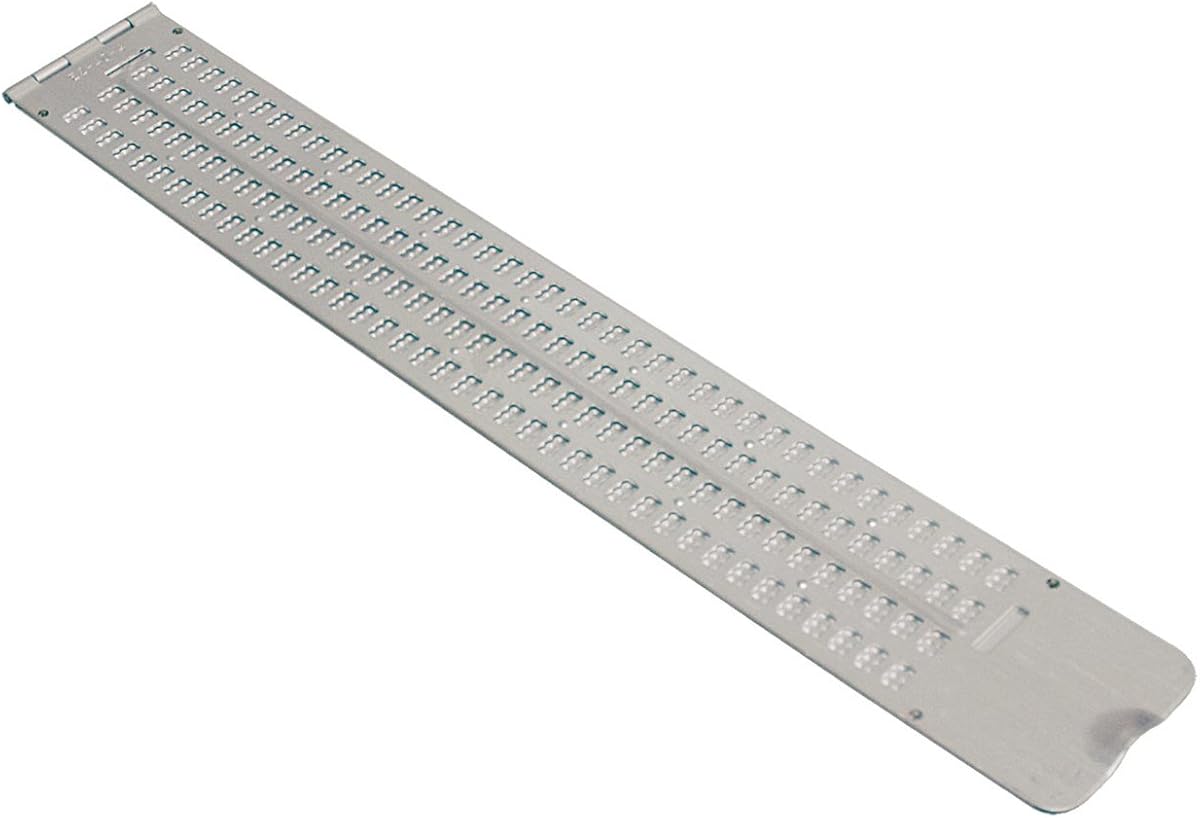
Braille Slate- 13 Lines
3.4Editor score
Durable aluminum construction
Hinged design for ease
Includes free stylus
This guide compares the top ten braille displays and related tools for blind users, focusing on portability, features, and accessibility across devices.
Finding the right braille display can transform how blind users access digital content. A good device offers reliable refreshable cells, seamless connectivity, and intuitive navigation to support daily reading and writing tasks efficiently.
We compared ten leading products based on connectivity options, battery life, and specialized features. This list covers refreshable displays, manual slates, and digital input tools to suit various needs and preferences.
Each pick highlights key strengths and ideal use cases for different users. Prices may change frequently, so please check the current listings before making your final decision on the best tool for you.
3.4Editor score

5.0Editor score

This side by side comparison highlights the key specifications and capabilities of each product to help you find the perfect match for your accessibility needs.




The Brailliant BI 20X stands out as a powerful compact option for blind users needing reliable access. It features a twenty cell display and strong connectivity options for seamless daily work.
We may earn a commission when you buy through this link, at no additional cost to you.
Users benefit from multi-device support allowing connections to five Bluetooth and one USB device. The onboard KeySoft Lite suite provides essential tools like an editor and calculator for productivity.
While the sixteen gigabytes storage is adequate, some may prefer more capacity for large libraries. The high price point is a consideration but matches the premium hardware and support offered.
This device is ideal for students and professionals who need portability. Its robust build and battery life make it a solid choice for daily reading and writing tasks.
Connect to multiple devices simultaneously without hassle using Bluetooth five technology for stable performance.
Access built-in apps like Editor and Online Libraries directly on the device for efficient workflow management.
We may earn a commission when you buy through this link, at no additional cost to you.
The Brailliant BI 40X delivers a larger forty cell display for expanded reading comfort. It is a top rated choice for those needing more screen real estate.
We may earn a commission when you buy through this link, at no additional cost to you.
Reliable multi-device connections via Bluetooth five ensure stable wireless use. The thirty two gigabytes storage supports extensive offline libraries and data needs efficiently.
The larger size may be less portable than the 20X model. Price is higher but justified by the enhanced storage and display capabilities for heavy users.
This model suits users who prioritize reading width and storage space. It remains a robust investment for daily accessibility needs and long term use.
The forty cell layout provides more text visibility at once reducing scrolling needs for complex documents.
With thirty two gigabytes you can store more documents and files locally without frequent offloading.
We may earn a commission when you buy through this link, at no additional cost to you.
This manual braille slate offers a cost effective way to practice and write braille. It is made of durable aluminum with a hinged design for convenience.
We may earn a commission when you buy through this link, at no additional cost to you.
The thumb notch allows for easy opening and closing. It measures six and a half by eleven and a quarter inches providing ample space for writing tasks.
Since it is non-electronic it lacks screen reader integration. It requires physical effort to write and read compared to refreshable displays which may slow workflow.
Ideal for students learning braille basics this slate is practical. Its affordability and durability make it a great starter tool for tactile literacy practice.
The aluminum construction ensures the slate withstands daily use in bags or classrooms without damage.
Features like the thumb notch and hinged side simplify opening and closing for quick access.
We may earn a commission when you buy through this link, at no additional cost to you.
This ultra thin aluminum slate is designed for business cards or labels. It features a built-in signature guide to help write perfectly straight braille.
We may earn a commission when you buy through this link, at no additional cost to you.
The package includes a durable classic stylus for embossing. It measures about four by two and a half inches making it highly portable for quick notes.
The small size limits it to short messages or business cards. It is not suitable for long documents but excels at specific labeling tasks.
Best for creating personalized braille labels this slate is a handy tool. Its guides and portability make it great for demos and small projects.
The signature guide ensures your braille lines remain straight and professional on cards or labels.
Its compact size allows you to carry it easily for on the go labeling needs.
We may earn a commission when you buy through this link, at no additional cost to you.
This full-page slate offers twenty five lines of space for extensive writing. It is designed to fit a full letter-size sheet of paper securely.
We may earn a commission when you buy through this link, at no additional cost to you.
The durable plastic construction is quieter than metal slates making it ideal for quiet settings. It keeps paper safe from wrinkles when you stop writing.
It is heavier than smaller slates but worth it for long sessions. It lacks digital features but excels in simplicity and comfort for paper-based notes.
Students and workers needing long notes will find this useful. Its ability to hold paper and quiet operation makes it a practical tool for daily use.
The slate holds the paper inside so pages are never lost or crumpled while working.
Plastic construction reduces noise compared to metal slates allowing discreet use in offices.
We may earn a commission when you buy through this link, at no additional cost to you.
This pocket slate is made of lightweight durable aluminum for portability. It features four lines with forty cells each providing decent space for notes.
We may earn a commission when you buy through this link, at no additional cost to you.
It fits easily in a briefcase or backpack for daily carrying. The design is compact allowing you to write notes quickly while on the move.
The smaller size limits extensive writing tasks compared to full page slates. It is ideal for quick memos rather than long documents due to line constraints.
Great for students or professionals who need quick writing tools this slate is reliable. Its durability and light weight make it perfect for frequent travel.
Designed to fit in backpacks it allows you to carry braille tools without bulk.
The aluminum material ensures it lasts through daily handling in bags or offices.
We may earn a commission when you buy through this link, at no additional cost to you.
The Hable One connects easily to smartphones and tablets allowing accurate typing. It features eight tactile buttons and requires no prior braille knowledge.
We may earn a commission when you buy through this link, at no additional cost to you.
Its design enhances privacy by keeping the phone secure while you type. The battery lasts over a month making it reliable for daily on the go use.
It does not display braille content directly but enables input. This distinction means you need screen reader audio to read what you type on the device.
For blind users needing efficient input this keyboard is excellent. Its intuitive design and compatibility make it a strong accessory for communication tasks.
Free onboarding calls and tutorials help users master the keyboard quickly.
A single charge supports over a month of use reducing frequent charging needs.
We may earn a commission when you buy through this link, at no additional cost to you.
This manual label maker helps organize items with braille tape. It embosses letters and numbers on vinyl tape up to half an inch wide.
We may earn a commission when you buy through this link, at no additional cost to you.
The spin dial allows easy letter selection while the trigger makes the symbol. It comes with a half inch roll providing a good starting point for labeling.
It requires physical effort and precision which may be slow for large batches. However it is durable and lightweight making it useful for household organization tasks.
Ideal for home users needing clear labels this tool is practical. Its simplicity and included tape make it a convenient choice for accessible organization.
Spin to select letters and trigger to create symbols for clear organization.
The package includes a roll of tape so you can start using it immediately.
We may earn a commission when you buy through this link, at no additional cost to you.
These transparent stickers help visually impaired users locate keys easily. They are printed on Lexan and use 3M adhesive to stay secure without curling.
We may earn a commission when you buy through this link, at no additional cost to you.
Because they are transparent you still see the original key legends creating a bilingual layout. Installation involves a simple peel and stick method.
They do not offer tactile braille but serve as a visual aid for those with low vision. They are an economical way to enhance existing keyboards quickly.
For users needing visual guidance on keyboards these stickers are useful. Their clear design and strong adhesive make them a reliable upgrade for existing hardware.
The clear material lets original legends show through so you can use standard keys.
The 3M adhesive prevents slipping or curling ensuring long lasting use.
We may earn a commission when you buy through this link, at no additional cost to you.
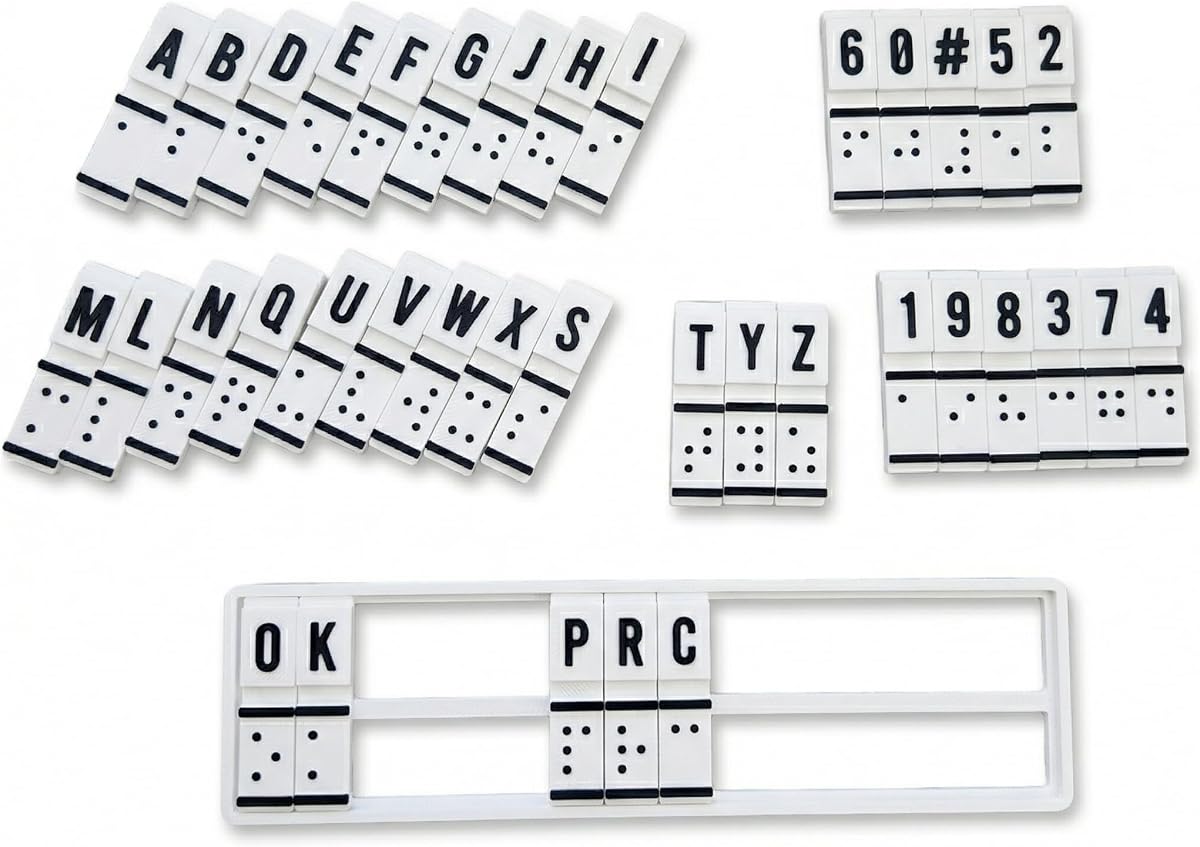
This device combines education and translation for braille beginners. It allows users to create and read braille patterns to build muscle memory.
We may earn a commission when you buy through this link, at no additional cost to you.
It supports blind and low vision users with a tactile design. The interactive mechanism helps bridge sighted and non-sighted communication effectively.
Reviews suggest it may lack durability or ease of use for some. Consider checking user feedback before relying on it for intensive training sessions.
For families or educators seeking a tactile tool this could be a starting point. Its design aims to make learning accessible and inclusive for all ages.
Manual input and output help users build confidence in braille literacy skills.
It is designed for self-study or classroom teaching to promote inclusion.
We may earn a commission when you buy through this link, at no additional cost to you.
Selecting the right tool depends on your specific workflow and mobility needs. This guide outlines key factors to consider before making a purchase.
Larger displays like forty cell models offer more context per line reducing scrolling. Smaller units are compact but may require frequent navigation through text.
Prioritize a size that balances readability with portability for your daily environment.
Check if the device supports Bluetooth five for stable wireless connections to phones or computers. Multiple device support allows seamless switching between work and personal devices.
Ensure the connection method matches your primary hardware for smooth integration.
Look for devices offering at least twenty hours of battery life for all day use. USB-C charging is a modern standard that ensures compatibility with many chargers.
A reliable battery prevents interruptions during critical reading or writing sessions.
Internal storage is vital for saving files locally without internet access. Models with higher capacity like thirty two gigabytes support larger libraries of documents.
Choose storage that fits your offline needs to avoid frequent transfers.
Built-in apps like editors or libraries add value by reducing reliance on external software. Compatibility with popular screen readers is essential for desktop use.
Verify that the device runs the apps you need most for your tasks.
If you travel often select a lightweight device that fits in bags easily. Durable materials ensure the device withstands daily wear and tear.
Balance weight and robustness to keep your tool accessible everywhere.
Higher prices often bring more storage and larger displays but may not suit everyone. Consider manual options if you need basic writing tools without electronics.
Match the budget to the features that directly impact your daily accessibility.
Check for warranty terms and customer support availability to protect your investment. A reputable brand often provides better reliability for long term use.
Strong support ensures you can resolve issues quickly when they arise.
To get started charge the device fully and pair it with your primary smartphone or computer. Follow the manufacturer instructions to ensure stable connections.
Clean the braille pins gently with a soft cloth to remove dust. Avoid harsh chemicals that could damage the display surface or electronic components.
Store the device in a protective case when not in use to prevent scratches. Keeping it away from extreme temperatures will extend the battery life and hardware lifespan.
A braille display provides tactile feedback for blind users to read digital text. It connects to computers or phones to show content as refreshable braille dots.
Manual slates are cheaper and require no power making them great for practice. Refreshable displays offer direct digital access which is more efficient for daily work.
Use a soft dry cloth to wipe the pins regularly. Avoid liquid cleaners that could seep into the device and damage the internal mechanisms.
Many modern displays support connections to several devices via Bluetooth or USB. This allows you to switch between a phone and a laptop seamlessly.
Yes knowing braille helps you read the display output directly. However some tools like keyboards can assist beginners in learning the system.
Most refreshable displays offer up to twenty hours of battery life on a single charge. This supports all-day use without needing frequent recharging.
We explored ten tools ranging from premium displays to manual slates. Each option serves specific needs such as portability, storage, or educational use.
Prioritize connectivity and battery life to ensure reliability in daily tasks. Also consider how much storage you need for offline files and documents.
Remember to check current listings for any price changes or updated models. The right tool can greatly enhance your digital accessibility and productivity.