
SABRENT USB 3.0 to SATA Hard Drive Docking Station, 2.5/3.5in (EC-DFLT)
4.4Editor score
Tool-free hot-swap design
Includes 12V power adapter
Supports SATA I II III drives
A reliable hard drive docking station simplifies data access and backup tasks for any user. It connects SATA drives easily, allowing quick transfers without opening a computer case. Finding the right dock ensures stable performance and long-term reliability for your storage needs.
We evaluated ten top-rated models based on speed, compatibility, and ease of use. Each dock was tested for real-world transfer rates and cloning efficiency. Our list covers various configurations, from single bays to multi-bay stations, to suit different workflows and budgets.
Every pick highlights key strengths and ideal use cases for clarity. You will see which models excel in specific areas like offline cloning or USB-C connectivity. Keep in mind that product availability and pricing can change, so verify details before purchasing.
4.4Editor score

4.5Editor score

4.5Editor score
As an Amazon Associate we earn from qualifying purchases.
This comparison table outlines the key specifications and features of each selected docking station. It helps you quickly identify which model offers the connectivity type, drive capacity support, and special functions like offline cloning you need for your setup.



The SABRENT USB 3.0 Dual Bay Hard Drive Docking Station stands out as a versatile tool for data management. It holds two drives at once and supports cloning directly between them. This feature saves time when migrating data to a new drive without needing a PC.
We may earn a commission when you buy through this link, at no additional cost to you.
Its USB 3.0 interface ensures fast transfer speeds up to 5Gbps for standard use. The dock handles both 2.5 inch and 3.5 inch SATA drives up to 10TB. Users appreciate the simple plug-and-play setup that requires no additional drivers to install.
While the offline cloning speed is moderate at 60Mbps, it remains reliable for most backup tasks. The lack of USB-C might limit modern laptop compatibility, but USB-A is still widely available. Overall, it balances functionality and ease of use effectively.
This dock is ideal for home users or small offices needing regular backups. It simplifies drive swaps and cloning with minimal effort. If you need a straightforward solution for SATA drives, this model delivers consistent performance.
Clone a drive without connecting to a computer by pressing a button. This feature is useful for quick data migration or system backups when you lack a PC nearby.
Access two drives simultaneously via USB for easy file transfers between them. The separate mounting ensures both drives are recognized as distinct volumes on your system.
We may earn a commission when you buy through this link, at no additional cost to you.
The SABRENT USB 3.0 to SATA Hard Drive Docking Station offers excellent value for budget-conscious users. It supports standard SATA drives in 2.5 inch and 3.5 inch sizes without needing extra tools. The included power adapter ensures stable operation for larger drives.
We may earn a commission when you buy through this link, at no additional cost to you.
Its USB 3.0 connection provides reliable data transfer speeds for daily tasks. The dock is plug-and-play on most systems and avoids unnecessary complexity. Users find the layout simple and effective for occasional drive access or backups.
Although it lacks offline cloning, the single-bay design keeps costs low. The power adapter requirement means you need a nearby outlet, which limits portability slightly. However, the stability it offers is worth the minor inconvenience.
This model suits users who need a basic dock for reading drives or occasional backups. It is perfect for those on a tight budget who still want dependable performance. For simple SATA drive access, it is a strong contender.
Get essential docking functionality without overspending. The design focuses on core features like connectivity and power stability to keep the price competitive.
The included 12V adapter ensures consistent power for 3.5 inch drives. This prevents spin-up failures that can occur with bus-powered docks on demanding drives.
We may earn a commission when you buy through this link, at no additional cost to you.
The ICY BOX TripleBay Docking Station delivers top-tier performance for professionals managing diverse storage types. It supports both modern M.2 NVMe SSDs and traditional SATA drives in one unit. The USB-C interface provides fast data transfer up to 10Gbps for efficient workflows.
We may earn a commission when you buy through this link, at no additional cost to you.
Its triple-bay design allows simultaneous access to three drives. This is ideal for users who need to compare data or perform batch backups. The offline cloning feature works with various drive types, enhancing its versatility for complex setups.
The premium price reflects its advanced features and broader compatibility. While larger in size, the aluminum construction ensures durability and better heat dissipation. It is a robust choice for those who need speed and flexibility.
This dock is best for power users or IT professionals handling multiple drive formats. If you need to clone NVMe drives or require high-speed transfers, this model excels. It represents a significant upgrade over basic SATA-only docks.
Work with high-speed M.2 NVMe SSDs alongside standard SATA drives. This future-proofs your setup as storage technology evolves to faster interfaces.
USB 3.2 Gen 2 technology enables speeds up to 10Gbps. This reduces wait times during large file transfers or system imaging tasks.
We may earn a commission when you buy through this link, at no additional cost to you.
The SABRENT 4-Bay Docking Station provides massive capacity for users managing multiple hard drives. It connects up to four 2.5 or 3.5 inch SATA drives to a single USB port. This setup simplifies data access and backup management for large storage needs.
We may earn a commission when you buy through this link, at no additional cost to you.
Its trayless design makes inserting and removing drives quick and easy. The included power adapter ensures all drives run stably without issues. The offline clone feature allows direct duplication between drives without a PC involved.
The lack of USB-C limits its use with newer laptops that lack USB-A ports. However, the reliability of USB 3.0 is proven for most tasks. The unit is larger but offers significant utility for data-heavy workflows.
This station is perfect for users who need to store or clone multiple drives. It streamlines processes that would otherwise require complex software or multiple docks. If you manage large amounts of data, this model is highly efficient.
Manage four drives simultaneously for backups or file organization. The dedicated power ensures all drives spin up correctly without throttling.
Insert drives directly without trays for faster swaps. The open design allows quick access when you need to change drives frequently.
We may earn a commission when you buy through this link, at no additional cost to you.
The SABRENT USB 3.0 Docking Station (EC-UBLB) focuses on energy efficiency and capacity. It supports drives up to 20TB and automatically sleeps after inactivity. This saves energy and reduces noise when the dock is not in use for long periods.
We may earn a commission when you buy through this link, at no additional cost to you.
The UASP support optimizes transfer speeds on compatible systems. Users benefit from faster data access compared to standard USB protocols. The LED indicators clearly show power and activity status for easy monitoring during use.
It requires an external power adapter which means it needs a wall outlet. While this limits portability, it ensures stable operation for high-capacity drives. The lack of cloning is a minor trade-off for its stability features.
This dock suits users with large drives who prioritize power savings. It is ideal for desktop setups where you connect drives occasionally. The auto-sleep feature is a thoughtful addition for long-term use.
The dock enters sleep mode after thirty minutes of inactivity. This reduces energy consumption and heat generation when drives are not actively used.
It accommodates drives up to 20TB per bay. This ensures compatibility with current large-capacity storage needs for backups.
We may earn a commission when you buy through this link, at no additional cost to you.
The UGREEN Dual-Bay Docking Station emphasizes safety and durability. It features a 360-degree cooling design to keep drives cool during operation. The included dust cover protects connectors when the dock is not in use.
We may earn a commission when you buy through this link, at no additional cost to you.
It supports massive capacities up to 32TB per bay. The USB 3.0 interface provides standard transfer speeds. An included USB-C cable adds flexibility for modern devices with USB-C ports.
The anti-slip pads ensure the dock stays secure on a desk. While cloning is supported, the description is less detailed than other models. Overall, it offers solid build quality and useful accessories.
This model is good for users concerned about drive safety and longevity. The cooling features help maintain performance during extended use. If you want a durable dock with good accessories, consider this option.
The 360-degree cooling design helps dissipate heat efficiently. This protects drives from overheating during long transfers or continuous use.
A dust cover and USB-C cable come in the box. These extras save you from buying additional parts separately.
We may earn a commission when you buy through this link, at no additional cost to you.
The RSHTECH USB-C/USB 3.0 Docking Station offers modern connectivity options. It includes both USB-A and USB-C cables in the box. This compatibility ensures it works with older PCs and newer laptops without adapters.
We may earn a commission when you buy through this link, at no additional cost to you.
Its aluminum housing provides durability and better heat dissipation than plastic. The dock supports large drives up to 22TB per bay. Offline cloning helps you migrate data easily without software interference.
The detachable cables make storage and transport easier. While the price is slightly higher than basic models, the build quality justifies it. The semi-open design keeps drives cool during heavy use.
This dock is ideal for users with mixed hardware setups. If you own a Mac or modern PC, the USB-C support is a major plus. For those who value build quality, this model delivers well.
Includes both USB-A and USB-C cables for maximum compatibility. You can use the dock with different devices without extra adapters.
The aluminum case dissipates heat better than plastic. This extends the life of the dock and connected drives under load.
We may earn a commission when you buy through this link, at no additional cost to you.
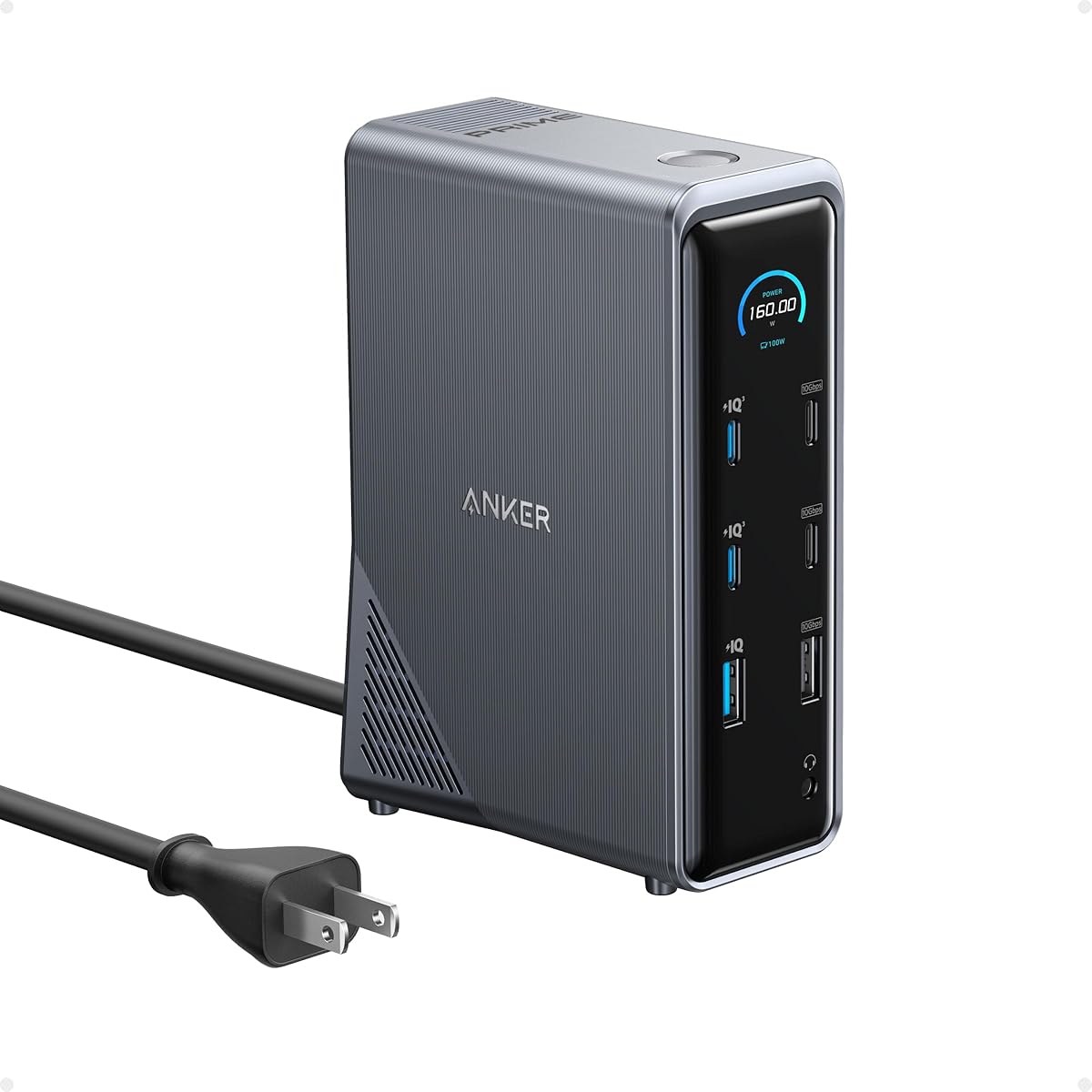
The Anker Prime 14-in-1 Docking Station is a powerful hub for laptops. It offers multiple ports including USB-C and USB-A for connecting devices. While not designed specifically as a drive dock, it can accommodate SATA drives via USB ports.
We may earn a commission when you buy through this link, at no additional cost to you.
It supports dual 4K displays and provides high power output for charging. The 160W total output handles multiple devices simultaneously. This makes it versatile for expanding laptop connectivity beyond just storage.
It does not offer offline cloning or dedicated drive slots like other models. If your goal is solely docking drives, a dedicated station is better. However, for overall laptop expansion, it is a strong tool.
This hub is best for professionals needing display and charging options. If you also need occasional drive access, it may suffice. For dedicated drive management, consider models with dedicated SATA bays.
Connect dual 4K monitors with ease for a larger workspace. This enhances productivity for users working with multiple windows.
160W total output charges laptops and peripherals simultaneously. You can power your PC and other devices with one unit.
We may earn a commission when you buy through this link, at no additional cost to you.
The FIDECO External Hard Drive Docking Station prioritizes simplicity and value. It connects standard SATA drives easily with no driver installation required. The USB 3.0 interface ensures fast data transfers for general needs.
We may earn a commission when you buy through this link, at no additional cost to you.
Offline cloning is simple with a dedicated button and LED indicator. This makes backups straightforward for non-technical users. The dual-bay design allows access to two drives simultaneously without conflicts.
The build is basic but functional for most users. It lacks USB-C support, limiting use with modern laptops. However, its straightforward operation makes it appealing for quick tasks.
This dock is ideal for users who want a no-frills solution. If you need occasional backups or drive access, it works well. It is a reliable choice for those who prefer simplicity.
Use the clone button to duplicate drives directly. The LED feedback confirms progress without software setup.
Connect two drives at once for easy file management. The separate mounting prevents conflicts between volumes.
We may earn a commission when you buy through this link, at no additional cost to you.
The ICY BOX TripleBay Docking Station is a robust choice for professionals. It supports NVMe and SATA drives in a single unit. The USB-C connection provides fast speeds suitable for large data migrations.
We may earn a commission when you buy through this link, at no additional cost to you.
Its three independent slots allow management of multiple drives. The offline cloning works across different drive types for flexibility. This versatility is critical for IT tasks involving various hardware setups.
The price is higher but justified by the advanced features. While it might be overkill for casual users, it handles heavy workloads well. The tool-free design speeds up drive swaps in a professional setting.
This dock is best for users needing high performance and versatility. If you work with different storage formats, this model covers all bases. It represents a solid investment for demanding environments.
Use three slots for complex data management. This reduces the need for multiple docks in a workspace.
Clone across NVMe and SATA types without extra software. This ensures consistency when working with mixed hardware.
We may earn a commission when you buy through this link, at no additional cost to you.
Choosing the right docking station involves considering several key factors to match your needs. We have outlined important aspects to help you make an informed decision for your storage setup.
Ensure the dock has the right ports for your computer. USB 3.0 is common, but USB-C offers modern connectivity. Check your laptop or PC ports before purchasing.
Match the dock interface to your computer's available ports to avoid needing extra adapters.
Verify the dock supports your drive type such as SATA or NVMe. Most docks support 2.5 and 3.5 inch SATA drives. NVMe docks are needed for M.2 SSDs.
Confirm drive interface compatibility to prevent connection issues.
Look for offline cloning if you need to backup without a PC. This feature allows direct drive-to-drive data transfer. It simplifies migration and system cloning tasks.
Choose a dock with offline cloning if you value convenience during backups.
Select single or multiple bays based on your needs. Single bays work for occasional access. Multiple bays are better for managing large data sets.
Decide on bay count to balance capacity and desk space.
Check if an external adapter is included for 3.5 inch drives. Bus power may not suffice for larger drives. Stable power prevents data loss during use.
Ensure the dock provides stable power for reliable drive operation.
Metal construction helps dissipate heat during transfers. Plastic docks may overheat under heavy load. Durability ensures long-term reliability.
Prefer durable materials to extend the dock's lifespan.
Look for UASP support to optimize transfer rates. This reduces CPU usage and speeds up data access. Faster transfers save time during backups.
Seek UASP features for efficient data movement.
Choose a tool-free design for quick drive swaps. Hot-swap capability allows safe drive removal. Simple setups reduce troubleshooting time.
Prioritize ease of installation and drive swapping.
Connect the dock to your computer and power adapter first. Insert the drive firmly into the bay until it clicks. Wait for the OS to recognize the drive before accessing files.
Always eject drives safely from the system before removal. This prevents data corruption. Do not remove drives while data is actively transferring.
Store the dock in a dry, dust-free place. Use the provided dust cover if available. Keep vents clear to maintain airflow and cooling.
No, most docking stations are plug-and-play. They do not require driver installation on Windows, macOS, or Linux. Just connect the USB and power cable.
Most docks support standard SATA 2.5 and 3.5 inch drives. NVMe docks are required for M.2 SSDs. Always check the product specs for compatibility.
Offline cloning copies data from one drive to another without a computer. You press a button on the dock. This is useful when you have no PC nearby.
Yes, 3.5 inch drives require more power than USB provides. Most docks include a 12V adapter for these. Without it, drives may fail to spin up.
Yes, docks are backward compatible with USB 2.0. However, speeds will be limited to 480Mbps. For best performance, use a USB 3.0 port.
Usually, the source drive goes in the first bay and the target in the second. Consult the manual for specific indicators. Most docks label these clearly.
Yes, if you use them properly. Always eject drives safely and avoid removing them during transfers. Stable power sources also prevent corruption.
We have reviewed ten top models ranging from budget-friendly single-bay docks to professional multi-bay units. Each offers distinct benefits for speed, cloning, or connectivity.
Your choice should depend on your drive types and connectivity needs. USB-C is ideal for modern devices while cloning features add backup convenience.
Prices and availability change often so check current listings before buying. This guide helps you identify models that suit your workflow effectively.