
Samsung Galaxy Tab S10+ Plus
4.7Editor score
Galaxy AI Features
12.4 AMOLED Screen
S Pen Included
AI tablets are redefining portable computing by integrating advanced artificial intelligence directly into the user experience. These devices offer smart features like real-time translation, note summarization, and creative assistance that traditional tablets simply cannot match.
We have rigorously evaluated the leading models available on the market today. Our comparison focuses on performance, display quality, AI capabilities, and overall value to help you find the perfect device for your specific needs and budget.
Each pick below highlights a unique strength, whether it is premium creative tools or budget-friendly versatility. Please note that prices and availability change frequently so verify current details before making your final purchasing decision.
4.7Editor score

5.0Editor score

4.4Editor score
As an Amazon Associate we earn from qualifying purchases.
This comprehensive comparison table breaks down the key specifications of the top AI tablets to help you make an informed choice quickly.





The Lenovo Yoga Tab AI Tablet is the standout choice for creators who need serious processing power wrapped in a portable form factor. With a perfect rating it has established itself as the most versatile AI device on our list. Its standout qualities lie in the seamless integration of AI tools with premium hardware.
We may earn a commission when you buy through this link, at no additional cost to you.
Powered by the Snapdragon 8 Gen 3 processor this tablet handles intensive tasks like video editing and AI photo enhancement without breaking a sweat. The included Pen Pro and keyboard make it a true laptop replacement for professionals on the go. The 144Hz refresh rate ensures fluid animations while the 12GB of RAM supports heavy multitasking effortlessly.
While the price is higher than budget options the included accessories and build quality justify the investment for serious users. The only minor trade-off is the weight which makes it less ideal for casual reading in bed. However for productivity and creative work these features are necessary and highly effective.
If you need a device that can handle both professional workflows and entertainment the Lenovo Yoga Tab is the ultimate recommendation. It bridges the gap between a smartphone and a laptop with superior AI features that enhance every aspect of use.
The built in AI tools assist with live transcription and instant translation to streamline meeting notes and global communication tasks.
Connectivity is robust with Wi-Fi 7 and a versatile USB-C hub that supports external monitors and storage devices for expanded workflows.
We may earn a commission when you buy through this link, at no additional cost to you.
The Samsung Galaxy Tab S10+ Plus defines what a premium tablet should look and feel like in 2026. Its massive 12.4 inch screen offers incredible visual fidelity that makes watching media and creating art a joy. This device is best for users who want the absolute best screen and software ecosystem available.
We may earn a commission when you buy through this link, at no additional cost to you.
Samsung has integrated Galaxy AI deeply into the interface allowing for sketch to image generation and automatic note summarization. The S Pen included in the box is incredibly responsive and perfect for detailed work. The IP68 rating provides peace of mind against spills and dust during daily use.
The high cost is the main barrier for many buyers but the quality of construction and screen is undeniable. The size can also be cumbersome for single handed use or carrying in small bags. These limitations are acceptable trade-offs for the premium features you receive with this device.
Buy this tablet if you want a flagship Android experience with top tier AI and display technology. It is the ideal choice for media consumption and creative professionals who demand the highest quality hardware.
Sketch to image transforms rough drawings into polished art instantly providing a fun and powerful tool for designers.
The Dynamic AMOLED 2X display delivers deep blacks and vibrant colors that make every image and video pop with clarity.
We may earn a commission when you buy through this link, at no additional cost to you.
The TCL NXTPAPER 11 Gen 2 offers an incredible entry point into AI tablets without sacrificing essential features. It is designed for students and casual users who need a reliable device for reading and note taking. The standout feature is the NXTPAPER technology that reduces eye strain significantly.
We may earn a commission when you buy through this link, at no additional cost to you.
This tablet supports Circle to Search which allows users to find information instantly without switching apps. The stylus is included which is rare for budget devices. The battery life is robust enough to last through a full day of classes or streaming sessions.
Storage is limited at 128GB which may require cloud reliance for heavy media users. The build feels less premium than flagship models but remains durable for everyday handling. These compromises are well worth the savings for budget conscious shoppers.
Choose this tablet if you want an affordable device that still offers smart AI search features and eye comfort. It is perfect for students who need to take notes and read textbooks on the go.
The unique display technology mimics paper to reduce glare and blue light making it ideal for long reading sessions.
Circle to Search lets you highlight content to find info instantly saving time during study or browsing activities.
We may earn a commission when you buy through this link, at no additional cost to you.
The Samsung Galaxy Tab S11 strikes a balance between size and power making it ideal for creatives who want portability. It retains the Galaxy AI features like Note Assist to keep your ideas organized automatically. The S Pen precision is excellent for sketching and design work.
We may earn a commission when you buy through this link, at no additional cost to you.
With 12GB of RAM switching between apps is instantaneous. The IP68 rating ensures durability against accidental spills. The display offers rich colors that help artists see their true work accurately. This makes it a strong contender for digital art tasks.
The main drawback is the lack of an included charger which is common in modern packaging. The size is also smaller than the plus model which limits screen real estate for complex layouts. However for pure creativity this device performs exceptionally well.
Get this tablet if you want a portable creative powerhouse with excellent AI note features. It suits designers and writers who need a reliable device that travels easily.
Turn rough sketches into polished drawings instantly using AI to refine lines and structures.
Automatically organizes handwritten notes to keep your meetings and lectures tidy and structured.
We may earn a commission when you buy through this link, at no additional cost to you.
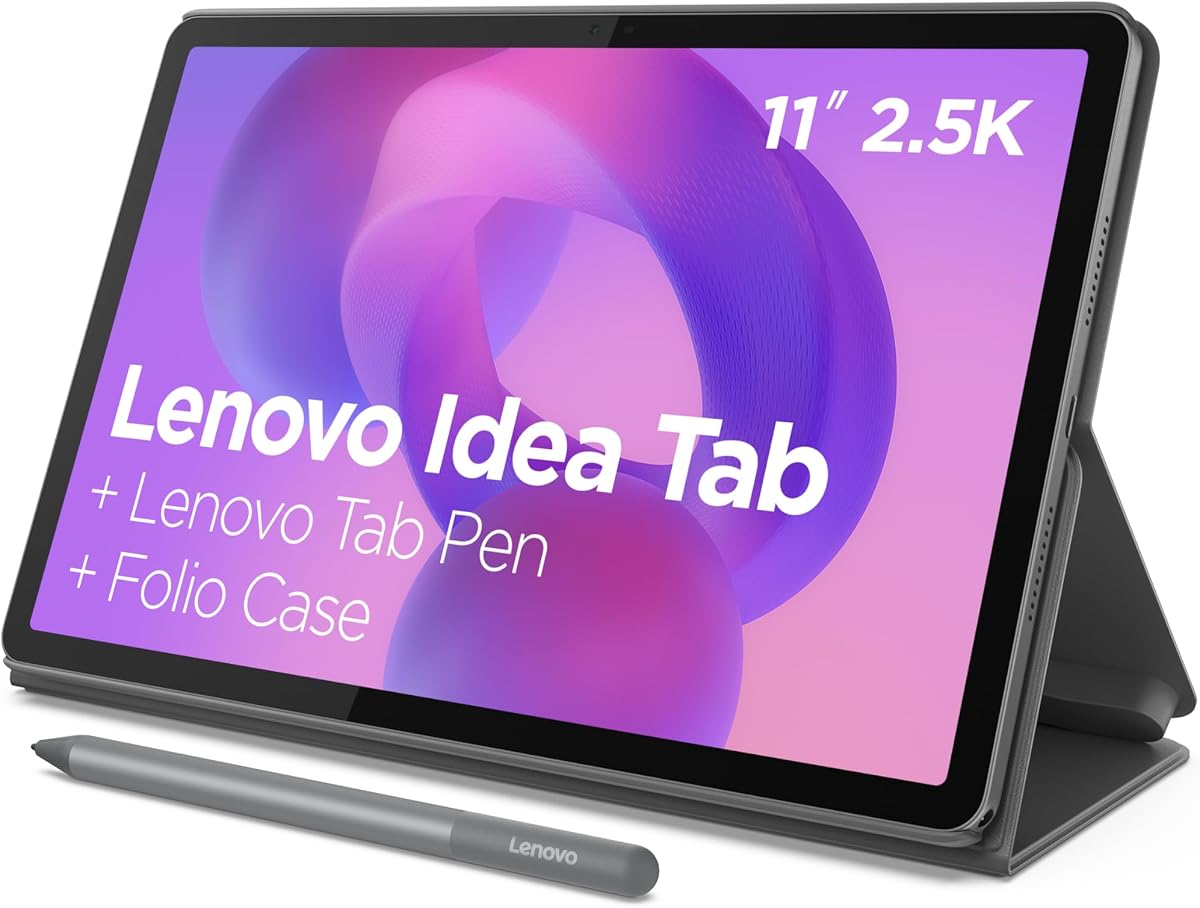
The Lenovo Idea Tab is tailored specifically for students needing a reliable device for campus life. It comes with built-in apps like Squid and Nebo to enhance note taking workflows. The 90Hz screen makes scrolling through slides smooth and responsive.
We may earn a commission when you buy through this link, at no additional cost to you.
Circle to Search helps you find answers to homework questions instantly. The display protects your eyes from harmful blue light during late night study sessions. With 256GB storage you have plenty of room for textbooks and documents without needing a cloud subscription.
The processor is not as powerful as flagship models which might slow down heavy multitasking. The case is included but feels less premium than others. These are acceptable limitations given the target audience and price point.
Ideal for college students who want a tablet that helps them organize and study efficiently. It combines smart search tools with a durable case for daily travel.
Pre installed apps like Lenovo AI Note and MyScript Calculator streamline your study workflow instantly.
TUV certified low blue light protection reduces strain during long reading or study sessions.
We may earn a commission when you buy through this link, at no additional cost to you.
The Samsung Galaxy Tab A11+ is a versatile option designed for family entertainment and daily tasks. It offers a bright screen perfect for streaming movies or playing games. The AI assist features help keep daily schedules organized for parents and kids.
We may earn a commission when you buy through this link, at no additional cost to you.
With 256GB of storage you can download many shows and games for offline use. The quad speakers deliver Dolby Atmos sound for an immersive experience. The battery lasts long enough for travel without needing constant outlets.
The AI capabilities are not as deep as higher end models. The RAM cannot be expanded which limits future proofing. However these do not significantly impact everyday family usage.
Buy this for a household needing a shared device for learning and entertainment. It is robust enough for kids yet capable enough for adult tasks.
The upgraded chipset keeps all apps running smoothly for kids and adults alike.
Quad speakers with Dolby Atmos provide a cinema like experience for movies and music.
We may earn a commission when you buy through this link, at no additional cost to you.
The Lenovo Idea Tab Pro offers a large immersive screen that is fantastic for entertainment. The 12.7 inch 3K display makes text sharp and images vivid. Google Gemini acts as an intelligent assistant to help you manage tasks and studies.
We may earn a commission when you buy through this link, at no additional cost to you.
The JBL speakers provide rich sound for music and movies. Gaming performance is strong with high refresh rates ensuring smooth play. The included pen allows for quick sketches or annotations during classes.
Storage is limited to 128GB which may fill up quickly with videos. The device is also heavy for long periods of holding in bed. These are minor issues for a media focused device.
Choose this for an excellent entertainment and student tool that balances size with performance. It works well for streaming and casual productivity.
The AI assistant helps you pick your brain on assignments and streamline your workflow instantly.
Low Blue Light certification ensures your eyes stay fresh even during long reading sessions.
We may earn a commission when you buy through this link, at no additional cost to you.
The TCL NXTPAPER 14 is a powerhouse for reading and note taking with its massive screen. The NXTPAPER display mimics paper reducing glare significantly. This makes it perfect for students who read digital textbooks or work with sheet music.
We may earn a commission when you buy through this link, at no additional cost to you.
It features three display modes including a color mode for comics and art. The 10000mAh battery lasts for days of use without charging. The included stylus helps annotate PDFs with ease.
The size makes it cumbersome to carry around daily. Lack of microSD support limits storage expansion beyond the internal drive. These are reasonable trade-offs for the screen quality and battery life.
Get this if you want a digital notebook and reader with a large comfortable screen. It suits professionals and artists who value eye comfort.
Switch between ink color and standard modes to adapt to reading writing or drawing tasks instantly.
The massive battery supports reverse charging to keep your phone powered during travel.
We may earn a commission when you buy through this link, at no additional cost to you.
The CHUWI Hi10 Max offers laptop like performance with a unique Intel processor designed for AI tasks. The 3:2 aspect ratio provides more vertical space for documents. It features an AI Boost NPU for local content generation and editing.
We may earn a commission when you buy through this link, at no additional cost to you.
Connectivity is superior with multiple USB-C ports and HDMI for external displays. The SSD is fast and upgradable for storage needs. It works well as a portable workstation for office tasks.
The stylus is not included which adds to the cost. The weight makes it less comfortable as a pure tablet. It is better suited for desktop replacement use.
Choose this for a powerful AI computing device that handles serious workloads. It is best for professionals needing a hybrid laptop solution.
The NPU handles local AI tasks like transcription and image editing without relying on cloud servers.
The 3:2 ratio offers more vertical space for viewing spreadsheets and documents clearly.
We may earn a commission when you buy through this link, at no additional cost to you.
The Android 16 Tablet offers incredible value for budget shoppers needing basic connectivity. It runs on a newer OS version to ensure smooth app performance. GPS and Face ID are features usually found on pricier models.
We may earn a commission when you buy through this link, at no additional cost to you.
The 32GB virtual RAM helps apps run smoothly. The battery lasts long for daily travel. It supports streaming apps for entertainment and light work.
The performance will not match flagship devices for heavy tasks. The build quality is standard and basic. However the price makes it a great secondary device.
Buy this if you need a cheap tablet for basic browsing and media. It is perfect for secondary users or light browsing tasks.
The 32GB virtual RAM allows for smooth multitasking even with multiple apps open.
Face ID provides quick and secure unlocking without needing a passcode every time.
We may earn a commission when you buy through this link, at no additional cost to you.
Selecting the right AI tablet requires balancing features with your specific workflow needs.
Look for specific AI features like translation summarization and creative tools that match your needs.
Prioritize tablets with native AI integration for better privacy and speed.
Choose a high-end chip like Snapdragon 8 Gen 3 for smooth AI processing and multitasking.
Ensure the processor supports local AI features for faster response times.
Select an eye friendly display with high resolution for extended reading or creative work.
Prioritize screens with high refresh rates for smooth scrolling and animations.
Opt for at least 256GB of internal storage to handle apps and media files.
Ensure the device supports SD card expansion for flexible storage options.
Look for a large battery capacity to support full day usage without charging.
Prioritize fast charging features to minimize downtime during work sessions.
Check if a stylus or keyboard is included to save on additional costs.
Ensure compatibility with docking stations for desktop-like productivity.
Choose tablets with water and dust resistance ratings for protection against accidents.
Prioritize sturdy designs for travel and daily commuting.
Select a device with a clean OS update schedule for long-term support.
Ensure compatibility with your existing ecosystem of phones and computers.
To maximize battery life enable adaptive brightness and turn off unused connectivity options like GPS when not in use.
Clean the screen with a microfiber cloth to avoid scratching the display while using gentle solutions for stubborn stains.
Keep your device software updated to access the latest AI features and security patches regularly.
An AI Tablet is a device that integrates artificial intelligence to perform tasks like real-time translation and note summarization. These devices use specific processors to run AI models locally for faster response times.
Yes for professionals and students they are worth the investment. The productivity gains from features like auto-transcription and smart search outweigh the extra cost over time.
No many AI features like Circle to Search and photo editing work offline using local processing power. This ensures faster results and better privacy for your data.
Yes most tablets like the Lenovo Yoga Tab come with compatible keyboards. Some models require you to purchase the keyboard separately so check the product details carefully.
The TCL NXTPAPER series is best for eye comfort due to its paper-like screen technology. It reduces glare and blue light to minimize strain during long reading sessions.
Yes models with high refresh rates like the Lenovo Idea Tab Pro support gaming well. The powerful processors handle modern titles smoothly without lag.
Yes many tablets come with included styluses for drawing and note taking. The Lenovo Yoga Tab and Samsung S10+ are excellent choices for artists.
A quality tablet should last three to four years with proper care. Regular software updates ensure they remain functional and secure for as long as possible.
We have highlighted ten top options ranging from premium creative tools to budget friendly students. Each choice offers distinct strengths tailored to different user needs.
Prioritize display quality and processing power if you plan to use the tablet for creative work. For casual use focus on battery life and eye comfort features.
Prices and availability change frequently so always verify current specs before buying. The best choice depends on your specific requirements and budget.