
MONSGEEK FUN60 Pro
4.5Editor score
Ultra-precise 0.005mm RT
16k scan rate
Compatible with third-party switches
Compare the top magnetic switch keyboards for rapid trigger technology to find the best option for competitive gaming and precision input needs.
Magnetic switch keyboards with rapid trigger technology are redefining how gamers and professionals interact with their computers. These devices use Hall Effect sensors to detect keypresses without physical contact, enabling incredibly fast response times and customizable actuation points.
We evaluated ten leading models based on polling rates, actuation precision, build quality, and software features. Our comparison covers wired and wireless options across various form factors to help you find the perfect match for your setup.
Each product profile highlights key strengths, technical specifications, and ideal use cases. Please note that availability and pricing may change over time so verify details on the retailer site before purchasing.
4.5Editor score

4.7Editor score

4.5Editor score
This side-by-side comparison highlights the core specifications and capabilities of each model to help you make an informed decision based on your specific requirements and preferences.
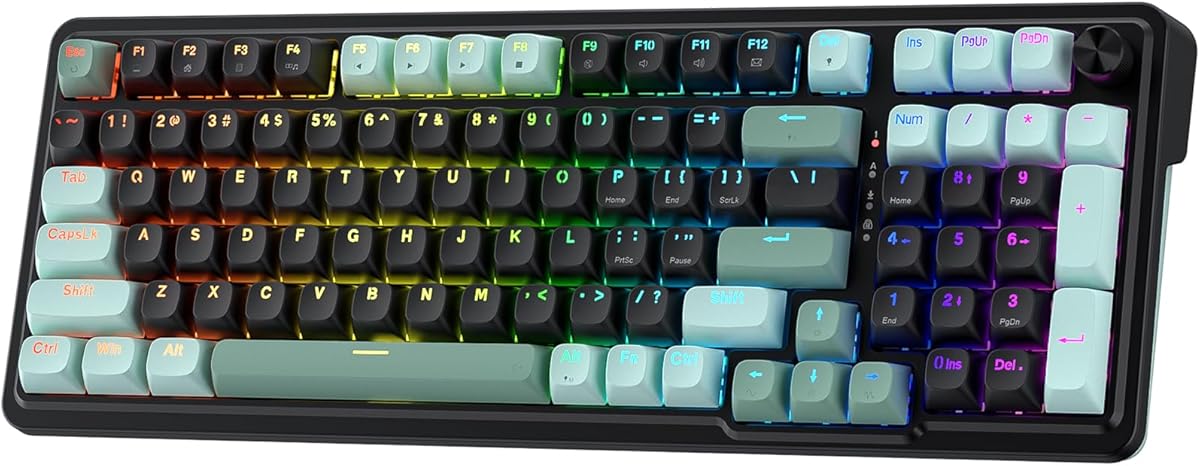


The EPOMAKER G84 HE stands out as a premier wireless option in the magnetic switch category. With a 4.7 rating from users it delivers a blend of performance and features that suits both competitive gamers and professionals seeking flexibility.
We may earn a commission when you buy through this link, at no additional cost to you.
Its 8K polling rate and 256K scan rate ensure near-instantaneous input registration which is crucial for fast-paced games. The Gasket Mount design coupled with five layers of dampening material produces a rich creamy sound that enhances the overall typing experience significantly.
While the price is higher than wired counterparts the 8000mAh battery supports extended use without interruption. The tri-mode wireless system allows seamless switching between devices but may require initial configuration to optimize settings across different operating systems.
Buy this if you need a premium wireless keyboard with top-tier performance specs. It is an excellent investment for those who value acoustic quality and connectivity options alongside rapid trigger functionality.
The 2.4GHz and Bluetooth 5.2 connections provide stable low-latency links essential for wireless gaming without sacrificing speed.
Adjust actuation travel from 0.1 to 3.3mm with 0.01mm precision to tailor sensitivity for specific gaming styles or typing tasks.
We may earn a commission when you buy through this link, at no additional cost to you.
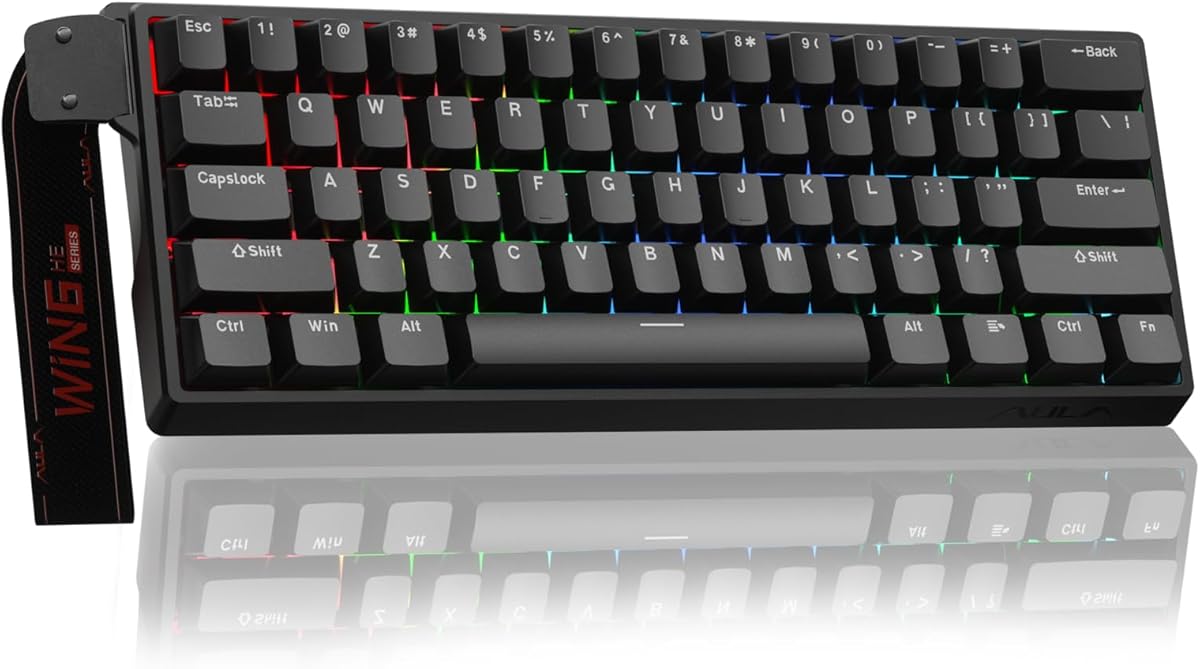
The MONSGEEK FUN60 Pro offers exceptional value for gamers seeking high-end features without a premium price tag. Rated 4.5 it provides an ultra-precise rapid trigger mechanism that allows for fine-tuned adjustments down to 0.005mm steps.
We may earn a commission when you buy through this link, at no additional cost to you.
Its 16k scan rate and 8K polling rate ensure that inputs are captured instantly minimizing lag during intense gaming sessions. The ability to use third-party magnetic switches adds a layer of customization that is rare in this price range.
The 60% layout saves desk space but removes function keys which may not suit all workflows. Wired connectivity limits mobility but guarantees consistent power and data transfer without battery concerns or wireless interference.
Choose this keyboard if you want competitive specs on a budget. It is ideal for FPS players who prioritize speed and precision over wireless convenience or full-size key arrangements.
Fine-tune actuation and trigger points with incredible precision to suit your exact finger movement and reaction style.
Swap switches freely among supported third-party options to customize tactile feedback across different keys as needed.
We may earn a commission when you buy through this link, at no additional cost to you.
The Keychron K2 HE combines premium build quality with advanced customization options for users who demand versatility. Its 75% layout includes arrow keys and navigation cluster while remaining compact. The 4.5 rating reflects strong performance in both work and gaming scenarios.
We may earn a commission when you buy through this link, at no additional cost to you.
Pre-lubed Gateron double-rail magnetic switches provide a stable and responsive feel right out of the box. The web-based Launcher configurator simplifies complex settings like actuation points and macro creation without needing heavy software installation.
Switch compatibility is limited to Gateron double-rail models which may restrict modification options compared to universal hot-swap boards. The higher cost is justified by the build quality and extensive feature set for enthusiasts.
This model is perfect for professionals and gamers who need cross-device switching and deep customization. It delivers a premium experience with reliable wireless performance and ergonomic design.
Connect up to three devices via Bluetooth and 2.4GHz to switch tasks effortlessly between PC phone and tablet.
Adjust actuation points from 0.2 to 3.8mm to minimize accidental touches and maximize responsiveness for different games.
We may earn a commission when you buy through this link, at no additional cost to you.
The Redragon K686 HE integrates a dedicated media knob that simplifies volume and brightness control without complex key combinations. With a 4.4 rating it appeals to users who want straightforward functionality alongside rapid trigger capabilities.
We may earn a commission when you buy through this link, at no additional cost to you.
Its Dual-Module Floating Structure and dampening layers create a soft and consistent acoustic output. The 8000Hz polling rate ensures minimal input lag making it suitable for competitive titles where timing is critical.
The knob is a convenient hardware feature that many competitors lack. However being wired limits portability and the layout does not offer a full numeric keypad for extensive data entry tasks.
Ideal for gamers who value ease of use and consistent performance. The physical knob adds a tactile layer of control that enhances workflow efficiency during sessions.
Adjust backlight brightness and media playback instantly with a single control knob saving time and key presses.
Anti-wobble switch-plate design paired with dampening layers delivers a softer bounce rather than a harsh clack.
We may earn a commission when you buy through this link, at no additional cost to you.
The Aula WIN60 HE brings rapid trigger technology to a tight 60% form factor ideal for maximizing mouse movement space. Its 4.5 rating highlights strong performance for FPS gaming where quick peek-and-fire actions are vital.
We may earn a commission when you buy through this link, at no additional cost to you.
Featuring a 0.02mm rapid trigger step distance it responds faster to finger movements than many competitors. The web-based driver means you do not need to download heavy software files to customize actuation or map keys.
The compact size means some keys require layer combos which can be tricky for newcomers. However the design saves desk space significantly and keeps the focus on essential gaming inputs.
This keyboard is perfect for travelers or those with limited desk real estate. It delivers high-speed performance without compromising on customization options or lighting aesthetics.
The 60% compact design removes unused keys to free up room for wide mouse swipes and ergonomic arm positioning.
Access powerful customization tools directly from your browser to remap keys and adjust settings without installation.
We may earn a commission when you buy through this link, at no additional cost to you.
The ATTACK SHARK X68 HE features a unique coiled cable that adds a stylish aesthetic while ensuring faster transmission speeds. Rated 4.5 it provides 0.01mm accuracy and zero dead zones for precise input registration during complex gaming maneuvers.
We may earn a commission when you buy through this link, at no additional cost to you.
Its custom web software allows detailed control over DKS key combinations and macro creation across Windows and Mac systems. The two-color injection molded PBT keycaps offer durability and a smooth tactile feel that resists wear over time.
While the coiled cable looks premium it can be less flexible than braided straight cables in some setups. The software integration is robust but may require familiarization to unlock full potential features effectively.
Select this for a stylish wired setup with strong performance specs. The combination of rapid trigger and web-based tools offers a balanced experience for budget-conscious gamers.
The included coiled cable enhances the setup look while supporting faster transmission speeds for responsive gaming.
Two-color injection molded PBT keycaps ensure legends remain crisp and provide a smooth long-lasting typing feel.
We may earn a commission when you buy through this link, at no additional cost to you.
The MONSGEEK M1 V5 TMR features a quick release aluminum case that allows tool-free assembly and disassembly for easy customization. With a 4.3 rating it combines high-end materials with advanced scanning technology for a robust gaming peripheral.
We may earn a commission when you buy through this link, at no additional cost to you.
Its 32k scanning rate detects internal key changes instantly enhancing responsiveness beyond standard polling limits. The keyboard supports both magnetic and mechanical switches giving users the flexibility to mix switches for different keys if desired.
The aluminum gradient build adds a sophisticated look but increases the overall weight. This may not suit users who travel often but provides excellent stability during intense gaming sessions at a fixed desk.
This model is great for enthusiasts who want to modify hardware internals regularly. The support for mechanical switches alongside magnetic ones offers unique customization opportunities.
Quick release aluminum top and bottom cases allow effortless customization without special tools or complex disassembly steps.
A 32k scan rate ensures internal key changes are detected instantly for superior response in competitive scenarios.
We may earn a commission when you buy through this link, at no additional cost to you.
The Redragon K673 HE emphasizes acoustic comfort with five layers of noise dampening that reduce harsh clacking sounds. Rated 4.1 it offers a softer typing experience while maintaining rapid trigger features essential for competitive gaming.
We may earn a commission when you buy through this link, at no additional cost to you.
Similar to its sibling models it includes a one-knob control for media and backlight adjustments. The software allows you to save multiple actuation profiles so you can switch settings between games or tasks effortlessly.
The acoustic improvements may appeal to users in shared spaces but may feel slightly muted for those who enjoy tactile feedback. Wired connection limits placement options but ensures stable performance during use.
Consider this if quiet operation is a priority alongside gaming speed. The dampening layers provide a refined sound profile that stands out among typical mechanical alternatives.
Five layers of dampening reduce harsh clacks to provide a softer and more enjoyable sound environment.
Save multiple actuation profiles through the desktop or web-based driver to maintain consistent settings across games.
We may earn a commission when you buy through this link, at no additional cost to you.
The Redragon K745 HE focuses on visual appeal with vibrant RGB lighting designed to bring your desk to life. Rated 3.9 it provides the same core rapid trigger technology but may have minor quality control variations affecting user satisfaction.
We may earn a commission when you buy through this link, at no additional cost to you.
It includes five-layer noise dampening for a comfortable acoustic experience. The software allows precise calibration of actuation points ensuring your setup stays consistent across different gaming environments and titles.
Some users may find the feedback inconsistent compared to higher-rated models. However the feature set remains competitive for those prioritizing aesthetics and basic rapid trigger performance.
Buy this if you want a visually striking keyboard with core magnetic features. It suits users who prioritize style and value in a gaming peripheral.
Adjustable RGB brightness and modes bring a dynamic and vibrant atmosphere to your gaming setup day or night.
Software-powered tuning saves profiles to ensure your magnetic switches behave consistently across various games.
We may earn a commission when you buy through this link, at no additional cost to you.
The Redragon K617 HE offers an accessible entry point into rapid trigger technology with a compact 60% design. Rated 4.3 it provides a cost-effective solution for gamers who need speed without a high investment in peripherals.
We may earn a commission when you buy through this link, at no additional cost to you.
Dedicated magnetic switches are designed for a longer lifespan compared to traditional mechanical options. The software allows you to fine-tune trigger points so you can adapt the keyboard to your specific playstyle over time.
While it lacks some advanced features found in higher-end models it covers the basics well. The compact design frees up space for mouse movement which is beneficial in FPS games requiring wide swipes.
Choose this as a reliable starter magnetic keyboard. It balances performance and price effectively for those new to rapid trigger technology.
Magnetic switches offer up to two times longer switch lifespan compared to traditional mechanical contact switches.
Experience up to ten times faster response to enable precise aiming and peeking in competitive titles.
We may earn a commission when you buy through this link, at no additional cost to you.
Selecting the right magnetic switch keyboard requires understanding several technical factors that directly impact performance and user experience.
Rapid trigger technology allows keys to reset instantly when released without needing to travel back to the rest position. Look for models with adjustable actuation points and fine step resolutions like 0.01mm or 0.005mm for maximum control.
Prioritize keyboards that offer low trigger step distances to ensure fast response times during rapid movement sequences.
Polling rate determines how often the keyboard sends data to the computer. Higher rates like 8000Hz reduce latency. Scan rate measures how quickly the controller detects internal changes which is critical for rapid triggers.
Choose models with 8K polling and high scan rates to minimize input delay and maximize responsiveness.
Not all magnetic keyboards support third-party switches. Verify if the hot-swap system works with standard or proprietary magnets. Durability is often improved as magnetic switches reduce physical wear compared to mechanical contacts.
Opt for keyboards with proven switch lifespans and compatibility options if you plan to customize the tactile feel later.
Layout choices range from full-size to 60% compact designs. A 60% layout maximizes mouse space but sacrifices navigation keys. Consider your workflow needs before committing to a specific size.
Ensure the keyboard size fits your desk and supports the number of keys you need for gaming or productivity tasks.
Wired connections ensure stable power and zero latency which is preferred for competitive gaming. Wireless options offer convenience but may introduce slight latency or battery concerns.
Decide based on your mobility needs. Wired models generally provide more consistent performance for high-speed inputs.
Robust software allows you to save profiles remap keys and adjust actuation settings easily. Web-based drivers are convenient but local drivers may offer more stability offline.
Check that the software supports your operating system and allows detailed control over trigger points and macros.
Sound dampening layers and mounting styles like gasket or tray affect the typing sound. Some users prefer quiet clicks while others enjoy a tactile thock.
Look for features like noise dampening layers if you need a quieter typing experience in shared environments.
Aluminum or plastic cases influence the weight and feel. Heavier keyboards stay put during intense sessions. PBT keycaps resist shine and wear better than ABS plastic.
Invest in keyboards with durable materials that match your aesthetic and ergonomic requirements for long-term use.
Start by installing the manufacturer software or visiting the web driver page to set your actuation points. Adjust the trigger depth to match your finger strength and gaming style for optimal responsiveness.
Keep the keyboard clean by using a soft brush to remove dust from keycaps and switches. Avoid liquid spills as these keyboards contain sensitive electronic components that could be damaged.
Update firmware regularly to ensure the latest optimizations for trigger accuracy and stability. If using wireless models charge the battery frequently to avoid unexpected disconnections during use.
Rapid trigger technology resets a key as soon as it is released rather than waiting for it to return fully to its original position. This allows for faster directional changes and repeated inputs which are crucial for competitive gaming titles.
No magnetic switches often last longer because they do not rely on physical contact points that degrade over time. The Hall Effect sensors detect changes without friction extending the lifespan of the keyboard significantly.
Many modern magnetic keyboards support hot-swapping allowing you to change switches without soldering. However check compatibility as some brands use proprietary magnetic housings that only work with specific switches.
High-end wireless models with 2.4GHz connections offer low latency suitable for gaming. Wired keyboards still guarantee the absolute lowest latency but wireless options have improved significantly in recent years.
You adjust actuation points through the keyboard software or web driver. Set the distance at which the key registers a press usually ranging from 0.1mm to 3.4mm depending on the model and your preference.
Yes most magnetic keyboards require software configuration to enable rapid trigger and customize actuation points. Some models include web-based tools while others provide desktop applications for deeper customization.
The EPOMAKER G84 HE, MONSGEEK FUN60 Pro, and Keychron K2 HE lead the list with their balance of performance features and user-friendly designs. Each offers unique strengths depending on whether you prioritize budget build quality or connectivity.
Focus on actuation precision and polling rates if you are a competitive player. For general use consider layout size and acoustic comfort to ensure long-term satisfaction during daily tasks.
Prices and stock fluctuate often so verify current availability before purchasing. Check the retailer links provided to ensure you get the best deal and latest model variant for your needs.