
APEVIA VENUS500W
3.9Editor score
500W ATX Power Output
120MM Fan Cooling
Full Protection Suite
Compare the top 10 low power PSU options for small form factor builds, NAS systems, and energy efficient PCs with detailed specs and expert insights.
Selecting the right low power PSU is crucial for compact builds and energy efficiency. These units deliver stable power while minimizing heat and noise in small cases.
We evaluated ten top-rated models based on efficiency, connectors, build quality, and compatibility. Our list covers ITX, TFX, and ATX formats for various system needs.
Each pick highlights key strengths and trade-offs to help you decide. Remember that prices fluctuate frequently so check current listings before purchasing your next power supply.
3.9Editor score

4.7Editor score

5.0Editor score
This side-by-side comparison highlights key specifications and features across all ten selected power supplies to help you find the perfect match for your system.




The Apevia ITX-PFC500W stands out with its fully modular design in a small ITX package. It holds a 4.1 rating and offers solid 500W output for compact systems.
We may earn a commission when you buy through this link, at no additional cost to you.
Its active PFC ensures efficient energy use across wide voltage ranges. The modular cables reduce clutter inside tight cases while supporting essential connectors like PCIe and SATA.
While the 40mm fan is small, it provides forced air ventilation effectively. Note that the unit needs full connection to power on which is standard for safety.
This PSU is ideal for builders needing flexibility in tight spaces. Choose it if you value cable management and reliable power in ITX chassis.
Fully modular cables allow you to use only what you need for cleaner builds.
Active PFC delivers consistent power across 90-264V input range for reliability.
We may earn a commission when you buy through this link, at no additional cost to you.
The Apevia ITX-AP300W delivers reliable 300W power for basic compact builds. It scores 3.9 stars and fits standard Mini-ITX and Flex-ATX cases easily.
We may earn a commission when you buy through this link, at no additional cost to you.
Its manual switch lets you adjust for 115V or 230V outlets. Separable connectors support both legacy and modern motherboards making it versatile for upgrades.
Safety features include OVP OCP and SCP to protect components. The thermal speed control keeps the 40mm fan quiet under typical loads.
This unit suits budget HTPC or office builds with modest power needs. Select it when space and cost are priority factors over high wattage.
Designed for Mini-ITX and Flex-ATX cases for broad compatibility.
Separable connectors adapt to different motherboard power requirements.
We may earn a commission when you buy through this link, at no additional cost to you.
The Thermaltake Smart 500W is a popular choice with a 4.6 rating. It provides continuous 500W output and meets Intel ATX standards for broad compatibility.
We may earn a commission when you buy through this link, at no additional cost to you.
Its 120mm fan ensures ultra quiet operation compared to smaller units. Active PFC and industry protections add reliability for daily workstation or gaming use.
While cables are fixed the high quality components support stable power under load. The five year warranty reflects confidence in long term durability.
This PSU works well for standard ATX builds needing dependable power. Choose it if you prioritize quiet cooling and brand reliability over modularity.
120mm fan reduces noise for a more peaceful computing environment.
Strong 12V rail ensures consistent power for CPU and GPU loads.
We may earn a commission when you buy through this link, at no additional cost to you.
The MSI MAG A650BE earns top marks with a 4.7 rating for balanced performance. It offers 650W semi-modular power with 80+ Bronze efficiency for savings.
We may earn a commission when you buy through this link, at no additional cost to you.
DC-DC circuit design enhances stability across voltage rails. Low-noise fan ensures quiet operation even under heavier system loads in ATX cases.
Protection features meet industrial standards ensuring safety against overloads. The semi-modular setup helps manage cables while keeping essential cables fixed.
This PSU is ideal for users seeking modern reliability without full modularity cost. Pick it for gaming rigs needing efficient stable power with manageable cables.
80+ Bronze efficiency reduces energy waste and heat generation.
DC-DC design ensures consistent power delivery to all components.
We may earn a commission when you buy through this link, at no additional cost to you.
The NovaMist Misting Fan appears in this list as a unique cooling component with 4.7 rating. Its labeling suggests efficiency but it differs from standard power units.
We may earn a commission when you buy through this link, at no additional cost to you.
It features low noise operation and a five year warranty for reliability. The 80 PLUS Bronze label indicates efficiency targets similar to certified PSUs.
However its misting technology is specialized for specific thermal needs not general system power. Ensure compatibility before purchase as it may not replace a standard PSU.
This product suits niche cooling setups rather than typical PC builds. Use it when you need supplemental cooling with efficiency ratings in mind.
Provides specialized misting to lower system temperatures effectively.
Bronze labeling aligns with power efficiency standards for components.
We may earn a commission when you buy through this link, at no additional cost to you.
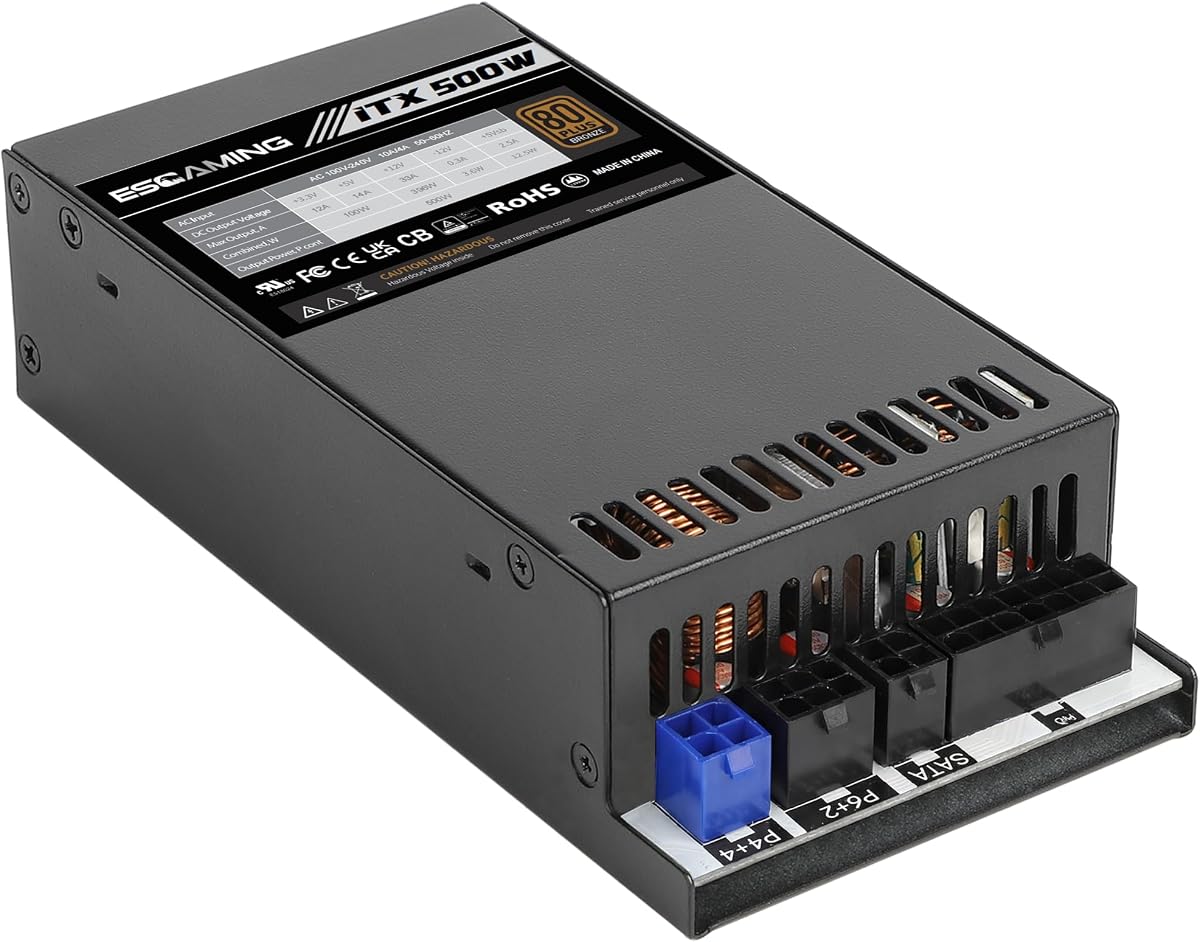
The ESGAMING Fully Modular delivers 500W in an ITX chassis with gold-level focus. It holds a 4.0 rating and achieves up to 85% efficiency at typical loads.
We may earn a commission when you buy through this link, at no additional cost to you.
Fully modular cables improve airflow in compact 1U systems. APFC range supports 90-264V ensuring stability across global power environments without manual switching.
Connectors include PCIe SATA and PATA for legacy and modern parts. Support contact ensures assistance if issues arise during installation or use.
This unit fits server or compact builds needing clean cable management. Choose it for high efficiency in tight spaces with reliable voltage handling.
Fully modular system reduces clutter and improves airflow in small cases.
APFC range supports international voltages for broader deployment.
We may earn a commission when you buy through this link, at no additional cost to you.
The Apevia TFX-PFC500W serves TFX cases with 500W power and 4.2 rating. Active PFC auto-switches voltage to prevent damage from manual setting errors.
We may earn a commission when you buy through this link, at no additional cost to you.
Its 80mm fan starts silently engaging only as temps rise for quiet runs. The 33A 12V rail supports stable gaming and workstation workloads efficiently.
Protections cover OVP OCP SCP and more to keep components safe. Verify case clearance as proprietary boards might need adapters for full compatibility.
This PSU is tailored for SFF TFX chassis needing dependable output. Select it if you value auto voltage safety and silent cooling in compact builds.
Automatic voltage adjustment prevents damage from incorrect manual settings.
Fan engages only when needed for quieter idle experiences.
We may earn a commission when you buy through this link, at no additional cost to you.
The APEVIA VENUS500W offers standard ATX power with 3.9 rating. It delivers 500W output with a 120MM fan for consistent cooling performance.
We may earn a commission when you buy through this link, at no additional cost to you.
Voltage regulation maintains 5% tolerance ensuring stable delivery. All protections guard against electrical risks including over-temperature and under-voltage events.
The switch allows manual voltage choice between 115V and 230V regions. Floppy and peripheral connectors add compatibility for legacy system upgrades.
This unit fits general ATX cases needing reliable protection and cooling. Choose it for balanced performance with straightforward manual voltage settings.
Manual switch lets you set correct voltage for your region easily.
Comprehensive safety suite prevents damage from electrical anomalies.
We may earn a commission when you buy through this link, at no additional cost to you.
The 600W Flex ATX PSU earns a rare 5.0 rating for premium quality. It combines fully modular cables with over 92% efficiency for minimal heat.
We may earn a commission when you buy through this link, at no additional cost to you.
Japanese capacitors ensure stable long-term reliability. The 16-pin connector supports modern GPU power needs without drops during peak draws.
Included adapters support various setups including PCIe and SATA. Silent fan and Japanese components make it ideal for high-end compact builds.
This is the top pick for enthusiasts needing robust efficient power. Invest in it when budget allows for maximum performance and quiet operation.
Japanese capacitors deliver stable power over long lifespans reliably.
16-pin design supports latest high-performance GPU power needs.
We may earn a commission when you buy through this link, at no additional cost to you.
The Smart W3 Series 600W supports ATX v3.1 specs with 4.6 rating. It delivers 600W efficiency with low-profile flat black cables for clean installs.
We may earn a commission when you buy through this link, at no additional cost to you.
FDB fan ensures smooth quiet cooling over time. DC to DC rail design improves stability for high amperage 12V loads in modern systems.
Industrial grade protection adds peace of mind during daily usage. The five year warranty supports long-term reliability for your components.
This PSU is great for forward-looking ATX builds. Choose it if you want latest specs without high-end price for stable power.
ATX v3.1 spec prepares your system for future component needs.
FDB fan reduces friction for quieter longer operation.
We may earn a commission when you buy through this link, at no additional cost to you.
Selecting the ideal low power PSU involves evaluating wattage, form factor, and efficiency. This guide breaks down key factors to ensure you pick a unit that fits your build needs.
Determine total system power draw by summing CPU and GPU needs. Low power units range from 300W to 650W matching compact or budget builds.
Match wattage to your components to avoid overloads while ensuring headroom for peaks.
Ensure the PSU fits your case size like ITX TFX or ATX. Measure dimensions before buying to avoid clearance issues.
Always verify case support for specific form factors before purchasing.
Look for 80+ certifications to reduce energy waste and heat. Higher ratings save power and keep system temps lower.
Prioritize Bronze or Gold units for better long-term efficiency.
Check for needed connectors like PCIe SATA and 4+4 CPU. Modular cables help manage space in tight cases.
Ensure all essential connectors are present for your components.
Larger fans reduce noise compared to small high-speed units. Look for thermal speed control to optimize quiet operation.
Choose fans with bearings that last for reliability.
Safety features like OVP and SCP protect against electrical spikes. These safeguards prevent damage to components during faults.
Verify that the PSU includes full protection suites.
Auto-switching PFC handles 90-264V inputs automatically. Manual switches add safety risks if set incorrectly for regions.
Prioritize units with auto voltage detection for convenience.
Longer warranties indicate confidence in build quality. Aim for at least five years of protection for peace of mind.
Review warranty terms for specific claims and limits.
Always connect all required cables before powering on. Most units will not start if connectors are loose or missing.
Keep intake vents clear to ensure airflow. Dust buildup can cause overheating and reduce fan life.
Use surge protectors to shield against electrical spikes. This extends lifespan and maintains performance over time.
A low power PSU delivers reduced wattage output designed for compact systems or lower energy consumption. They fit small cases while providing stable power for basic or specialized builds.
Some models feature fully or semi-modular cables to reduce clutter. Check specs for modular options if cable management is a priority for your build.
Yes if the wattage meets GPU and CPU requirements. Compact builds often use 500W units which handle entry-level gaming efficiently.
ITX builds typically need 24-pin motherboard 8-pin CPU and PCIe for GPUs. Ensure your unit supplies all required connectors.
Many units auto-switch between 115V and 230V. Others have manual switches so verify your region matches the setting.
Smaller fans can be noisier but many models include thermal control. Larger fans in compact sizes help reduce noise under load.
Most units last years with proper care. Signs like noise spikes indicate replacement. Regular dusting helps extend lifespan.
ATX units are standard size for larger cases while ITX are smaller for compact builds. Match the form factor to your case design.
Our top picks cover diverse needs from budget 300W units to premium 600W models. Each option balances wattage efficiency and form factor for different builds.
Prioritize compatibility and safety features when choosing. Ensure the unit meets your power needs and fits your case comfortably.
Prices may vary so check current listings before finalizing your purchase. Selecting the right PSU ensures stable efficient power for your system.