
TK Node Mini PC
4.5Editor score
Zorin OS Core Linux
AMD Ryzen R2314
Dual NVMe SSD Slots
Discover the best Linux Mini Pcs for productivity and performance. This guide compares top models with Linux pre-installed for developers and professionals.
Finding the right Linux Mini Pcs can transform your workspace into a efficient and powerful setup. These compact devices offer full desktop computing power without the bulk of traditional towers, making them ideal for modern work environments.
We compared ten top models based on performance, expandability, connectivity, and Linux compatibility. Each product was evaluated for its processor strength, RAM capacity, storage options, and overall value for users seeking open-source computing solutions.
Every pick highlights key strengths and potential trade-offs to help you make an informed decision. Prices and availability change frequently, so check current listings before purchasing to ensure you get the best deal available today.
4.5Editor score

4.8Editor score

4.0Editor score
This side-by-side comparison highlights the core specifications and unique features of each Linux Mini PC model to help you identify the perfect fit for your specific computing needs and budget constraints.


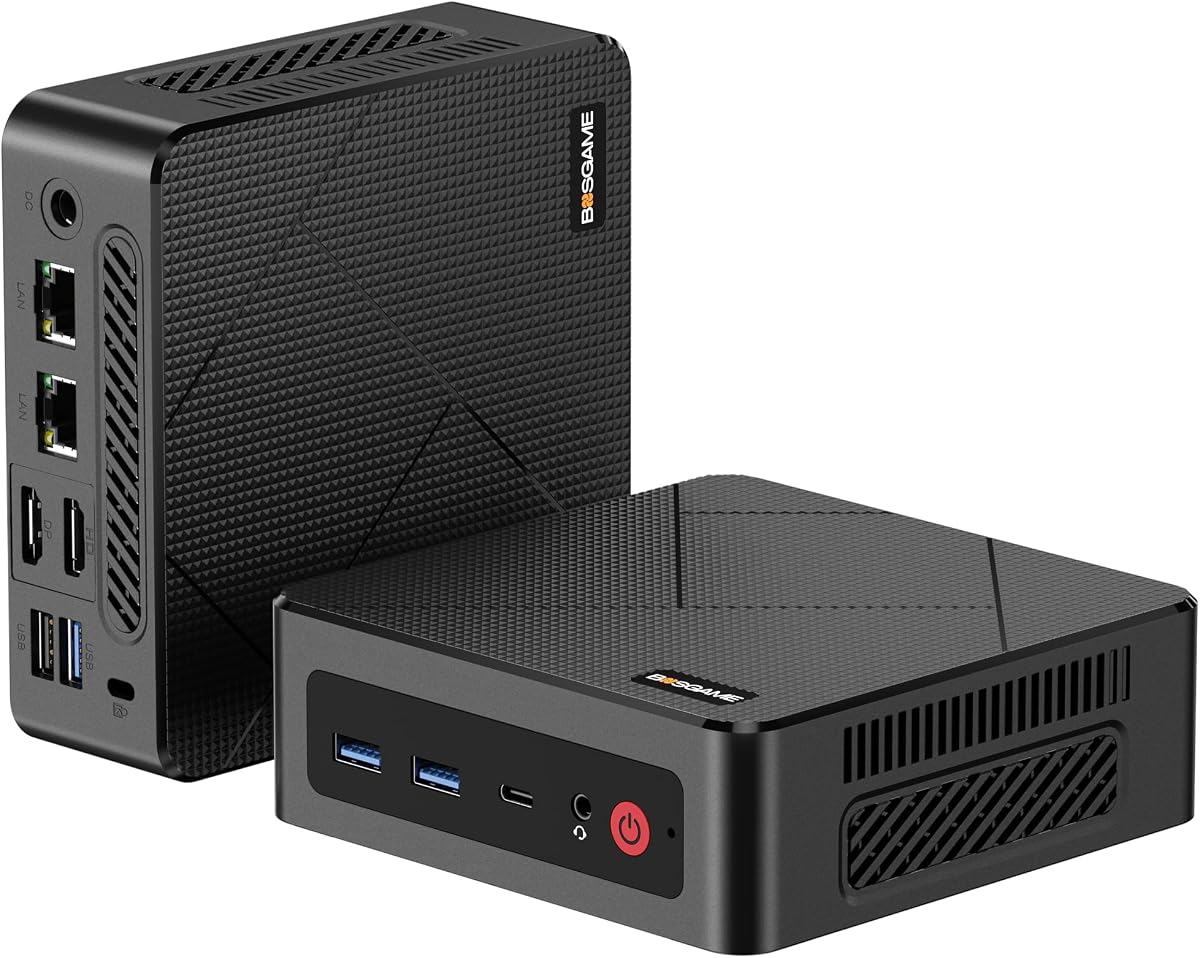
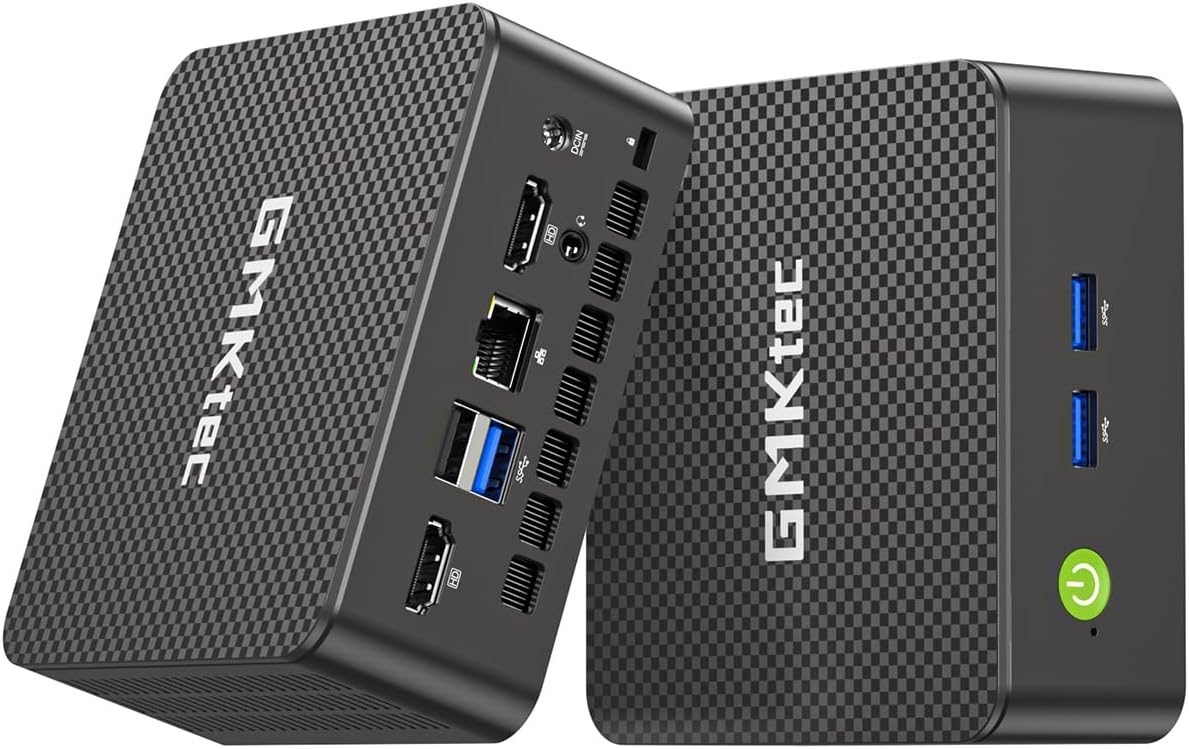
The TK Node Mini PC stands out as a reliable choice for users seeking a fully configured Linux environment. Pre-installed with Zorin OS Core, it offers a familiar desktop experience that transitions smoothly from Windows while delivering the security and efficiency of open-source software.
We may earn a commission when you buy through this link, at no additional cost to you.
Performance is anchored by an AMD Ryzen R2314 processor, which handles everyday tasks and lightweight development work with ease. The system supports up to 64GB of RAM and dual NVMe SSDs, providing ample headroom for virtualization and storage expansion as your needs grow.
While the base model comes with 8GB of RAM, the dual SO-DIMM slots allow for significant upgrades. The triple 4K display support ensures you can connect multiple monitors for enhanced productivity without needing additional docking stations or adapters.
This Mini PC is ideal for professionals who value reliability and support. With a 2-year US-based warranty and quality assurance from Texas, it delivers peace of mind for long-term deployments in home offices or small business environments.
Zorin OS Core provides a polished interface that reduces setup time and ensures immediate productivity upon unboxing.
Dual NVMe and RAM slots allow you to scale storage up to 4TB and memory up to 64GB as needed.
We may earn a commission when you buy through this link, at no additional cost to you.
The Beelink SER3 delivers solid performance for everyday computing tasks with its 16GB of DDR4 RAM and 500GB SSD. Although it uses an older Ryzen 3 processor, the dual-core configuration handles web browsing, office applications, and media playback without lag.
We may earn a commission when you buy through this link, at no additional cost to you.
Its integrated Radeon Vega 3 graphics provide decent visual performance for light creative work and video playback. The dual HDMI ports enable a dual-monitor setup, which is beneficial for multitasking across spreadsheets and documents simultaneously.
Thermal management is well-designed, keeping the system quiet even under load. This makes it suitable for noise-sensitive environments like home offices or libraries where fan noise could be distracting during video calls.
Beelink backs this model with lifetime technical support and a 3-year warranty, which adds significant value. For budget-conscious users who need reliable performance without breaking the bank, this Mini PC is a compelling option.
With 16GB of RAM, you can run multiple applications simultaneously without performance degradation.
Lifetime technical support ensures you have assistance available whenever you encounter technical issues.
We may earn a commission when you buy through this link, at no additional cost to you.
The ASUS NUC 14 Pro represents the pinnacle of Linux Mini PC performance with its powerful Intel Ultra 7 155H processor and pre-installed Linux Mint. This combination delivers exceptional processing power for developers, AI researchers, and power users who demand efficiency.
We may earn a commission when you buy through this link, at no additional cost to you.
With up to 64GB of DDR5 RAM and a 2TB PCIe SSD, this system handles heavy multitasking and large file operations effortlessly. The integrated Intel Arc GPU provides stunning visuals and acceleration for creative tasks and virtualization workloads.
Thunderbolt 4 support and WiFi 6E ensure fast connectivity and future-proofing. You can connect multiple 4K displays via HDMI, DisplayPort, or Thunderbolt, enabling a high-resolution workstation setup within a compact chassis.
Designed for 24/7 operation, the advanced cooling system maintains performance during extended workloads. Although priced higher than other options, the combination of premium components and open-source software makes it a top choice for professional environments.
Linux Mint provides a stable, clutter-free environment optimized for programming and virtualization tasks.
Thunderbolt 4 allows fast data transfer and connection to high-performance peripherals and docks.
We may earn a commission when you buy through this link, at no additional cost to you.
The Beelink Mini S12 Pro offers impressive efficiency and performance for its size with the Intel N100 processor. It comes with 16GB of DDR4 RAM and a 500GB SSD, making it ready for productivity tasks out of the box.
We may earn a commission when you buy through this link, at no additional cost to you.
Its low power consumption makes it ideal for use as a home server, NAS, or media center. The dual HDMI 4K support allows you to connect two high-resolution monitors for efficient multitasking during work or entertainment.
The system includes advanced features like Auto Power-On and Wake-on-LAN, which are useful for remote management. While storage expansion is limited compared to other models, the included capacity is sufficient for most general users.
Backed by a 3-year warranty and 24/7 support, this Mini PC provides reliable long-term value. For users seeking an affordable and efficient solution for daily computing needs, it strikes a great balance between cost and functionality.
The N100 processor delivers strong performance while consuming minimal power for eco-friendly operation.
Wake-on-LAN and Auto Power-On allow convenient remote access and automated operations.
We may earn a commission when you buy through this link, at no additional cost to you.
The KAMRUI Pinova P2 excels in multitasking with its AMD Ryzen 7 3300U processor and triple 4K display output. This makes it ideal for professionals who need multiple screens for trading, coding, or content creation.
We may earn a commission when you buy through this link, at no additional cost to you.
With 16GB of high-speed LPDDR4X RAM, the system handles multiple applications smoothly. While the RAM is soldered, the dedicated storage expansion slots let you add up to 4TB of total storage for media and projects.
The full-function Type-C port supports video output and data transfer at 10Gbps speeds, offering versatile connectivity. The compact design and included VESA mount make it easy to integrate into any workspace setup.
Quiet operation and efficient cooling ensure stable performance under load. For users who prioritize screen real estate and multitasking capability, this Mini PC delivers exceptional value without compromising on power.
Connect up to three 4K monitors simultaneously for maximum workspace efficiency.
The 10Gbps Type-C port ensures quick transfers between devices and external storage.
We may earn a commission when you buy through this link, at no additional cost to you.
The GMKtec G11 stands out for its dual 2.5GbE Ethernet ports, making it perfect for networking enthusiasts and homelab users. It can function as a router, firewall, or server with professional-grade networking capabilities.
We may earn a commission when you buy through this link, at no additional cost to you.
Powered by an AMD Ryzen R2514 processor and dual-channel 16GB RAM, it delivers strong performance for virtualization and container workloads. The dual-channel memory ensures smooth 4K video playback and better gaming frame rates.
Triple 4K display support allows for extensive multitasking across multiple screens. The system is designed for 24/7 operation, ensuring reliable uptime for servers or continuous monitoring tasks in home or office environments.
While expandability is limited compared to other models, the included connectivity options are robust. This Mini PC is an excellent choice for users who need powerful networking hardware in a compact form factor.
Dual 2.5GbE ports support high-speed data transfer and secure network segmentation.
Built for continuous operation, ideal for running servers or home lab services.
We may earn a commission when you buy through this link, at no additional cost to you.
The CyberGeek Mini PC delivers flagship performance with an Intel Core i9 processor and 32GB of RAM. It is designed for demanding workloads like video editing, virtualization, and gaming within a compact chassis.
We may earn a commission when you buy through this link, at no additional cost to you.
With a 1TB PCIe SSD and Ubuntu Linux pre-loaded, it offers fast boot times and a robust computing environment. The triple 4K display support ensures you can manage multiple projects or games across high-resolution screens.
The advanced cooling system keeps the powerful hardware running smoothly without throttling. Six USB ports and dual LAN ports provide extensive connectivity for peripherals and network redundancy in complex setups.
While it consumes more power than entry-level models, its performance justifies the demand for users seeking desktop-class power. This Mini PC is a top choice for gamers and professionals who need maximum performance.
The i9 processor provides processing strength comparable to full-sized desktops in a smaller package.
Ubuntu pre-installation ensures immediate access to a reliable open-source environment.
We may earn a commission when you buy through this link, at no additional cost to you.
The BOSGAME E5 combines efficient computing with robust networking features including dual 2.5GbE LAN ports. This makes it a versatile choice for home servers or users who need network segmentation and redundancy.
We may earn a commission when you buy through this link, at no additional cost to you.
Equipped with 16GB DDR4 RAM and a 512GB NVMe SSD, it handles everyday tasks and light professional work smoothly. The triple 4K display support enhances productivity by allowing multiple windows and documents on screen.
The front-facing Type-C port adds convenience for quick data transfers and device charging. Quiet operation ensures that the system remains unobtrusive even when running continuous background processes or downloads.
Overall, this Mini PC offers a balanced mix of speed, storage, and connectivity. It is an ideal solution for users who need reliable performance and networking features without the complexity of building a custom server.
Dual LAN ports enable failover configurations and efficient network traffic management.
The NVMe SSD ensures quick boot times and responsive application performance.
We may earn a commission when you buy through this link, at no additional cost to you.
The BOSGAME E4 Air provides a compact and affordable computing solution for basic home and office tasks. Its Ryzen 5 processor and triple 4K display support make it suitable for media centers and light multitasking.
We may earn a commission when you buy through this link, at no additional cost to you.
With 8GB of RAM and a 256GB SATA SSD, it handles everyday applications and media streaming efficiently. The dual Ethernet ports allow for wired connectivity redundancy or network segmentation if needed.
Its lightweight and quiet design fit well into living rooms or small desks. While not intended for heavy professional workloads, it delivers solid performance for general productivity and entertainment purposes.
For users seeking an economical option without sacrificing display capabilities, this Mini PC is a practical choice. It keeps the essential features needed for daily computing while maintaining an accessible price point.
Triple 4K output and quiet operation make it ideal for home entertainment setups.
Its small size and lightweight build allow flexible placement in any room.
We may earn a commission when you buy through this link, at no additional cost to you.
The GMKtec G3S is an entry-level Mini PC that offers reliable performance for daily tasks. With its Intel N95 processor and dual HDMI 4K support, it handles media playback and office work smoothly.
We may earn a commission when you buy through this link, at no additional cost to you.
Equipped with 8GB of RAM and a 256GB M.2 SSD, it provides enough speed for booting and running essential applications. The AV1 video decoding ensures modern streaming services run efficiently without extra hardware.
Its compact design and simple connectivity make it easy to integrate into any workspace. While not suitable for intensive multitasking, it serves well as a secondary workstation or digital signage controller.
For budget-conscious users who need a functional desktop replacement, this Mini PC delivers value. It covers the basics effectively while maintaining a small footprint that suits modern living and working spaces.
AV1 decoding ensures compatibility with current streaming codecs for smooth video playback.
A minimal design allows it to fit behind monitors or in tight entertainment setups.
We may earn a commission when you buy through this link, at no additional cost to you.
Selecting the right Linux Mini PC requires balancing performance needs, expandability, and budget. This guide outlines key factors to evaluate before purchasing.
The processor determines how fast your Mini PC handles tasks. Look for Intel Core i-series or AMD Ryzen CPUs for better multitasking and future-proofing. Embedded chips like Intel N-series suit basic web browsing and media tasks.
Choose a processor that matches your workflow demands to avoid bottlenecks during daily use.
RAM impacts how many applications you can run simultaneously. 16GB is the sweet spot for most productivity and light development work. Higher-end models offer 32GB or 64GB for heavy multitasking and virtualization.
Prioritize models with SO-DIMM slots if you plan to upgrade memory later as your needs evolve.
SSD speed and capacity define boot times and file access. NVMe PCIe SSDs offer faster performance than SATA. Dual M.2 slots allow you to expand storage up to several terabytes for large media collections.
Select storage capacity that accommodates your OS, applications, and essential files comfortably.
Multiple display ports boost productivity by enabling multi-screen setups. Look for HDMI and DisplayPort or USB-C with DP Alt Mode. Triple 4K support is valuable for developers and analysts needing wide workspace.
Ensure your Mini PC has enough video outputs to match your monitor configuration needs.
Gigabit Ethernet and dual LAN ports are crucial for servers and NAS setups. WiFi 6 or 6E provides fast wireless connectivity. Some models include dual 2.5GbE ports for faster home network speeds.
Choose networking options that support your internet speed and local data transfer requirements.
Having Linux pre-installed reduces setup time and ensures compatibility. Popular options include Zorin OS, Ubuntu, and Linux Mint. Verify the distribution matches your familiarity and software needs.
Pre-installed OS saves troubleshooting time and lets you start using the system immediately.
Reliable customer service ensures long-term satisfaction. Look for at least a 2-year warranty and accessible support channels. US-based support teams simplify troubleshooting for North American customers.
Strong warranty terms indicate manufacturer confidence and protect your investment over time.
Position your Mini PC in a well-ventilated area to prevent overheating. Avoid enclosing it in tight cabinets where airflow is restricted, as continuous heat buildup can reduce hardware lifespan.
Regularly update your Linux system to maintain security and performance. Use the terminal or software center to apply patches for the kernel and installed packages at least once a month.
Protect your Mini PC from power surges by using a quality surge protector or UPS. Sudden voltage spikes can damage internal components, so stable power delivery is essential for long-term reliability.
Yes, many Linux Mini Pcs come pre-installed with development-friendly distributions like Ubuntu or Zorin OS. They support compilers, IDEs, and virtualization tools efficiently, especially models with 16GB RAM or more. With SSD storage and multi-core CPUs, they handle coding tasks smoothly.
Most models have SO-DIMM slots that allow memory upgrades. Check the specifications for maximum RAM capacity before purchasing. Some budget models may have soldered memory, so always verify expandability if you plan to scale up later.
Light and indie gaming runs well on integrated GPUs like Radeon Vega or Intel Iris Xe. However, heavy AAA titles may need external graphics solutions. For gaming-focused setups, look for models with powerful discrete or Arc graphics.
Common options include Ubuntu, Zorin OS, and Linux Mint. These provide familiar interfaces for transitioning from Windows. Some manufacturers also allow custom distro installs if you prefer Arch or Debian-based systems.
For daily productivity, browsing, and media consumption, they serve as excellent desktop replacements. They consume less power and take up minimal desk space. For intensive tasks like video rendering, high-end Mini PCs offer comparable performance.
Most models support dual or triple 4K displays via HDMI, DisplayPort, and USB-C. Check the video output count on the product page. Using adapters may be necessary if your monitors require different connection types.
Yes, they consume significantly less power than traditional desktop towers. Entry-level models use as little as 6 watts at idle, reducing electricity bills and environmental impact. This makes them ideal for always-on setups like home servers.
Most manufacturers offer 1 to 3-year limited warranties covering defects. Some include US-based support and lifetime technical assistance. Always check warranty terms and customer service availability before purchasing.
The ASUS NUC 14 Pro leads our list for its premium performance and Linux Mint pre-installation, while the TK Node Mini PC offers excellent value with Zorin OS Core. Budget buyers will appreciate the Beelink Mini S12 Pro for its efficiency and price.
Prioritize memory and storage expandability if you anticipate growing your setup over time. Models with multiple RAM and SSD slots provide long-term flexibility for evolving workloads and data storage needs.
Prices and availability change frequently so verify current deals before purchasing. Choose the model that best fits your performance needs and Linux preferences to enjoy a smooth and productive computing experience.