
AV Access KVM Switch 3 Monitors 2 Computers KVM Docking 8K@60Hz
4.9Editor score
100W USB-C charging
Ethernet network sharing
SD card reader built-in
Compare top KVM switches for triple monitors and two computers to find the best solution for high-resolution displays and shared peripherals in your workspace.
Finding a reliable KVM switch for triple monitors and two computers is essential for modern professionals who need seamless workflow continuity. These devices allow you to control multiple systems with a single set of peripherals, saving desk space and reducing cable clutter significantly.
We evaluated ten top-rated models based on video resolution support, USB data transfer speeds, and ease of switching between systems. Our analysis focuses on compatibility with high-refresh displays, EDID capabilities, and overall build quality to ensure stable performance.
Each pick highlights specific strengths like 8K support, docking features, or budget-friendly designs. Prices fluctuate frequently, so please verify current listings before purchasing to ensure you get the best value for your specific setup needs.
4.9Editor score

3.9Editor score

This side-by-side comparison highlights key specifications across all ten models to help you identify the right fit for your specific display and peripheral requirements efficiently.


The UGREEN KVM switch stands out as a top-tier solution for users needing high-resolution output across three monitors and two computers. Its ability to support up to 8K@60Hz makes it ideal for professionals working with detailed graphical content.
We may earn a commission when you buy through this link, at no additional cost to you.
This model features two DisplayPort 1.4 and one HDMI 2.1 port per computer, ensuring robust bandwidth for ultra-high-definition displays. The included USB 3.0 ports facilitate fast data transfer for peripherals like external drives and webcams.
While it lacks EDID emulation which means window layouts may reset when switching, the included desktop controller offers a clean switching experience. Users must ensure their PCs have the specific port configuration to utilize all three monitors effectively.
For users needing high-speed video transfer without breaking the bank, this UGREEN unit delivers impressive performance. It is a solid choice for creative professionals and gamers looking to maintain high refresh rates across multiple screens.
The switch supports 8K@60Hz and 4K@240Hz, ensuring smooth visuals for both productivity and gaming scenarios.
Four USB 3.0 ports allow for sharing keyboards, mice, printers, and webcams between computers seamlessly.
We may earn a commission when you buy through this link, at no additional cost to you.
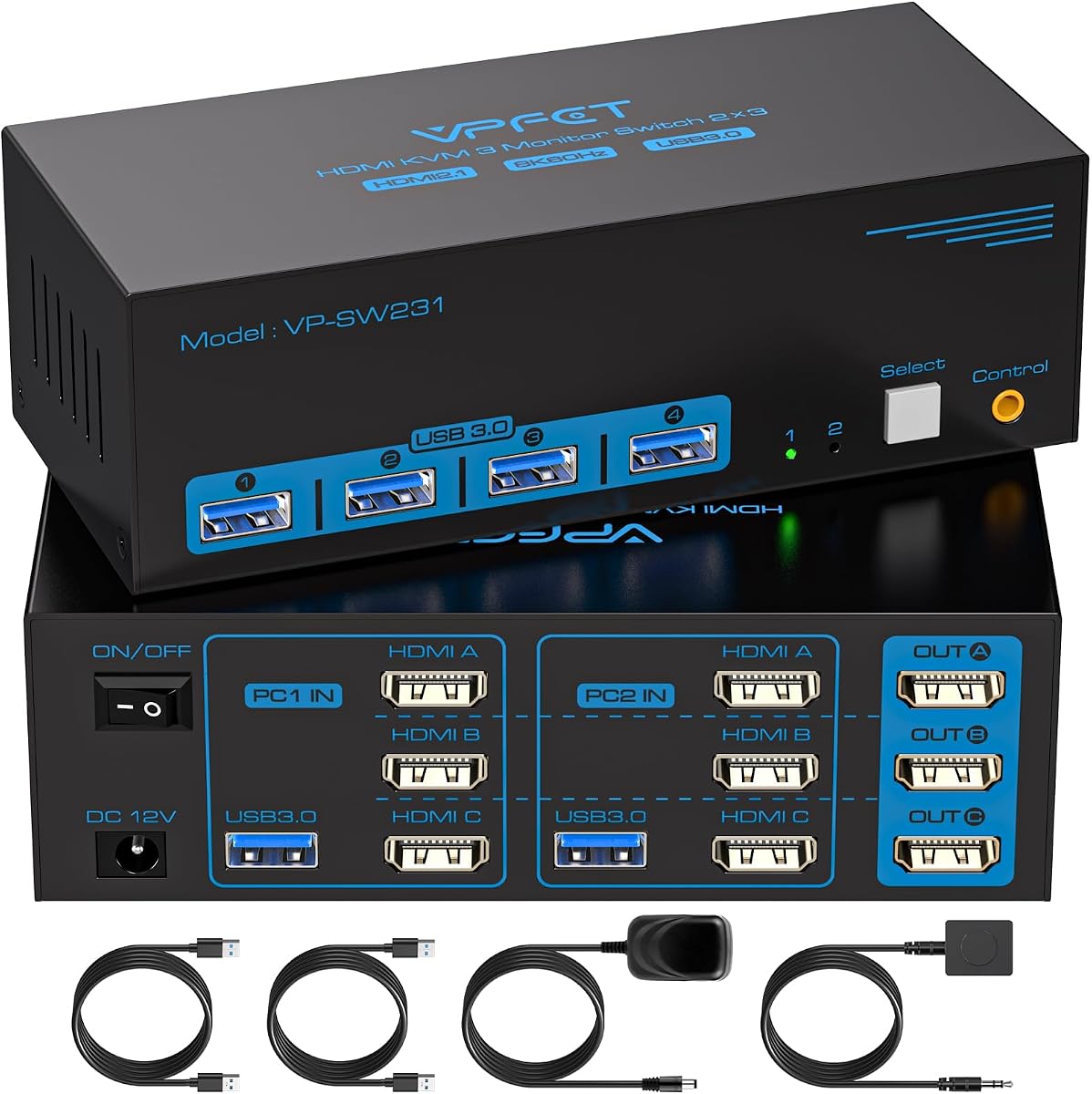
This KVM switch offers a straightforward solution for setups relying entirely on HDMI connections. It supports up to 4K@60Hz across three monitors, which is sufficient for most office work and casual media consumption tasks.
We may earn a commission when you buy through this link, at no additional cost to you.
The device includes a 12V power adapter to ensure stability, especially when connecting high-power USB devices like hard drives. The wired remote control allows users to place the switch unit out of sight while keeping control accessible on the desk.
While it does not support DisplayPort which limits ultra-high-refresh gaming setups, it covers standard HDMI needs effectively. Users must ensure their computers have three HDMI ports available to utilize the full triple-monitor capability.
For those prioritizing affordability and simplicity in an all-HDMI environment, this switch is a practical choice. It simplifies cable management significantly compared to maintaining separate peripherals for every computer.
Designed specifically for HDMI outputs, making it ideal for TVs and monitors without DisplayPort inputs.
The included 12V adapter ensures consistent power for both video signals and connected USB devices.
We may earn a commission when you buy through this link, at no additional cost to you.
This unit brings high-resolution capabilities to a more accessible price point. It supports 8K@60Hz and 4K@144Hz, catering to users who want high fidelity for video editing or design work without premium costs.
We may earn a commission when you buy through this link, at no additional cost to you.
The switch includes HDMI 2.1 and DP 1.4 cables in the box, reducing initial setup complexity. A wired remote controller is included, providing flexibility to place the main unit in a central location away from view.
Users should note that optimal performance depends heavily on cable length and quality. Keeping cables under recommended limits ensures the 8K signal remains stable without signal degradation or flickering issues on the displays.
For a mix of performance and value, this KVM switch is a strong contender. It effectively bridges the gap between basic HDMI switches and high-end DP solutions for triple monitor setups.
The package includes necessary HDMI and DP cables, simplifying initial installation for new users.
Wired remote and panel button options ensure you can switch systems quickly from your preferred location.
We may earn a commission when you buy through this link, at no additional cost to you.
Designed for robust performance, this KVM switch handles up to 8K@60Hz and 4K@144Hz for gaming and professional work. The inclusion of both HDMI 2.1 and DP 1.4 ensures compatibility with modern display standards.
We may earn a commission when you buy through this link, at no additional cost to you.
A standout feature is the external power switch, allowing users to restart the KVM unit without unplugging it. This is particularly useful for re-recognition signals when displays fail to wake up after switching between computers.
The switch supports a broad range of devices from PCs to gaming consoles like PS4. LED indicators clearly show which computer is active, adding a layer of visual clarity to the workflow process.
For users needing a reliable solution that handles high refresh rates well, this model is well-suited. It balances high-resolution support with practical features like the power switch and clear status indicators.
The dedicated power switch allows for easy restarts of the KVM unit without disturbing the PC connections.
Compatibility with consoles adds versatility for those wanting to switch between work and entertainment systems.
We may earn a commission when you buy through this link, at no additional cost to you.
This model is ideal for systems utilizing full DisplayPort connections. It supports 8K@60Hz and 4K@120Hz, making it excellent for high-resolution design work and detailed photo editing tasks requiring accurate visuals.
We may earn a commission when you buy through this link, at no additional cost to you.
With a strong user rating, it is trusted for its stable performance. The device includes a dedicated 12V power supply to ensure that high-power USB devices function correctly without power drops during operation.
It is worth noting that this switch requires three DisplayPort inputs per computer. Users must check their PC graphics card capabilities carefully before purchasing to ensure all three monitors will connect properly.
For pure DisplayPort environments, this KVM switch delivers consistent high-performance results. It is a reliable choice for professionals who need high bandwidth and clear visual output across multiple screens.
Designed specifically for DisplayPort inputs, ensuring maximum bandwidth for high-resolution displays.
The included power adapter ensures that external hard drives and other power-hungry devices work reliably.
We may earn a commission when you buy through this link, at no additional cost to you.
This KVM switch stands out for its EDID emulation feature, which retains monitor resolution and layout data when switching computers. This eliminates the need to manually rearrange windows every time you switch systems, boosting workflow efficiency significantly.
We may earn a commission when you buy through this link, at no additional cost to you.
While it supports up to 4K@60Hz rather than 8K, it is sufficient for most high-resolution professional workflows. The configuration requires one DP and two HDMI ports per computer, offering flexibility for various connection types.
Users benefit from a stable setup that does not constantly reset displays. This feature is particularly valuable for complex multi-screen arrangements used in trading or video editing where layout consistency is critical.
For users tired of resetting their screen layouts after every switch, this model is the clear choice. It prioritizes workflow continuity and ease of use over maximum raw resolution capabilities.
EDID emulation preserves your monitor settings, ensuring you do not lose your screen configuration when switching PCs.
Retaining window layouts saves significant time for professionals who rely on precise screen arrangements daily.
We may earn a commission when you buy through this link, at no additional cost to you.
This KVM docking station replaces multiple devices, offering USB-C laptop charging, SD card reading, and network connectivity alongside video switching. It supports up to 8K@60Hz on desktop and high refresh rates on USB-C laptops.
We may earn a commission when you buy through this link, at no additional cost to you.
The inclusion of a shared 1Gb Ethernet connection ensures network continuity. Downloads and cloud syncs continue even when you switch computers, which is a crucial feature for remote work or heavy data transfers.
Mac users should note that this dock supports mirrored displays only on MacBooks, limiting extended multi-monitor usage. Windows laptops with compatible USB-C video output support extended multi-monitor modes effectively.
For those seeking a premium hub that integrates video switching with full docking capabilities, this AV Access model is unmatched. It simplifies the desk setup for both desktop and laptop users significantly.
The shared Ethernet port keeps internet connected on both PCs even when you switch control between them.
Power Delivery allows your laptop to charge while connected, removing the need for a separate charger cable.
We may earn a commission when you buy through this link, at no additional cost to you.
This KVM switch supports up to 8K@60Hz and 4K@120Hz, ensuring high-quality visuals for demanding tasks. It includes HDMI 2.1 and DP 1.4 support for maximum compatibility with modern monitors.
We may earn a commission when you buy through this link, at no additional cost to you.
A wired remote is provided to keep the main switch discreet. The 12V power adapter ensures that high-power USB devices like scanners and external drives function smoothly without interruption.
The device operates on plug-and-play principles, requiring no drivers. This makes setup quick and easy for Windows and Linux users looking to streamline their workspace connections quickly.
For those needing reliable 8K support with a clean setup process, this model is a strong candidate. It balances technical specs with ease of use for professional environments.
The 12V adapter ensures stable performance for high-demand peripherals connected to the USB ports.
No drivers are needed for immediate use, saving time during initial setup and configuration.
We may earn a commission when you buy through this link, at no additional cost to you.
This docking station offers comprehensive features including 100W Power Delivery and SD card access. It supports 8K@60Hz for desktops and high refresh rates for laptops, making it versatile for hybrid work environments.
We may earn a commission when you buy through this link, at no additional cost to you.
The shared 1Gb Ethernet connection allows background tasks to run on the inactive computer. This ensures that file transfers and updates continue uninterrupted even when you are working on the other system.
Users should verify laptop USB-C ports support video output via MST. Windows laptops support extended modes while MacBooks support mirrored displays only, limiting some multi-monitor scenarios.
For users needing a robust hub that combines video switching with peripheral expansion, this dock is an excellent investment. It significantly reduces cable clutter while maintaining full functionality.
Network tasks remain active on both computers, ensuring uninterrupted data transfers during system switching.
USB 3.2 ports support 10Gbps transfer speeds, ideal for moving large files between connected devices.
We may earn a commission when you buy through this link, at no additional cost to you.
This switch offers up to 8K@60Hz resolution for detailed visual work. It supports HDMI 2.1 and DP 1.4 standards ensuring modern displays can achieve maximum refresh rates and color depth.
We may earn a commission when you buy through this link, at no additional cost to you.
The wired controller helps keep desks tidy by allowing remote switching. A 12V power adapter ensures reliable power for peripherals even when connected to lower-power USB hubs or older ports.
It is designed to work with Windows, Mac, and Linux systems easily. Users can switch between extended and copy modes effortlessly to suit different workflow needs during the day.
For budget-conscious users seeking high-resolution capabilities, this model delivers excellent value. It provides essential high-end features like 8K support without the premium cost of docking stations.
Delivers 8K resolution capabilities at an affordable price point for budget-conscious high-resolution users.
The wired remote allows for a clutter-free desk by keeping the main unit hidden away from direct view.
We may earn a commission when you buy through this link, at no additional cost to you.
Selecting the right KVM switch requires understanding your specific display and port needs to ensure seamless multi-computer operation.
Check the maximum resolution supported by the switch such as 4K@60Hz or 8K@60Hz. Ensure the switch supports the refresh rates of your monitors like 144Hz or higher for smooth motion and gaming performance.
Verify that your computers have the exact ports required by the switch such as three DisplayPorts or two DisplayPorts plus one HDMI. Missing ports will require additional adapters or prevent full triple-monitor usage entirely.
EDID emulation retains your window layout and resolution when switching between computers. This prevents the need to constantly rearrange windows and saves significant time during daily workflows and multitasking.
Ensure the switch provides enough USB 3.0 ports for your devices like keyboards, mice, and external drives. USB 3.0 supports up to 5Gbps transfer speeds for efficient file sharing between systems.
Look for models that offer both physical buttons and wired remote controls. Wired remotes allow you to place the switch out of sight while keeping easy access to the control on your desktop.
Choose models with external power adapters to ensure stable performance for high-power devices. Built-in USB power may be insufficient for external hard drives and webcams requiring constant power.
Consider docking stations if you need Ethernet sharing or laptop charging. These models replace multiple peripherals and provide a cleaner desk setup for laptop and desktop hybrid environments.
Check if necessary video cables are included in the package. Some switches require separate purchases of specific HDMI or DisplayPort cables which can increase the total cost significantly.
Connect the video cables from each computer to the respective input ports on the switch ensuring each monitor is correctly assigned to a specific port on the switch.
Attach the USB cables to the USB upstream ports on the switch and the computers to enable peripheral sharing functionality between both systems.
Connect the external power adapter to the switch and plug it into a wall outlet to ensure stable power delivery for all connected devices.
Most modern KVM switches are plug-and-play and do not require driver installation. They work directly with Windows, Mac, and Linux systems automatically. However, always check the manufacturer documentation for specific OS requirements before installation.
If your computer has only two video ports, you can only connect two monitors directly. Ensure your PC supports three independent displays to utilize the full triple-monitor capability of the switch.
Passive adapters are generally not supported as they may not transmit the necessary video signals. Use active adapters if you must convert between different video ports to ensure stable display output.
This usually happens because the switch does not support EDID emulation. Without EDID support, the system resets the display configuration each time you switch computers requiring manual window adjustments.
Most switches in this list do not support keyboard hotkeys for switching. You must use the physical button or the included wired remote controller to change between connected computers effectively.
Standard KVM switches do not share Ethernet connections. Only docking station models with shared Ethernet ports allow network continuity on both computers simultaneously without interruption.
Cable lengths should generally be under two meters for optimal video signal stability. Longer cables may cause signal degradation or flickering especially at high resolutions like 8K.
The UGREEN KVM switch leads with high-resolution support and comprehensive features making it the top choice for demanding professional workflows and creative tasks.
For users prioritizing workflow continuity the EDID Emulation model prevents the need to reset window layouts saving valuable time during daily computer switching operations.
Always verify your PC's port configurations and monitor capabilities against the switch specifications before purchasing to ensure full functionality and avoid compatibility issues.