
Transparent Mechanical Keyboard RGB
3.2Editor score
Crystal clear acrylic design
Triple mode connectivity support
Silent linear switch operation
Discover the top 10 keyboards with acrylic chassis for 2026. This guide compares features, aesthetics, and performance to help you choose the perfect setup.
In the world of mechanical keyboards, aesthetics and performance often collide. The acrylic chassis keyboard offers a unique blend of modern design and robust functionality. These keyboards feature transparent or semi-transparent bodies that showcase internal components while providing a sturdy build.
Choosing the right one involves more than just looks. You need to consider connectivity options, switch types, battery life, and customization features. Our team has evaluated the top models available this month to provide a comprehensive overview of what each offers.
Each selection in this list highlights specific strengths whether you need budget-friendly value or premium features. We have organized them by rank to help you navigate your options quickly. Keep in mind that prices and availability can change frequently on retailer sites.
3.2Editor score

4.7Editor score
5.0Editor score
We have compiled a detailed side-by-side comparison of the ten leading options on the market today. This table highlights the core specifications that differentiate each model for your convenience.


The KiiBoom Phantom81 V4 stands out as a premium choice for those who want a striking visual presence. Its frosted acrylic construction offers a semi-transparent look that hides internal components while glowing with RGB light. This model balances aesthetics with high-end specs like a massive battery.
We may earn a commission when you buy through this link, at no additional cost to you.
One of its strongest features is the 8000mAh battery, which provides weeks of use between charges. The tri-mode connectivity ensures you can switch between wired, Bluetooth, and 2.4GHz wireless seamlessly. The gasket-mounted structure adds a creamy typing feel that enthusiasts appreciate.
While the build quality is excellent, the price is higher than average for this category. The driver software requires installation on Windows for full customization which might be a hurdle for casual users. However, the durability and battery life justify the investment for many.
This keyboard is perfect for users who want a statement piece that performs well in long sessions. If you need a desk centerpiece with reliable wireless performance and a long-lasting charge, this is the top recommendation for 2026.
With 8000mAh battery capacity, you can go weeks without charging even with RGB on. The tri-mode system supports Bluetooth 5.0 and 2.4GHz wireless for lag-free performance.
The frosted acrylic case and stainless steel base provide a premium look and solid stability. The gasket mount ensures a creamy typing experience free from wobbling.
We may earn a commission when you buy through this link, at no additional cost to you.
This transparent mechanical keyboard is an excellent entry point for anyone interested in acrylic aesthetics without breaking the bank. It features a crystal clear design that reveals the internal mechanics and RGB lighting. The build is lightweight yet functional for daily use.
We may earn a commission when you buy through this link, at no additional cost to you.
The silent linear switches make it suitable for office environments or late night gaming sessions. You get the convenience of triple mode connectivity including Bluetooth 5.0 which pairs with up to five devices. The rotary knob adds a touch of premium utility for volume control.
Users report mixed experiences with the software interface which is less advanced than competitors. The battery life is decent but not class leading compared to higher capacity models. Still, the price makes it a compelling option for budget conscious buyers.
If you want to try out a clear keyboard setup for the first time, this is a safe choice. It offers the core features of a premium board at a fraction of the cost making it accessible to everyone.
The premium acrylic material gives a high-end look without the high-end price tag. The crystal clear finish allows RGB light to shine through beautifully.
You can switch between wired, 2.4GHz, and Bluetooth modes effortlessly. The rotary knob offers quick control for volume and lighting adjustments on the fly.
We may earn a commission when you buy through this link, at no additional cost to you.
The GravaStar Mercury K1 Lite brings a unique open-frame construction that enhances airflow and lighting effects. Inspired by the Northern Lights, the Crystal Aurora edition features a stunning gradient that transforms any desk. It is a true statement piece for gamers and creators.
We may earn a commission when you buy through this link, at no additional cost to you.
Under the hood, it features a five-layer gasket mount system that delivers a soft and responsive typing experience. The custom linear switches are designed to be light and effortless. The hot-swappable PCB allows you to customize the feel further with your favorite switches.
While the open frame looks cool it may collect dust more easily than closed chassis models. The 4000mAh battery is standard for wireless keyboards but lacks the extended capacity of some rivals. The design prioritizes visuals over ruggedness.
This model is ideal for users who prioritize desk aesthetics and a premium typing feel. If you want a keyboard that doubles as art while offering a creamy thocky sound, this is the one to choose for your setup.
The open skeletal design and pastel aurora gradient create a dreamy glow. The translucent keycaps capture and diffuse RGB lighting beautifully.
Five layers of dampening material ensure a deep satisfying thock sound. The gasket mount provides a solid yet elastic keystroke response.
We may earn a commission when you buy through this link, at no additional cost to you.
The YUNZII X98 offers a 96% layout which balances compactness with the functionality of a numpad. The creamy white finish with glossy bezels gives it a polished and modern look. It is designed for users who need a number pad but want to save desk space.
We may earn a commission when you buy through this link, at no additional cost to you.
This keyboard features jelly keycaps made from an ABS PC blend that create a crystal clear texture. The hot-swappable PCB allows you to change switches easily without soldering. The QMK VIA firmware support gives you deep customization options for macros and layers.
The pre-lubed switches provide a silky smooth typing experience right out of the box. However, the larger footprint might not fit on very small desks. The software is powerful but takes time to learn for beginners.
For professionals who need a full set of keys in a smaller footprint, this is an excellent choice. The combination of the gasket mount and premium keycaps ensures a high quality typing feel.
The 96% layout keeps navigation keys and the numpad while saving space. It is ideal for data entry and financial work.
You can remap keys and adjust RGB lighting with QMK VIA firmware. The hot-swap sockets support 3-pin and 5-pin switches for flexibility.
We may earn a commission when you buy through this link, at no additional cost to you.
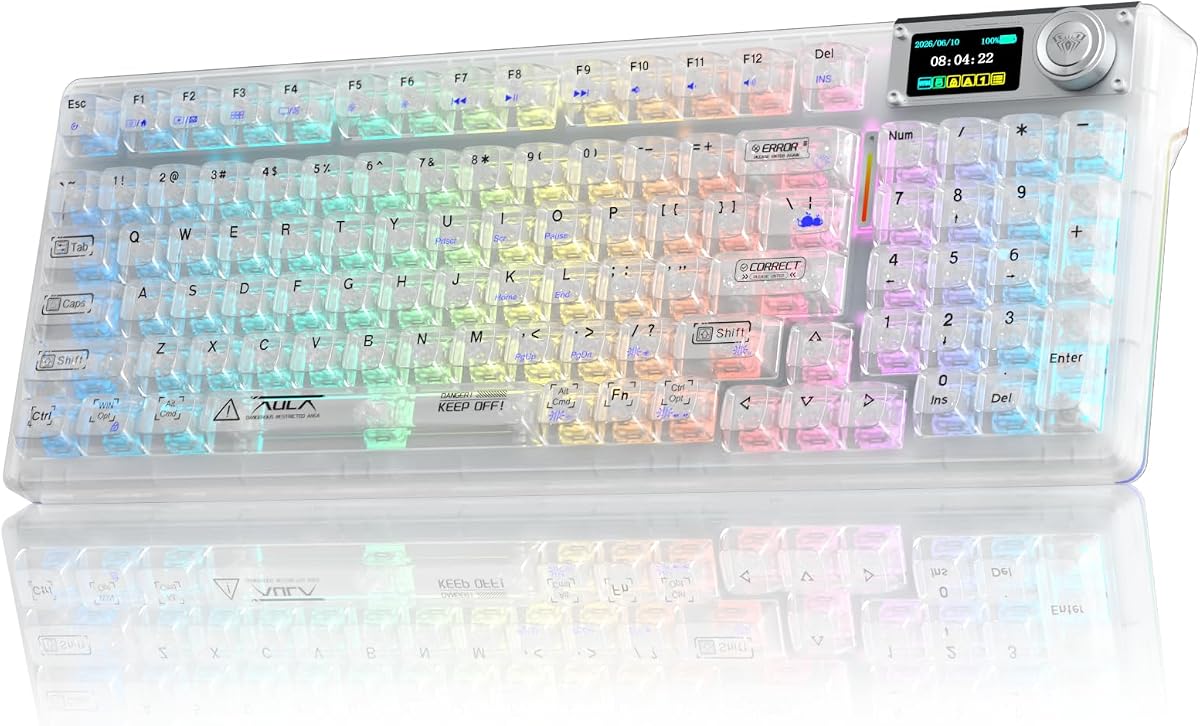
The Aula F98Pro V3 stands out with a smart LCD screen that displays battery level and time. This feature adds a futuristic touch to the clear chassis design. It is aimed at users who want to monitor their system status directly on the keyboard.
We may earn a commission when you buy through this link, at no additional cost to you.
With a 10000mAh battery, it offers exceptional endurance for long work sessions or gaming marathons. The ice crystal switches are designed for fast actuation and creamy sound. The gasket mount with five layers of filling ensures a soft typing feel.
Setting up the custom screen images requires a driver that is only compatible with Windows. This limits its usability for Mac users who want the full visual experience. The battery is large but charging times may be longer.
If you need a keyboard with an integrated screen and massive battery life, this is the best option. It brings a high level of functionality to a clear keyboard setup.
The TFT screen shows connection status and system info in real time. You can customize images and GIFs via the driver software.
The 10000mAh battery frees you from battery anxiety. It supports long periods of usage on a single charge.
We may earn a commission when you buy through this link, at no additional cost to you.
This YUNZII X98 variant emphasizes multi-device functionality with support for up to five devices. The crystal clear casing and shine-through keycaps maintain a pristine aesthetic. It is designed for users who switch between a PC, Mac, and tablet frequently.
We may earn a commission when you buy through this link, at no additional cost to you.
The pre-lubed snow switches offer a creamy typing feel without much effort. The south-facing LEDs ensure that keycap legends do not block the RGB light. This results in a uniform and bright illumination across the board.
While it excels at connectivity it does not stand out as much as the V3 version with a screen. The battery life is standard for wireless boards but not exceptional. It is a reliable choice for consistent performance.
For users who need to manage multiple devices efficiently, this keyboard is a solid pick. The clear design and smooth switches make it a pleasure to type on every day.
You can connect to five devices via Bluetooth and 2.4GHz wireless. Switching between them is fast and seamless.
The south-facing LEDs and double-layer clear keycaps provide vivid RGB effects. The high-transparency PC material ensures the case looks bright.
We may earn a commission when you buy through this link, at no additional cost to you.
The GravaStar Mercury V60 HE is built for competitive gaming with a true 8000Hz polling rate. The Hall Effect magnetic switches allow for rapid trigger and adjustable actuation points. This tech gives players an edge in fast-paced FPS titles.
We may earn a commission when you buy through this link, at no additional cost to you.
The Crystal Rose design combines soft pink aesthetics with immersive RGB lighting. It appeals to streamers and gamers who want a unique look on their desk. The multi-layer acoustic foam provides a satisfying thock sound during use.
While the performance is top notch the price is steep for those who do not need magnetic switches. The customization options are powerful but require time to configure correctly. It is a specialized tool for serious players.
If you play competitive games and want the fastest response time, this is the keyboard to get. The magnetic switches offer a level of precision that mechanical ones cannot match.
The rapid trigger and 8000Hz polling rate deliver ultra-low latency. You can tune actuation points for faster movements in games.
The transparent Crystal Rose chassis creates a visually appealing setup. It is designed to stand out on a streamer desk.
We may earn a commission when you buy through this link, at no additional cost to you.
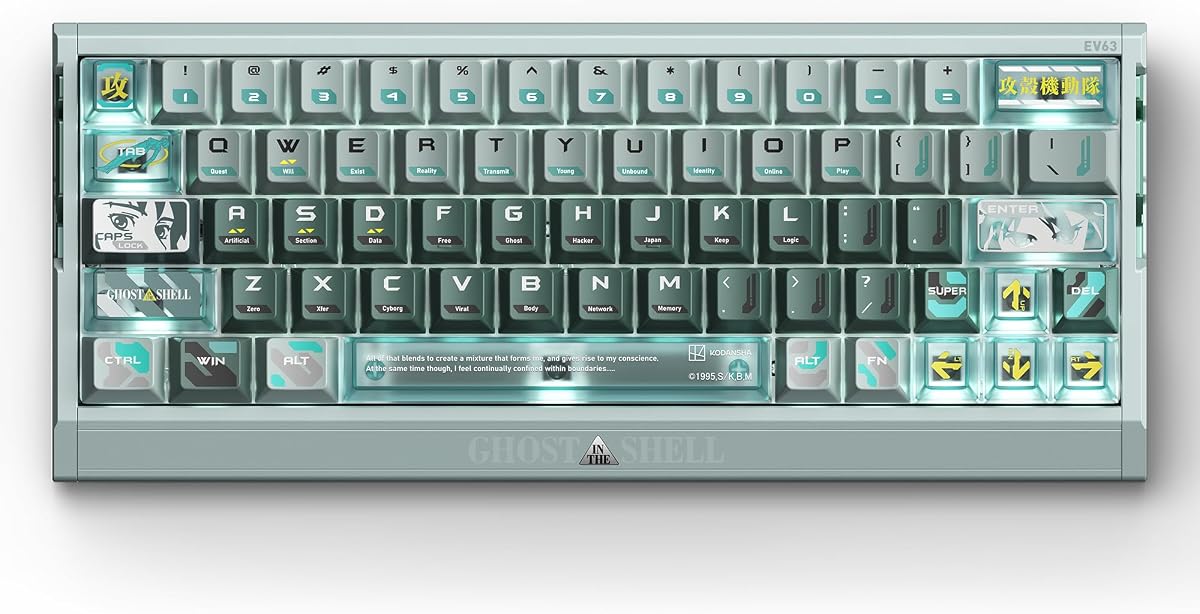
The IQUNIX EV63 is officially licensed by Ghost in the Shell and combines competitive performance with tactical aesthetics. It uses HyperCore V3 technology for precise magnetic sensing. This keyboard is a collector's item as well as a high-performance tool.
We may earn a commission when you buy through this link, at no additional cost to you.
The CNC aluminum case gives it real weight and a cold-touch premium finish. It feels solid and stable on the desk. The magnetic switches offer a smooth linear feel with customizable actuation for faster movement.
At this price point it is an investment for dedicated fans or collectors. It is not for everyone but the build quality and features are unmatched. The design is stable for competitive play and stands out as a centerpiece.
If you want the best in the class with a unique licensed theme, this is the top pick. It delivers a high-performance control terminal for gaming and desk setups.
The CNC aluminum case ensures a heavy and stable typing experience. It is distinct from lightweight plastic gaming keyboards.
The Smart Hall calibration gives more signal room for precise input. You get cleaner Hall signals and more stable inputs.
We may earn a commission when you buy through this link, at no additional cost to you.
The KiiBoom Phantom81 Lite is designed for users who want to tweak every key and macro. It supports QMK and VIA firmware which allows for deep customization. The frosted ABS finish offers durability and a refined look.
We may earn a commission when you buy through this link, at no additional cost to you.
The sound-enhancing gasket structure ensures a creamy typing foundation. Pre-lubed stabilizers eliminate unwanted rattling for a refined sound quality. This versatility appeals to DIY aficionados and productivity-minded individuals.
It uses frosted ABS technology rather than full acrylic which might not satisfy those seeking transparency. The battery is standard but sufficient for daily use. It is a robust choice for tinkerers.
For those who value customization over pure visuals, this keyboard is ideal. It meets specific needs for coding and gaming with efficient shortcut assignment.
You can remap keys and adjust RGB with QMK VIA compatibility. This is great for programmers and tech enthusiasts.
The gasket mount with damping materials provides a creamy sound. It reduces ping noise for a smooth experience.
We may earn a commission when you buy through this link, at no additional cost to you.
The Aula F98Pro V3 is praised for its massive 10000mAh battery which eliminates charging anxiety. The transparent chassis with crystal switches offers a futuristic look. It supports full key programming for efficient daily operations.
We may earn a commission when you buy through this link, at no additional cost to you.
The gasket mount with five layers of filling provides a soft typing experience. The ice crystal switches have excellent light transmission which boosts RGB brightness. This model is designed to suit both gaming and daily office use.
The driver is only compatible with Windows in wired mode which limits accessibility. However the battery life and build quality are significant strengths. It is a practical choice for heavy users.
If you need a keyboard that stays charged for weeks and offers a clear aesthetic, this is a strong candidate. It delivers stable performance for long work sessions.
The 10000mAh high-capacity battery fits long-time work needs. You can enjoy extended periods of usage without recharging.
The high-light-transmission keycaps improve RGB brightness. It creates a layered light transmission visual effect.
We may earn a commission when you buy through this link, at no additional cost to you.
Selecting the right acrylic keyboard involves looking at several technical and aesthetic factors. This guide breaks down the key aspects to consider before making your purchase.
Acrylic chassis keyboards come in frosted, semi-transparent, or crystal clear finishes. Frosted options resist fingerprints while clear ones show internal mechanics. Choose a finish that matches your desired level of visibility and maintenance.
Look for high-quality acrylic that does not yellow over time. Ensure the material feels durable enough to withstand daily typing.
Most modern keyboards offer tri-mode connectivity including wired, Bluetooth, and 2.4GHz wireless. This allows you to switch between devices easily. Check if the Bluetooth version supports multiple devices simultaneously.
Ensure the wireless mode offers low latency for gaming. Wired USB-C provides the most stable connection for competitive play.
Battery life varies significantly between models. Some offer 4000mAh while others go up to 10000mAh. Higher capacity means less frequent charging but may add weight.
Consider your usage habits. If you use RGB lighting often, a larger battery is essential to maintain weekly usage.
Many acrylic keyboards are hot-swappable allowing you to change switches without soldering. Look for support for 3-pin and 5-pin switches. Hall Effect switches offer magnetic actuation for gaming.
Choose a switch profile that matches your typing style. Linear switches are quiet while tactile ones provide feedback.
Gasket mount keyboards provide a softer and more elastic feel. This is achieved by mounting the PCB on rubber gaskets. It helps reduce noise and improves typing comfort.
If you prefer a solid feel, a plate mount might be better. However, gasket mounting is generally preferred for premium keyboards.
Software is key for customizing RGB lighting and macros. Ensure the driver is compatible with your operating system. Open-source support like QMK and VIA is a bonus.
Check if the software works in wired or wireless mode. Some features require a physical connection to configure fully.
Acrylic keyboards are available in 60%, 75%, and 96% layouts. The 75% offers a balance of compactness and arrow keys. The 96% adds a numpad while saving space.
Choose a layout that fits your desk and workflow. Smaller layouts save space but remove essential navigation keys.
Look for features like rotary knobs and LCD screens which add utility. RGB lighting should be customizable with multiple modes. The finish should match your desk theme.
High-quality keycaps like jelly or transparent ones enhance the look. Ensure the legends are readable on clear keycaps.
To maintain the clarity of your acrylic chassis, clean it regularly with a soft dry cloth. Avoid using harsh chemicals that can scratch the surface. Use compressed air to blow out dust from the transparent interior.
If your keyboard has hot-swappable switches, ensure the PCB is powered off before changing them. This prevents short circuits and damage. Handle the switches with care to avoid bending the pins.
Update your firmware through the official driver to get the latest features. Check for battery calibration settings to ensure accurate reporting. Always use the original cable for charging to protect the port.
Acrylic keyboards are durable but may be prone to scratching compared to aluminum. High-quality acrylic resists yellowing and impacts. To maintain longevity, avoid dropping heavy objects on the keycaps or case.
Yes, clear keyboards work well in well-lit rooms due to their bright RGB lighting. Ensure you turn off light bleed by using opaque keycaps if needed. The chassis allows for a unique glow that stands out.
Frosted acrylic diffuses light for a soft glow and hides internal parts. Clear acrylic shows the internal mechanics and offers a sharper look. The choice depends on your preference for visibility and fingerprint resistance.
Many acrylic keyboards feature gasket mounts which improve sound quality. The material itself does not dictate sound but the internal dampening does. Look for models with foam layers for a creamy thock.
Use compressed air to blow dust out through the gaps. Do not disassemble the case unless it is designed for it. Wipe the outer surface gently to avoid scratches.
Most modern wireless keyboards have low latency suitable for gaming. Look for models with 2.4GHz wireless mode which is faster than Bluetooth. For competitive play, wired mode is still the safest option.
We have reviewed ten top options ranging from budget-friendly to premium models. The GravaStar Mercury K1 Lite leads with its stunning design and solid performance. The Aula F98Pro V3 offers unmatched battery life for power users.
When choosing, prioritize the features that matter most to you. If battery life is key, look for higher mAh. If aesthetics drive your choice, consider the crystal clear options with RGB.
Always verify the current pricing and stock before buying. Deals change frequently on retail sites. We hope this guide helps you find the perfect keyboard to elevate your workspace.