
HDMI Extender Over Ethernet, 1080P 60Hz, 164FT, PoC, EDID -HT202P
4.4Editor score
1080P 60Hz support
164ft maximum range
Power over Cable included
This guide compares the top HDMI over Ethernet extenders for 2026, evaluating range, 4K support, and features to help you choose the right solution.
HDMI over Ethernet technology allows you to extend high-definition video and audio signals over long distances using standard network cables. This solution is ideal for installations where traditional HDMI cables are too short or impractical to run across rooms or buildings without signal degradation.
We have evaluated ten leading HDMI over Ethernet extenders based on their maximum range, resolution support, additional features like IR control, and overall value. Our analysis focuses on real-world performance metrics and compatibility with common consumer and professional AV equipment.
Each product review highlights key specifications, strengths, and potential limitations to help you make an informed decision. Please note that product availability and pricing can change over time, so verify the latest details before making a purchase.
4.4Editor score

4.6Editor score

4.6Editor score
The following table provides a side-by-side comparison of all ten HDMI over Ethernet extenders evaluated in this guide. Use this reference to quickly identify which model best matches your specific distance and resolution requirements.



This OREI HDMI extender delivers reliable high-definition video transmission over CAT5e/CAT6/CAT7 cables, supporting up to 4K@30Hz and Full HD 1080P at higher refresh rates. With a 4.6-star rating from users, it stands out for its stability and useful features like HDMI Loop-Out and IR control.
We may earn a commission when you buy through this link, at no additional cost to you.
The device uses video transmission technology to maintain stable visuals up to 70 meters over CAT5e/CAT6 cables. The included HDMI Loop-Out on the transmitter allows you to monitor the source locally while sending the signal to a remote display, which is ideal for dual-display setups.
While it supports 4K@30Hz, it does not handle 4K@60Hz, which may be a limitation for some high-performance gaming or media setups. Additionally, it is not compatible with HDMI ARC or IP/network systems, so ensure your use case matches these specifications.
For users needing a reliable point-to-point HDMI extension solution for home theaters, offices, or media players, this model offers excellent value. Its compact design and included power adapter make setup straightforward without requiring additional infrastructure.
The HDMI Loop-Out port lets you connect a local monitor to the transmitter for real-time signal preview while the main content displays remotely.
Power over Cable technology sends power from the transmitter to the receiver through the Ethernet cable, reducing the need for multiple power adapters at the remote end.
We may earn a commission when you buy through this link, at no additional cost to you.
This HDMI extender is designed for budget-conscious users who need reliable Full HD video extension up to 164 feet over Cat5e, Cat6, or Cat7 cables. With a 4.4-star rating, it offers solid performance for home, office, and classroom AV installations without high costs.
We may earn a commission when you buy through this link, at no additional cost to you.
The device supports 1080P at 60Hz and includes Power over Cable technology, meaning only the transmitter needs external power while the receiver draws power through the Ethernet cable. The built-in EDID copy function helps establish correct resolution and stable video signals across long cable runs.
While it lacks 4K support, it handles 1080P and 3D content effectively. Transmission is uncompressed over CAT6, making it suitable for point-to-point connections without converting to streaming video. It works with PCs, laptops, DVD players, and projectors without requiring software or drivers.
Ideal for schools, small offices, or home setups where Full HD is sufficient, this extender provides clean installation and reliable performance. If you do not need 4K resolution, this model delivers strong value with essential features for extended HDMI connectivity.
EDID copy reads and stores display information to ensure the transmitter and receiver establish the correct resolution for stable video output.
Video and audio are transmitted uncompressed over a single network cable, avoiding conversion to streaming video and maintaining signal integrity.
We may earn a commission when you buy through this link, at no additional cost to you.
This premium OREI HDMI extender supports pristine 4K@60Hz video signals over distances up to 230 feet using high-quality Cat6 or Cat7 cables. With a 4.6-star rating, it delivers lossless, low-latency transmission ideal for professional and high-end residential AV installations.
We may earn a commission when you buy through this link, at no additional cost to you.
The device supports HDMI 2.0a, HDCP 2.2, HDR10+, Dolby Digital, and 18Gbps bandwidth for crisp, vibrant video and high-fidelity audio. Only the transmitter requires power, enabling clean installation. The rugged metal housing protects internal components and aids in heat dissipation for reliable operation.
While the price is higher than basic models, the extended range and 4K@60Hz capability justify the investment for demanding applications. It works with Blu-ray players, game consoles, media players, satellite boxes, PCs, and laptops, backed by a one-year warranty and professional support.
For home theaters, conference rooms, or setups requiring high-resolution content over long distances, this extender provides exceptional performance. Its compact design and plug-and-play setup make it accessible for both residential and professional environments.
With 18Gbps bandwidth and HDR support, this extender delivers high-fidelity audio and crisp video for immersive viewing experiences.
Transmit 4K@60Hz signals up to 230 feet over a single Cat6 or Cat7 cable, making it ideal for large rooms or multi-room setups.
We may earn a commission when you buy through this link, at no additional cost to you.
This HDMI splitter extender allows you to distribute one HDMI source to four HDMI displays simultaneously over Cat6 network cables up to 230 feet. With a 4.6-star rating, it is designed for exhibitions, video conferences, meeting rooms, and commercial AV setups requiring multiple screens.
We may earn a commission when you buy through this link, at no additional cost to you.
The transmitter includes a 4-port Cat6 output and an additional HDMI output for local display monitoring. Power over Cable means only one power adapter is required for the entire setup, reducing clutter at remote display locations. IR support enables control of video sources from a remote location.
While it supports 4K@30Hz and 1080p@60Hz, it is not ideal for high-refresh-rate 4K applications. The package includes one transmitter, four receivers, and IR cables, making it a complete solution for multi-display installations without additional hardware.
For businesses or events needing to replicate content across four screens with long cable runs, this extender provides a scalable and efficient solution. Its plug-and-play setup ensures easy deployment without software installation.
Distribute one HDMI source to four HDMI displays simultaneously, ideal for classrooms, meeting rooms, or commercial signage.
Power over Cable technology allows only one power adapter to power all units, reducing cable clutter around wall-mounted displays.
We may earn a commission when you buy through this link, at no additional cost to you.
This OREI UHD-EX165H-K extender sends uncompressed 4K@60 Hz RGB/YCbCr 4:4:4 video and audio up to 165 feet through one CAT6 or CAT7 cable. With a 4.2-star rating, it supports 18Gbps bandwidth, HDR, HDMI 2.1, and HDCP 2.2 for sharp visuals and smooth playback.
We may earn a commission when you buy through this link, at no additional cost to you.
The HDMI Loop-Out port enables local screen viewing while extending content to a remote display. Built-in EDID management optimizes resolution compatibility, and one-way IR pass-through allows control of streaming devices from the receiver side. It works with TVs, monitors, projectors, and gaming consoles.
While it requires a direct Cat6 or Cat7 connection and is not compatible with network switches or routers, it offers high-speed connectivity for home theaters and conference rooms. The 12-month warranty and OREI tech support add reliability to the product.
For users needing 4K@60Hz performance over moderate distances, this extender delivers reliable uncompressed transmission. Its compatibility with high-fidelity audio formats ensures immersive sound performance alongside crisp visuals.
18Gbps bandwidth ensures uncompressed 4K@60Hz RGB/YCbCr 4:4:4 video and audio for sharp visuals and smooth playback.
One-way IR pass-through allows control of streaming devices, media players, and cable boxes from the receiver side for convenient operation.
We may earn a commission when you buy through this link, at no additional cost to you.
This HDMI over Ethernet extender delivers uncompressed video and audio up to 230 feet over Cat6 or Cat7 cables. It supports 4K at 30Hz up to 131 feet or 1080P at 60Hz up to 230 feet, making it versatile for home theaters, conference rooms, and security systems.
We may earn a commission when you buy through this link, at no additional cost to you.
Power over Cable technology sends power from the transmitter to the receiver through the Ethernet cable, reducing clutter. The HDMI Loop-Out allows local display connection, and included IR cables enable control of Blu-ray players or streaming devices from the remote location.
EDID management helps the source recognize the connected display for compatible resolution selection. Real-time, uncompressed signal transmission keeps video and audio synchronized for gaming and presentations. The plug-and-play setup requires no software or drivers.
For users needing extended range with 4K capability and easy setup, this model offers strong performance. Its compatibility with various devices makes it suitable for diverse applications from classrooms to home entertainment systems.
Extend 1080P at 60Hz up to 230 feet, ideal for large rooms or remote installations without signal loss.
Included IR cables let you control streaming devices and cable boxes from the remote viewing location without needing to access the source.
We may earn a commission when you buy through this link, at no additional cost to you.
This OREI KVM extender transmits 4K@60Hz video signals up to 230 feet over Cat6 or Cat7 LAN cables while enabling remote keyboard and mouse control at the receiver end. With a 4.2-star rating, it is ideal for remote desktop setups and professional environments.
We may earn a commission when you buy through this link, at no additional cost to you.
The HDMI 2.0b and HDCP 2.2 compliance supports HDR, Dolby Vision, and high-fidelity audio formats. The HDMI loop-out on the transmitter allows local display connection while maintaining HDCP compliance. Additionally, a 3.5mm stereo audio output lets you extract audio to analog speakers.
The USB KVM extension enables control of your PC remotely, making it useful for servers or workstations located in inaccessible areas. It is backed by a one-year warranty and includes all necessary cables for plug-and-play installation.
For users needing both video extension and remote control of computers, this model provides a complete solution. Its compact design and professional support make it suitable for offices or IT setups requiring reliable connectivity.
Control your PC remotely through keyboard and mouse at the receiver end, ideal for servers or workstations in inaccessible locations.
The 3.5mm stereo audio output lets you extract audio to analog speakers or headphones at the receiver for flexible audio setups.
We may earn a commission when you buy through this link, at no additional cost to you.
This KVZOO HDMI extender transmits 4K@30Hz and 1080P@60Hz signals over a single Cat5e, Cat6, Cat6A, or Cat7 cable up to 230 feet. With a 4.3-star rating, it features mounting holes for secure installation and zero latency transmission for home theater or commercial use.
We may earn a commission when you buy through this link, at no additional cost to you.
The HDMI loop-out port allows connecting a local monitor for real-time monitoring. Included IR cables enable remote control of source devices. POC technology simplifies cabling by powering both transmitter and receiver through the Ethernet cable. Built-in EDID management ensures compatibility.
While native HDR is not supported due to HDMI 1.4 protocol limitations, the device delivers vivid images with efficient compression. The mounting hole design facilitates wall or rack installation. Customer support includes a 12-month replacement service and 24/7 assistance.
For installations requiring secure mounting and extended range, this extender is a practical choice. Its compatibility with various devices and environments makes it suitable for classrooms, offices, or outdoor screens.
Patented mounting hole design facilitates easy wall or rack installation, securing the device for permanent setups.
HDMI over Ethernet technology delivers stable, reliable signal transmission with zero latency or signal loss for real-time applications.
We may earn a commission when you buy through this link, at no additional cost to you.
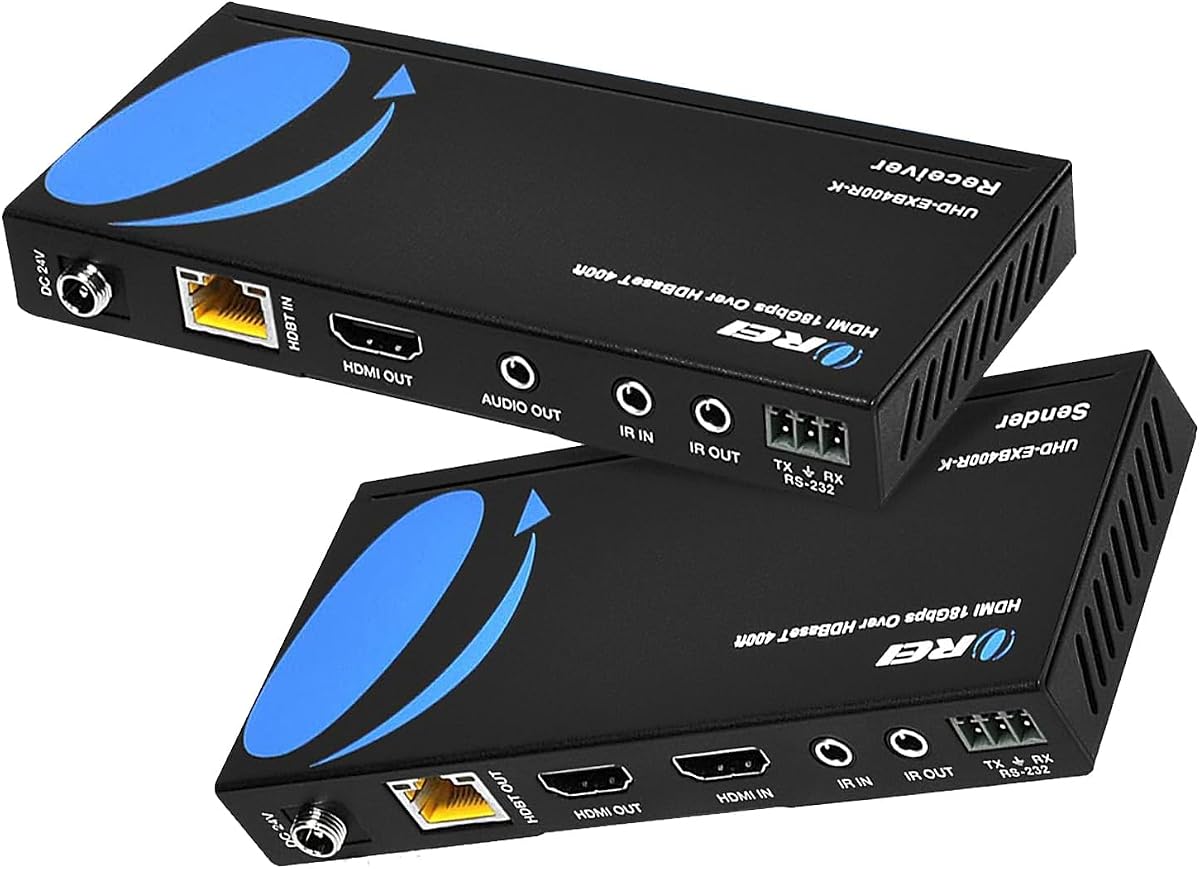
This OREI HDBaseT extender supports long-range transmission up to 400 feet over CAT5e/6/7 LAN cables with zero latency. With a 4.2-star rating, it provides lossless video transmission ideal for professional installations requiring maximum distance and control options.
We may earn a commission when you buy through this link, at no additional cost to you.
Support for HDMI 2.0a, HDCP 2.2, UHD 4K/60Hz, and 18Gbps bandwidth ensures high-quality video. RS-232 command control port allows advanced system integration, and bi-directional IR enables remote commands from the display or control of the remote display from the source.
Power over Cable allows only one power adapter at either the transmitter or receiver side. Note that these models are designed to work only with their own matching transmitter and receiver, so ensure you use the included pair for compatibility.
For professional AV installations needing 400ft range and advanced control, this extender is a robust solution. Its support for HDR and Dolby TrueHD provides immersive audio and visual quality for high-end setups.
Extend HDMI signals up to 400 feet with zero latency using HDBaseT technology for lossless video transmission in large spaces.
RS-232 command control and bi-directional IR enable system integration and remote control for professional AV environments.
We may earn a commission when you buy through this link, at no additional cost to you.
This PWAY HDMI extender offers crisp 4K@30Hz visuals up to 230 feet over a single Cat6 cable. With a 4.6-star rating, it delivers clear, stable video and audio transmission for home theater, meetings, or live streaming without delay.
We may earn a commission when you buy through this link, at no additional cost to you.
The HDMI Loop-Out port lets you preview content locally while sending signals to a remote display. Included IR cables enable remote control of source devices, and mounting holes simplify installation. POC ensures only one power adapter is required.
For users needing a reliable, budget-friendly solution with extended range and 4K capability, this model is a strong choice. Its simplicity and ease of installation make it accessible for various environments without requiring technical expertise.
Ideal for home offices, classrooms, or small commercial setups, this extender provides solid performance at a competitive price. Its compatibility with common AV devices ensures seamless integration into existing systems.
With strong user ratings and essential features like 4K support and IR control, this model delivers reliable performance at a budget-friendly price.
Mounting holes included allow easy wall mounting, ensuring secure installation without additional hardware.
We may earn a commission when you buy through this link, at no additional cost to you.
Choosing the right HDMI over Ethernet extender requires understanding your specific needs regarding range, resolution, and additional features. This guide outlines the key factors to consider before making a purchase.
The maximum distance your extender can support varies by model, typically ranging from 165 feet to 400 feet. Ensure you choose a device compatible with your existing cable infrastructure, such as Cat5e, Cat6, or Cat7, to maintain signal stability. High-quality cables are essential for long-distance 4K transmission.
For distances exceeding 200 feet, prioritize models supporting Cat6 or Cat7 and verify their performance ratings for your target resolution.
Consider whether you need 4K@60Hz for smooth gaming and high-quality video or if 4K@30Hz suffices for standard media playback. Most budget models support 1080P at 60Hz, while premium models offer full 4K@60Hz capabilities. Ensure the extender supports the highest resolution your source and display devices can handle.
If you plan to use high-refresh-rate displays or HDR content, select an extender explicitly supporting those specifications.
Power over Cable (PoC) allows the receiver to draw power through the Ethernet cable, eliminating the need for a separate power adapter at the remote end. This simplifies installation and reduces clutter, particularly when connecting wall-mounted TVs or projectors.
Look for models that include PoC to ensure a cleaner and more straightforward setup process.
IR control enables you to operate source devices like Blu-ray players or set-top boxes from the remote display location. Some models support one-way IR pass-through, while others offer two-way IR for bidirectional control. Check if IR cables are included in the package.
For setups where the source device is hidden in a different room, IR support is crucial for convenient operation.
EDID management ensures seamless resolution compatibility between source and display devices by communicating display capabilities. HDCP compliance is necessary for encrypted content like streaming services or Blu-ray discs. Verify that the extender supports required HDCP standards.
Proper EDID and HDCP support prevents resolution mismatches and content playback issues.
Audio formats supported vary by model, with some offering Dolby Digital, TrueHD, DTS-HD, and multi-channel support. If you require high-fidelity audio or analog extraction, confirm the extender supports your preferred formats or includes audio outputs.
For home theaters, prioritize extenders supporting lossless audio formats for immersive sound experiences.
Consider additional features like HDMI Loop-Out for local monitoring, splitter capabilities for multi-display setups, or KVM for remote computer control. Some models also include mounting hardware or RS-232 control for professional installations.
Choose a model that aligns with your specific use case requirements and potential future expansions.
Select reputable brands offering reliable customer support and clear warranty terms. Most extenders come with one-year warranties, but response times and support quality can vary. Check if the brand provides technical assistance for setup issues.
A solid warranty and responsive support ensure peace of mind and long-term reliability for your investment.
Connect the transmitter unit to your source device via an HDMI cable, then connect the receiver to your display using another HDMI cable. Run a Cat5e, Cat6, or Cat7 cable between the transmitter and receiver to establish the link.
If using Power over Cable, connect only one power adapter to the transmitter. If your model does not support PoC, plug power adapters into both units. Ensure all connections are secure to maintain signal integrity.
Store extra cables and accessories in a dry, cool place to prevent damage. Avoid bending the Ethernet cables sharply during installation, as this can degrade signal quality over time. Keep the units in a well-ventilated area to prevent overheating during extended use.
Most HDMI over Ethernet extenders support distances from 100 feet up to 400 feet depending on the model and cable type. High-quality Cat6 or Cat7 cables are recommended for maintaining signal integrity over longer runs. Always check the product specifications for exact range limits at your target resolution.
No, most extenders are designed for point-to-point connections directly between transmitter and receiver without network switches or routers. However, some advanced models may offer network-based distribution requiring infrastructure. Verify the product details before purchase.
Only models explicitly supporting 4K@60Hz and sufficient bandwidth (typically 18Gbps) can handle this resolution and refresh rate. Many budget models support only 4K@30Hz or 1080P. Check the product specs to ensure compatibility with your source content.
Many modern extenders support HDR formats like HDR10 and HDR10+ if they are HDMI 2.0a compliant and support sufficient bandwidth. Basic models may not support HDR. Confirm HDR support in the product specifications if your content requires it.
Power over Cable sends electrical power from the transmitter to the receiver through the Ethernet cable. This means only the transmitter needs a separate power adapter, reducing clutter and simplifying installation at remote display locations.
You need HDMI cables to connect source and display devices to the extender units, and a Cat5e, Cat6, or Cat7 Ethernet cable to connect the transmitter and receiver. Using high-quality Ethernet cables is critical for stable long-distance transmission.
Yes, but latency and refresh rates vary by model. Choose extenders with zero-latency claims and support for 60Hz refresh rates to ensure smooth gameplay. Avoid compressing video, as this can introduce lag affecting gaming performance.
HDBaseT is a specific technology standard offering longer distances and more features like RS-232 and Ethernet pass-through. Regular HDMI over Ethernet may use proprietary or simpler transmission methods. Ensure compatibility between transmitter and receiver brands when using HDBaseT.
We reviewed ten HDMI over Ethernet extenders ranging from budget-friendly 1080P models to premium 4K@60Hz solutions. The OREI models offer strong performance with features like IR control and Power over Cable, while other brands provide competitive alternatives.
Prioritize your specific needs: if you require maximum distance, select a model with 400ft range; if you need 4K@60Hz, ensure bandwidth and resolution support are adequate. Power over Cable and IR control add convenience to any installation.
Always verify the latest product specifications and availability before purchasing since details may change over time. With the right extender, you can enjoy seamless high-definition video and audio transmission across any distance.