
LEXiBOOK LAPTAB 10 inch Version 11 Touchscreen Laptop LT11EN
4.2Editor score
10.1 HD Touchscreen
Android App Access
Parental Controls Included
Finding the right first laptop for kids can be a daunting task for parents who want to balance education with entertainment. Today's young learners need devices that are safe engaging and tailored to their developmental stages to foster a love for technology and learning.
We have carefully selected and compared ten top rated options ranging from simple toy laptops to more advanced Android powered tablets. Each product was evaluated based on build quality educational content parental controls and overall value to ensure you find the perfect match for your child.
This guide provides detailed reviews and key specifications for every pick helping you make an informed decision. Keep in mind that prices and availability can change frequently so check the current listings before purchasing to get the best deal available now.
4.2Editor score

4.5Editor score
4.5Editor score
As an Amazon Associate we earn from qualifying purchases.
Below you will find a detailed side by side comparison of all ten products including key specifications and links to view more details or make a purchase.




The VTech Genio Bilingual JuniorBook stands out as a top choice for introducing young children to the basics of computing. With a solid 4.5 star rating from users it offers a realistic computer experience tailored specifically for ages five and up.
We may earn a commission when you buy through this link, at no additional cost to you.
This laptop features a full size QWERTY keyboard and cursor controller helping kids develop typing and navigation skills early. It includes over 80 pre loaded activities covering subjects like math science and language arts without needing an internet connection.
While it relies on batteries and lacks a traditional screen resolution like adult laptops its focus on tactile learning and offline safety makes it highly practical for parents who want controlled screen time.
We recommend this device for families looking for a dedicated educational toy that mimics a real laptop without the complexity or cost of a full computer system.
Every activity can be played in English or Spanish allowing children to explore new languages naturally while playing games or completing lessons.
Since all content comes pre loaded parents do not need to worry about Wi-Fi settings or internet safety filters making setup quick and easy.
We may earn a commission when you buy through this link, at no additional cost to you.
The LEXiBOOK LAPTAB offers a more advanced computing experience with a 10.1 inch HD touchscreen and robust internal specs that rival entry level adult devices. Its 4.2 star rating reflects strong performance in entertainment and educational apps.
We may earn a commission when you buy through this link, at no additional cost to you.
Powered by an octa-core processor and 128GB storage this laptop can handle multiple apps and games smoothly. The inclusion of a Power Academy app and Google Play access ensures endless learning and entertainment possibilities.
Parents will appreciate the family-friendly design which includes customizable profiles and robust parental controls to manage time and app usage securely without sacrificing the child's independence.
This model is ideal for older children who need a powerful device for schoolwork streaming and creative projects while staying within a kid safe ecosystem.
Access thousands of games and educational apps on Google Play allowing your child to grow with the device as their needs change.
Customizable profiles and parental controls let you set time limits and content filters ensuring a safe browsing experience for every family member.
We may earn a commission when you buy through this link, at no additional cost to you.
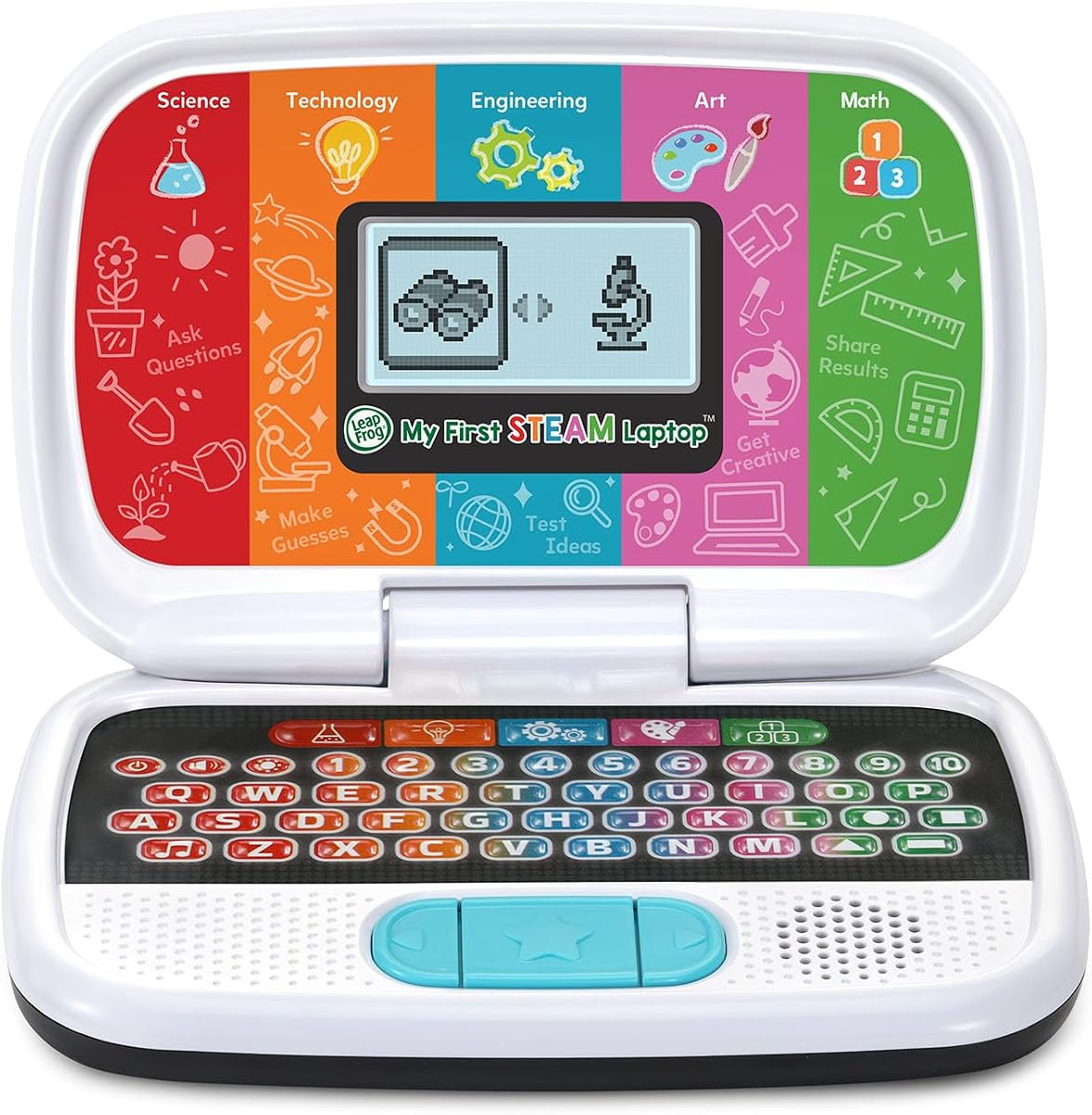
For families on a budget the LeapFrog My First STEAM Laptop provides an excellent introduction to science technology engineering art and math. With a 4.5 star rating it is highly praised for its educational value and ease of use.
We may earn a commission when you buy through this link, at no additional cost to you.
This device focuses on interactive play where children can grow plants investigate fossils and build robots using guided stories and activities. The tactile design helps young learners engage with concepts without needing a screen.
Although it lacks a traditional display its sturdy construction and simple button layout make it perfect for toddlers who are still developing fine motor skills and attention spans.
We suggest this laptop for younger children aged three and up who benefit most from hands on storytelling and conceptual learning rather than digital interfaces.
Children engage with physical buttons to learn about sunlight fossils and inventions making complex topics fun and accessible through storytelling.
The device is built to withstand drops and rough handling ensuring it lasts through years of playful learning without breaking easily.
We may earn a commission when you buy through this link, at no additional cost to you.
This colorful educational laptop offers a vibrant 4.3 inch TFT display that captures a's attention while teaching core concepts. Rated 4.0 stars it combines visual appeal with practical learning tools for children aged five and up.
We may earn a commission when you buy through this link, at no additional cost to you.
With 48 learning modes covering alphabet math colors and animals this device provides a broad curriculum in a compact form. The ergonomic design mimics a real laptop making it easy for small hands to grip and use.
The inclusion of fun games to test logic memory and speed ensures that learning feels like play keeping children engaged for extended periods without frustration.
Ideal for parents seeking a visual learning tool that balances education with entertainment this laptop is a strong contender in the mid range market.
The TFT color screen offers lifelike visuals that make learning activities more engaging and easier to understand for young eyes.
Designed with ergonomics inspired by real laptops this device fits comfortably in a child's hands reducing strain during long play sessions.
We may earn a commission when you buy through this link, at no additional cost to you.
This budget friendly Android laptop provides access to the Google ecosystem including Docs Drive and the Play Store. With a 3.4 star rating it offers a lot of features for the price including WiFi and USB-C connectivity.
We may earn a commission when you buy through this link, at no additional cost to you.
The 10.1 inch IPS display with a resolution of 1280×800 ensures clear visuals for videos and reading. It comes with a quad core processor and 64GB storage allowing for multiple apps and files.
While reviews vary due to build quality consistency the inclusion of accessories like a mouse and carrying bag adds significant value making it a ready to use package out of the box.
Consider this option if you want a versatile device that functions like a real laptop but at a lower price point than major brands.
Run Google Docs Drive and other essential apps making this suitable for older kids needing basic productivity tools for homework or projects.
The bundle includes a mouse charger manual and bag reducing extra costs and ensuring everything needed to start using the device is present.
We may earn a commission when you buy through this link, at no additional cost to you.
This 7 inch netbook is designed for maximum portability making it easy for kids to carry to different rooms or on trips. Rated 4.0 stars it combines a compact form with a powerful quad core Android processor for basic tasks.
We may earn a commission when you buy through this link, at no additional cost to you.
It includes 32GB storage and WiFi connectivity enabling access to popular apps and YouTube. The package even comes with an optical mouse and a keychain light adding convenience and fun to the user experience.
While the screen is smaller than standard laptops it is perfect for younger children who do not need a large display for detailed work or gaming.
Choose this if you need a lightweight device that fits easily into a backpack or bag without sacrificing basic computing capabilities.
The lightweight and compact size make this laptop ideal for travel car rides or carrying to grandparents homes without adding bulk.
An optical mouse and keychain light are included in the package ensuring you have everything needed to start using the device immediately.
We may earn a commission when you buy through this link, at no additional cost to you.
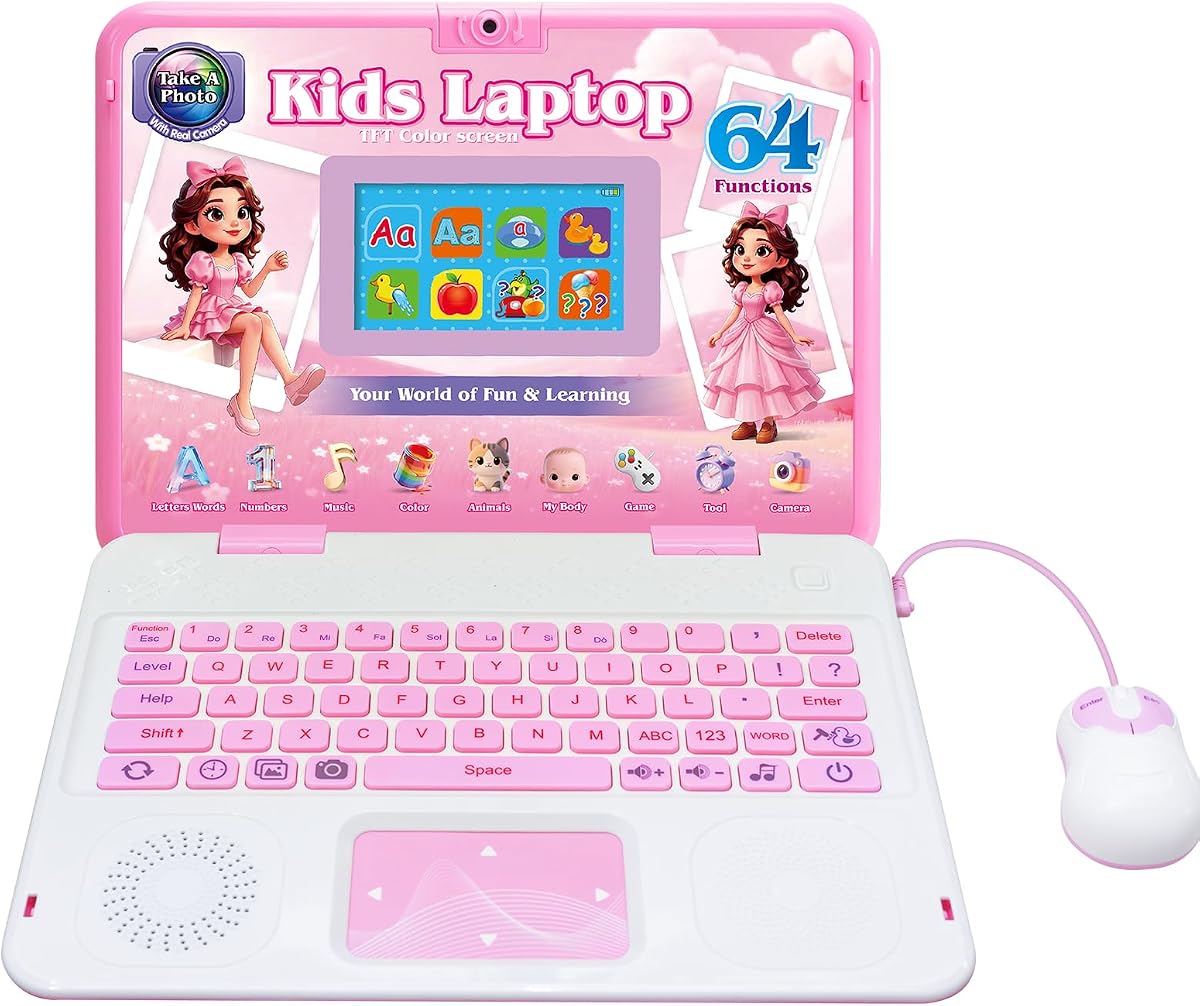
This laptop stands out with a built-in camera that allows children to take photos and use fun filters and frames. With a 4.6 star rating it is one of the most popular educational toys for creative kids aged five and up.
We may earn a commission when you buy through this link, at no additional cost to you.
It offers 64 learning modes covering alphabet math music and games plus the unique ability to capture memories and edit them with digital frames. The vibrant 4.3 inch TFT display ensures colors are true to life.
The ergonomic design mimics a real laptop with a realistic mouse and keyboard helping children develop typing skills while having fun with games.
Parents looking for a device that encourages creativity and photography skills alongside traditional learning will find this laptop to be an excellent choice.
Kids can take pictures and apply cute photo frames fostering creativity and self-expression through a simple and safe digital interface.
With 64 activities covering multiple subjects this device provides a well rounded educational experience that grows with your child.
We may earn a commission when you buy through this link, at no additional cost to you.
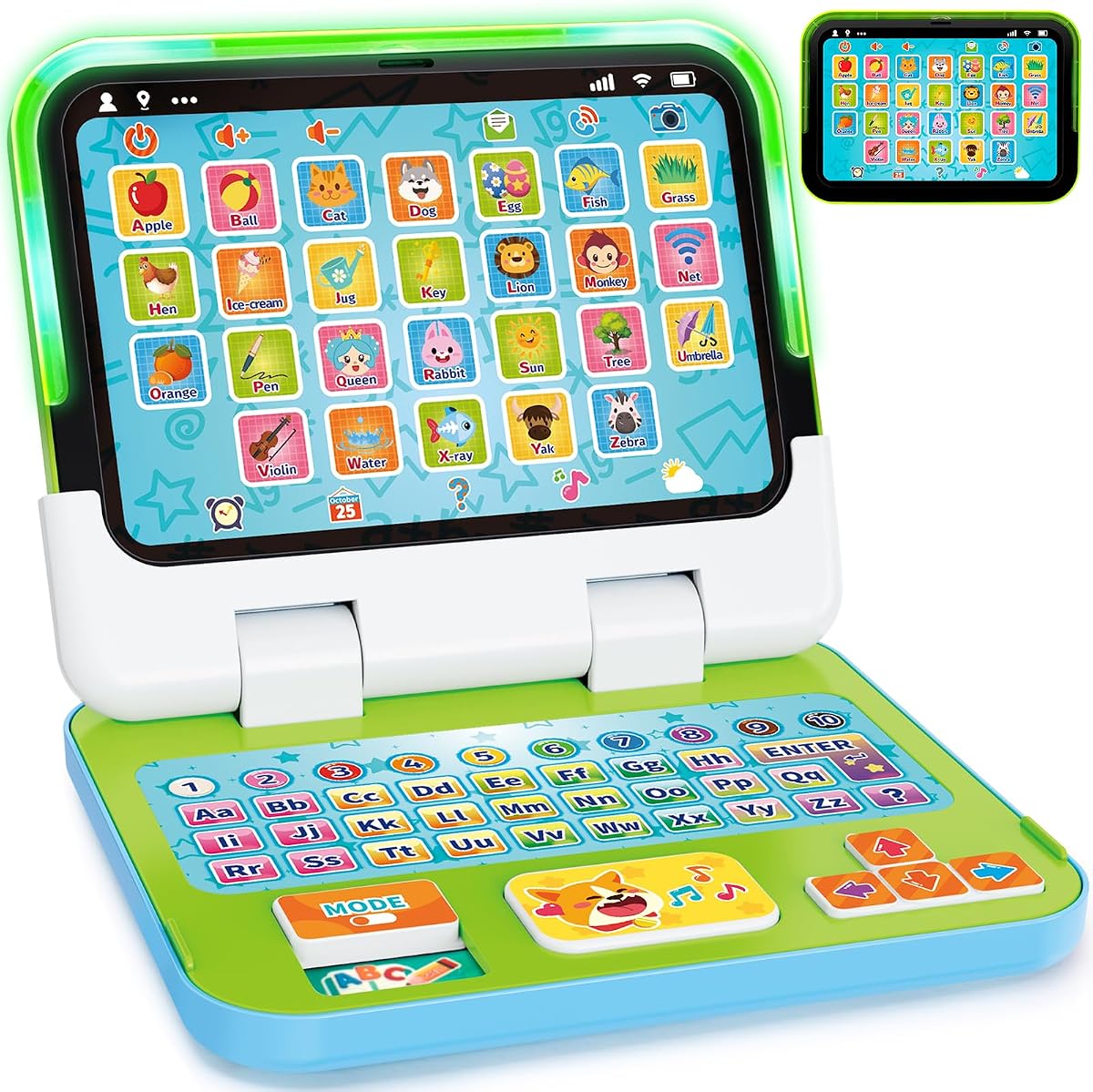
Designed specifically for toddlers aged one to three this device offers a 2-in-1 design that switches between a laptop and a tablet. Rated 4.4 stars it is praised for its durability and engaging early learning themes.
We may earn a commission when you buy through this link, at no additional cost to you.
It features over 120 learning themes including letters words numbers and colors helping children develop cognition and vocabulary through interactive play. The detachable base allows for flexible learning positions on desks or laps.
Built with strong ABS plastic and chew-resistant materials this toy is safe and durable enough to withstand rough handling by young children without breaking.
This is the perfect starting point for very young children who need a sturdy and simple introduction to technology concepts without complex digital interfaces.
Switch easily between laptop and tablet modes to match your child's play style and ensure comfortable use whether sitting at a table or on the floor.
Over 120 learning themes introduce essential early concepts like letters and numbers helping your child build a strong foundation for future learning.
We may earn a commission when you buy through this link, at no additional cost to you.
This Dell Chromebook is a more traditional option for children who need a real computer for school and homework. Rated 4.3 stars it offers a 11.6 inch touchscreen and Chrome OS environment ideal for educational apps.
We may earn a commission when you buy through this link, at no additional cost to you.
It features an Intel Celeron processor with 4GB RAM and 32GB storage providing smooth performance for web browsing and document editing. The renewed condition ensures a like new experience at a lower price point.
While it requires an internet connection and is not a toy its familiar form factor and software compatibility make it perfect for older kids ready for serious study.
Select this device for school aged children who need reliable access to Google Classroom and other web based learning tools with professional hardware.
Chrome OS supports a wide range of educational apps and tools used in schools ensuring your child can complete assignments without technical issues.
Buying a renewed model allows you to access premium hardware and performance at a fraction of the cost of buying new brand equipment.
We may earn a commission when you buy through this link, at no additional cost to you.
The Lexibook Unicorn Educational Laptop combines a beloved theme with practical learning tools making it a favorite for many children. Rated 4.3 stars it offers a realistic keyboard and ergonomic design to encourage proper typing habits.
We may earn a commission when you buy through this link, at no additional cost to you.
It includes activities in English and Spanish covering mathematics logic and clock reading. Musical activities allow children to learn notes compose melodies and play along with fun tunes.
The unicorn theme adds an element of fun that keeps kids engaged while they test their knowledge through various games and quizzes provided on the device.
This laptop is perfect for children who love unicorns and want a device that looks and feels like a grown-up tool while still being safe and educational.
Activities in both English and Spanish help children develop bilingual skills naturally through everyday math and logic exercises.
Interactive musical activities teach notes and composition making this an ideal gift for aspiring musicians who want to explore sound early.
We may earn a commission when you buy through this link, at no additional cost to you.
Selecting the right laptop for your child involves balancing safety educational value and durability. Here are the key factors to consider before making a purchase.
Ensure the device matches your child's developmental stage. Simple toy laptops with buttons and lights are ideal for toddlers while more complex devices with keyboards and apps suit older children.
Always check the manufacturer's recommended age range to avoid frustration or safety issues.
Look for laptops that offer a wide variety of learning modes covering subjects like math science language and logic. Pre loaded content ensures your child can start learning immediately without setup.
Choose devices that update or expand activities to keep learning fresh and engaging.
For devices connected to the internet robust parental controls are essential to limit screen time and filter content. Look for customizable profiles and safe browsers.
Controls help ensure a safe online environment while giving you peace of mind.
Children often drop or mishandle devices so look for rugged plastic builds and rounded edges. Shock resistant designs and protective screen films extend the life of the laptop.
Durable construction saves money by reducing the need for frequent replacements.
Consider how the device is powered. Rechargeable batteries are convenient while AA batteries are easier to replace on the go. Check the estimated usage time per charge.
Long battery life ensures uninterrupted play and learning without constant charging.
Larger screens are easier for small eyes to view but may be heavier. TFT IPS screens offer better color and viewing angles which reduce eye strain during extended use.
Aim for a screen that balances visibility with portability for your child.
Realistic keyboards and mice help children develop fine motor skills and prepare them for adult computers. Touchscreens are more intuitive for younger kids but keyboards offer typing practice.
Choose a device that combines touch and keyboard input for a complete learning experience.
Set a budget that reflects how often the child will use the device. Higher priced models often offer more features and durability but budget options can provide excellent educational value.
Compare specs and included accessories to ensure you get the best value for your investment.
Always supervise your child during initial setup to install any updates or configure parental settings. Read the user manual to understand the battery requirements and charging instructions before handing it over.
Keep the device clean by wiping the screen and keyboard with a soft dry cloth. Avoid exposing the laptop to direct sunlight or extreme temperatures which can damage the battery and screen.
Teach your child to handle the laptop gently by lifting the lid properly and keeping food and drinks away. Establish clear rules about when and where they can use the device to promote healthy habits.
Yes most models in this guide are designed with safety in mind featuring rounded edges and non toxic materials. Always check the age rating to ensure the device matches your child's developmental stage.
Some educational toy laptops work offline with pre loaded content while Chromebooks and Android laptops need internet for apps. Choose based on whether you want controlled offline play or flexible online access.
Battery life varies by model but most toy laptops last several hours on a full charge or battery set. Advanced laptops may provide five to seven hours depending on usage patterns.
Most battery powered models allow you to replace AA batteries easily. Rechargeable devices include a charging cable and power adapter for convenient recharging as needed.
The collection ranges from toddler friendly toy laptops for ages one to three to more advanced devices for ages five and up. Always match the complexity to your child's reading and motor skills.
Most devices come with all necessary features pre loaded. However some models may require batteries or additional accessories which are listed clearly in the product description.
We have explored ten top options including the VTech Genio Bilingual JuniorBook the LEXiBOOK LAPTAB and the LeapFrog My First STEAM Laptop. Each offers unique benefits depending on your child's age and educational needs.
Consider prioritizing durability and content quality over advanced features for younger children while older kids may benefit from app access and real operating systems. Always check parental controls to ensure safety.
Remember to review current pricing and availability before purchasing as deals change frequently. Choosing the right first laptop sets a strong foundation for your child's future learning and tech confidence.