
HP LaserJet M207dw
4.0Editor score
Dual-band Wi-Fi with self-reset
Fast two-sided printing
Strong built-in security features
This guide compares the top ten Ethernet laser printers for offices and home use, focusing on speed, reliability, security, and network connectivity features.
Ethernet laser printers offer reliable wired connectivity for office environments that demand stable and secure printing solutions without wireless interference or signal drops.
We analyzed ten top models based on print speed, duplex capabilities, security features, and network integration to help you find the right fit for your workflow.
Each selection highlights key strengths and trade-offs so you can choose confidently. Note that availability and pricing may change, so always check current listings before purchasing.
4.0Editor score

4.4Editor score

4.2Editor score
The following table provides a side-by-side comparison of all ten selected Ethernet laser printers, highlighting their core specifications and key capabilities for easy reference.



The HP LaserJet Pro 4001dn stands out as the top choice for small teams needing fast, secure, and reliable Ethernet connectivity. With a rating of 4.4 stars, it delivers professional-quality prints at speeds up to 42 pages per minute.
We may earn a commission when you buy through this link, at no additional cost to you.
Its standout feature is the inclusion of HP Wolf Pro Security, which protects your data with customizable settings built into the hardware and firmware. The printer supports mobile printing and works seamlessly with Windows, Mac, and Android devices via Ethernet or USB.
While it lacks wireless capabilities, this wired-only design ensures stable connections for office environments where security is paramount. The trade-off is acceptable for teams that prioritize consistent performance and data protection over mobile flexibility.
This printer is ideal for small teams up to 10 people who need high-speed document output without sacrificing security. It offers a strong balance of performance and reliability for professional use.
HP Wolf Pro Security provides built-in protection against cyberattacks, ensuring your documents and network remain safe during transmission and storage.
With 42 pages per minute, this model handles large print jobs efficiently, keeping your team productive and reducing wait times.
We may earn a commission when you buy through this link, at no additional cost to you.
The HP LaserJet M207dw is an excellent budget-friendly option for small offices requiring both Ethernet and wireless flexibility. Rated at 4.0 stars, it offers reliable printing for up to five people with fast duplex capabilities.
We may earn a commission when you buy through this link, at no additional cost to you.
Its dual-band Wi-Fi with self-reset technology ensures stable connectivity, while built-in security features protect your network. The printer supports printing from any device including PC, tablet, and mobile with AirPrint and Android compatibility.
Though its 28 ppm speed is modest compared to higher-end models, it remains efficient for daily office tasks. The balance of cost, security, and connectivity makes it a smart choice for startups and home offices.
Choose this printer if you need a dependable workhorse for small teams that values budget efficiency without compromising on essential security and connection options.
Finish multipage projects quickly with the fastest two-sided printing speed in its class, reducing paper usage and saving time.
Built-in security protects against attacks, and dual-band Wi-Fi ensures your printer stays connected even if issues arise.
We may earn a commission when you buy through this link, at no additional cost to you.
The Brother HL-6210DW delivers professional-grade performance for high-volume environments needing speed and security. With a 4.2 rating, it stands out for its 50 ppm output speed and extensive paper capacity for uninterrupted printing.
We may earn a commission when you buy through this link, at no additional cost to you.
Its Gigabit Ethernet ensures fast network sharing across busy offices, while Triple Layer Security safeguards devices and documents. The printer supports ultra high-yield toner cartridges, significantly reducing long-term operational costs.
While it requires more space and investment, the efficiency gains justify the cost for demanding workflows. The robust design supports up to 1,660 sheets with optional trays, minimizing refill interruptions.
This model is best for offices prioritizing speed, capacity, and security. If you need a printer that handles heavy workloads without compromise, this is the premium choice.
With up to 1,660 sheet capacity, you can run large print jobs without constant manual intervention or tray refills.
Gigabit Ethernet allows efficient printer sharing across multiple devices, ensuring quick access and smooth workflow integration.
We may earn a commission when you buy through this link, at no additional cost to you.
The Brother HL-L2460DW offers consistent, high-quality black and white output ideal for home offices and small teams. With a 4.0 rating, it balances affordability with reliable performance and connected features.
We may earn a commission when you buy through this link, at no additional cost to you.
It prints up to 36 pages per minute and includes automatic duplex to reduce paper waste. Connectivity options include Ethernet, dual-band wireless, and USB, plus mobile printing via the Brother Mobile Connect app.
While it has a compact design suitable for smaller desks, the 250-sheet tray may require frequent refills during heavy use. Alexa integration adds convenience for hands-free operation.
Choose this printer if you want an affordable yet efficient solution for home-based work. It delivers sharp prints and flexible connectivity without taking up much room.
Built-in dual-band Wi-Fi and Ethernet ensure you can connect via wired or wireless depending on your home office setup.
The Brother Mobile Connect app lets you print remotely and track toner usage to avoid running out of supplies.
We may earn a commission when you buy through this link, at no additional cost to you.
The Brother DCP-L2640DW combines printing, scanning, and copying into one compact unit, perfect for small businesses needing versatility. Rated at 4.1 stars, it delivers high-quality prints and efficient document management.
We may earn a commission when you buy through this link, at no additional cost to you.
It prints up to 36 ppm and includes a 50-page auto document feeder for convenient multi-page scanning. Secure connectivity options include Ethernet, dual-band Wi-Fi, and USB for single computer setups.
While it lacks color, its monochrome focus ensures sharp text and professional documents. The ability to manage tasks remotely via mobile app adds significant value for busy teams.
This model is ideal if you need an all-in-one device that doesn't sacrifice speed or connectivity. It streamlines office workflows while keeping your workspace organized.
The 50-page auto document feeder allows quick scanning and copying of multi-page documents without manual page turning.
Secure connectivity via Ethernet or dual-band Wi-Fi ensures stable access across multiple devices in your business network.
We may earn a commission when you buy through this link, at no additional cost to you.
The HP Laserjet Pro 3001dw is designed for small teams needing reliable speed and security. With a 4.1 rating, it delivers professional-quality prints up to 35 pages per minute.
We may earn a commission when you buy through this link, at no additional cost to you.
Intelligent Wi-Fi helps your printer stay connected, while HP Wolf Pro Security protects data with customizable settings. It supports mobile printing from PC, tablet, and mobile with Android and Mac compatibility.
Bluetooth and Ethernet connectivity ensure flexible integration into various office setups. However, firmware updates may enforce original chip usage, limiting third-party cartridge options.
Pick this printer if your team needs a balance of speed, connectivity, and security. It fits well in environments where reliable network sharing is essential.
Intelligent Wi-Fi automatically seeks the best connection to keep your printer online and ready for use.
HP Wolf Pro Security ensures your printer remains safe from cyberattacks with hardware and firmware protection.
We may earn a commission when you buy through this link, at no additional cost to you.
The Brother HL-L2405W is an affordable compact solution ideal for home and personal office use. Rated at 4.1 stars, it delivers sharp, crisp prints at a pace suitable for everyday tasks.
We may earn a commission when you buy through this link, at no additional cost to you.
Its flexible connections include dual-band Wi-Fi and USB, and it supports mobile printing via the Brother Mobile Connect app. The 250-sheet tray and manual feed slot handle standard documents and envelopes easily.
While it lacks duplex printing, its speed of 30 ppm keeps productivity flowing for smaller volumes. Alexa integration adds voice control convenience for smart home setups.
Choose this model if you want a budget-friendly, space-saving printer for light to moderate printing. It handles essential document needs efficiently without clutter.
Its compact footprint fits easily into home offices, while dual-band Wi-Fi ensures stable connection for remote printing.
Print from anywhere using the Brother Mobile Connect app, letting you track supplies and manage jobs on the go.
We may earn a commission when you buy through this link, at no additional cost to you.
The HP LaserJet Pro M404dn is engineered to keep businesses moving with consistent quality and fast speeds. With a 4.4 rating, it delivers up to 40 pages per minute for high-volume office needs.
We may earn a commission when you buy through this link, at no additional cost to you.
Built-in Ethernet allows easy access and resource sharing on your network. Energy-efficient technologies reduce waste and save up to 18% energy compared to prior models.
Security is built into the hardware, firmware, and OS to protect data. Its compact design fits shared work areas while maintaining professional performance.
This printer suits businesses prioritizing efficiency and network integration. If reliable Ethernet sharing and speed are key, this model is a solid investment.
Built-in Ethernet capabilities make it easy to access, print, and share resources across your office network efficiently.
Designed with the environment in mind, this model saves significant energy while reducing paper waste through smart features.
We may earn a commission when you buy through this link, at no additional cost to you.
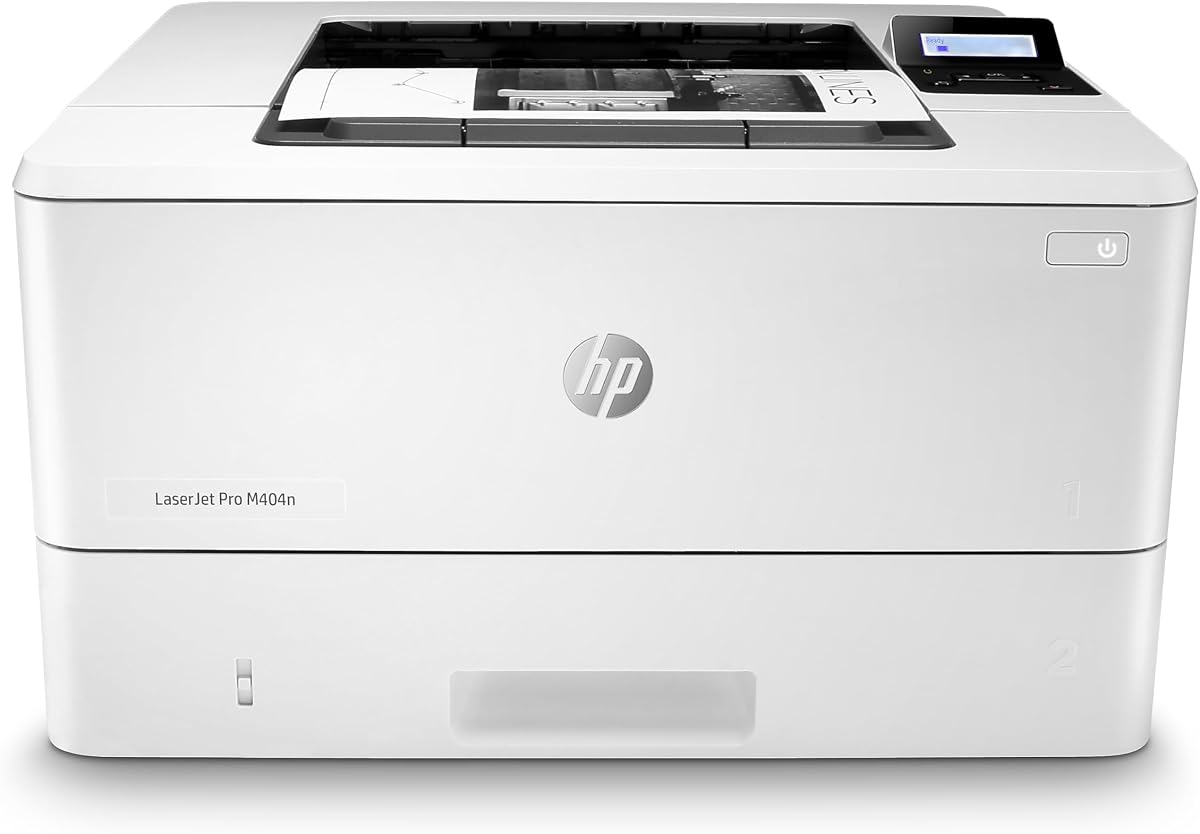
The HP LaserJet Pro M404n is built for environments where wired Ethernet is the standard for printing. It offers up to 40 pages per minute with consistent high-quality output.
We may earn a commission when you buy through this link, at no additional cost to you.
Its compact design makes it easy to fit in shared workspaces. HP Wolf Pro Security safeguards data with built-in protection, and energy-efficient tech reduces operational costs.
While it lacks wireless, this design ensures stable network sharing. It serves businesses focused on straightforward, reliable Ethernet printing without extra complexity.
Choose this printer for simple Ethernet setups needing speed and security. It delivers dependable performance for teams prioritizing wired connectivity.
Built-in Ethernet capabilities allow you to access and share resources easily across your business network without wireless issues.
HP Wolf Pro Security protects company data and defends against cyberattacks with built-in hardware and firmware measures.
We may earn a commission when you buy through this link, at no additional cost to you.
The Brother HL-L5100DN is designed to increase productivity with fast speeds and expandable capacity. With a 4.4 rating, it handles high-volume tasks while maintaining document security.
We may earn a commission when you buy through this link, at no additional cost to you.
It prints up to 42 ppm and supports expandable trays totaling up to 1,340 sheets. Secure function lock and secure print features restrict unauthorized access and protect sensitive documents.
Ethernet networking allows easy sharing across your network, and mobile printing works with AirPrint and Google Cloud Print. This setup suits offices needing reliable, secure output.
If you need a printer that scales with your office growth, this model delivers. It balances speed, security, and capacity for professional environments.
Expandable trays allow up to 1,340 sheets total, reducing refills and ensuring uninterrupted printing during busy periods.
Advanced features like secure function lock help restrict unauthorized printing and protect sensitive documents effectively.
We may earn a commission when you buy through this link, at no additional cost to you.
Choosing the right Ethernet laser printer involves weighing key factors to ensure it meets your office workflow and security needs.
Print speed measured in pages per minute determines how quickly your documents will be ready. Higher speeds benefit busy offices with frequent large-volume printing needs to avoid bottlenecks.
Look for models offering at least 30 ppm for standard use, or 40 ppm and above for high-demand environments to maintain productivity.
Ethernet ensures stable wired connections essential for secure networks, while Wi-Fi adds flexibility for mobile devices. Some models support both, others only one option.
Prioritize printers with Gigabit Ethernet or dual-band Wi-Fi if you need fast sharing across multiple devices without signal drops.
Built-in security protects your organization from cyberattacks and unauthorized access. Look for features like secure print, user authentication, and hardware-based encryption to safeguard data.
Choose printers with robust security suites if your business handles sensitive information or operates in regulated industries.
Larger input trays reduce the need for frequent refills during high-volume tasks. Expandable capacity allows you to scale storage as your printing needs grow.
For teams with heavy workloads, select models with 500-sheet trays or expandable options up to 1,000 sheets or more to minimize interruptions.
Automatic duplex printing saves paper and cost by printing on both sides without manual intervention. This feature is essential for reducing waste in large-volume environments.
Ensure the model you choose supports two-sided printing natively to maximize efficiency and meet sustainability goals.
Mobile printing support lets staff print directly from smartphones and tablets, increasing flexibility in modern workplaces. Look for AirPrint, Google Cloud Print, and proprietary app support.
Choose models with mobile management apps to track supplies and manage jobs remotely, improving operational efficiency.
Compact designs are essential for small offices where desk space is limited. A smaller footprint can make a difference in shared workspaces.
Assess physical dimensions carefully to ensure the printer fits your allocated area without obstructing workflow or movement.
Cost-effective toner options and high-yield cartridges reduce long-term operating expenses. Some printers support subscription services for automatic replenishment.
Consider printers with subscription-ready features or compatible high-yield options to manage supply costs predictably.
Begin by connecting the printer to your network via Ethernet cable for stable performance. Install the necessary drivers and software on your computers to enable printing from all devices.
Regularly update the printer firmware to ensure you have the latest security patches and performance improvements. Use the manufacturer's app to monitor toner levels and maintenance alerts proactively.
Keep the printer in a clean, dry environment away from direct sunlight to prevent damage. Perform routine cleaning of paper paths and rollers to avoid jams and maintain print quality.
Ethernet printers provide stable wired connections that reduce interference and dropouts. They also offer better security for sensitive data transmission in office networks.
Many modern models support simultaneous use of both connections. However, some budget models may allow only one connection type at a time.
Secure printing typically requires user authentication via a code or badge. Check the printer settings menu to enable secure print features and user accounts.
Yes, most include mobile printing support through apps or protocols like AirPrint. You can print directly from smartphones and tablets once connected.
Look for hardware-based encryption, secure print, and user authentication. Advanced security suites protect against cyber threats and unauthorized access.
Many models offer optional subscription services for automatic toner delivery. Check the manufacturer's website for availability with your specific printer.
The top picks highlighted in this guide provide excellent choices for various office needs. The HP LaserJet Pro 4001dn stands out for overall speed and security, while the Brother HL-6210DW delivers premium performance.
When choosing, prioritize the factors that matter most to your workflow such as speed, capacity, and security. Budget models like the HP LaserJet M207dw offer strong value for smaller teams.
Remember that prices and availability can change frequently. Always verify current listings before purchasing to ensure you get the best deal available today.