
Arteck Split Ergonomic Keyboard with Palm Rest
4.3Editor score
Affordable split layout
Cushioned wrist palm rest
Long battery life
Programmers spend countless hours typing code which places significant stress on wrists and forearms. Choosing the right ergonomic keyboard can dramatically reduce muscle strain and improve long term comfort.
We evaluated ten top rated models based on split design quality wrist support adjustability and typing feel. Each product offers unique features tailored to different workspace needs and budgets.
Every pick highlights key benefits and potential trade offs to help you decide quickly. Please note that availability and pricing may change so verify details before purchasing.
4.3Editor score

4.4Editor score

4.1Editor score
As an Amazon Associate we earn from qualifying purchases.
This table provides a side by side overview of all ten models helping you compare key specs and design features at a glance.




The Logitech Ergo K860 stands out as a top choice for programmers seeking comfort without sacrificing productivity. With a 4.4 rating it combines a split curved keyframe with a pillowed wrist rest to promote natural typing posture.
We may earn a commission when you buy through this link, at no additional cost to you.
Its ergonomic design reduces muscle strain on wrists and forearms by offering 54 percent more wrist support than standard keyboards. The scooped keys match fingertip shape ensuring precision and fluidity during long coding sessions.
While it uses membrane switches rather than mechanical ones the quiet keys are ideal for shared workspaces. The lack of mechanical feedback might be a trade off for enthusiasts but the comfort gains are significant.
This keyboard is perfect for developers who prioritize ergonomics and reliability. Its ergonomicist approved certification and adjustable tilt legs make it a safe investment for long term wrist health.
The curved split frame and sloping design encourage a natural hand position reducing bending and strain during extended use.
Connect via USB receiver or Bluetooth and use Logitech Options to customize Fn keys and receive battery notifications.
We may earn a commission when you buy through this link, at no additional cost to you.
The KINESIS Freestyle2 offers unmatched adjustability for programmers with unique hand sizes or posture needs. Its award winning split design allows module separation up to 9 inches for natural hand positioning.
We may earn a commission when you buy through this link, at no additional cost to you.
The VIP3 tenting accessory enables 5 10 or 15 degrees of tilt helping keep forearms neutral. Low force key switches reduce finger fatigue without compromising tactile feedback for accurate typing.
A detachable pivot tether lets you adjust splay but adds a small cable management consideration. The standard Windows layout means no software is needed though Mac users might find keys less intuitive.
Ideal for users needing precise ergonomic tuning the Freestyle2 balances flexibility with ease of use. Its pre assembled tenting saves setup time and supports optimal posture right out of the box.
Rotate and separate key modules to match your body type ensuring wrists and forearms stay in natural positions.
The box includes VIP3 lifters cushioned palm pads and a tether making it ready for ergonomic typing immediately.
We may earn a commission when you buy through this link, at no additional cost to you.
The Logitech Wave Keys brings ergonomic benefits to compact desks with a wavy design that places hands in a natural typing position. Its cushioned palm rest offers all day support reducing pressure on wrists.
We may earn a commission when you buy through this link, at no additional cost to you.
Certified by United States Ergonomics the keyboard helps maintain neutral alignment during coding. The Easy-Switch feature allows seamless switching between up to three devices via Bluetooth or Logi Bolt.
A notable trade off is the absence of a numeric keypad which may affect data entry tasks. However for programmers focused on code entry the compact form factor saves valuable desk space.
This keyboard suits developers who want ergonomics without bulk. With up to three years battery life and recycled plastic parts it balances comfort sustainability and convenience effectively.
The curved layout reduces wrist bending while the foam rest provides stable support during extended typing sessions.
Built with certified post-consumer recycled plastic and FSC-certified packaging for a greener environmental footprint.
We may earn a commission when you buy through this link, at no additional cost to you.
The Arteck Split Ergonomic Keyboard delivers essential ergonomic features at a budget friendly price. Its split design positions wrists and forearms in a relaxed natural position reducing strain.
We may earn a commission when you buy through this link, at no additional cost to you.
A soft cushioned wrist rest complements the layout helping users rest hands comfortably. The rechargeable lithium battery lasts up to six months on a single charge providing reliable wireless performance.
Setup is effortless with a nano USB receiver stored inside the keyboard. While it lacks advanced customization or mechanical switches it meets core ergonomic needs for everyday coding tasks.
This keyboard is ideal for cost conscious developers seeking comfort. The included warranty and USB-C charging add value making it a practical entry point into ergonomic keyboards.
Get a split layout and wrist support without the high price tag of premium models.
Plug the nano receiver into your computer and start typing instantly with no drivers needed.
We may earn a commission when you buy through this link, at no additional cost to you.
The ProtoArc EK01 Plus combines a full size layout with a unique curved split frame that actively reduces wrist strain. Scooped keys fit fingertips perfectly for natural effortless typing.
We may earn a commission when you buy through this link, at no additional cost to you.
Adjustable white LED backlighting offers three brightness levels for different lighting conditions. The 2000mAh rechargeable battery ensures long operation with up to 100 days when backlight is off.
While the backlight enhances usability in dim environments it adds to battery drain if left on continuously. The keyboard occupies more desk space but provides a familiar full size layout.
Best for developers needing a numpad with ergonomics the EK01 Plus supports up to three devices via Bluetooth or USB. Its cushioned wrist rest and tilt feet enhance comfort further.
The 2000mAh battery delivers up to 100 days of use with backlight off for minimal recharge frequency.
Three brightness levels allow comfort adjustment for low light environments while conserving power when off.
We may earn a commission when you buy through this link, at no additional cost to you.
The Logitech Ergo K860 Business targets IT departments requiring secure wireless connections and scalable deployment. It uses Logi Bolt technology for fully encrypted secure connections exceeding standard security needs.
We may earn a commission when you buy through this link, at no additional cost to you.
Designed for business users the keyboard supports mass deployment and remote management via Logitech Options app. Its ergonomic design mirrors the consumer version ensuring day long comfort and productivity.
The two year battery life and connection to up to three devices prevent performance compromise. While security and management features add value the core hardware matches the standard model.
Ideal for corporate environments this keyboard balances ergonomics with enterprise grade security. It ensures developers stay productive without risking data transmission security.
Logi Bolt provides encrypted connections ensuring safe wireless data transmission for business use.
IT pros can remotely deploy and manage updates via the Logitech Options app for streamlined operations.
We may earn a commission when you buy through this link, at no additional cost to you.
The KINESIS Advantage360 offers a patented contoured shape with split key wells and thumb keys for maximum comfort. Quiet mechanical switches provide a premium typing experience with 50M press durability.
We may earn a commission when you buy through this link, at no additional cost to you.
Users can fully program the layout via GitHub or web GUI enabling custom shortcuts and workflows. Adjustable tenting and separation up to 10 inches accommodate diverse body types and preferences.
Premium palm pads are sold separately adding to the cost. The high price reflects advanced features and build quality but may be steep for casual users.
Best for professionals investing in long term ergonomics the Advantage360 delivers unmatched customization and comfort. Its mechanical switches and open source flexibility suit power users seeking control.
Split wells and thumb keys follow natural hand shape reducing muscle tension and strain during coding.
Reconfigure layouts via GitHub or web GUI for personalized workflows without proprietary software limits.
We may earn a commission when you buy through this link, at no additional cost to you.
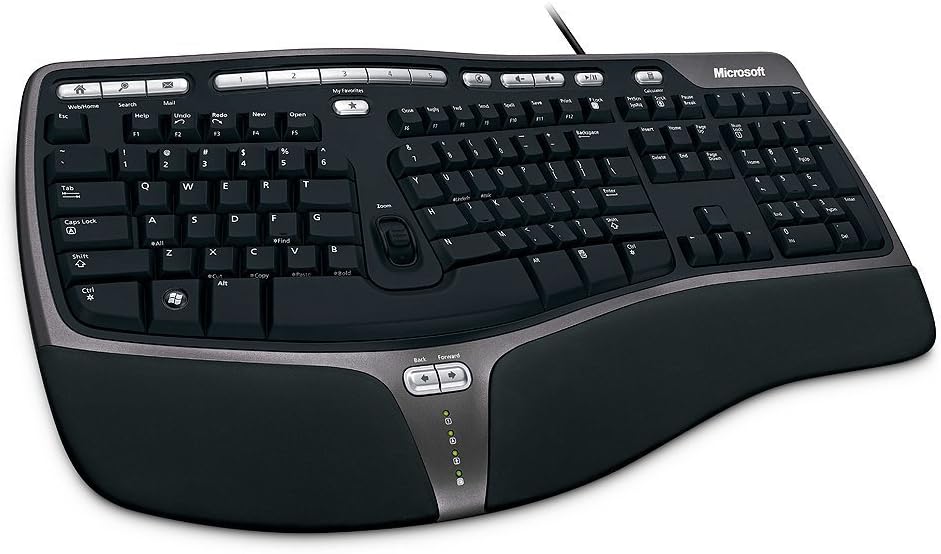
The Microsoft Wired Natural Ergonomic Keyboard 4000 remains a reliable choice with a split design encouraging natural hand positions. A cushioned palm rest supports a neutral wrist position reducing strain.
We may earn a commission when you buy through this link, at no additional cost to you.
Media keys provide easy access to music and video controls enhancing convenience during breaks. The palm lift promotes a relaxed natural angle helping maintain comfort over hours of typing.
While it lacks wireless features its wired connection ensures zero latency and no battery concerns. The design may feel dated but ergonomic benefits remain effective for daily use.
Ideal for users preferring simplicity and stability the 4000 offers proven comfort without advanced wireless features. Its media controls add utility for multimedia heavy workflows.
Wired USB connection ensures consistent performance with no need for batteries or pairing.
The palm rest and lift are built in providing immediate ergonomic support without extra accessories.
We may earn a commission when you buy through this link, at no additional cost to you.
The Microsoft Natural Keyboard Elite features a proven ergonomic design with enhanced F key commands for customizable shortcuts. Multimedia controls simplify access to music and video files for better workflow.
We may earn a commission when you buy through this link, at no additional cost to you.
Its white finish and classic look suit traditional desks. Connecting via USB or PS/2 ports ensures compatibility with various systems though PS/2 may require adapters on modern PCs.
While not the latest model its ergonomic benefits remain valid for reducing wrist strain. The durable construction supports long term use without needing frequent replacements.
Best for users prioritizing proven ergonomics over modern wireless features the Elite offers reliable comfort. Its enhanced F keys allow quick access to frequently used functions.
Enhanced F key commands allow customizable shortcuts for improved workflow efficiency during coding.
Built with durable materials and timeless design ensuring long term performance and comfort.
We may earn a commission when you buy through this link, at no additional cost to you.
The Microsoft Natural Ergonomic Keyboard 4000 for Business improves design with taskbar favorites for quick program access. Split ergonomic design encourages natural hand and forearm positions for comfort.
We may earn a commission when you buy through this link, at no additional cost to you.
An improved number pad places common numeric functions above keys for better reach. Media keys support video control while the plush palm rest offers better support than earlier models.
Mac users need IntelliType Pro software for full compatibility which adds setup steps. Despite this wired reliability and ergonomic benefits remain strong for office environments.
Ideal for business users needing quick task access the 4000 Business balances ergonomics with productivity. Its improved layout supports efficient workflows without wireless complexity.
Convenient hot keys let you access programs in the taskbar easily improving workflow speed.
Common numeric functions like equals and backspace are placed above the numpad for easier reach.
We may earn a commission when you buy through this link, at no additional cost to you.
Selecting the right ergonomic keyboard requires evaluating several factors beyond basic design. This guide breaks down key considerations to help you find the best fit.
Split designs reduce strain by allowing hands to rest at a natural angle. Look for models with adjustable separation to match your body size and shoulder width for optimal posture.
Adjustable splits offer customization that fixed splits cannot providing better long term comfort.
Comfortable wrist rests with memory foam or cushioning prevent pressure on the carpal tunnel. Ensure the rest is attached or available separately to maintain neutral wrist alignment.
Padded rests reduce fatigue during extended coding sessions significantly.
Mechanical switches offer tactile feedback and durability while membrane switches provide quieter operation. Choose based on whether you prefer feedback or a quiet environment.
Mechanical switches suit power users membrane ones quiet offices.
Wireless keyboards via Bluetooth or USB receiver offer flexibility but require battery management. Wired models provide zero latency and no charging needs for uninterrupted use.
Wireless is convenient while wired ensures reliability.
Adjustable tenting lifts the outer edge to reduce forearm rotation keeping wrists neutral. Tilt legs help achieve the right angle for comfortable hand positioning.
Look for adjustable tenting to match your posture needs.
Full size keyboards include numpads for numeric input while compact models save desk space. Choose based on whether you need numeric keys or prefer a smaller footprint.
Balance desk space with functional needs when choosing size.
Materials and switch durability impact how long a keyboard lasts. Check for warranties and build materials that ensure longevity under heavy daily use.
High build quality ensures long term value.
Certifications from ergonomists indicate tested designs that reduce strain. Look for models approved by organizations like United States Ergonomics for proven comfort.
Certified keyboards offer verified ergonomic benefits.
Set up your ergonomic keyboard at elbow height with wrists straight to maintain neutral posture. Adjust tilt and tenting gradually to allow your muscles to adapt without strain.
Clean keys regularly with compressed air to remove dust and debris. Wipe surfaces with a damp cloth to avoid buildup that can affect key movement.
For wireless models charge batteries before they deplete completely to maintain performance. Store the keyboard in a dry place when not in use to protect electronics.
Yes ergonomic keyboards reduce strain on wrists and forearms which helps prevent repetitive stress injuries. The improved posture and comfort can lead to better productivity during long coding sessions.
Initially there may be an adjustment period but most users regain or improve speed after adapting to the layout. The comfort benefits often outweigh a short learning curve.
A split angle between 15 to 30 degrees suits most users reducing shoulder and wrist strain. Adjust the angle based on your comfort and body type for best results.
While not a cure ergonomic keyboards promote neutral wrist positions reducing risk factors for carpal tunnel. Regular breaks and proper posture further support wrist health.
Most ergonomic keyboards support Mac via Bluetooth or USB but some require software adjustments for keys. Check compatibility details before purchasing to ensure full functionality.
Battery life varies by model but many offer months of use on a single charge. Wireless models with LED backlighting may consume power faster if used continuously.
The Logitech Ergo K860 KINESIS Freestyle2 and Arteck Split Keyboard offer top options across different needs and budgets. Each provides unique ergonomic features to suit various preferences and workspaces.
Prioritize adjustable split angles and wrist support to ensure long term comfort. Choosing a model that matches your typing habits and desk setup will maximize benefits.
Always check current availability and specifications before purchasing since models may update. Investing in an ergonomic keyboard is a valuable step toward sustainable coding health.