
ELUTENG Curved Monitor Light Bar
4.6Editor score
Wireless remote control included
Stepless dimming and temp adjust
Space saving base-free design
Finding the right lighting for your curved monitor setup is crucial for reducing eye strain and improving productivity. A good curved monitor light bar provides even illumination without causing glare on your screen. It ensures your workspace remains comfortable during long hours of work or gaming.
We have evaluated ten top-rated products based on their optical design, compatibility with curved screens, and ease of use. Our comparison focuses on features like auto-dimming, color temperature adjustment, and build quality. This list covers a wide range of budgets and specific user needs.
Each pick highlights key strengths and potential trade-offs to help you make an informed decision. Please note that product availability and pricing can change frequently. Check the latest details before purchasing to ensure you get the best value for your specific setup.
4.6Editor score

4.7Editor score

4.7Editor score
As an Amazon Associate we earn from qualifying purchases.
This side-by-side comparison highlights the key specifications and unique features of each model to help you find the ideal lighting for your curved display.


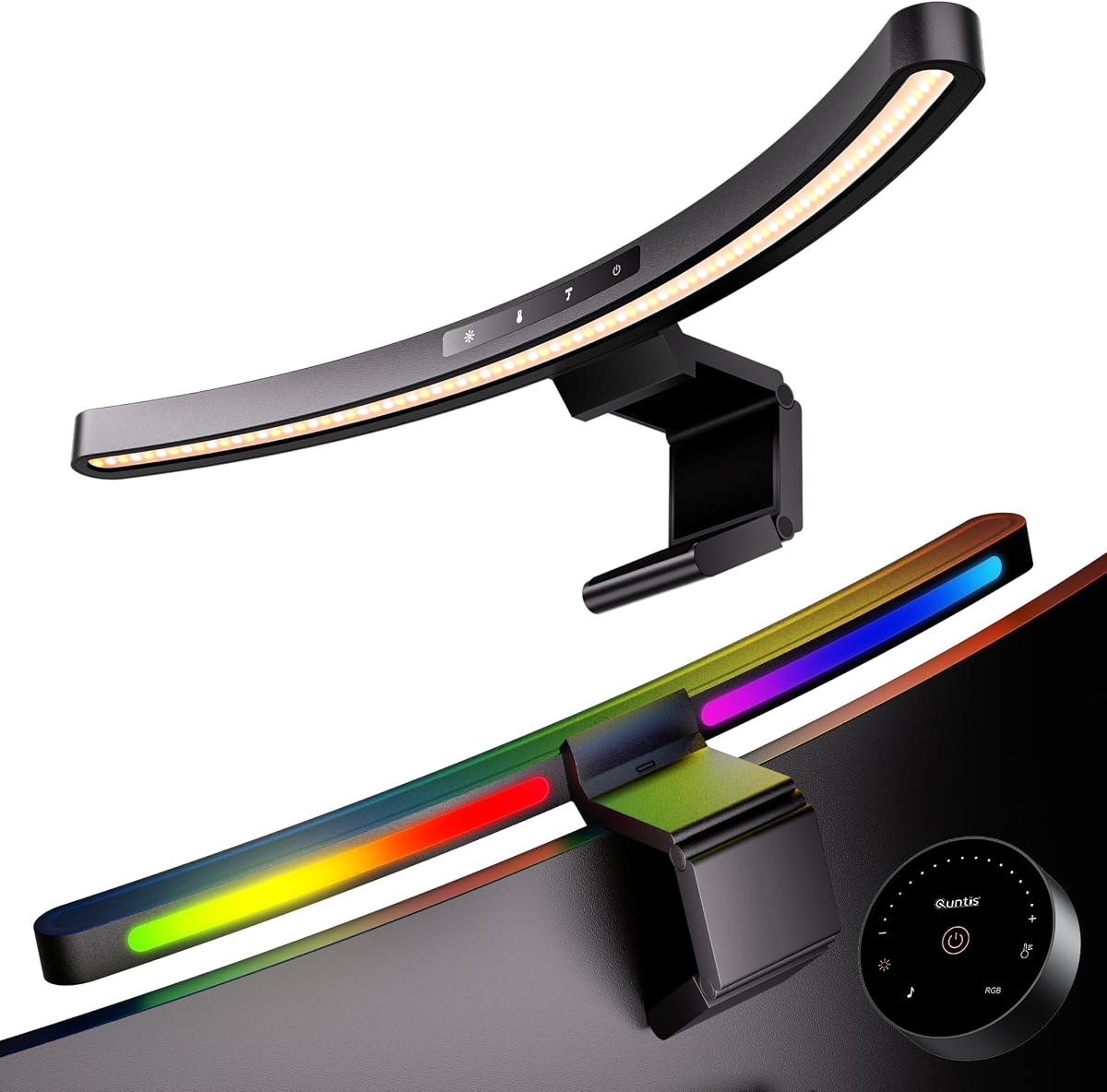


This Quntis model stands out as the top choice for users with large ultrawide displays. It holds a strong rating of 4.7 stars due to its specialized design for curved screens over 34 inches. The dual light bar structure allows for unprecedented flexibility in lighting angles.
We may earn a commission when you buy through this link, at no additional cost to you.
The lighting performance is exceptional with up to 1400 lux at the center and 500 lux across wider areas. Its asymmetrical optical design directs light onto the desk rather than the screen, eliminating glare effectively. The high RA98 CRI ensures colors remain accurate during creative work.
While it is more expensive than some competitors the feature set justifies the cost for professionals. The auto dimming sensor adjusts brightness based on ambient light conditions. This hands-free operation maintains comfort throughout the day without manual intervention.
It is ideal for gamers and professionals who need reliable task lighting without glare. The RGB backlight adds a customizable ambiance for entertainment sessions. We recommend this for anyone seeking a premium solution for large curved monitor setups.
Its patented clamps accommodate ultra-thin to thick screens ensuring a secure fit.
Stepless brightness and color temperature adjustments allow precise customization for any task.
We may earn a commission when you buy through this link, at no additional cost to you.
The ONWAY light bar offers an excellent balance of features and price for general users. It supports monitors from 27 to 34 inches with various curvature options. The wireless remote control simplifies adjustments without reaching for the bar itself.
We may earn a commission when you buy through this link, at no additional cost to you.
Its stepless color and brightness adjustments provide smooth transitions between settings. The 10 RGB backlight modes add a dynamic touch for gaming or movie watching. The 45 degree asymmetric design prevents screen glare effectively during use.
While the light flux is moderate it suits typical office environments well. The included camera mount is a thoughtful addition for remote workers needing a clear webcam view. However the remote needs battery replacement over time.
Choose this model if you want versatile lighting without spending a premium. It is suitable for home offices and study spaces where moderate illumination is sufficient. It remains a strong contender in the budget category.
Control all functions via the 8cm touch-sensitive remote for seamless operation.
The flexible clamp accommodates varying screen thicknesses for a secure fit.
We may earn a commission when you buy through this link, at no additional cost to you.
This model is specifically engineered for 34 inch plus ultrawide curved monitors. The 26 inch extended arc ensures light covers the entire desk width evenly. Its dual independently adjustable light bars offer unmatched flexibility for complex tasks.
We may earn a commission when you buy through this link, at no additional cost to you.
With 112 high-quality LED beads it delivers ample illumination for any task. The high RA98 CRI ensures true color rendering for creative professionals. The auto dimming sensor adjusts brightness in real time based on ambient light.
The design minimizes dark corners that often plague large desk setups. However the size might be too large for compact spaces. Proper alignment is crucial to maximize its potential on curved screens.
Ideal for deep ultrawide setups where even coverage is paramount. It transforms the workspace with consistent lighting across a wide area. Consider this for high-end curved monitor configurations.
Two curved LED light bars pivot independently for flexible coverage control.
Extend both bars outward for maximum desk coverage during work sessions.
We may earn a commission when you buy through this link, at no additional cost to you.
This light bar brings unique gaming features with its music sync capability. It responds to sound in real time creating a dynamic atmosphere during games. The 23 RGB effects total offer extensive customization for mood lighting.
We may earn a commission when you buy through this link, at no additional cost to you.
It features dual control options with both touch controls and a remote. This convenience ensures you can adjust settings easily from anywhere at your desk. The Ra95 color rendering supports accurate color work during the day.
The auto-off timer reminds you to take breaks after two hours. While the length is shorter it fits well on smaller curved setups. The music sync is a standout feature for entertainment users.
Best for gamers who want their lighting to match their audio. It adds an immersive layer to your setup without compromising task lighting. Highly recommended for entertainment focused desktops.
Press Music Sync to access 10 audio-reactive RGB modes that respond to sound.
Dual-control design keeps key functions available when the remote is unavailable.
We may earn a commission when you buy through this link, at no additional cost to you.
The Quntis Focus model emphasizes eye health with its specialized optical design. The remote control integrates multifunction capabilities for seamless adjustments on the desktop. Its auto dimming sensor ensures optimal light levels automatically throughout the day.
We may earn a commission when you buy through this link, at no additional cost to you.
The 2 hour rest timer helps you remember to step away and rest your eyes. It fits monitors from 17 to 32 inches including irregular shapes. The asymmetrical design prevents glare on both sides of the screen.
While the light intensity is moderate it suits focused work well. The remote requires batteries which are not always provided. It remains a practical choice for standard curved setups.
Ideal for students and office workers prioritizing eye health. The timer feature adds a valuable wellness element to your workspace. Choose this for balanced illumination and health focus.
Built-in ambient light sensor allows you to achieve optimal illumination levels.
Long press to turn on 2-hour auto-off timer to remind you to rest.
We may earn a commission when you buy through this link, at no additional cost to you.
This ELUTENG model is designed for simplicity and space efficiency. The base-free design keeps your desk clutter-free and tidy. It supports stepless adjustment of brightness and color temperature easily.
We may earn a commission when you buy through this link, at no additional cost to you.
The wireless remote uses a dry battery scheme for longer life than button types. This ensures stable use without frequent battery replacements. The asymmetric surround lighting prevents direct irradiation on the screen.
It offers a good flux of approximately 167LM for general lighting. The compact size fits well on smaller curved monitors. While less powerful it covers essential needs efficiently.
Best for minimalists who want clean desk aesthetics. It provides sufficient brightness for study and light work. A solid choice for budget-conscious buyers.
No base design effectively reduces the burden on the desktop area.
The remote has a long battery life ensuring stable use.
We may earn a commission when you buy through this link, at no additional cost to you.
The Geisofu bar offers basic RGB functionality for gaming ambiance. It features a 1 hour timed mode to remind you to rest your eyes. The touch sensitive buttons allow for seamless mode transitions.
We may earn a commission when you buy through this link, at no additional cost to you.
Its anti-weight clips provide a stable hold on curved monitors. The RGB modes create a lively atmosphere for movie watching or gaming. The adjustable angle range allows you to tailor lighting as needed.
It is recommended only for flat panel displays due to design limitations. The simple interface may lack the precision of dial controls. But it serves the purpose of basic mood lighting well.
Choose this for an affordable entry into RGB lighting. It suits casual users who want some customization without complexity. A practical pick for simple setups.
The ultimate vivid RGB light enhances your immersive experience of gaming.
Set to 1 hour timed mode to remind you to have a rest.
We may earn a commission when you buy through this link, at no additional cost to you.
This model features a unique human sensor that turns lights on when you sit. It cuts standby waste by up to 50% automatically. The 45 degree asymmetric lens ensures zero glare on the screen.
We may earn a commission when you buy through this link, at no additional cost to you.
Its high Ra97 CRI supports true-to-life color accuracy for creative work. The dual control options let you tweak settings from anywhere easily. The clamp fits screens up to 50mm thick securely.
The auto on off feature is great for saving power. However the sensor might be sensitive to movement in the room. The memory function ensures your settings are ready next time.
Ideal for eco-friendly offices where automation is valued. It keeps your workspace lit exactly when needed. Consider this for premium convenience features.
High-sensitivity PIR sensor detects your presence instantly.
Ra97 CRI for true-to-life colors and eye protection.
We may earn a commission when you buy through this link, at no additional cost to you.
The BenQ ScreenBar Halo 2 is a top-tier professional lighting solution. Its wireless controller features a dial for precise brightness and color adjustments. The built-in display shows precise values for fine-tuning.
We may earn a commission when you buy through this link, at no additional cost to you.
It includes a wide ambient backlight to reduce eye strain. The clamp fits curved monitors from 1000R to 1800R well. The tested lifespan of 50,000 hours ensures years of reliable use.
While expensive the build quality and features justify the investment for pros. It offers true-to-life color accuracy for designers and photographers. Motion sensors add to its automated convenience.
Best for professionals needing absolute precision and durability. It is a premium tool for serious creative workflows. Consider this if budget is not a primary constraint.
The intuitive wireless dial controls brightness, color temperature, and modes.
Built with reliable quality to ensure years of use without dimming.
We may earn a commission when you buy through this link, at no additional cost to you.
The Laliled bar is designed for straightforward task lighting. It features three preset color temperatures for quick switching. The stepless dimming allows you to adjust brightness smoothly.
We may earn a commission when you buy through this link, at no additional cost to you.
A built-in timer reminds you to rest after prolonged use. The anti-weight clip is easy to install and stable on most monitors. It saves up to 90% of your workspace with its design.
While basic it covers the essentials for eye care well. It lacks advanced features like RGB or remote control. However it is effective for focused work without distractions.
Choose this for a no-frills lighting solution. It suits users who want simplicity and reliability. A practical option for budget setups.
The computer light bar includes a 1-hour timer mode to remind you to rest.
The anti-weight clip features a 180° adjustable angle for custom lighting.
We may earn a commission when you buy through this link, at no additional cost to you.
Selecting the right curved monitor light bar requires considering several key factors to ensure compatibility and performance.
Ensure the light bar fits your screen size and curvature. Check the minimum and maximum dimensions specified by the manufacturer. A good clamp should accommodate various thicknesses without slipping.
Look for high CRI values to ensure accurate color rendering. The light should be flicker-free to prevent eye strain. Asymmetrical designs are preferred to avoid screen glare.
Decide between touch controls, remotes, or dials for adjustments. Wireless options add convenience but require battery changes. Touch sensors offer quick access but may be less precise.
Adjustable color temperature helps match ambient lighting conditions. Warm light is relaxing while cool light aids focus. Stepless adjustment provides more granular control.
Auto-dimming sensors adjust brightness based on room light. Motion sensors can save power by turning lights off when away. These features enhance convenience and energy efficiency.
RGB backlighting adds aesthetic value for entertainment setups. Check the number of modes and sync capabilities. This feature is optional for professional workflows.
Most bars use USB cables which need a nearby port. Check cable length to ensure reach to your computer. Ensure the power adapter is included if required.
Durable materials ensure longevity and stability. Look for silicone pads that protect your screen from scratches. A solid clamp prevents the bar from sagging.
Clean the bar regularly with a soft, dry cloth to remove dust. Avoid harsh chemicals that may damage the finish. Store in a safe place if moving your desk setup.
Yes, many curved bars are designed to work on flat monitors as well. Check the product specs for specific compatibility details. Some models include flexible arms to adapt to different screen shapes.
No, quality bars use asymmetrical optical designs to direct light downwards. This prevents light from reflecting onto the screen. Always ensure the angle is adjusted correctly to maintain glare-free use.
High CRI ensures colors appear accurate and true to life. This is crucial for designers and photographers. It reduces eye strain by providing natural-looking illumination.
They measure ambient light levels and adjust brightness automatically. This maintains a consistent lighting environment without manual input. It helps protect eyes from sudden brightness changes.
No, they are primarily for aesthetic appeal during gaming or movies. Professionals might prefer neutral lighting. Consider if you want ambiance lighting before paying extra for RGB.
No, they are generally energy efficient LED devices. The power consumption is low compared to standard desk lamps. Auto-off features help save even more energy when not in use.
Product prices and availability change frequently so verify details before buying. Check current deals to ensure you get the best value. Your workspace deserves reliable lighting that supports your productivity.