
Corsair Skiff 100 Quiet RGB Wired Gaming Keyboard – US QWERTY – Black
4.7Editor score
Quiet responsive keys
IP53 protection rating
10-zone RGB lighting
This guide compares the best Corsair keyboard for gaming options featuring mechanical switches RGB lighting and advanced gaming features for every budget and
Finding the right gaming peripheral can transform your entire setup. A high-quality keyboard offers precision response and comfort during long sessions. Corsair delivers reliable options for every type of player seeking performance.
We evaluated ten top models based on build quality switch types and software features. Each selection balances value with advanced capabilities like polling rates and lighting customization. Our analysis highlights what makes each model stand out uniquely.
Every pick includes key specs pros and cons to help you decide. Prices and availability shift frequently so verify details before purchasing. Choose the model that fits your specific gaming needs and desk space.
4.7Editor score

4.5Editor score

3.8Editor score
Below you will find a detailed side-by-side comparison of all ten selected Corsair gaming keyboards. This table highlights the core specifications and unique features that define each model performance and utility.


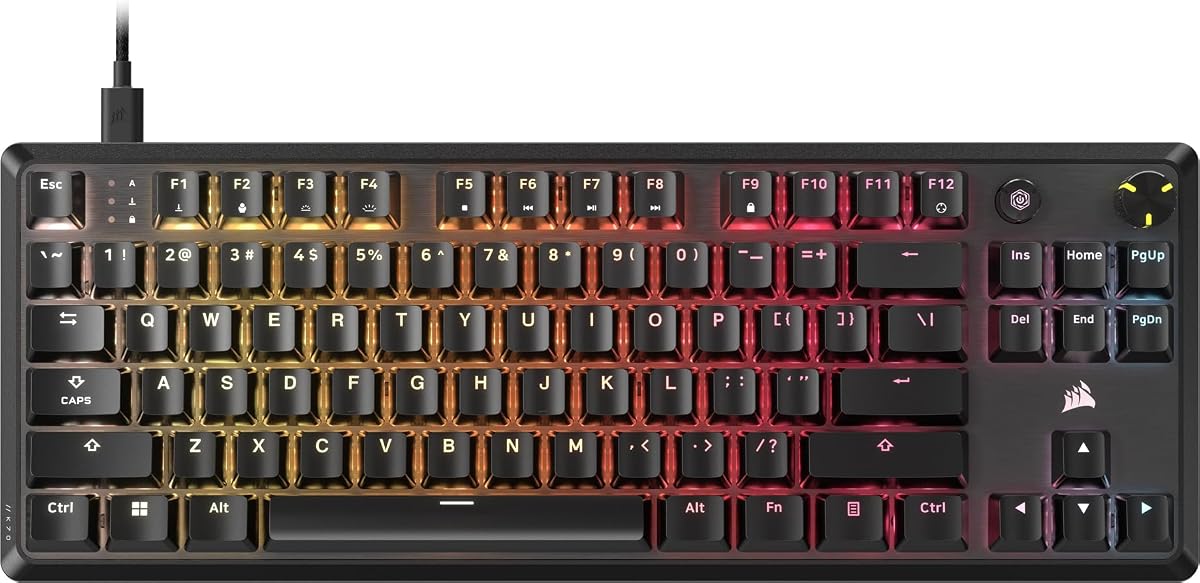


The Corsair K100 RGB stands as a flagship option offering top-tier performance and advanced features. It combines optical-mechanical switches with proprietary processing technology for unmatched responsiveness. This model targets serious gamers needing precision and full customization capabilities.
We may earn a commission when you buy through this link, at no additional cost to you.
Its OPX switches offer a 1.0mm actuation distance delivering near-instant inputs. The AXON technology enables 4,000Hz polling rates surpassing standard gaming limits. The PBT keycaps ensure durability while the aluminum frame adds a premium feel to any setup.
While expensive this keyboard justifies its cost with extensive programmability. The control wheel handles media and game functions seamlessly. However its size may clutter smaller desks and the price exceeds budget constraints for casual players.
Buyers seeking a high-performance centerpiece should choose this model. It excels in competitive titles where split-second timing matters. The integration with iCUE and Elgato Stream Deck adds utility for streamers and power users alike.
The 44-zone LightEdge provides dynamic per-key RGB effects that sync with gameplay or audio cues.
Six dedicated macro keys work with Elgato software for complex streaming commands and in-game shortcuts.
We may earn a commission when you buy through this link, at no additional cost to you.
The Corsair Skiff 100 Quiet delivers exceptional value with features normally found on pricier models. It focuses on comfort and durability making it ideal for shared spaces or quiet offices. The low-noise keys ensure smooth operation without disturbing others.
We may earn a commission when you buy through this link, at no additional cost to you.
Its IP53 rating protects against dust and spills adding longevity to everyday use. The full-size detachable palm rest reduces fatigue during extended sessions. RGB lighting spans ten zones offering ample customization for aesthetic preferences.
Though it lacks mechanical switches this keyboard provides a satisfying tactile feel. The media dial allows quick volume adjustments without interrupting gameplay. It is not designed for extreme competitive play but serves daily use perfectly.
This is the best choice for casual gamers or budget-conscious buyers. It offers reliability and comfort without sacrificing style. Consider this model if you prioritize silence and spill resistance over raw speed.
The IP53 dust and water protection keeps the keyboard functional even during accidental spills or dusty environments.
A detachable palm rest with a rubber surface ensures hands stay supported and comfortable throughout long gaming marathons.
We may earn a commission when you buy through this link, at no additional cost to you.
The Corsair Galleon 100 SD represents the pinnacle of gaming keyboard innovation with unique streaming features. Its large LCD display replaces separate hardware allowing control over Discord and Spotify directly from the board. This design streamlines the desk for a cleaner workflow.
We may earn a commission when you buy through this link, at no additional cost to you.
Customizable Stream Deck keys provide precise command execution without extra apps. The dynamic screen shows hardware performance or Twitch stats in real time. Speed is ensured through 8000Hz hyper-polling for minimal input delay during intense matches.
Despite its advanced tech this model faces criticism for its steep price. It serves power users who want an all-in-one solution. The extra features justify the cost only for those deeply invested in streaming or system monitoring.
Pros streamers or tech enthusiasts this keyboard offers unmatched utility. It merges gameplay and broadcast control into one device. For average users it may be overkill but for pros it is a powerful tool.
The customizable Stream Deck keys let you trigger complex macros or app commands without adding external hardware to your desk.
A five-inch full-color LCD tracks system stats and channels so you never miss a game event or viewer update.
We may earn a commission when you buy through this link, at no additional cost to you.
The CORSAIR Vanguard 96 offers a unique 96% layout that balances compactness with full functionality. It fits within a TKL footprint while retaining numpad and arrow keys. This makes it ideal for users with limited desk space who refuse to sacrifice utility.
We may earn a commission when you buy through this link, at no additional cost to you.
A luminous LCD screen displays animations and system data adding flair to the setup. It supports 8000Hz hyper-polling for lightning-fast response times. Six G-keys and virtual streaming integration make it versatile for both gaming and productivity tasks.
The layout can feel crowded requiring an adjustment period for some users. The lack of a detachable cable adds to the fixed nature of the design. However the performance and features provide strong value at this price point.
Buyers needing a compact full-featured keyboard will appreciate this choice. It supports competitive play while saving valuable mouse space. Consider this model if you need a numpad but want a smaller footprint.
The 1.9 LCD allows you to personalize your workspace with custom animations system metrics or gaming stats on demand.
Virtual Stream Deck integration maps functions directly to programmable G-keys for quick shortcuts during gameplay or broadcasts.
We may earn a commission when you buy through this link, at no additional cost to you.
The CORSAIR K70 CORE provides a reliable mechanical experience at an accessible price. Pre-lubed MLX Red switches ensure smooth and consistent keystrokes. Sound dampening layers reduce unwanted noise making it suitable for quiet environments.
We may earn a commission when you buy through this link, at no additional cost to you.
Its aluminum top plate adds stability and premium aesthetics. The magnetic detachable palm rest offers convenience for comfort. A multi-function rotary dial gives precise volume control without menu diving during games.
While it uses ABS keycaps they are double-shot for durability against wear. The lighting and software options are functional but lack deep customization. This model excels for users wanting core mechanical benefits without complex features.
It suits gamers upgrading from membrane keyboards seeking tactile feedback. The combination of speed and comfort makes it a practical daily driver. Choose this if you value a clean typing experience and sturdy build.
Two layers of sound dampening foam minimize ping and clack sounds for a more subdued and pleasant typing experience.
A multi-function rotary dial lets you adjust volume or scroll through apps quickly using iCUE software customization.
We may earn a commission when you buy through this link, at no additional cost to you.
The Corsair K70 CORE TKL optimizes the classic design by removing the numpad. This leaves room for wider mouse movements essential in FPS games. It retains the core strengths of the standard CORE model with enhanced switch technology.
We may earn a commission when you buy through this link, at no additional cost to you.
Pre-lubed MLX Red v2 switches deliver stable and responsive inputs. Two sound dampening layers reduce noise for a pleasant experience. A sturdy double-shot keycap design ensures longevity under heavy gaming use.
It lacks a full numpad which may inconvenience productivity workflows. However the space savings are significant for competitive gamers. The media dial and dialCUE support add necessary utility for daily tasks.
Choose this for competitive play where mouse space is critical. It delivers a focused gaming experience without sacrificing comfort. Ideal for FPS players wanting reliable mechanical performance in a smaller frame.
Premium foam layers and pre-lubed stabilizers temper unwanted pings for a quiet and satisfying keystroke sound profile.
The tenkeyless design fits tight setups and maximizes desk space for larger mouse movements during competitive sessions.
We may earn a commission when you buy through this link, at no additional cost to you.
The Corsair K70 PRO TKL introduces advanced magnetic switch technology for competitive precision. MGX Hyperdrive switches allow adjustable actuation points for personalized sensitivity. Rapid Trigger technology resets keys instantly for faster movement inputs.
We may earn a commission when you buy through this link, at no additional cost to you.
This enables rapid resets ideal for competitive titles needing precise control. Per-key customization means each key can have different settings. The sturdy double-rail structure reduces wobble ensuring consistent input registration over time.
Complexity may deter casual users unfamiliar with these features. Initial setup requires navigating software to unlock full potential. However once tuned it outperforms standard mechanical switches in responsiveness.
Pros seeking maximum competitive edge will find this unmatched. It supports movement techniques impossible on standard boards. Choose this if you want fully customizable switches and instant reset capabilities.
Rapid Trigger dynamically adjusts actuation and reset points so you can move and reset faster than traditional keyboards allow.
Adjust actuation from 0.4mm to 3.6mm per key allowing for sensitive or deep presses tailored to specific keys.
We may earn a commission when you buy through this link, at no additional cost to you.
The Corsair K60 RGB TKL offers a portable solution with high-speed optical switches. OPX switches provide rapid input with minimal actuation travel. The compact tenkeyless footprint saves space while maintaining core gaming functionality.
We may earn a commission when you buy through this link, at no additional cost to you.
Polycarbonate keycaps ensure durability against wear and tear. An 8000Hz hyper-polling rate delivers near-instant signal transmission. The detachable USB-C cable makes it easy to pack for LAN parties or travel.
Its lighter weight may feel less stable than heavier alternatives. The software features are functional but simpler compared to flagship models. Still it provides excellent performance for competitive users on the move.
Select this for travel friendly gaming without sacrificing speed. It balances portability with the responsiveness needed for tournaments. Ideal for esports players needing a reliable backup or travel board.
Inputs are transmitted up to eight times faster ensuring actions register instantly for competitive advantage.
A detachable USB Type-C cable simplifies packing and management making this keyboard ready for travel on short notice.
We may earn a commission when you buy through this link, at no additional cost to you.
The CORSAIR STRAFE RGB MK.2 offers a traditional experience with trusted switches. It uses Cherry MX Red keys known for smooth linear performance. This model provides a stable baseline for gamers who prefer established components.
We may earn a commission when you buy through this link, at no additional cost to you.
Its USB passthrough port offers convenient access for connecting a headset. Onboard storage lets you carry profiles without installed software. Per-key RGB lighting syncs across compatible peripherals for a cohesive look.
While effective it lacks modern features like volume knobs or quick toggles. The design feels dated compared to newer options. Still it remains a solid choice for users prioritizing reliability over new features.
This suits users wanting proven switch quality and basic media control. The passthrough port adds utility for headsets without dongles. Choose this for a simple reliable setup focused on core gaming needs.
A built-in USB passthrough port gives you quick access to plug in a headset without reaching behind the PC.
Eight megabytes of onboard memory save lighting and macros so your settings travel with you anywhere.
We may earn a commission when you buy through this link, at no additional cost to you.
The Corsair K55 RGB PRO is an ideal entry point for new gamers. It offers membrane switches that provide a soft and quiet typing experience. RGB lighting zones and macro keys bring advanced utility to an affordable package.
We may earn a commission when you buy through this link, at no additional cost to you.
Its IP42 rating protects against dust and spills for everyday safety. The detachable palm rest adds comfort for long sessions. Dedicated media keys let you control volume without stopping gameplay.
While not mechanical it still offers enough performance for casual use. The lack of tactile feedback may not suit competitive players. However for beginners or families it is a practical and robust choice.
Pick this for budget-conscious setups needing durability and style. It delivers essential features without overwhelming cost. Great for students or casual gamers seeking a reliable first upgrade.
IP42-rated protection guards your desktop from minor spills so gameplay continues without hardware damage.
Six dedicated macro keys let you execute complex commands or shortcuts in a single stroke for faster results.
We may earn a commission when you buy through this link, at no additional cost to you.
Selecting the right gaming keyboard involves evaluating several technical and ergonomic factors. This section breaks down the key considerations to help you find a model that matches your specific needs.
Gaming keyboards typically use mechanical switches for precision. Corsair offers optical options like OPX and MLX Red for speed or traditional Cherry MX for classic feel. Opt for linear switches for rapid gaming and tactile ones for typing comfort.
Always choose switches that match your gaming style and noise tolerance.
Polling rate measures how often the keyboard sends data to your PC. Higher rates like 8000Hz reduce input lag for competitive games. Standard 1000Hz is sufficient for casual play while high Hz is vital for pros.
Prioritize high polling rates if you play fast-paced competitive titles.
Layout determines the physical footprint on your desk. Full-size includes a numpad while TKL removes it for mouse space. Compact 96% models balance both needs. Select based on how much room you have and need.
Choose TKL for FPS gaming and Full-Size for data entry.
Materials define durability and feel. Aluminum frames resist flex and look premium compared to plastic. Look for double-shot keycaps that won't fade over time. A sturdy build ensures the keyboard withstands years of heavy use.
Invest in metal frames and durable keycaps for longevity.
RGB customization adds personal flair to your setup. Corsair's iCUE software allows per-key control and macro syncing. Some models feature LightEdge or LCD screens for enhanced visual feedback. Ensure the software integrates well with your other gear.
Look for per-key RGB and robust software support for best results.
Macro keys and onboard memory help automate complex commands. Models with dedicated macro rows save time during gameplay. Ensure the software allows deep customization for both games and apps. This feature is essential for MMO and strategy players.
Prioritize keyboards with dedicated macro keys for complex tasks.
Protective ratings like IP42 or IP53 shield against dust and spills. These are crucial for shared spaces or messy desks. They extend the life of the keyboard by preventing internal damage from liquids. Consider this if you drink near your setup.
Opt for spill-resistant models to protect against accidents.
Ergonomic accessories like detachable palm rests reduce fatigue. Sound dampening layers minimize noise during typing. Media dials provide quick volume control without interrupting gameplay. Comfort is key for long sessions where hand strain is a concern.
Select models with rests and media controls for extended use.
After connecting your keyboard install the CORSAIR iCUE software. This tool unlocks all customization features including lighting and macros. Create profiles for specific games to save your preferred settings.
Clean the keyboard regularly by unplugging and turning it upside down. Use compressed air to remove dust between keys gently. Wipe the surface with a dry microfiber cloth to remove oils without harsh chemicals.
Store the keyboard properly if transporting it. Use the detachable cable to prevent port stress. Keep it in a protective case during travel to maintain structural integrity and prevent accidental spills or damage.
Yes they are widely considered top-tier for gaming due to precision switches and low latency. Their iCUE ecosystem ensures seamless integration with other peripherals. This makes them a reliable choice for both casual and competitive players.
Linear switches like MLX Red or OPX are best for fast inputs without tactile resistance. Optical switches also offer faster response times than mechanical ones. These traits help minimize delay during critical moments in shooters.
First ensure the iCUE software is updated to the latest version. Restart the software and check for firmware updates for the device. Replugging the USB cable or restarting the computer can also resolve minor glitches effectively.
Absolutely they offer responsive and comfortable typing experiences. Many models feature sound dampening to reduce noise for office use. Adjustable actuation points also let you tailor the feel to typing preferences easily.
TKL removes the number pad to save desk space for mouse movement. Full-Size includes all keys including the numpad for data entry. Choose TKL for gaming and Full-Size if you need numeric input regularly.
Most models work physically but software support is limited to Windows. Some basic features function natively but advanced customization requires PC tools. Check product specs for confirmed Mac compatibility before purchasing.
We have highlighted ten models that cover every need from budget entry to premium performance. The K100 RGB leads for high-end features while the Skiff 100 Quiet offers best value for casual users.
Prioritize switch type and layout based on your primary gaming style. Speed matters for competitive titles but comfort is key for long play sessions. Select the keyboard that balances your performance needs with desk space.
Always verify current prices and availability before making a purchase. Product details can change over time so review the latest specifications online. A well-chosen keyboard will elevate your setup and last for years.