
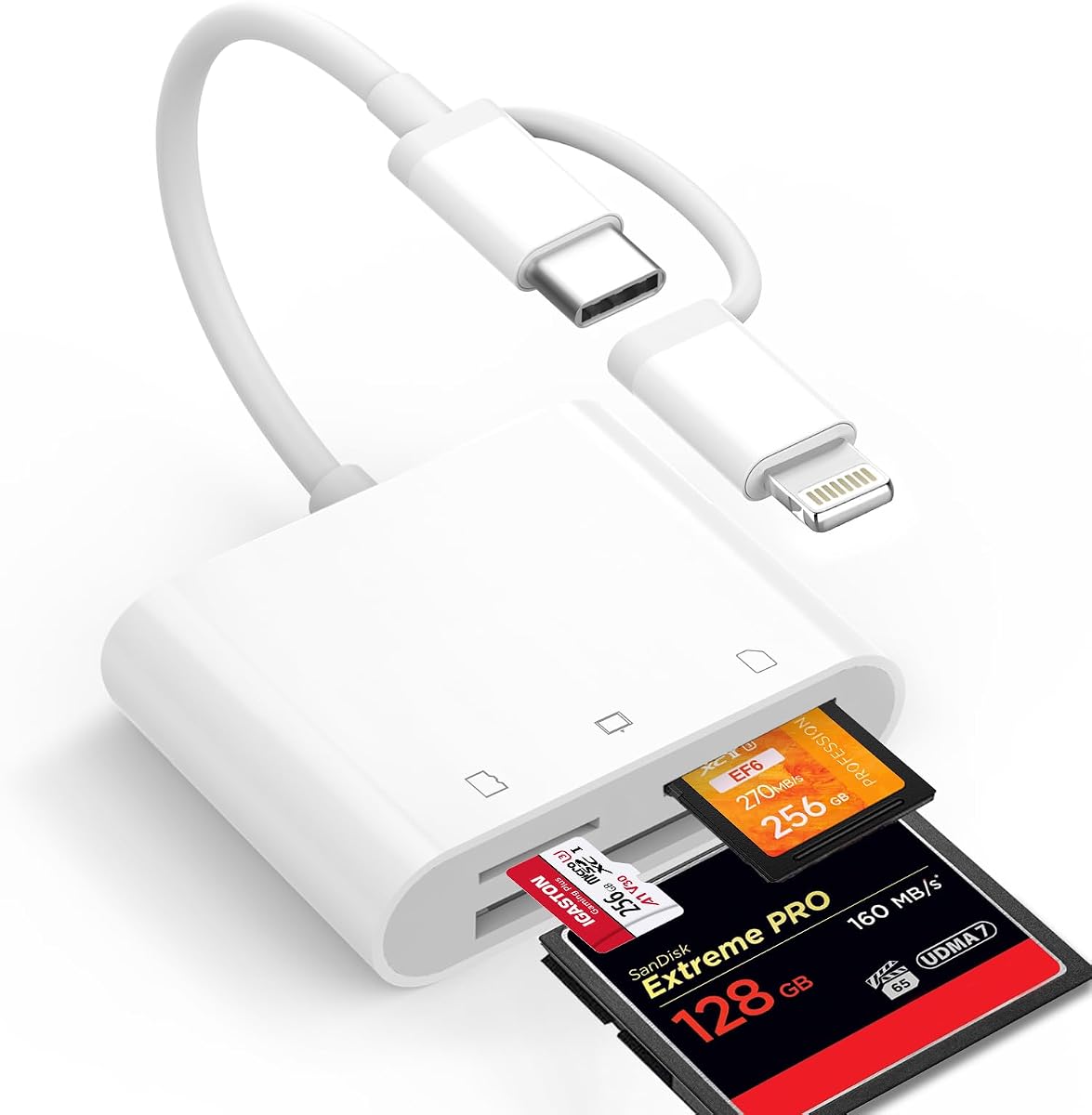
Memory Card Reader, BENFEI 4in1 USB 3.0 and USB-C to SD Micro SD MS CF Card Reader Adapter
4.5Editor score
4 cards read simultaneously
USB-C and USB 3.0 support
18-month warranty included
This guide compares the top Compact Flash Card Reader options for photographers and content creators seeking reliable multi-card access and fast data transfer
Finding the right Compact Flash Card Reader is essential for modern photographers who need quick access to their memory cards. A good reader supports multiple formats and offers fast transfer speeds to keep your workflow efficient.
We compared ten top-rated models based on compatibility, build quality, and performance metrics. Our list includes versatile options for both legacy CF cards and newer SD formats used in contemporary cameras.
Each pick highlights specific strengths like simultaneous reading or rugged construction. Remember that prices change frequently so check current listings before making your final purchase decision today.
4.5Editor score

4.7Editor score

4.3Editor score
This side-by-side comparison reviews all ten selected models to highlight their unique features and specifications for informed decision-making.



The Lexar Multi-Card Reader stands out as our top choice for professional workflows needing reliable performance. It holds a high user rating of 4.7 stars and supports SD microSD and CF cards with impressive speed.
We may earn a commission when you buy through this link, at no additional cost to you.
Its standout feature is the transfer rate of up to 312MB/s for SD and microSD which is among the fastest available. The USB 3.1 interface ensures quick data offloading while remaining backward compatible with older ports.
While it costs more than basic models the speed and brand reliability justify the investment for serious users. The two-year limited warranty adds peace of mind that cheaper generic readers often lack.
Photographers and videographers who prioritize speed and stability should choose this model. It offers the best balance of performance and durability for daily professional use.
With speeds reaching 312MB/s users can offload large photo sessions quickly without bottlenecks during editing sessions.
Lexar is known for memory quality so this reader delivers consistent performance without data corruption risks.
We may earn a commission when you buy through this link, at no additional cost to you.
The BENFEI 4in1 Reader offers exceptional value for users needing multi-card access without breaking the bank. It supports CF SD Micro SD and MS cards simultaneously with solid USB 3.0 performance.
We may earn a commission when you buy through this link, at no additional cost to you.
Its ability to read four cards at once is a rare feature at this price point. The inclusion of a USB-C connector makes it future-proof for modern Macs and mobile devices like the iPhone 15 series.
While it lacks the premium build of expensive models the 18-month warranty provides strong protection against defects. It is a practical choice for casual photographers or students on a tight budget.
Buyers looking for an affordable yet versatile solution will find this model ideal. It delivers essential features reliably while keeping costs low.
Users can access data from four different card types in a single session saving time during busy editing workflows.
With both USB-C and USB 3.0 it connects to almost any laptop or tablet without needing extra dongles.
We may earn a commission when you buy through this link, at no additional cost to you.
This 6-in-1 Adapter is designed for professionals who need to archive legacy formats alongside modern ones. It supports CFast XD CF SD and more with a robust aluminum build for heat management.
We may earn a commission when you buy through this link, at no additional cost to you.
The dual USB-C and USB-A connectors offer maximum flexibility for Mac and PC users alike. Reading six cards simultaneously means no more swapping cards during critical data recovery or transfer sessions.
Its aluminum chassis ensures durability and better heat dissipation than plastic models. While it costs more the extensive format support and rugged build make it a top-tier tool for pros.
Those with mixed card collections or demanding field work should invest in this premium option. It handles the widest range of formats with professional-grade reliability.
The inclusion of XD and CFast slots ensures older camera data remains accessible without expensive adapters.
Aluminum construction provides superior durability and thermal performance for extended transfer sessions in the field.
We may earn a commission when you buy through this link, at no additional cost to you.
The UGREEN USB 3.0 Card Hub is a robust solution for users needing fast and flexible data transfer. It reads four cards simultaneously including CF and SD formats with a rated speed of 5Gbps.
We may earn a commission when you buy through this link, at no additional cost to you.
Its support for 2TB capacity cards means it remains relevant even as storage needs grow. The compact design with a 1.7 ft cable makes it easy to toss into a camera bag for travel.
While it lacks a USB-C connector the standard USB-A fits most PCs and older laptops perfectly. The high user rating reflects its reliable performance for daily professional work.
Buyers prioritizing speed and capacity support will appreciate this model. It balances portability with high-performance features effectively.
Compatible with up to 2TB cards ensuring you can handle large capacity professional SDXC and CF cards easily.
Read multiple cards at once to speed up backup routines and save time during post-production tasks.
We may earn a commission when you buy through this link, at no additional cost to you.
The ZIYUETEK CF Card Reader delivers solid performance with a slim aluminum cover for better durability. It supports up to five cards including CF MS and SD types with 5Gbps speeds.
We may earn a commission when you buy through this link, at no additional cost to you.
Its intelligent multiple protection guards against over-current and voltage issues protecting your connected devices. The plug and play feature ensures immediate use without driver installation on Mac or Windows systems.
While it lacks premium marketing the functional specs like aluminum construction and speed make it a reliable workhorse. It is a great pick for users needing specific card slot flexibility.
Those looking for a dependable and protected reader for multiple formats will find this option effective. It offers good performance without unnecessary frills.
Built-in circuit protection safeguards your hardware from electrical surges during power fluctuations or transfer errors.
The durable aluminum cover adds a premium touch and helps dissipate heat during heavy usage.
We may earn a commission when you buy through this link, at no additional cost to you.
This UGREEN USB-C Reader is designed for the modern shift to USB-C ports across phones and laptops. It handles SD CF and Micro SD cards simultaneously with fast 5Gbps transfer speeds.
We may earn a commission when you buy through this link, at no additional cost to you.
Its compatibility with iPhone 15 and Mac devices makes it essential for content creators on Apple ecosystems. The plug and play functionality ensures seamless integration without needing extra software.
The focus on USB-C means it lacks backward compatibility with older USB-A ports without adapters. However for those with modern devices it offers a clean and efficient connection experience.
Apple users needing a dedicated multi-card reader should consider this model. It simplifies workflow by matching the native ports of recent iPhones and Macs.
Perfectly matches USB-C ports on iPhones and MacBooks for direct data access without dongles or adapters.
Transfer large video files in seconds thanks to the 5Gbps speed supported by USB 3.0 standards.
We may earn a commission when you buy through this link, at no additional cost to you.
The SmartQ C368 Reader focuses on simplicity and ease of use with a clear blue LED indicator. It supports SD Micro SD MS and CF cards with standard USB 3.0 transfer speeds.
We may earn a commission when you buy through this link, at no additional cost to you.
The LED light confirms power and active transfer status so users always know if the device is working. This is a helpful feature for those who manage multiple devices in low-light environments.
While it lacks premium metal builds the included cable organizer adds a thoughtful touch for neatness. It remains a solid choice for basic needs at a very accessible price point.
Casual users wanting a straightforward reliable reader will find this model sufficient. The clear status indicator prevents confusion during file transfers.
The blue LED light immediately shows power and data transfer activity removing guesswork during use.
A included cable organizer keeps your setup tidy and prevents tangles in camera bags.
We may earn a commission when you buy through this link, at no additional cost to you.
This CFast 2.0 Reader is essential for videographers using high-speed media cards for 4K and 8K projects. It supports CFast CF SD and XD cards with blazing fast 5Gbps transfer rates.
We may earn a commission when you buy through this link, at no additional cost to you.
The dual USB-C and USB-A connectors ensure compatibility with both modern laptops and older desktops. Its aluminum body dissipates heat during long offload sessions which is critical for large video files.
With a two-year warranty it offers significant confidence for users relying on professional gear. While niche the CFast support fills a gap that general readers often miss.
Video professionals needing reliable high-speed access should prioritize this model. It handles the heaviest data loads efficiently and safely.
The dedicated CFast 2.0 slot handles high-bitrate footage without bottlenecks during critical project deadlines.
Durable aluminum housing protects internal components during extended transfers ensuring consistent performance over time.
We may earn a commission when you buy through this link, at no additional cost to you.
The Denlane Dual Connector Reader bridges the gap between legacy Lightning ports and modern USB-C devices. It handles CF SD and Micro SD cards with reliable Apple certification.
We may earn a commission when you buy through this link, at no additional cost to you.
Its unique design includes fixed connectors so you never lose an expensive adapter during travel. This makes it a secure and dependable tool for content creators on the go.
While it does not use both ports simultaneously having one cover both generations is a huge advantage. The MiFi certification ensures stable data transfer across various iOS versions.
iPhone users transitioning to USB-C will find this model highly convenient. It future proofs your card reading capability across different device generations.
Compatible with both Lightning and USB-C devices ensuring longevity even as ports change across device generations.
Built-in connectors mean no risk of losing small adapter pieces during trips or field shoots.
We may earn a commission when you buy through this link, at no additional cost to you.
The ChiaoPio USB-C Reader simplifies connectivity with a built-in cord that does not block other ports. It handles CF SD and Micro SD cards directly on iPad Pro and iPhone 15 devices.
We may earn a commission when you buy through this link, at no additional cost to you.
Its compact size and lack of need for external power make it incredibly travel-friendly. You can instantly view photos on your tablet without carrying extra cables or dongles.
While the fixed cable limits flexibility it keeps the profile small and secure. This is a pragmatic choice for those prioritizing convenience and simplicity over advanced features.
Travelers and casual iPad users will find this model perfectly sufficient. It provides essential card reading in the smallest possible footprint.
The built-in cord prevents blocking adjacent ports keeping your device usable during transfers.
Draws minimal power directly from the device eliminating the need for separate battery packs or charging.
We may earn a commission when you buy through this link, at no additional cost to you.
Selecting the right reader requires balancing speed, format support, and connectivity for your specific workflow needs.
Ensure the reader supports all your current and legacy card types. Many photographers still rely on older CF or XD cards that require specific slots.
Prioritize multi-slot readers if you shoot across different brands or formats simultaneously.
Look for USB 3.0 or 3.1 models offering 5Gbps speeds to minimize wait times. Faster speeds are critical when offloading 4K video or RAW photo batches.
Check the theoretical maximum speed but understand that actual performance depends on your card's speed class.
Modern Macs and iPhones use USB-C ports so native support is vital. If you have older Windows PCs ensure it also offers USB-A compatibility or a dongle.
Dual connector models provide the most flexibility for mixed environments.
Aluminum alloy bodies are more durable and dissipate heat better than plastic. This is essential for long transfer sessions in warm environments.
Choose a rugged build if you travel frequently or work in the field regularly.
Multi-slot readers allow you to transfer data from multiple cards at once. This feature significantly speeds up backup routines for high-volume shooters.
Look for models specifying the exact number of cards readable in parallel.
Bus-powered readers are simpler and travel lighter than those needing external power. Ensure the unit can operate without additional cables or batteries.
Compact designs fit easily into camera bags without adding bulk to your kit.
Reliable brands often back their readers with 18 to 24-month warranties. This protects your investment against hardware failure over time.
Prioritize sellers with accessible customer service for driver or compatibility issues.
Entry-level readers offer basic functionality at lower prices while premium models include advanced speed and build features. Identify your must-haves to avoid overspending.
Value often lies in balancing necessary formats with reliable speed at a reasonable price point.
Connect the reader to a USB or USB-C port before inserting any memory cards to prevent data corruption. Wait for the operating system to recognize the device before proceeding with file transfers.
Eject the reader safely via the operating system before unplugging to ensure all read and write operations are complete. This step avoids potential file loss or damage to the memory card.
Store the reader in a protective case or dry environment to prevent dust accumulation in the slots. Regularly check the connectors for debris and wipe them gently with a soft cloth.
A USB-C reader will work with a USB-A laptop only if you use a USB-C to USB-A adapter. Some readers come with dual connectors or include a cable that supports both interfaces for broader compatibility.
Many modern readers support simultaneous reading of multiple cards such as four or six at once. Check the specifications to confirm how many slots can be active simultaneously without switching.
Most modern readers are plug and play and do not require manual driver installation. They work instantly on Windows Mac and Linux systems as long as your OS supports the card file system.
Actual transfer speeds depend on your card's speed class and your computer's port version. If your card is slower or your port is USB 2.0 the speed will drop significantly below the reader's maximum rating.
Most USB 3.0 readers support SDXC cards formatted as exFAT. Ensure your computer is updated to recognize exFAT file systems to avoid compatibility issues with larger cards.
For CFast 2.0 cards choose a dedicated reader with a specific slot for that format. These models offer the necessary bandwidth to handle high-speed video data without bottlenecks.
This guide highlights ten top-rated options ranging from budget-friendly to premium models. The Lexar Multi-Card Reader stands out for overall speed while the BENFEI offers best value for everyday needs.
Prioritize compatibility with your specific card types and device ports to ensure smooth workflow integration. High-speed transfers and simultaneous reading features can save significant time during busy shoots.
Always check current pricing and availability before purchasing as deals fluctuate frequently. Select the model that best fits your budget and technical requirements for reliable data access.