
Zobirez 420W 10-Port Fast USB Charging Station
4.5Editor score
Ten mixed USB-C and USB-A ports
Compact design with included short cables
GaN technology for fast and safe charging
This guide compares the top ten charging stations for Chromebooks to help schools and offices organize devices safely with efficient power and reliable storage
Finding the right charging station for Chromebooks is essential for modern classrooms and offices. You need a solution that keeps devices secure, organized, and powered without creating cable messes or safety hazards for daily use.
We evaluated ten top-rated models based on capacity, durability, safety features, and ease of use. Our analysis focuses on real-world performance in schools and businesses where reliable device management is critical for productivity and learning.
Each pick highlights key strengths and ideal use cases to help you choose quickly. Prices and availability change frequently, so verify details on the product pages before making your final decision for your specific setup.
4.5Editor score

4.7Editor score
4.8Editor score
This table provides a side-by-side overview of the ten leading charging solutions we reviewed. Use it to compare device capacity, port types, design features, and key specifications at a glance.


The POCHAR 8-Device Universal AC Laptop Charging Station stands out as a top choice for managing multiple Chromebooks in shared spaces. With a rating of 4.7, it offers a reliable way to charge up to eight devices simultaneously without creating a tangled mess of cords.
We may earn a commission when you buy through this link, at no additional cost to you.
Its wide-angle slots accommodate various laptop and Chromebook sizes up to fourteen inches, making it versatile for different models. The built-in power strip with surge protection ensures safe charging, while the durable construction holds up to daily use in busy classrooms or offices.
While it lacks wheels for mobility, its compact design fits well on desks or tables where devices stay put. The no-assembly feature saves time, allowing you to start organizing immediately. This makes it an excellent balance of functionality and ease of use for static setups.
Ideal for schools or small businesses needing a quick setup for device charging, this station delivers consistent performance. It prioritizes safety and organization, ensuring your Chromebooks are always ready for use without risking damage from power surges or clutter.
The wide-angle design allows for Chromebooks and tablets of various sizes to fit securely without forcing or bending.
Integrated surge protection guards against voltage spikes, keeping your valuable devices safe during long charging sessions.
We may earn a commission when you buy through this link, at no additional cost to you.
This charging station supports up to ten devices with a mix of AC outlets and USB ports, catering to diverse electronics in a workspace. Its 4.4 rating reflects solid performance in managing both laptops and smaller gadgets efficiently without overwhelming your power supply.
We may earn a commission when you buy through this link, at no additional cost to you.
The integrated cable routing system helps keep cords tidy, reducing clutter on desks and counters. An open rack design ensures quick access for students or staff, while the surge protection feature adds a layer of safety for connected devices during peak usage times.
While it offers great capacity, setup requires attention to cable organization to maximize the built-in management system. The vertical layout saves horizontal space but may need a stable surface. It is a strong choice for areas needing flexible charging options.
Best for offices or libraries with mixed device needs, this station provides a unified solution for power and storage. It balances accessibility with organization, ensuring your Chromebooks and tablets stay charged and ready for use throughout the day.
Six AC outlets and four USB ports allow you to charge laptops and smaller devices from a single station easily.
Integrated routing paths help prevent tangled cords, making maintenance and access simpler for shared environments.
We may earn a commission when you buy through this link, at no additional cost to you.
With a perfect five-star rating, this 14-slot rack offers exceptional capacity for classrooms needing to charge many Chromebooks at once. The open design promotes airflow, preventing overheating during extended charging sessions while keeping devices accessible for students or staff.
We may earn a commission when you buy through this link, at no additional cost to you.
Its solid steel construction ensures longevity and stability, even in high-traffic areas. The adjustable leveling feet allow it to sit firmly on uneven surfaces, which is crucial for safety and device protection. This makes it a reliable choice for schools with varying floor conditions.
Keep in mind that you must provide your own power strip since it is not included in the package. This gives flexibility but requires planning. The open structure also means less physical protection than enclosed carts, so it suits supervised environments.
For schools prioritizing capacity and durability, this rack delivers outstanding value. It simplifies device management by keeping devices organized and charged safely, ensuring your Chromebooks are always available for learning activities without risking thermal issues.
The open frame allows natural ventilation, reducing heat buildup to keep devices safe and efficient during charging.
Adjustable leveling feet ensure the rack stays balanced even on uneven floors, protecting devices from tipping risks.
We may earn a commission when you buy through this link, at no additional cost to you.
This desktop cart provides a secure solution for eight devices with padded shelves that prevent scratches and damage. With UL-approved power strips included, it ensures safe charging without extra purchases, making it a complete package for classroom or office use.
We may earn a commission when you buy through this link, at no additional cost to you.
The open design allows quick access, while cord clips at the back keep cables managed and out of the way. Removable dividers add flexibility for larger laptops, accommodating varying device sizes within the eight-slot limit. This adaptability is useful for mixed fleets.
Assembly is required, which adds a small step before use, but the sturdy build justifies the effort. The back tray offers extra storage for chargers, reducing clutter. However, the slots may need adjustment for very thick cases.
Best for schools needing immediate safety and organization on desks, this cart balances protection with accessibility. It keeps Chromebooks safe and charged efficiently, ensuring students can focus on tasks without worrying about device safety or cord tangles.
Soft pads and dividers prevent scratches, keeping devices safe from accidental bumps during daily use in busy spaces.
UL approved power strips ensure safe electrical performance, giving peace of mind for long-term daily charging needs.
We may earn a commission when you buy through this link, at no additional cost to you.
This station offers an impressive twenty ports, allowing you to charge Chromebooks, tablets, and phones simultaneously. With 600W power and GaN technology, it delivers fast and safe charging, making it a budget-friendly option for diverse device needs in small offices or homes.
We may earn a commission when you buy through this link, at no additional cost to you.
The inclusion of ten short cables eliminates the mess of finding your own cords, keeping your desk tidy. Its sturdy slots hold devices upright securely. The real-time temperature monitoring ensures safety, even with many devices charging overnight or for long periods.
While the slots are designed for durability, thick cases might require fitting adjustments. There is no dedicated power strip for wall outlets, so it relies on direct USB charging. This is a trade-off for the port density and cost savings.
Best for budgets needing high port counts without breaking the bank, this station excels at versatile charging. It keeps your Chromebooks and gadgets powered up efficiently, ensuring you never run out of power during critical work or learning sessions.
High-wattage PD ports allow laptops to charge quickly, saving time when you need devices ready for use fast.
Ten mixed cables cover most devices, reducing clutter and saving money on separate charger purchases for your team.
We may earn a commission when you buy through this link, at no additional cost to you.
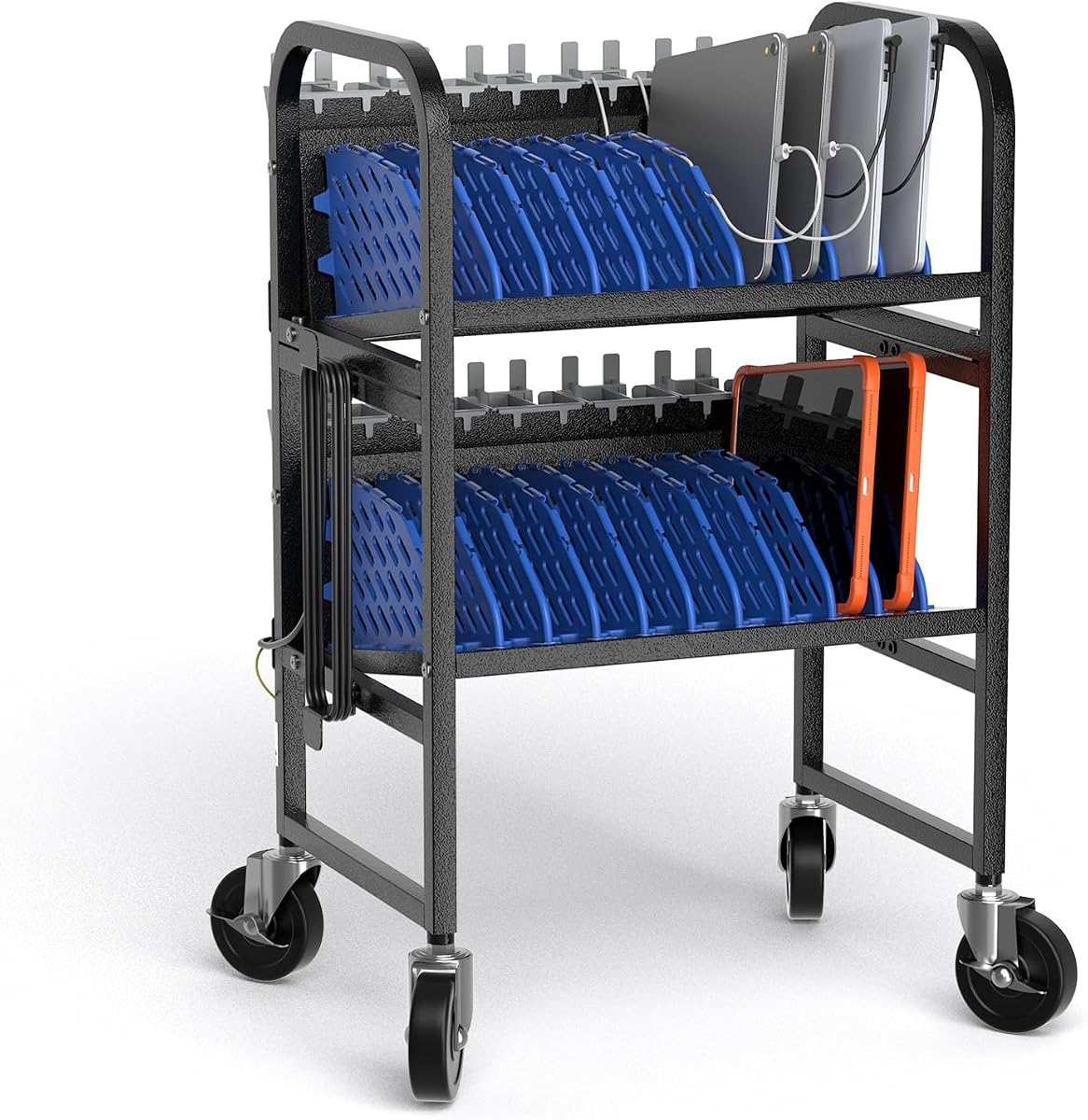
This mobile cart supports up to twenty devices with a robust steel frame and locking casters for easy transport between rooms. Its 4.8 rating highlights excellent performance in high-traffic environments like schools and hospitals where reliable and safe device management is vital.
We may earn a commission when you buy through this link, at no additional cost to you.
Adjustable dividers accommodate various device sizes, including large Chromebooks and tablets. The open-frame design improves airflow to prevent overheating, and smart cable management keeps cords neat. This ensures devices stay secure and organized while you move them as needed.
Though it requires assembly and comes at a premium price, its durability and mobility justify the investment. The locking casters provide stability, and the heavy-duty build withstands daily wear. It is a professional solution for dynamic learning or work spaces.
Ideal for institutions needing to move devices regularly, this cart offers ultimate convenience and protection. It keeps Chromebooks organized, charged, and safe, allowing staff to manage fleets efficiently without compromising on quality or device safety during transport.
Locking casters allow easy movement between rooms while keeping the cart stable when parked for charging.
Adjustable dividers let you reconfigure slots to fit different laptop or tablet sizes as your device fleet evolves.
We may earn a commission when you buy through this link, at no additional cost to you.
This station supports ten devices with a compact design that fits well on desks or tables in busy environments. With a 4.7 rating, it provides reliable organization and charging, featuring an open structure that prevents overheating while keeping devices accessible for quick retrieval.
We may earn a commission when you buy through this link, at no additional cost to you.
Cable clips on the back help manage cords, reducing tangles, while the lower tray stores chargers and accessories. The industrial steel frame ensures it lasts even with daily use, and it includes a ten-outlet power strip for safe simultaneous charging.
While not mobile, its stability and build quality make it a strong fixed option. It balances size with functionality, keeping devices neat and safe. However, it may need careful placement to avoid overcrowding in smaller spaces.
Best for offices or clinics needing a fixed, tidy solution, this station delivers consistent performance. It ensures Chromebooks are charged and organized safely, helping teams stay efficient without worrying about device safety or power management issues.
The open-frame design promotes airflow to keep devices cool during charging, preventing heat-related damage over time.
Built-in clips on the back keep cords organized, reducing tangles and improving access to ports when needed.
We may earn a commission when you buy through this link, at no additional cost to you.
Known for quality, this Belkin station charges ten devices with built-in surge protection and wide-angle slots for various Chromebooks. With a 4.3 rating, it is a trusted choice for K-12 classrooms needing reliable safety features and secure device storage without clutter.
We may earn a commission when you buy through this link, at no additional cost to you.
The design allows easy access and wireless syncing, and it can be mounted to desks for added stability. Wide slots fit devices even in cases, making it versatile for protected hardware. The small footprint helps save space on busy tables.
While slightly pricier than some options, the brand's reliability and safety features are valuable. It is portable and fits standard carts, so you can move it between rooms. Setup is simple, though the design feels traditional compared to modern open frames.
Ideal for schools valuing brand trust and safety, this station ensures devices stay charged and protected. It is a solid investment for environments where device security and electrical safety are top priorities for student and teacher use.
Automatic surge protection guards against voltage spikes, protecting your devices from potential electrical damage.
You can mount the unit to tables or carts for fixed stability or move it freely as needed.
We may earn a commission when you buy through this link, at no additional cost to you.
This station delivers fast charging for ten devices with mixed USB-C and USB-A ports, perfect for modern Chromebooks and phones. Its 4.5 rating reflects strong performance, using GaN technology to keep charging efficient and safe without needing bulky wall adapters.
We may earn a commission when you buy through this link, at no additional cost to you.
The one-piece slots hold devices securely without fragile dividers. It includes eight short cables to tidy your desk. Non-slip rubber pads keep the unit stable, protecting your surface from scratches. This compact design fits well in homes or small offices.
Since it lacks an AC power strip, it relies on USB power. This limits it to USB-C devices but simplifies setup. The included cables save time. It is a practical choice for budgets needing reliable and fast charging solutions.
Best for home or small office setups needing fast USB charging, this station ensures your Chromebooks stay powered efficiently. It keeps desks organized and charges devices quickly, making it a great budget-friendly choice for daily device management.
Advanced GaN technology delivers high speed charging while keeping the unit cool and energy efficient for daily use.
Rubber pads protect surfaces and keep the unit steady, preventing slides during cable connection or device access.
We may earn a commission when you buy through this link, at no additional cost to you.
This mobile cart supports ten devices with a simple, open design that prioritizes airflow and quick access. With a perfect five-star rating, it is praised for ease of setup and mobility, making it ideal for classrooms needing to move Chromebooks around efficiently.
We may earn a commission when you buy through this link, at no additional cost to you.
Locking wheels secure the cart in place when charging. Removable dividers allow you to adjust space for larger laptops. It has a bottom shelf for extra storage, keeping everything tidy. Tool-free assembly means you can start using it immediately.
Power strips are not included, so you must provide your own, but this keeps costs lower. The easy-clean surface simplifies maintenance. While basic, it performs well for organizing device fleets in active learning environments without extra complexity.
Best for mobile setups needing simplicity, this cart ensures devices are organized and ready to go. It is a practical choice for schools wanting an easy, effective way to manage Chromebooks and tablets without complicated tools or setup.
Smooth rolling casters let you move the cart easily, while locking brakes keep it stable during charging.
Wipe-clean surfaces mean you can quickly dust off the unit, saving time during busy classroom schedules.
We may earn a commission when you buy through this link, at no additional cost to you.
Selecting the right charging station depends on your environment, device count, and specific needs. This guide breaks down the critical factors to consider.
The number of devices you need to charge determines the slot count. Look for stations that accommodate your current fleet with room for growth. Consider the physical layout, such as open slots for airflow or enclosed slots for security. This ensures your devices fit properly without crowding.
Choose a capacity that matches your daily use to avoid overloading or unused space.
Check if the station includes a power strip with surge protection. This safeguards your devices from voltage spikes and ensures consistent power. Verify the number of outlets or USB ports to match your charging needs. Safety certifications like UL approval are vital for long-term use.
Prioritize stations with built-in surge protection to protect valuable hardware.
If you need to move devices between rooms, look for carts with rolling casters. Locking wheels are essential for stability during charging. Fixed desks save space but lack transport flexibility. Consider the weight and size to ensure it fits through doorways or elevators.
Select mobile carts for shared spaces and fixed desks for dedicated areas.
Cable clutter can cause safety hazards and frustration. Stations with clips, routing holes, or integrated trays keep cords organized. Look for models that come with or support short cables to reduce mess. Proper management makes daily access easier for students and staff.
Opt for stations with integrated cable management to maintain a tidy workspace.
Materials matter for longevity in high-traffic areas. Steel frames and flame-retardant plastics withstand daily use better than cheap plastics. Check for padded shelves to prevent scratches on Chromebooks. A sturdy build ensures the station lasts years without deforming or breaking.
Choose durable materials to ensure the station withstands daily handling.
Overheating can damage batteries and reduce device lifespan. Open-frame designs promote natural airflow, keeping devices cool during long sessions. Avoid enclosed designs without ventilation for heavy charging loads. Proper heat management ensures safe and efficient charging for all devices.
Prefer open designs to keep devices cool during extended charging periods.
Complex assembly can delay deployment. Look for models with tool-free or quick setup instructions. Features like adjustable dividers allow easy adaptation to different device sizes. User-friendly designs save time and reduce frustration for admins managing the equipment.
Choose stations with simple setup to save time and effort.
Reputable brands often offer better support and reliability. Check for warranties that cover parts or electrical safety issues. Reading reviews helps gauge real-world performance beyond specs. Trustworthy brands give peace of mind for long-term investments in classroom or office gear.
Check warranty details and brand reviews to ensure reliable service.
Place the charging station on a stable, flat surface near a power outlet. Ensure there is enough space around it for airflow and access. Plug in the power strip carefully to avoid tripping hazards.
Insert Chromebooks into the slots, ensuring cables connect securely before closing any dividers. Keep cables organized using built-in clips to prevent tangling. Avoid forcing devices into slots to prevent damage to hinges.
Regularly wipe the station with a damp cloth to remove dust and maintain cleanliness. Check for signs of wear or overheating. Store unused accessories on lower shelves to keep the main area tidy and safe.
Use stations with built-in cable clips or routing holes to keep cords secure. Short, labeled cables reduce tangles and make it easy to identify connections. Regularly tidy up loose wires to prevent safety hazards and maintain order.
Yes, a surge protector is essential to safeguard devices from voltage spikes. Look for stations with built-in surge protection to simplify your setup. This ensures safe charging and extends the lifespan of your expensive hardware.
Most modern stations have wide slots to fit various sizes. Check the slot dimensions against your device thickness and width. Adjustable dividers can help accommodate mixed fleets of different Chromebook models.
Choose a station with an open-frame design for better airflow. Avoid stacking devices or covering vents. Monitor charging times and ensure the station is in a well-ventilated area to keep devices cool and safe.
Yes, modern devices manage their own power, but a surge-protected station is wise. Ensure the charging area is free of clutter to reduce risks. Most stations have safety features to prevent overcharging if used correctly.
Mobile carts allow you to transport devices between rooms easily, ideal for shared classrooms. They offer flexibility but may cost more. Fixed stations save space and are better for permanent setups where devices stay put.
Our top picks offer a range of solutions from budget-friendly port hubs to robust mobile carts. Each model balances capacity, safety, and durability to meet different classroom or office needs effectively.
When selecting, prioritize safety features and ease of use to ensure long-term satisfaction. Consider how you move and access devices to choose between fixed and mobile options wisely.
Remember to verify current availability and details on the product pages before purchasing. Prices and stock may vary, so acting quickly ensures you get the best value for your team.