
4K Vlogging Camera
4.4Editor score
4K video recording
330-degree lens
WiFi connectivity
Includes accessories kit
This guide compares the top cameras for social media content creators offering detailed specs pros and cons to help you choose the best device for your videos
Creating engaging content requires reliable tools that capture high-quality visuals effortlessly. Whether you are filming travel vlogs or daily updates, the right camera ensures your audience stays engaged with clear and stable footage every time.
We evaluated ten top-rated devices based on resolution, stabilization, portability, and ease of use. Our analysis covers everything from budget-friendly options to premium creator kits designed for YouTube, TikTok, and Instagram platforms specifically.
Each pick highlights unique strengths like rotating screens or built-in microphones to suit different needs. Please note that prices fluctuate frequently so check current listings before making your final decision for your creative workflow today.
4.4Editor score

4.5Editor score
5.0Editor score
The following table provides a side-by-side overview of key specifications and features for each camera model to help you quickly identify the right fit for your content creation needs.


The DJI Osmo Pocket 3 stands out as the top pick for serious creators seeking professional quality in a compact form. Its 1-inch sensor delivers stunning clarity and low-light performance that rivals much larger cameras.
We may earn a commission when you buy through this link, at no additional cost to you.
Key strengths include advanced stabilization that keeps footage smooth during movement and a rotating screen that adapts to vertical social media formats effortlessly. ActiveTrack ensures you stay in focus even when moving freely.
Trade-offs involve the premium price and limited optical zoom but these are acceptable given the superior image quality and portability. Most users find the value justified for high-end content production.
This camera is ideal for travel vloggers and Instagram creators who need reliable gear. We recommend it for anyone prioritizing image quality and ease of use in daily filming routines.
The 1-inch CMOS sensor captures rich colors and details even in challenging lighting conditions for professional results.
The rotating screen makes it easy to switch between landscape and portrait modes for different social platforms.
We may earn a commission when you buy through this link, at no additional cost to you.
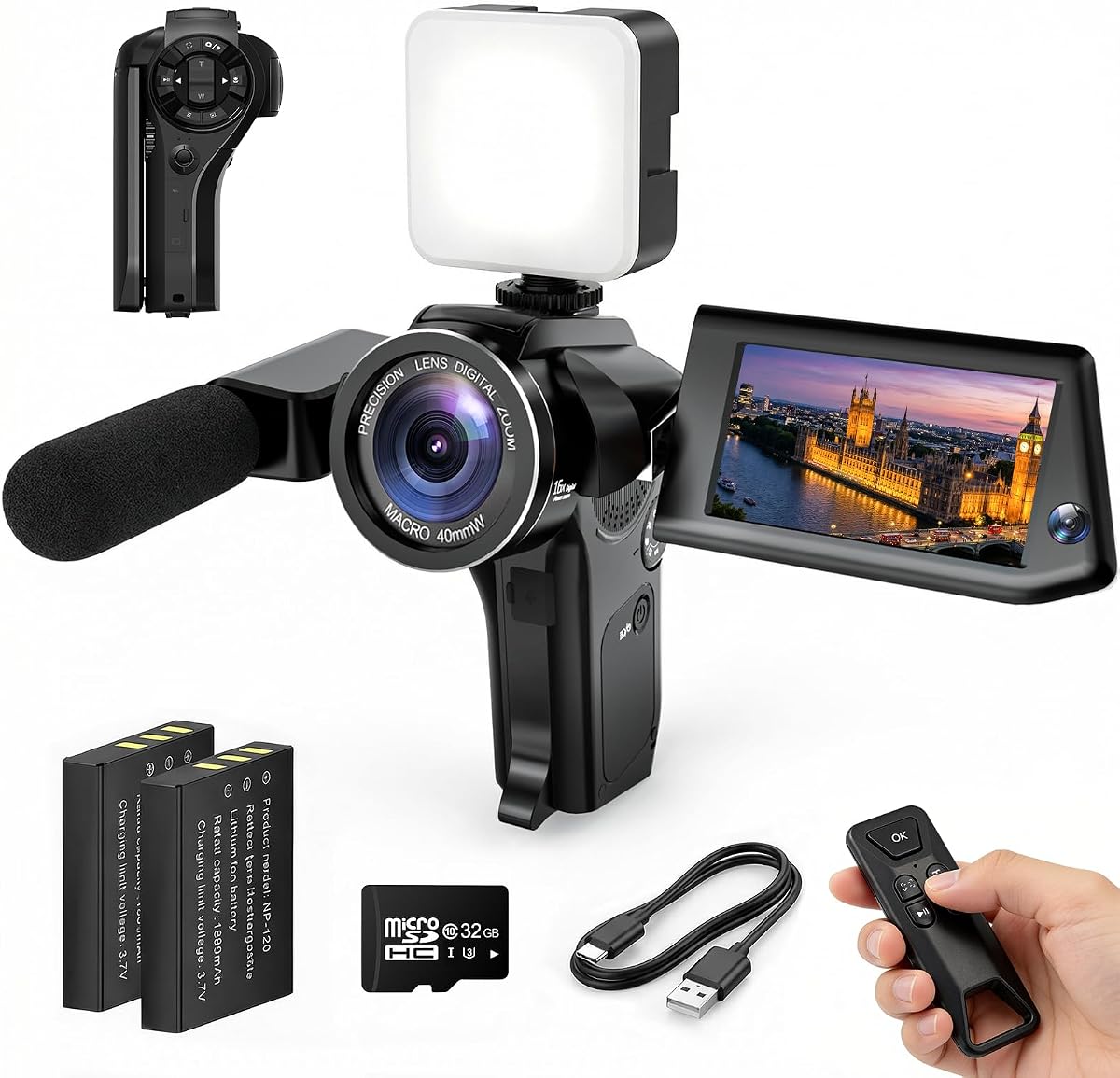
This affordable 4K camera offers an excellent starting point for beginners entering the world of social media content creation. It delivers clear footage without requiring complex settings or expensive gear purchases.
We may earn a commission when you buy through this link, at no additional cost to you.
Its standout feature is the rotating lens that simplifies solo vlogging and framing selfies without a mirror. The included accessories like tripod and SD card make it ready to use right out of the box.
While video bitrate is lower than premium models and build quality is basic, these limitations are reasonable for the price. It serves well for casual updates and short-form video content.
We recommend this for students or new creators needing a functional kit. It provides essential features to start producing content immediately while keeping costs low.
Comes with a tripod and card so you can start filming your videos right away.
The rotating lens helps you frame yourself accurately without needing a second person.
We may earn a commission when you buy through this link, at no additional cost to you.
This camera introduces a unique Picture-in-Picture mode that captures both your subject and your reaction simultaneously for richer storytelling. It is designed to create more engaging and personal content for social media.
We may earn a commission when you buy through this link, at no additional cost to you.
The standout benefit is the ability to show viewer reactions while filming events or tutorials without needing two devices. The flip screen and WiFi support ensure easy framing and sharing.
Some users might find the interface slightly complex and the weight heavier than pocket cams but these are minor issues for the creative value. It excels at capturing genuine moments.
Ideal for family vloggers and reviewers wanting to show reactions. This tool helps build stronger connections with audiences by making content feel more personal and interactive.
Record the scene and your reaction at the same time for authentic storytelling.
WiFi connectivity allows you to transfer files quickly to your phone for editing.
We may earn a commission when you buy through this link, at no additional cost to you.
The FlyFrost 8K camera promises high-resolution visuals and comes with essential accessories like a microphone and remote. It is a robust option for creators needing specific features like night vision.
We may earn a commission when you buy through this link, at no additional cost to you.
Its main strength lies in offering 8K recording and IR night vision at an accessible price point. The touchscreen interface simplifies navigation through settings and playback options.
However, actual video bitrate may not match true professional 8K performance and menus can be deep. Still it is a versatile tool for varied lighting conditions.
Best for creators needing night shooting or a microphone included. It balances features and affordability for general vlogging needs.
Includes IR night vision for recording in low light environments.
Comes with an external microphone to improve audio quality immediately.
We may earn a commission when you buy through this link, at no additional cost to you.
This camera focuses heavily on still image quality with 96MP resolution and HDR imaging support. It is excellent for creators who post high-resolution photos alongside their video content.
We may earn a commission when you buy through this link, at no additional cost to you.
A flip screen makes framing selfies easy while the included SD card gets you started immediately. The 20x zoom is useful for distant subjects.
Video performance is good but not top-tier and battery life is moderate. For photo-centric social media accounts this is a strong contender.
We suggest this for Instagram users prioritizing image quality. It combines photography tools with basic vlogging features effectively.
Capture detailed 96MP images that look great on social media feeds.
Includes an SD card so you can begin recording right away.
We may earn a commission when you buy through this link, at no additional cost to you.
The Mini Camcorder is designed for maximum portability and ease of use. It fits easily in a pocket and has a long battery life for spontaneous recording.
We may earn a commission when you buy through this link, at no additional cost to you.
It offers simple one-button recording and a rotating lens for self-recording. It is ideal for casual documentation without complex settings.
Image quality is basic and lacks advanced video features like 4K or stabilization. It is purely for capturing simple moments.
This is a good choice for travel diaries or quick checks. Use it when convenience and battery life are your top priorities.
Fits in your pocket for easy carrying on daily outings.
Battery lasts up to seven hours for extended recording sessions.
We may earn a commission when you buy through this link, at no additional cost to you.
This camera is similar to the first pick but offers a different kit configuration. It focuses on travel and daily use with essential accessories.
We may earn a commission when you buy through this link, at no additional cost to you.
The rotating lens allows for easy solo vlogging and framing. It is lightweight and fits well in bags for trips.
Performance is solid for standard vlogs but audio is average. It is a good balance of features and portability.
We recommend this for travelers needing a quick setup. It supports spontaneous recording well with included gear.
Includes a travel bag to keep your camera safe during trips.
Plug and play design helps you start filming quickly.
We may earn a commission when you buy through this link, at no additional cost to you.
This kit upgrades smartphone filming with essential accessories like a wireless mic and RGB lighting. It is perfect for creators who already use their phones for content.
We may earn a commission when you buy through this link, at no additional cost to you.
It provides stable tripods and a fill light to improve video quality significantly. The mic ensures clear audio for interviews and tutorials.
Since it depends on a phone camera it may lack sensor size advantages of dedicated cams. However, it is great for budget upgrades.
Ideal for TikTok creators using mobile devices. This kit transforms phone footage into professional-looking content easily.
Wireless microphone delivers clear sound without background noise.
RGB fill light helps balance exposure in dark rooms.
We may earn a commission when you buy through this link, at no additional cost to you.
This kit features auto face tracking and gesture control to keep you centered while recording without holding a phone. It is a smart solution for hands-free vlogging.
We may earn a commission when you buy through this link, at no additional cost to you.
Dual mics ensure good audio quality and the height allows for varied angles. It simplifies the setup for solo creators.
Tracking works best with consistent lighting and clear gestures. It depends on your phone camera which limits sensor performance.
Great for tutorials and talk videos. We suggest this for creators needing automatic framing support.
Face tracking keeps you centered so you can move freely.
Includes lights to improve your visibility on camera.
We may earn a commission when you buy through this link, at no additional cost to you.
This webcam is designed for desktop streaming and meetings with reliable performance. It is the best choice for fixed studio setups or online presentations.
We may earn a commission when you buy through this link, at no additional cost to you.
Auto-light balance ensures you look good even in dim rooms. Plug-and-play setup means you can start broadcasting immediately.
It lacks mobility and zoom but is consistent for home studios. Privacy shutter is a secure feature.
We recommend this for Twitch streamers or educators. It offers reliability and ease of use.
Plug it in and start streaming without installing drivers.
Integrated privacy shutter protects your privacy when not streaming.
We may earn a commission when you buy through this link, at no additional cost to you.
Choosing the right camera involves balancing features with your specific content style. We have broken down the essential factors to consider before purchasing.
Resolution affects clarity and detail. Higher resolutions like 4K allow for cropping and flexibility in editing. For most social platforms, 1080p is sufficient but 4K future-proofs your content.
Prioritize 4K if you plan to edit heavily or want sharper details. Check sensor size for low-light performance as well.
Portability is crucial for creators on the go. Cameras that fit in a pocket or are lightweight are easier to carry everywhere. This encourages more spontaneous recording.
Choose a compact design if you travel often. A flip screen helps you frame yourself while carrying minimal gear.
Stabilization prevents shaky footage that can distract viewers. Optical or mechanical stabilization provides smoother movement compared to digital options.
Look for stabilization if you film while walking. It ensures professional-looking results without a gimbal.
Good audio is as important as video. Some cameras have built-in microphones but external inputs offer better sound. Check for microphone jacks or wireless support.
Invest in a model that supports external mics. Clear audio keeps viewers engaged in your content.
Battery life determines how long you can film on a single charge. Long recording sessions require efficient power management. Some models support charging while filming which is useful.
Check battery specs and consider extra batteries. This avoids interruptions during your creative process.
Connectivity allows quick transfer of files to your phone for editing. WiFi and Bluetooth make this seamless. Some cameras have dedicated apps for remote control.
Ensure the camera has reliable WiFi. This simplifies the workflow from filming to posting.
Simple interfaces help creators focus on content rather than settings. Auto modes and intuitive menus are beneficial for beginners. Touchscreens simplify navigation.
Look for user-friendly designs. You should be able to start recording without consulting a manual.
Accessories like tripods, cards, and bags add value. Kits often save money compared to buying separately. Check what is included in the box.
Prioritize cameras that come with essentials. This reduces upfront costs and speeds up setup.
Start by familiarizing yourself with the basic buttons and menu settings to ensure smooth operation. Take test shots to understand how lighting affects your footage before shooting critical content.
Always clean the lens with a microfiber cloth before recording to avoid smudges that reduce clarity. Store the camera in a protective case when not in use to prevent accidental scratches.
Update the firmware regularly to access new features and improve performance. Recharge batteries fully after each use to maintain their longevity and ensure readiness for future shoots.
Most social media platforms compress video heavily so 1080p is often sufficient. However, 4K allows for cropping and flexibility. We recommend 4K if you want to future-proof your footage for better quality after compression.
Yes, modern smartphones have excellent cameras for social media. They are portable and easy to use. However, dedicated cameras offer better audio and stabilization. Use a smartphone for convenience or a camera for higher quality.
Stabilization and audio are critical for vlogging. Shaky footage and poor audio can ruin a video. Look for cameras with mechanical stabilization or built-in support for external microphones.
A flip screen is highly recommended for solo creators. It allows you to frame yourself accurately without a mirror. This feature simplifies self-recording and saves time during setup.
Many budget and mid-range cameras come with accessories like cards or tripods. Premium models may sell extras separately. Check the product description carefully to confirm what is included.
Ideally, a battery should last at least two hours of continuous recording. Longer is better for travel. Check if the camera supports charging while filming for extended use sessions.
We explored ten top options ranging from portable budget cameras to premium creator kits. Each device offers unique strengths for different content styles and budget requirements.
Prioritize features like stabilization and audio quality to ensure professional results. The right tool can significantly improve your workflow and viewer engagement levels.
Prices and availability change frequently so verify details before purchasing. We hope this guide helps you select a camera that empowers your creativity effectively.