
ASRock DeskMeet X300 Mini PC Barebone Kit
4.8Editor score
Supports AMD AM4 Ryzen processors
Includes 500W 80+ Bronze PSU
Features PCIe 3.0 x16 slot
This guide compares the top 10 barebone gaming PCs, evaluating performance, expandability, cooling, and ports to help you build a custom gaming desktop today.
Barebone gaming PCs offer a unique blend of compact design and customizable power. They allow enthusiasts to select specific components like CPU, RAM, and storage to tailor performance to their needs without the bulk of traditional towers.
We compared ten leading barebone kits based on processor support, expansion slots, cooling efficiency, and connectivity options. Our analysis focuses on real-world gaming capabilities and future-proofing potential for various user scenarios.
Each pick highlights specific strengths such as eGPU support, dual display outputs, or ultra-compact footprints. Please note that availability and pricing may fluctuate frequently on retailer platforms, so verify current stock before purchasing.
4.8Editor score

4.0Editor score

4.5Editor score
This table provides a quick side-by-side look at key specifications for all ten barebone gaming PC kits selected for this review to help you compare features at a glance.


The ASRock DeskMeet X300 stands out as a highly affordable entry into barebone gaming builds. With a rating of 4.8, it offers solid support for AMD Ryzen 5000 and older series processors, making it ideal for budget-conscious gamers who already have parts.
We may earn a commission when you buy through this link, at no additional cost to you.
This kit includes a 500W power supply and supports up to 128GB of DDR4 memory. The PCIe 3.0 x16 slot allows for discrete graphics cards, while dual M.2 slots provide fast storage options. Connectivity is robust with USB 3.2 Gen2 Type-C and multiple USB-A ports.
While the PCIe 3.0 interface might limit throughput for the newest high-end GPUs, it remains fully capable for mid-range cards. The lack of DDR5 support is another trade-off, but given the price point and included PSU, it delivers strong value for compact builds.
This system is best suited for users building a cost-effective home theater PC or entry-level gaming rig. If you prioritize affordability and a pre-included PSU over bleeding-edge connectivity, this DeskMeet X300 kit is a reliable choice.
Unlike many barebone kits requiring separate power purchases, this kit includes a 500W 80+ Bronze PSU for convenience.
The 8-liter chassis fits easily on desks or shelves while still supporting full-size desktop components including graphics cards.
We may earn a commission when you buy through this link, at no additional cost to you.
The AOOSTAR MACO delivers impressive performance in a compact gaming desktop. Rated 4.0, it features the Ryzen 7 PRO 8845HS and Radeon 780M graphics, capable of handling AAA gaming and heavy multitasking without an external GPU.
We may earn a commission when you buy through this link, at no additional cost to you.
Key strengths include the OCuLink port which enables external GPU connections with minimal latency compared to USB4. Dual USB4 ports support 8K display output and 100W power delivery. The chassis uses recycled aluminum for durability and environmental sustainability.
As a barebone kit, it requires users to purchase RAM and SSD separately. While this adds to initial cost, it allows customization. The fingerprint unlock feature is convenient but may require driver installation to function correctly on your preferred OS.
This Mini is recommended for gamers seeking a balance of integrated performance and external expandability. Its robust connectivity and eco-friendly design make it a top choice for modern desktop builds that prioritize future-proofing.
The OCuLink port offers lower latency than USB4 for connecting external GPUs, preserving maximum performance for gaming workloads.
With dual USB4 ports and 2.5G LAN, this unit supports fast data transfer and stable wired connections for competitive gaming.
We may earn a commission when you buy through this link, at no additional cost to you.
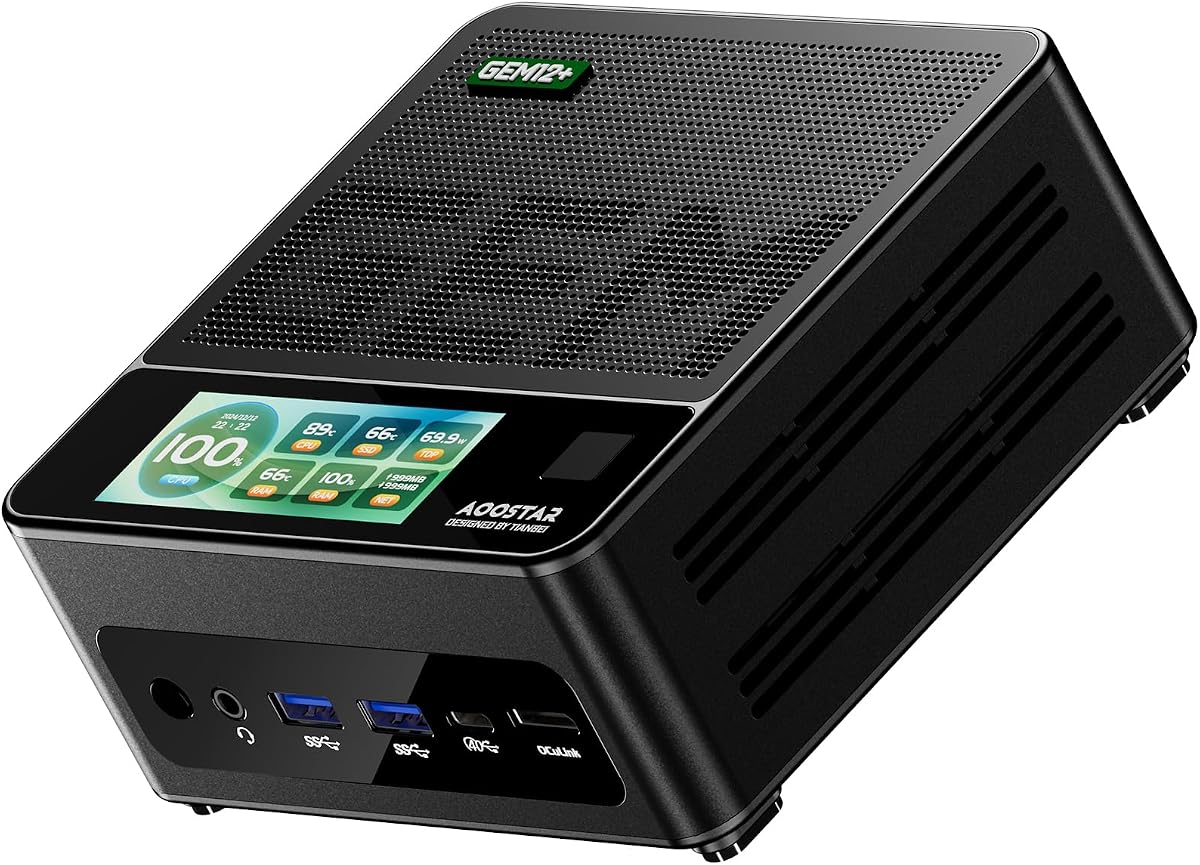
The AOOSTAR GEM12+ represents a premium option for barebone gaming PCs. With a 4.5 rating, it offers a powerful Ryzen 7 PRO 8845HS processor and dedicated vapor chamber cooling to sustain performance under load.
We may earn a commission when you buy through this link, at no additional cost to you.
Its standout feature is the OCuLink port on an independent channel, ensuring external GPUs do not compete with internal bandwidth. The system supports four 4K displays via USB4 and DP1.4, making it excellent for multi-monitor gaming or creative work.
Three BIOS modes allow users to adjust power and noise between silent, balanced, and performance settings. However, note that the OCuLink port requires a power-off to connect or disconnect devices, which limits convenience compared to hot-swappable USB options.
Buyers seeking top-tier cooling and expandability will find this system compelling. It is ideal for users planning to add high-end eGPUs or multi-screen setups, provided they accept the barebone nature and connection protocols.
The vapor chamber cooling system effectively dissipates heat to maintain low temperatures even during prolonged high load usage.
The OCuLink port operates on an independent channel without occupying M.2 slots, preserving internal storage capacity.
We may earn a commission when you buy through this link, at no additional cost to you.
The GEM12+ PRO builds on the previous model with a focus on security and customization. Rated 4.1, it retains the powerful Ryzen 7 PRO 8845HS CPU and OCuLink port but adds built-in fingerprint recognition for quick access.
We may earn a commission when you buy through this link, at no additional cost to you.
Key strengths include customizable built-in display software for monitoring system stats and setting backgrounds. The vapor chamber cooling ensures stable performance during gaming. Dual DDR5 slots allow up to 128GB RAM which is faster than standard DDR4 options.
This unit shares the barebone limitation requiring separate RAM and SSD purchases. While the fingerprint unlock is convenient, it is an enterprise-grade feature that may require specific driver support depending on your chosen operating system installation.
Security-conscious users or small office setups will appreciate the fingerprint feature. Combined with robust gaming specs, this model suits those who want secure access alongside high-performance capabilities in a compact form.
Built-in fingerprint recognition simplifies login processes without complex passwords for quicker and safer system access.
Dedicated software allows real-time CPU GPU and RAM monitoring along with personalized background images for better visuals.
We may earn a commission when you buy through this link, at no additional cost to you.
The ASRock DeskMeet B760 Series offers a robust Intel-based option for barebone gaming. With a perfect 5.0 rating, it supports 14th, 13th, and 12th Gen Intel Core processors making it future-proof for productivity and gaming.
We may earn a commission when you buy through this link, at no additional cost to you.
It features a PCIe 4.0 x16 slot that supports graphics cards up to 20cm. The included 500W power supply simplifies the build process. Four DDR4 slots support up to 128GB memory while triple display outputs allow flexible multi-monitor configurations.
This kit is ideal for users who prefer Intel's ecosystem or need specific CPU features. The limitation of DDR4 might be a downside for new builds aiming for maximum bandwidth, but the PCIe 4.0 slot ensures good GPU performance.
Buyers should ensure their chosen CPU cooler fits within the 54mm height constraint. Overall, this is a reliable choice for those seeking a complete motherboard and PSU package for a compact desktop.
Designed for 14th, 13th, and 12th Gen Intel Core processors, providing a modern foundation for gaming and productivity.
Comes with a built-in 500W power supply peak 550W simplifying the building process and ensuring reliable power delivery.
We may earn a commission when you buy through this link, at no additional cost to you.
This CyberPowerPC gaming PC offers a ready-to-use alternative for those preferring prebuilt systems. It comes with a Ryzen 5 5500 and Radeon RX 6500 XT, ready for gaming out of the box with Windows 11 Home preloaded.
We may earn a commission when you buy through this link, at no additional cost to you.
The unit includes a tempered side panel with RGB lighting and a keyboard and mouse set. Connectivity is standard with USB-A and LAN ports. The warranty covers one year of parts and labor with lifetime tech support available.
Compared to barebone kits, this model has limited upgrade potential due to case constraints. The 8GB RAM might need upgrading for heavier games. However, it offers significant convenience for users who want immediate usability.
This PC is best for users who want a complete setup without technical assembly. If you prioritize immediate gameplay and support over customization, this option provides a straightforward entry into PC gaming.
The system comes pre-assembled with Windows 11 Home and gaming peripherals allowing immediate use upon unboxing.
Includes one year of warranty coverage and free lifetime tech support for peace of mind after purchase.
We may earn a commission when you buy through this link, at no additional cost to you.
The BRENUC NUC 11 Extreme offers exceptional raw power with an Intel Core i9-11900KB processor. Rated 5.0, it supports up to 12-inch discrete graphics cards making it rare for mini desktops to accommodate large GPU coolers.
We may earn a commission when you buy through this link, at no additional cost to you.
Connectivity is robust with dual Thunderbolt 4 ports and high-speed LAN. It supports up to three 4K displays and includes SD card readers. The kit is a barebone requiring installation of RAM and SSD by the user.
While the CPU is powerful, it belongs to an older generation. Thunderbolt 4 remains useful for external storage and docking however users might prefer newer platforms for long-term software support and efficiency.
This model suits users who need high compute power in a small form factor. If you can find it at a good price, it remains a capable option for specialized mini builds requiring large GPU compatibility.
Supports latest high-performance dual-slot graphics cards up to 12 inches long delivering incredible action and cooling room.
Includes two Thunderbolt 4 ports for high-speed data transfer and external display connectivity at 40Gbps speeds.
We may earn a commission when you buy through this link, at no additional cost to you.
The DESKMINI 310W is one of the smallest barebone kits available. With a 2-liter design, it saves significant desk space while supporting Intel 8th and 9th Gen processors via LGA1151 socket.
We may earn a commission when you buy through this link, at no additional cost to you.
It offers triple video outputs and dual M.2 slots for fast storage. The front USB 3.1 Type-C port is convenient for peripherals. VESA mount readiness allows it to be attached behind monitors for hidden setups.
This unit is limited by older CPU support and 64GB RAM capacity. For gaming, it requires a dedicated GPU via external or specific low profile options. It shines in home theater or office productivity roles where space is critical.
Recommend this for users needing extreme compactness. While not ideal for high-end gaming, its portability and VESA mount compatibility make it a unique solution for minimalist setups.
Compact 2-liter design with optional VESA mount kit for clean workspace setup that saves valuable desk real estate.
DisplayPort HDMI and D-Sub ports support up to two displays simultaneously for flexible productivity work configurations.
We may earn a commission when you buy through this link, at no additional cost to you.
The MINISFORUM X1 Lite-255 delivers efficient performance with the Ryzen 7 255 processor and Radeon 780M graphics. Rated 3.9, it supports DDR5 memory and dual M.2 PCIe 4.0 slots for fast data access.
We may earn a commission when you buy through this link, at no additional cost to you.
It features a full-blood USB4 port supporting 40Gbps transfer and PD 65-100W input. OCulink support is included though it requires an adapter plate. Triple display outputs allow flexible multi-screen setups for work or entertainment.
Cooling is managed through large ventilation openings and PCM phase-change materials for the CPU fan. Users should note the OCulink connection needs manual adapter installation which adds a step to setup.
This unit suits those needing modern connectivity like DDR5 and USB4 in a compact form. It is a strong candidate for productivity and light gaming if you value Wi-Fi 6e and USB charging features.
Equipped with a full-blood USB4 port allowing you to easily handle large files and complex projects at high speeds.
Chassis features large ventilation openings and PCM phase-change materials ensuring memory and SSD run at full speed.
We may earn a commission when you buy through this link, at no additional cost to you.
The ASRock DeskMini B760 series offers ultra-compact design with cutting-edge storage support. Rated 4.3, it features a Blazing M.2 slot for PCIe 5.0 NVMe SSDs delivering incredible transfer speeds for modern applications.
We may earn a commission when you buy through this link, at no additional cost to you.
It supports 14th 13th and 12th Gen Intel Core processors up to 65W TDP. Connectivity includes USB 3.2 Gen2x2 Type-C for fast data transfer. Triple display outputs ensure versatile workspace configurations for multiple monitors.
While it lacks a discrete GPU slot, its integrated graphics potential and storage speeds make it ideal for office or media centers. The DDR4 memory limitation is balanced by the high speed PCIe 5.0 storage capabilities.
This model is perfect for users prioritizing storage performance in a tiny footprint. If you need maximum data read/write speeds without the bulk of a full tower, this system is a compelling choice.
Features one Blazing M.2 slot for next-generation NVMe SSDs with incredible transfer speeds via PCIe Gen5 x4.
Includes USB 3.2 Gen2x2 Type-C and USB 3.2 Gen2 Type-C ports ensuring fast external device data transfer.
We may earn a commission when you buy through this link, at no additional cost to you.
Selecting the right barebone gaming PC involves evaluating several critical factors to ensure it meets your performance and space requirements.
Check which CPUs are supported by the motherboard socket. Most kits support either Intel LGA1700 or AMD AM4 sockets. Ensure the TDP matches the cooling solution to avoid thermal throttling.
Always verify CPU support lists before purchase to ensure compatibility with your preferred processor.
Newer systems support DDR5 for higher bandwidth while older kits use DDR4. Aim for at least 32GB of RAM for modern gaming and multitasking. More slots allow for easier future upgrades.
Prioritize kits that support dual-channel memory configurations for optimal performance.
Look for M.2 PCIe slots for fast SSDs. PCIe 4.0 and 5.0 slots are preferred for next-gen drives. Some units also include SATA ports for additional mass storage options.
Ensure the number of M.2 slots aligns with your storage needs and caching requirements.
Some kits support discrete GPUs via PCIe slots or external docks. For gaming without internal GPUs, check for OCuLink or Thunderbolt ports. These allow high-speed external GPU connections.
Verify physical clearance for internal GPUs if you plan to install a dedicated graphics card.
Assess USB counts and versions. USB4 or Thunderbolt ports offer fast data and display options. Multiple video outputs like HDMI 2.1 and DisplayPort are essential for multi-monitor setups.
Ensure the system has enough USB-A and Type-C ports for your peripherals.
Efficient cooling is vital for performance under load. Vapor chambers and large heat sinks help sustain high performance. Fans should be noise-efficient for home environments.
Check reviews for thermal performance under sustained loads to ensure stability.
Some kits include a PSU while others require separate purchase. Included units simplify assembly but check wattage limits. Ensure the PSU has necessary connectors for planned components.
Always verify the included wattage matches the power demands of your build.
Measure your available space for the chassis. Form factors range from 2 liters to 8 liters. VESA mount availability can help hide the device behind a monitor for cleaner setups.
Choose a size that balances component compatibility with your desk space constraints.
Install the CPU, RAM, and storage drives carefully following the motherboard manual. Align notches on connectors properly to avoid damage to pins or sockets. Secure all components firmly before powering on.
Keep the system in a well-ventilated area to prevent dust buildup. Regularly clean air vents and fans to maintain optimal cooling efficiency. Use compressed air to blow out accumulated dust from the interior.
Update BIOS and drivers frequently to ensure system stability. Use manufacturer tools to monitor temperatures and adjust fan speeds. Avoid placing the device near heat sources or direct sunlight for longevity.
A barebone gaming PC is a system that comes without CPU RAM storage and operating system. It includes the chassis motherboard and sometimes power supply. Users install all necessary components themselves to customize performance and cost.
Some barebone PCs feature OCuLink or Thunderbolt ports designed for external GPUs. Others may have internal PCIe slots for standard graphics cards. Check the product specs to confirm external GPU compatibility before buying.
Not all kits include a power supply. Some models like ASRock DeskMeet come with a PSU while others do not. Always review the package contents to determine if you need to buy a separate power unit.
Upgrading CPU depends on socket compatibility. If you stay within the same socket generation like AM4 or LGA1700 you can swap CPUs. However BIOS updates may be required for newer processor support.
Mini kits can handle high-end gaming if they support dedicated GPUs or high-power integrated graphics. Models with OCuLink or PCIe slots allow for discrete graphics which are essential for AAA titles and VR.
Most vendors provide a one to three year limited warranty on the hardware. Specific terms vary by manufacturer and retailer. Check the product page details to confirm warranty duration and service options.
The ASRock DeskMeet X300 AOOSTAR MACO and AOOSTAR GEM12+ lead our top picks for their distinct strengths in budget value balanced performance and premium expandability respectively. Each offers unique features catering to different gaming needs.
When making a decision prioritize the processor type and expansion options that fit your goals. Consider whether you need external GPU support or high-speed storage to future-proof your build effectively for next-gen games.
Always verify current availability and component compatibility before buying. Prices and stock change frequently so double-check the latest specs on retailer pages to ensure you get the exact model you need.