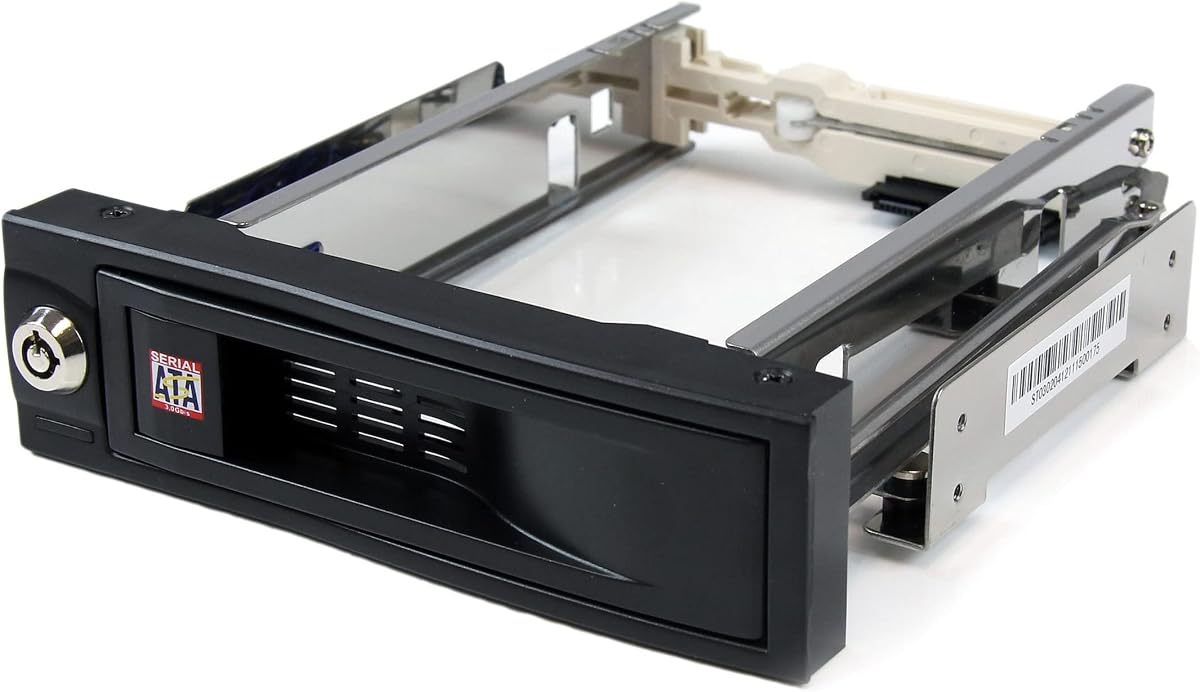
StarTech 3.5in Trayless
4.4Editor score
Trayless mobile rack
Lockable drive bay
Rubber shock absorbers
Hot swappable drive bays offer a convenient way to add storage without shutting down your system. They are essential for servers, workstations, and enthusiasts who need flexible storage solutions that maximize uptime and efficiency in critical environments.
We evaluated ten top-rated products based on compatibility, cooling, build quality, and ease of use. Our selection includes internal enclosures and external DAS units designed to meet diverse requirements from basic expansion to enterprise-level deployment scenarios.
Each pick highlights specific strengths such as trayless design, multi-bay support, or high-speed interfaces. Note that product availability and pricing can change frequently, so verify current details before making your final purchase decision for your setup.
4.4Editor score

5.0Editor score

4.2Editor score
As an Amazon Associate we earn from qualifying purchases.
The following table provides a side-by-side comparison of key specifications for all ten products featured in this guide to help you quickly identify the best fit for your storage expansion needs.


This ICY DOCK enclosure holds six 2.5 inch drives in a single 5.25 inch bay. It receives perfect ratings for its tool-less ExpressTray system and Active Power Technology that only powers installed drives.
We may earn a commission when you buy through this link, at no additional cost to you.
The ExpressTray system allows secure drive placement without screws using bottom holes for stability. Its three-speed fan control lets you balance cooling needs with noise levels while maintaining excellent thermal management.
One trade-off is the reliance on dual fans which may be noisy in quiet environments. Additionally, it accommodates 2.5 inch drives only which may limit users needing 3.5 inch drive support.
This unit is ideal for NAS builds or servers needing high density 2.5 inch storage. We recommend it for anyone prioritizing reliability and compact form factors without sacrificing drive capacity.
Dual upgradeable 40mm fans with three-speed control ensure drives stay cool even under heavy load.
Active Power Technology reduces energy waste by powering up only when a drive is detected.
We may earn a commission when you buy through this link, at no additional cost to you.
This StarTech backplane converts two 5.25 inch bays into a three-drive hot swap solution. It features individual ejection levers and key locks for secure drive management with enterprise-grade reliability.
We may earn a commission when you buy through this link, at no additional cost to you.
The vented aluminum enclosure provides superior heat dissipation which is critical for 3.5 inch hard drives. The speed control fan helps maintain optimal temperatures during intense workloads or extended operation periods.
A drawback is the limited three-bay capacity which may restrict future scalability. Also, setup requires careful cabling for power and data interfaces to ensure proper function.
Best for IT professionals managing small server setups this backplane delivers stability and security. It suits environments where quick drive changes and physical security are top priorities.
Individual key-lock designs for each bay prevent unauthorized removal and protect your data.
Solid aluminum construction actively dissipates heat to prevent drive overheating and failures.
We may earn a commission when you buy through this link, at no additional cost to you.
This Rosewill cage converts three 5.25 inch slots into four hot-swap bays for 3.5 or 2.5 inch drives. It supports SATA and SAS 6Gbps with a rear exhaust fan for efficient cooling.
We may earn a commission when you buy through this link, at no additional cost to you.
The single 120mm fan provides adequate airflow for typical home office setups. Its rugged steel ABS construction ensures years of reliable use even with frequent drive changes.
While cost-effective the single fan might struggle in densely packed cases. Also SAS support is limited to 6Gbps which may bottleneck high-performance drives.
This is a great entry-level option for users needing basic expansion without breaking the budget. It works well in workstations where moderate storage growth is required.
Converts three optical drive bays into four storage slots maximizing case real estate.
Single rear 120mm fan creates consistent exhaust airflow to protect your drives.
We may earn a commission when you buy through this link, at no additional cost to you.
This single bay rack offers the most affordable entry point for hot swap access. Its trayless design allows you to slide drives in and out without trays or tools.
We may earn a commission when you buy through this link, at no additional cost to you.
Internal rubber shock absorbers protect drives from vibration which extends their lifespan. The lockable bay adds a layer of security against accidental removal or theft.
The limitation is obviously the single drive capacity which won't suit bulk storage needs. It also lacks active cooling so airflow depends on your case fans.
Ideal for users needing occasional drive swapping for testing or backups. It delivers reliable performance for the price in simple desktop setups.
No tools needed to install or remove drives thanks to the innovative trayless design.
Rubber shock absorbers absorb vibrations to protect sensitive drive components.
We may earn a commission when you buy through this link, at no additional cost to you.
This RackChoice enclosure converts three 5.25 inch bays into five hot-swap slots. It supports mixed 2.5 or 3.5 inch drives with a metal body for durability.
We may earn a commission when you buy through this link, at no additional cost to you.
The 80mm fan helps dissipate heat from five drives in a tight space. It also includes five SATA cables for immediate setup upon arrival.
A significant drawback is the need for Molex power which may be outdated for some modern PSUs. User reviews note mixed reliability compared to other brands.
Best for budget-conscious builds needing many drive slots quickly. Ensure your power supply has Molex connectors before purchasing.
Holds up to five drives in just three standard bays for maximum flexibility.
Full metal body construction protects your drives from physical damage.
We may earn a commission when you buy through this link, at no additional cost to you.
This external DAS unit uses USB 3.2 Gen2 for speeds up to 10Gbps. It features tool-free trays with a unique push-lock design for secure drive installation.
We may earn a commission when you buy through this link, at no additional cost to you.
Sound-absorbing panels reduce noise significantly which is perfect for office environments. It supports up to 120TB total capacity with plug-and-play compatibility across major OS.
While premium the lack of internal RAID may not suit all enterprise needs. Also external-only design limits it to desktop or external server setups.
Perfect for creative professionals needing high-speed portable storage arrays. It delivers exceptional performance and quiet operation for professional workflows.
Specialized sound-absorbing panels reduce noise levels significantly for quiet environments.
Unique push-lock design secures drives automatically without tools for safety.
We may earn a commission when you buy through this link, at no additional cost to you.
This six-bay enclosure supports massive storage expansion with both USB-A and USB-C ports. Dual fans cool the drives efficiently and daisy chain support allows expansion up to 360TB.
We may earn a commission when you buy through this link, at no additional cost to you.
Aluminum-alloy construction maximizes heat dissipation which is vital for six drive operation. It supports up to 20TB per drive and offers plug-and-play simplicity.
Note that fan noise may be audible in quiet rooms at around 50dB. Also USB 3.0 limits speed compared to newer USB 3.2 standards.
Great for power users needing extensive local storage without NAS complexity. It balances capacity and performance for professional backup needs.
Daisy chain support allows linking multiple units for massive total storage capacity.
Two built-in fans actively cool your drives to prevent overheating during use.
We may earn a commission when you buy through this link, at no additional cost to you.
This upgraded version offers USB 3.2 Gen 2 for faster transfer speeds up to 10Gbps. It retains the six-bay design with dual fans for cooling and supports Thunderbolt connections.
We may earn a commission when you buy through this link, at no additional cost to you.
Files transfer significantly faster than USB 3.0 models reducing wait times during large data migrations. The aluminum body and dual fans manage heat effectively for six drives.
The higher cost is a factor for budget buyers. Also noise levels remain similar to the USB 3.0 model around 50dB.
Ideal for professionals needing maximum speed and capacity in a portable DAS. It is worth the investment for high-throughput workflows.
USB Type-C interface supports Thunderbolt 3 and 4 for versatile connectivity options.
Two fans ensure even cooling across all six drive bays.
We may earn a commission when you buy through this link, at no additional cost to you.
This Silverstone cage converts three bays into four hot-swap slots with full 12Gbps SAS support. It features independent LEDs for monitoring each drive status easily.
We may earn a commission when you buy through this link, at no additional cost to you.
The built-in fan provides adequate cooling for the four drives inside. Its trayless design allows quick access to drives without removing trays.
Users must ensure their system provides proper power connectors as cables may not be included. The lack of screw mounting may limit stability for heavy drives.
Best for enterprise workstations needing high-speed SAS drives. It offers professional features in a compact chassis.
Supports SAS 12Gbps drives for maximum data transfer speeds and reliability.
Independent LED indicators allow quick visual checks of each drive status.
We may earn a commission when you buy through this link, at no additional cost to you.
This Kingwin unit fits five 3.5 inch drives into three 5.25 inch bays. It features a durable aluminum shell for excellent heat dissipation and a trayless mobile rack design.
We may earn a commission when you buy through this link, at no additional cost to you.
Integrated power control ensures efficient energy use minimizing risks of data loss. The aluminum construction enhances durability and longevity during extended use.
Installation requires precise alignment which may challenge less experienced users. Pricing is higher compared to some competitors offering similar features.
Recommended for power users needing robust internal expansion with five bays. It balances durability with performance for demanding workstations.
Integrated power control features ensure safe and efficient drive operation.
Robust aluminum shell case enhances heat dissipation and durability.
We may earn a commission when you buy through this link, at no additional cost to you.
Choosing the right hot swappable drive bay involves considering capacity, interface speed, cooling, and build quality. This guide breaks down key factors to help you find the best option for your needs.
Determine how many drives you need and whether they are 2.5 inch or 3.5 inch. Internal bays typically fit into 5.25 inch slots while external enclosures vary from four to six bays. Some units support mixed sizes so check specifications carefully to avoid compatibility issues.
Choose a model that offers enough bays for current needs plus future expansion options.
Internal bays use SATA or SAS interfaces while external ones use USB or Thunderbolt. SATA 6Gbps is standard but SAS 12Gbps offers better performance for enterprise drives. External USB 3.2 Gen 2 supports up to 10Gbps transfer speeds ideal for large files.
Ensure the interface matches your system ports and performance requirements.
Multiple drives generate significant heat requiring active cooling. Look for units with built-in fans that have speed control. Aluminum enclosures also dissipate heat better than plastic. Consider noise levels if your system is in a quiet workspace.
Proper cooling extends drive lifespan and ensures stable operation.
Aluminum or steel enclosures are more durable than plastic and dissipate heat better. Check for features like rubber shock absorbers that protect drives from vibration. Solid construction ensures the unit withstands frequent drive changes.
Invest in robust materials for long-term reliability.
Tool-less designs allow quick drive installation without screws or tools. Trayless systems let drives slide directly into the backplane. Some units use ExpressTray systems combining both approaches for security and convenience.
Select a mounting style that fits your workflow needs.
Internal bays require power connectors from your PSU while external ones need USB or AC adapters. Some internal units use Molex power which may be outdated. Verify your power supply compatibility before purchasing.
Ensure the unit has the correct power inputs for your setup.
Enterprise options may include key locks to prevent unauthorized drive removal. Status LEDs help monitor drive activity and health at a glance. Look for units with individual LEDs per bay for easy identification.
These features add safety and manageability to your storage setup.
Check compatibility with your OS such as Windows Mac or Linux. Enterprise units often include warranty and technical support options. Customer reviews provide insight into real-world reliability and customer service.
Confirm support coverage and OS compatibility before buying.
To install drives properly power off the system before inserting internal units. Slide drives into the bays firmly ensuring connectors click into place. If your unit has screw holes use them for added stability during transport.
Regularly clean fans and vents using compressed air to prevent dust buildup. Dust accumulation can reduce cooling efficiency and lead to overheating issues over time.
Monitor drive temperatures using software tools. If you notice high heat consider increasing fan speeds or adding external cooling. Hot swapping should be done via OS safe removal before ejecting external drives.
A hot swappable drive bay allows you to insert or remove hard drives without shutting down your computer. This feature is vital for servers and workstations needing continuous uptime. You can add storage or replace failed drives instantly.
Internal bays typically require SATA power connectors from your existing PSU. If your unit uses Molex power ensure your supply has those adapters. External enclosures usually draw power through USB so no extra PSU is needed.
Trayless designs are faster for drive changes and simpler to clean. However trays add extra stability and can help align drives better. Both work well so choose based on your workflow preference.
Many enclosures support both 2.5 inch and 3.5 inch drives but always check specs. Some use adapter brackets while others have flexible mounting rails. Verify compatibility before buying to avoid fit issues.
Look for units with built-in fans that can be speed controlled. Aluminum enclosures help dissipate heat naturally. If possible ensure your PC case has good airflow to support additional internal fans.
SATA is common for consumer drives while SAS offers higher speeds and reliability for enterprise use. Most units support both but SAS may require a specific controller card. Check your motherboard compatibility.
Many external DAS units do not include hardware RAID. You must use software RAID in your OS. Some higher-end models include RAID controllers but check product descriptions carefully for this feature.
Hot swapping is safe when done correctly via the operating system. Always eject external drives properly before unplugging. For internal bays ensure your OS supports hot plug before removing drives while running.
We reviewed ten options ranging from single-bay racks to six-bay enclosures. The ICY DOCK MB326SP-1B leads with six 2.5 inch bays and Active Power Technology. For external needs the TERRAMASTER D4-320 offers premium speeds and quiet operation.
Consider your primary use case before buying. Workstations need reliability and cooling while home offices benefit from budget-friendly solutions. Ensure your power supply and motherboard support your chosen interface type.
Prices and availability change frequently. Check current deals before purchasing. These units provide flexible storage growth for many setups without replacing your entire system.