
Elderly Keyboard Large Print
4.5Editor score
High Contrast White Keys
Full Size Layout
Plug And Play
This guide compares the top 10 large print keyboards for seniors and low vision users, focusing on contrast, backlighting, and ergonomic design features.
Large print keyboards are essential tools for individuals with visual impairments or those who simply prefer larger text for comfortable typing. These devices feature oversized keys and high contrast colors to ensure every character is clearly visible. Finding the right model can significantly reduce eye strain and improve typing accuracy for users of all ages.
We evaluated ten top-rated large print keyboards based on key visibility, build quality, and ease of use. Our comparison considers factors like backlight options, ergonomic designs, and compatibility across various operating systems. Each product was assessed for its ability to provide a seamless typing experience for seniors and low vision individuals.
Each selection in this guide highlights unique features tailored to specific user needs, from spill resistance to adjustable lighting. We have included detailed reviews and a comprehensive buying guide to help you make an informed decision. Please note that product prices and availability may change over time, so check current listings before purchasing.
4.5Editor score

4.9Editor score

4.5Editor score
The following table provides a side by side comparison of all ten large print keyboards reviewed in this guide. It highlights the core specifications and unique features of each model to help you quickly identify the best fit for your needs.


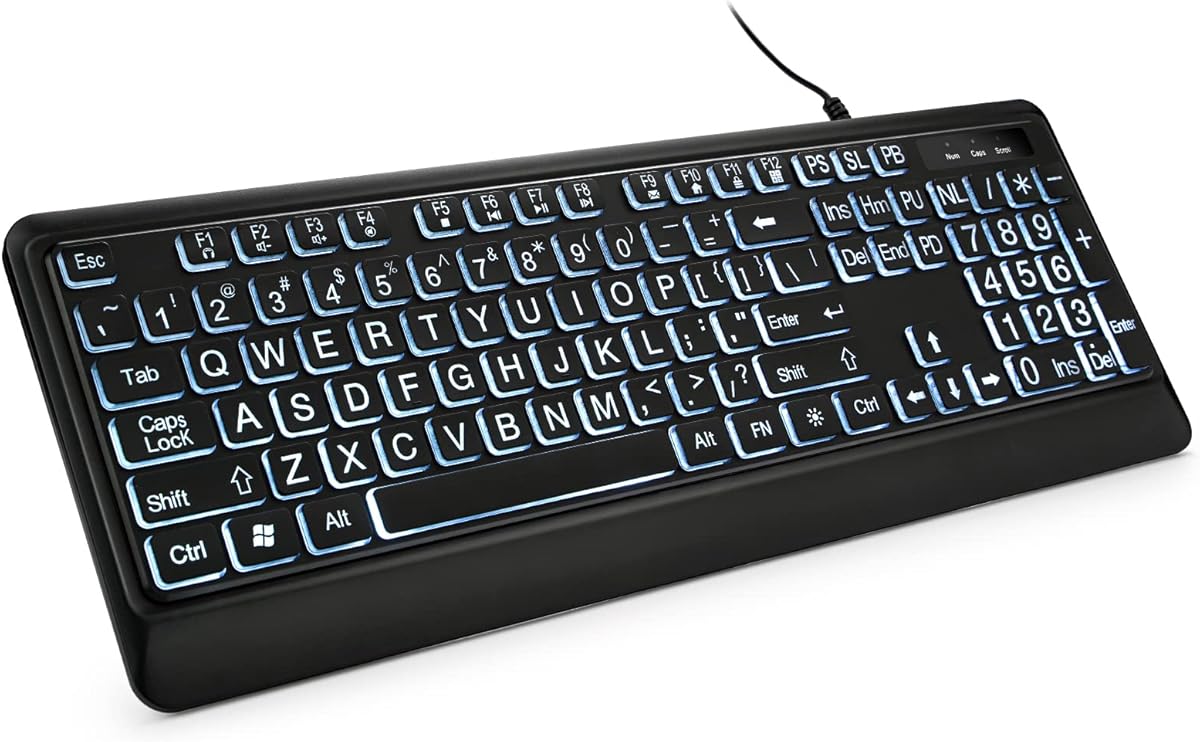


The TECURS Large Print Backlit Keyboard stands out as the top choice in our review due to its exceptional rating and versatile connectivity. It features oversized letters that are four times larger than standard keyboards, making it ideal for seniors and low-vision users who need clear visibility.
We may earn a commission when you buy through this link, at no additional cost to you.
This model offers a unique 2-in-1 connector supporting both USB and Type C, ensuring broad compatibility with modern and traditional devices. The backlit keys include seven adjustable brightness levels, allowing users to customize the light to suit their environment comfortably. The silent membrane structure reduces noise significantly, which is perfect for shared offices or quiet home environments.
While the multimedia keys may not function perfectly on Mac systems, the core typing experience remains robust. The spill-resistant design provides extra confidence for daily use, protecting the internal components from accidental liquid damage. These trade-offs are minimal compared to the overall functionality and durability offered.
Anyone looking for a reliable, modern large print keyboard with quiet operation should consider this model. It combines traditional large key benefits with contemporary connectivity options, making it a practical choice for diverse settings.
The dual USB Type C connector ensures this keyboard works with a wide range of devices without needing adapters.
Soft membrane keys minimize sound, creating a peaceful environment for users who prefer silent typing.
We may earn a commission when you buy through this link, at no additional cost to you.
The Elderly Keyboard Large Print offers a straightforward and affordable solution for those seeking high visibility typing. It features the largest print on keycaps available in a full-size keyboard, ensuring that users can easily see every character. The white key caps with black letters provide excellent contrast even in low-light conditions.
We may earn a commission when you buy through this link, at no additional cost to you.
Designed for simplicity, this keyboard requires no software installation and works across multiple Windows versions and OS X. The durable membrane switches provide a quiet and accurate typing experience, with a life cycle of 5 million keystrokes. The 1.35-meter cord offers convenient reach for desktop setups.
While it lacks backlighting, the high contrast design makes it suitable for well-lit rooms. The ABS material ensures wear resistance, making it a long-lasting choice for daily use. This is an ideal pick for users who prioritize clear text over lighting effects.
Users on a budget who need reliable visibility will find this keyboard meets their needs effectively. It is a practical choice for elderly individuals or beginners learning to type without unnecessary extra features.
White keys with black letters ensure clear visibility even in lower light environments.
Constructed from wear-resistant ABS material to withstand daily use at an affordable price.
We may earn a commission when you buy through this link, at no additional cost to you.
The X9 Large Print Backlit Computer Keyboard combines visibility with stylish lighting, making it a premium choice for modern workspaces. It features large bold print that makes every character easy to see, supported by a versatile backlight system. The backlight includes seven colors and four brightness levels, ensuring keys stay visible in any lighting condition.
We may earn a commission when you buy through this link, at no additional cost to you.
This keyboard is designed for productivity with a full-size 107-key layout that includes a number pad and 12 shortcut keys. These shortcuts facilitate faster navigation and smoother workflow for various projects. The USB wired connection ensures reliable performance without the need for charging or batteries.
The lighting is always on when connected to a computer, which may drain power if the device is not fully shut down. However, the ability to customize the visual experience adds significant value. The sleek design appeals to professionals and seniors alike who want both function and style.
Anyone seeking a keyboard that balances large print with customizable lighting will appreciate this model. It is a reliable tool for home or office use that stands out with its modern aesthetic and functional shortcuts.
Choose from seven colors and four brightness levels to match your environment and preference.
Includes 12 shortcut keys for quick access to common tasks and navigation.
We may earn a commission when you buy through this link, at no additional cost to you.
The BOOGIIO Large Print Computer Keyboard offers a unique yellow and black color scheme that provides high visibility for users with low vision. The letter characters are larger than usual and command keys feature a larger bolder font. This design is perfect for elderly users and special needs departments requiring clear input tools.
We may earn a commission when you buy through this link, at no additional cost to you.
It includes a spill-resistant feature that protects electronic components from accidental liquid damage. The membrane key switches offer a faster response and quieter experience with a 5 million keystroke life cycle. Ergonomic feet at the back can be unfolded to reduce hand fatigue during long typing sessions.
While the yellow color might not appeal to everyone, the functional benefits are significant. The keyboard requires no software installation and works on Windows and macOS systems. The company offers lifetime after-sales service, adding value to the purchase.
This keyboard is a strong choice for environments where spills are a risk. It provides robust protection and clear visibility for users who prioritize safety and comfort over lighting features.
Water-resistant function protects internal components from accidental spills during use.
Adjustable feet reduce hand fatigue for comfortable long-hour usage.
We may earn a commission when you buy through this link, at no additional cost to you.
This Large Print Backlit Keyboard features a foldable wrist rest that provides excellent support for users needing comfort during extended use. The oversized font design makes characters clear and easy to find, reducing typing errors for seniors. A white LED backlight ensures keys are visible in lower light environments.
We may earn a commission when you buy through this link, at no additional cost to you.
The package includes a protective cover that prevents water splashes and dust from entering the gaps. This feature extends the service life of the keys and keeps the keyboard clean. The quick rebound keys reduce hand fatigue, while 12 FN key combinations allow for faster access to multimedia functions.
The backlight cannot be turned off when the computer is in standby mode, which might consume power unnecessarily. However, the ergonomic benefits and included accessories make this a versatile option. It is designed for office work and general use with a focus on user comfort.
Anyone needing wrist support and a protective accessory will find this keyboard ideal. It combines large print visibility with ergonomic features to enhance the typing experience in shared workspaces.
Foldable tripod and wrist support reduce fatigue during long typing sessions.
Original cover keeps keys clean and protects against spills and dust.
We may earn a commission when you buy through this link, at no additional cost to you.
The KOPJIPPOM Large Print Keyboard features fonts that are four times larger than standard keyboards for excellent visibility. It offers a colorful backlit design with seven color options and three brightness levels. Users can choose from blue, green, red, and more to customize their desk setup to the next level.
We may earn a commission when you buy through this link, at no additional cost to you.
This keyboard is spill-proof, ensuring durability against accidental liquid spills. The foldable stand allows users to adjust the angle for comfort and reduce hand fatigue. It is fully compatible with Windows and Mac systems, requiring no drivers for easy plug-and-play setup.
The brightness levels allow adjustment for different environments, though the colors might not suit all tastes. The corded connection ensures stable performance without battery changes. This model is a fun and functional choice for users who want visual variety.
Anyone looking for a customizable backlight experience combined with large print will enjoy this keyboard. It provides comfort and reliability while adding a touch of personal style to the workspace.
Select from seven colors to personalize your keyboard to match your preferences.
Foldable stand adjusts the keyboard angle to reduce wrist strain.
We may earn a commission when you buy through this link, at no additional cost to you.
This KOPJIPPOM model offers a clean white illuminated LED design that ensures clear typing in lower light environments. The 4X larger fonts are clear and easy to find, making it ideal for visually impaired users. The spill-proof design adds durability against spills and water damage.
We may earn a commission when you buy through this link, at no additional cost to you.
The full-size ergonomic layout includes adjustable feet to reduce hand fatigue. It is compatible with a wide range of systems including Windows and Raspberry Pi. No drivers are required, making setup simple for desktops and laptops alike.
While the backlight is fixed to white, it provides consistent brightness for visibility. The keyboard is reliable for daily office or home use. The durable construction ensures it lasts through regular typing cycles.
Users seeking a simple, reliable backlight keyboard will find this option practical. It focuses on functionality and visibility without extra color options, ensuring a clean and effective tool.
Evenly distributed white LED light improves visibility in dim spaces.
Spill-proof design and membrane switches ensure long-term reliability.
We may earn a commission when you buy through this link, at no additional cost to you.
The SABLUTE Large Print Backlit Keyboard features an oversized font keys design to alleviate eye strain. It includes a built-in phone and tablet holder, which helps users better watch videos or read materials while working. The keyboard also has a palm rest and bottom support to reduce wrist fatigue.
We may earn a commission when you buy through this link, at no additional cost to you.
Backlight options include seven levels of brightness and seven different colors. The lights can be turned on or off and adjusted for convenience. The keyboard enters sleep mode after five minutes of inactivity to save power. It does not require batteries, relying on a stable USB connection.
The phone holder does not charge devices, limiting its function to display support. However, it adds utility for media consumption. The ergonomic design and sleep features make it a thoughtful choice for students.
Students and teachers looking for a keyboard that supports multitasking will find this model useful. It balances typing needs with media viewing capabilities effectively.
Built-in holder lets you watch videos while typing without using extra space.
Automatic sleep mode prevents battery drain during periods of inactivity.
We may earn a commission when you buy through this link, at no additional cost to you.
The Adesso AKB-132UY uses fluorescent yellow keys with large 4X size black print for excellent contrast. This design provides a stronger appeal than traditional keyboards with white letters on black keys. It features built-in multimedia hotkeys to control media players with just one touch.
We may earn a commission when you buy through this link, at no additional cost to you.
Windows one-touch controls allow instant access to applications like Calculator or Mail. The membrane key switches are quiet and provide a fast response. The keyboard is PC powered via USB and has a life cycle of 5 million keystrokes.
This model lacks backlighting which may affect low light use. However, the high contrast is visible enough in many situations. The multimedia controls enhance functionality for music and video tasks.
Users who prefer a classic design with strong contrast and multimedia convenience will value this keyboard. It is a reliable tool for traditional desktop setups.
Dedicated hotkeys provide quick access to media playback and system apps.
Black print on yellow keys ensures clear visibility for all users.
We may earn a commission when you buy through this link, at no additional cost to you.
This Large Print Computer Keyboard is designed to make finding numbers and letters easy for beginners. It features high-contrast keys with large lettering for improved visibility. The soft keys give a quiet and comfortable typing experience in a neutral position.
We may earn a commission when you buy through this link, at no additional cost to you.
There is no installation required with this simple wired USB connection. It is compatible with both Windows and Mac OS without needing drivers. The company offers satisfaction guaranteed returns if expectations are not met.
The keyboard lacks advanced ergonomic features or lighting but focuses on simplicity. This makes it ideal for those just learning to type or elderly users needing clear keys. The soft key feel reduces strain during short sessions.
Beginners and seniors looking for a simple effective tool will appreciate this model. It provides the essential features needed for comfortable typing without unnecessary complexity.
Large letters help new typists find keys quickly without stress.
Plug and play design ensures immediate use without software installation.
We may earn a commission when you buy through this link, at no additional cost to you.
Selecting the right large print keyboard involves considering several key factors that affect usability and comfort. This guide outlines what to look for to ensure the best experience.
Key visibility is the most important factor. Look for keyboards with oversized fonts and high contrast colors like white on black or yellow on black. These combinations help users with low vision distinguish keys more easily in various lighting conditions.
Prioritize models that offer clear, bold lettering that stands out against the key background.
If you type in dim environments, backlighting is essential. Some keyboards offer white lights while others provide multiple colors. Adjustable brightness levels allow you to set the light intensity to suit your preference.
Choose a backlighting style that works for your typical lighting environment.
Ergonomic features such as wrist rests and adjustable feet reduce hand strain during long use. These elements help maintain a neutral hand position which prevents fatigue.
Look for keyboards with adjustable angles and soft key surfaces for comfort.
Ensure the keyboard is compatible with your operating system. Most work with Windows and macOS but some features like hotkeys may not function on Mac.
Verify compatibility before purchasing to avoid functionality issues.
Durability can be enhanced by spill resistance or protective covers. Membrane switches usually provide a quiet and responsive typing experience.
Select models with protection features for long-term reliability.
Most large print keyboards use wired USB connections for stable performance without battery concerns. Some modern models may include Type C connectors for versatility.
Choose wired connections for reliability and continuous power.
Extra shortcut keys can improve productivity by allowing quick access to media or applications. These are useful for daily tasks and navigation.
Consider whether you need additional multimedia features.
Prices vary based on features like backlighting and ergonomics. Basic models offer essential visibility at lower costs while premium versions add lighting and comfort.
Balance your needs with your budget to find the best value.
Plug the keyboard into a USB port on your computer. If the keyboard has a backlight, press the designated key to turn it on or off.
To maintain visibility, keep the keys clean and free of dust. Use a soft cloth to wipe the surface regularly.
Avoid spilling liquids on the keyboard. If spills occur, turn off the device and let it dry completely before using it again.
A large print keyboard is designed with oversized keys and bold letters to improve visibility. These keyboards help users with low vision or elderly users see characters clearly and type without strain.
Most large print keyboards work with Mac operating systems. However, specific multimedia keys or shortcuts may not function properly on Mac compared to Windows systems.
Some models include backlighting with options for colors and brightness levels. Others rely on high contrast designs for visibility in low light without lights.
Spill resistant keyboards protect internal components from liquid damage. This feature extends the lifespan of the keyboard and provides peace of mind for daily use.
Most large print keyboards use plug and play technology. This means you can connect them without installing additional drivers or software.
Look for keyboards with ergonomic designs like wrist rests and adjustable feet. These features help maintain a comfortable hand position during long typing sessions.
Choosing the right large print keyboard depends on your specific needs for visibility and comfort. Models like the TECURS offer modern connectivity and quiet operation while budget options like the Elderly Keyboard provide clear text at an affordable price.
Consider whether features like backlighting or ergonomic support are essential for your workflow. Prioritizing these elements will ensure the keyboard suits your environment effectively.
We recommend checking current prices and availability before purchasing. Product details may change so always verify specifications on the retailer site.