
GE BigEZ OneTouch Big Button Universal TV Remote for Seniors, Easy to Use
4.3Editor score
Backlit buttons for visibility
Simple one-touch setup
Five brand compatibility
This guide compares the top easy to use TV remote for seniors featuring big buttons, simple layouts, and high compatibility to help elderly users enjoy
Finding the right control device is essential for seniors who want to enjoy their favorite shows without frustration. A good remote should feature large buttons, clear labels, and an intuitive layout that reduces confusion. When vision or dexterity becomes a challenge, standard remotes often fail to meet these critical needs effectively.
We evaluated ten top-rated options based on ease of use, compatibility, and design features tailored for older adults. Each product was assessed for button size, setup complexity, and overall reliability. Our goal is to highlight models that simplify entertainment and restore independence for users with limited mobility or vision.
Each pick below showcases a unique approach to simplifying TV control with specific strengths for different needs. Prices and availability change frequently so please check the current listings before making a final decision. We hope this guide helps you find the perfect solution for your loved ones or for yourself.
4.3Editor score
4.2Editor score

4.4Editor score
This side-by-side comparison highlights key features and specifications for each of the top ten models. It helps you quickly identify which remote offers the best fit for your specific needs regarding button size, brand compatibility, and setup requirements.


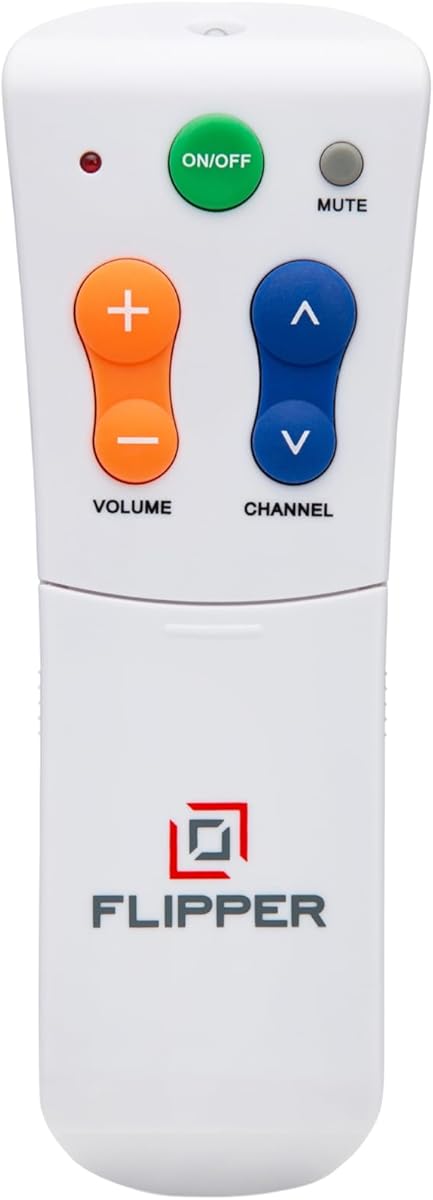
The Flipper remote is a dedicated device created to help seniors and individuals with dementia regain independence in watching television. It has a solid rating from users who appreciate its focused approach to simplicity. The design philosophy centers on reducing clutter by showing only essential controls at first glance.
We may earn a commission when you buy through this link, at no additional cost to you.
Its main strength lies in the color-coded buttons which correspond to functions like power volume and channel changes. This visual cue system helps users with low vision or cognitive decline navigate the device without reading small text. The hidden buttons allow caregivers to program up to twenty five favorite channels for easy access.
However the lack of navigation buttons means it cannot control streaming apps like Netflix or YouTube. This limitation is acceptable for households that rely on traditional cable or broadcast TV for primary viewing. It is a trade-off made to ensure the interface remains as simple as possible for vulnerable users.
This remote is ideal for caregivers seeking a solution that minimizes frustration for their loved ones. It provides peace of mind knowing the device will not confuse the user with complex menus. It is a strong recommendation for those prioritizing cognitive simplicity over smart features.
The color-coded system uses green for power orange for volume and blue for channels to make functions instantly recognizable.
Caregivers can pre-program favorite channels so seniors only cycle through shows they actually enjoy without scrolling through hundreds of options.
We may earn a commission when you buy through this link, at no additional cost to you.
The GE BigEZ OneTouch remote offers an affordable solution with a focus on rapid setup and visibility. It is well rated for users who need a reliable replacement for their existing TV control. The white casing and backlit buttons ensure it is easy to find and use in dark rooms.
We may earn a commission when you buy through this link, at no additional cost to you.
Its standout feature is the OneTouch setup which reduces configuration time significantly. Users simply press the brand button and power button to pair which removes the need for complex code entry. It also supports a secondary device like a DVD player adding versatility to the simple design.
One limitation is that it supports only five specific TV brands such as Samsung and LG. This restricts its universal appeal compared to models that cover more manufacturers. However for many households this coverage is sufficient for daily use and the technical support adds value.
This model is a top choice for budget-conscious buyers who still want premium features like backlighting. It is particularly suitable for users with vision impairments who need to see buttons clearly. We recommend it for those who value speed and simplicity during the initial setup phase.
Fully backlit buttons illuminate the keypad allowing users to navigate controls even in a dark living room.
The AUX button allows control of a second device like a DVD player or cable box without needing a separate remote.
We may earn a commission when you buy through this link, at no additional cost to you.
This remote is a specialized replacement for Samsung TVs that removes the guesswork of universal pairing. It has a high rating for its ability to light up automatically to help users find controls in the dark. The package includes a protective cover and a wall hook which adds practical value to the purchase.
We may earn a commission when you buy through this link, at no additional cost to you.
The backlit buttons stay illuminated for thirty seconds after use which gives users ample time to change channels without squinting. It requires no setup beyond inserting batteries so it works right out of the box. This immediacy is helpful for those with Parkinson's disease or limited dexterity who may struggle with complex instructions.
The main drawback is its lack of universality across brands since it is designed only for Samsung TVs. This means it cannot be used in households with mixed brand electronics. However for a Samsung household it offers a tailored experience that is highly reliable and responsive.
We recommend this option for Samsung owners who prioritize ease of use and immediate functionality. The included accessories show attention to detail that enhances daily usability. It is a premium choice for those willing to sacrifice brand flexibility for superior button visibility.
Pressing any button triggers a soft light that lasts for thirty seconds providing clear visibility during late night viewing.
A silicone cover protects the remote from spills and a hook helps keep it organized and within reach.
We may earn a commission when you buy through this link, at no additional cost to you.
The EZclicker universal remote is designed with a focus on physical feedback and ease of handling. It holds a steady rating for users who appreciate the tactile response of the keys. The black design is simple and blends well with most furniture while remaining easy to spot.
We may earn a commission when you buy through this link, at no additional cost to you.
Its standout feature is the extra-large enter button which is helpful for confirming selections with ease. The tactile feedback ensures that a press is registered without needing to push hard which is beneficial for arthritic hands. It supports most TV brands making it a versatile choice for general use.
However it lacks a backlight which may be a disadvantage for users with poor vision in dark rooms. Additionally it does not support streaming devices like Fire Stick so it is best suited for traditional TV setups. This limits its utility in modern smart home environments.
This remote is recommended for those who prioritize physical comfort and broad TV brand compatibility. It is a practical solution for daily use where basic controls are sufficient. We suggest it for users who need a reliable remote without complex electronic features.
Buttons are engineered to click under pressure ensuring users feel every input clearly.
Setup involves holding two buttons for up to sixty seconds which is straightforward for most users.
We may earn a commission when you buy through this link, at no additional cost to you.
This remote is notable for its ability to function immediately without complex configuration steps. It is highly rated for its simplicity and compatibility with a wide range of major TV brands. The design focuses on removing barriers for users who find setup instructions difficult to follow.
We may earn a commission when you buy through this link, at no additional cost to you.
Its key advantage is that no programming is needed meaning it works right after battery installation. The extra-large enter button is prominent and easy to press which aids navigation for those with limited dexterity. It also includes a warranty which adds a layer of trust to the purchase.
One drawback is that it does not support streaming devices or cable boxes so it is limited to basic TV functions. This makes it less versatile for households that rely on apps for content. However for a straightforward TV replacement it is highly efficient.
This remote is perfect for seniors who want a remote that works instantly without technical hurdles. It is a reliable choice for daily viewing of broadcast or cable content. We recommend it for its practical approach to user convenience.
Users do not need to enter codes or use apps to pair the remote with their television.
The seller offers a replacement service which ensures continued support for the product.
We may earn a commission when you buy through this link, at no additional cost to you.
This remote is tailored for traditional TV setups with a focus on clarity and ease of handling. It has strong ratings from users who appreciate its clean and straightforward interface. The ergonomic design ensures that it is comfortable to hold for extended periods.
We may earn a commission when you buy through this link, at no additional cost to you.
Its standout feature is the oversized buttons which minimize misclicks and improve visibility. The layout is uncluttered making it easy to find essential controls like power and volume quickly. It is built with sturdy materials that ensure long-lasting use for daily entertainment.
It does not include voice control which may be a limitation for some modern setups. However for those who prefer simple physical buttons this is an acceptable trade-off. It is designed specifically for users with low vision who need clear labels and large surfaces.
This remote is recommended for households that use traditional TV setups without smart complexity. It is a dependable tool for seniors who value simplicity over advanced features. We suggest it for its reliability and user-friendly design.
The lightweight body provides a comfortable grip reducing strain on the hand during use.
It works with most major TV brands but is not designed for streaming devices.
We may earn a commission when you buy through this link, at no additional cost to you.
The Philips BigEZ OneTouch remote provides a familiar alternative to the GE model with similar features. It has a rating that reflects mixed but generally positive user experiences. The design is focused on visual clarity and quick setup for common TV brands.
We may earn a commission when you buy through this link, at no additional cost to you.
Its main strength is the colorblind-friendly buttons which use distinct colors for volume and channel functions. This helps users with vision differences to differentiate controls without relying on text labels. The backlit keypad adds visibility in low light environments for better usability.
One limitation is that it supports only five preset brands which may not cover all TVs. This restricts its utility for households with varied brand equipment. The rating is lower than some competitors but it remains a solid choice for specific brand owners.
This remote is best for those who prioritize color-coded navigation and backlighting. It is a good fit for users who are familiar with Philips products. We suggest it for households with compatible TVs needing a simple replacement.
Distinct blue and orange buttons help users identify functions quickly without needing to read labels.
The remote includes a directional pad for navigation on smart TVs and streaming devices.
We may earn a commission when you buy through this link, at no additional cost to you.
This remote is designed with simplicity in mind for users with limited vision or dementia. It has a rating that indicates potential variability in performance but it aims for a straightforward design. The large buttons are intended to reduce confusion and make control accessible.
We may earn a commission when you buy through this link, at no additional cost to you.
Its key feature is the tactile feedback which ensures presses are registered without hard pressure. This is helpful for users who may have difficulty applying force consistently. The layout avoids complex menus which reduces the cognitive load during use.
However the remote does not include backlighting which may make it hard to find in dark rooms. The lower rating compared to others suggests it may have some reliability issues. It remains a budget option for those who need basic functionality.
This remote is suitable for budget-conscious buyers who need a simple control solution. It is best for users with traditional TV setups who do not require smart features. We suggest it for its basic simplicity but test carefully.
The layout avoids complex menus to reduce cognitive load during daily viewing.
It offers a cost-effective solution for basic television control without extra features.
We may earn a commission when you buy through this link, at no additional cost to you.
This compact remote is designed for easy handling and storage with a focus on basic functionality. It holds a good rating for users who appreciate a small footprint without sacrificing control. The black finish makes it discreet and easy to place on side tables.
We may earn a commission when you buy through this link, at no additional cost to you.
Its main feature is the simple layout which reduces visual clutter significantly. The tactile feedback ensures that every press is felt clearly which aids users with dexterity challenges. It is light enough to be held easily even for those with weak grip strength.
One limitation is the lack of backlighting which limits use in dark environments. It also does not support streaming devices so it is not suitable for smart TV navigation. This restricts its use to basic channel and volume adjustments.
This remote is recommended for users who need a small and reliable control device. It is ideal for those who prioritize portability and simplicity. We suggest it for basic TV setups with traditional broadcasting.
The compact dimensions make it easy to store on a couch or nightstand.
Its low weight ensures it does not fatigue the hand during use.
We may earn a commission when you buy through this link, at no additional cost to you.
The Anderic RR1004 remote stands out with its glow-in-the-dark keys which assist users in low light. It has a solid rating for its focus on assisted living and senior care environments. The minimalist design ensures that only essential controls are presented to the user.
We may earn a commission when you buy through this link, at no additional cost to you.
Its key feature is the infrared learning function which allows copying functions from existing remotes. This flexibility helps in customizing the remote for specific needs like input switching. The setup guide is included to help users through the initial configuration process.
One limitation is that it does not support Bluetooth or RF systems which limits compatibility with some modern TVs. This restricts its use to traditional infrared devices. However for standard setups it is a practical and affordable solution.
This remote is ideal for caregivers who need a remote for assisted living facilities. It is a good choice for basic setups that do not require wireless features. We suggest it for its unique light-up feature and ease of use.
Users can copy functions from existing IR remotes to customize their own set.
The remote limits buttons to essential functions to reduce confusion.
We may earn a commission when you buy through this link, at no additional cost to you.
Selecting the right remote involves evaluating several key factors that impact usability and satisfaction. This guide outlines the essential features to consider when choosing a device for older adults.
Large buttons with clear spacing are critical for users with arthritis or low vision. A simple layout that avoids unnecessary menus reduces confusion and makes navigation intuitive. Look for models with raised or tactile keys to provide physical feedback during use.
Prioritize remotes with oversized controls and distinct separation between buttons to prevent accidental presses.
Easy setup is a major factor for seniors and caregivers who may struggle with technical instructions. Remotes that offer one-touch pairing or pre-programmed codes eliminate the need for complex code entry. This reduces the initial barrier to entry and ensures quicker usability.
Choose models that require minimal programming steps or come pre-configured for common brands.
Ensure the remote supports the specific brands and models in your home to avoid frustration. Basic models are ideal for traditional TV but smart TVs may require additional navigation capabilities. Check if the remote can control devices like cable boxes or streaming sticks if needed.
Verify that the remote supports all devices in your entertainment system before purchasing.
Backlit buttons are a valuable feature for users who watch TV in dimly lit rooms. Some remotes offer glow-in-the-dark keys or automatic lighting after a button press. This ensures that controls are always visible and easy to find without needing additional light sources.
Opt for a model with backlighting or glow features for better visibility in the dark.
The physical design should be lightweight and comfortable to hold for extended periods. A slim and balanced body helps users with weak grip strength to maintain control without fatigue. Durable materials ensure that the remote can withstand everyday drops and handling.
Select a remote with an ergonomic shape and durable build to ensure long-term comfort and reliability.
Some remotes include color-coded buttons or simplified modes specifically for users with cognitive decline. These features help to reduce confusion and provide a more accessible experience for individuals with dementia. Customizable favorites can also limit channel options to a manageable few.
Look for remotes designed with cognitive simplicity in mind such as color cues or restricted menus.
Insert fresh batteries into the remote compartment to ensure consistent signal strength and power. If the remote requires setup follow the simple on-screen instructions or use the quick pairing codes included in the manual. This initial configuration is vital to ensure all buttons function correctly.
Clean the remote regularly with a soft dry cloth to remove dust and prevent button sticking. Avoid using water or liquid cleaners as they can damage the internal electronics and reduce reliability. Store the remote in a consistent location like on a side table to prevent it from getting lost.
Check the battery level periodically and replace them if you notice a weak signal. Keeping the remote in a dry and cool environment helps to prolong the lifespan of the device. These simple maintenance steps ensure the remote remains reliable for years of daily use.
The Flipper remote is often recommended for seniors with dementia due to its color-coded buttons and limited interface. It simplifies the control process by hiding complex menus and focusing on essential functions. This reduces cognitive load and helps users maintain independence with less frustration.
Yes some remotes like the Big Button Universal Remote for All TV Remote offer no programming setup. These devices work out of the box with common brands to allow immediate use without code entry. This feature is helpful for users who want a simple plug and play experience.
Big buttons are essential for seniors with arthritis or poor vision to press accurately without strain. They reduce the likelihood of accidental clicks and make it easier to locate controls quickly. This design improvement promotes independence and comfort during daily viewing.
Many simple remotes are designed for traditional TV and may not support streaming apps. Always check the product description to see if it controls Fire Stick or Roku devices. Universal models with navigation buttons may offer this capability but basic models often do not.
Most senior remotes use standard AA or AAA batteries found in a compartment on the back. Slide the cover off remove the old cells and insert new ones with correct polarity. Replace them regularly to maintain strong signal strength and reliable performance.
Some remotes like the Flipper allow you to program up to twenty five favorite channels. This customization lets you cycle through only the shows a user enjoys without scrolling through all channels. It adds a layer of personalization that enhances the viewing experience.
The top picks in this guide offer a range of features tailored to different needs from simplicity to advanced accessibility. The Flipper remote leads in cognitive simplicity while the GE BigEZ offers great value with backlighting. These options provide reliable solutions for seniors and caregivers looking to enhance TV viewing.
When choosing a remote prioritize features like button size backlighting and ease of setup that match the user's needs. Consider whether the user requires smart TV support or if a traditional remote is sufficient for daily use. Selecting the right device can significantly improve comfort and independence at home.
Prices and availability may change so please check the latest listings before making a final decision. We hope this guide helps you find the perfect remote to simplify entertainment for your loved ones. Thank you for using our resource to make an informed purchase.