
Otoscope with Light No App Needed
4.5Editor score
No app pairing required
720P real-time view
USB-C fast charging
Digital otoscopes allow users to visualize the ear canal with high clarity, making them valuable tools for monitoring ear health at home. These devices combine cameras with lights to provide a clear view of wax buildup or irritation without needing a clinic visit.
We compared ten leading models based on screen availability, camera resolution, connectivity options, and safety features. Our analysis focuses on how well each device delivers real-time images and supports safe ear wax removal for adults and children.
Each pick in this guide highlights unique strengths like built-in screens, app connectivity, or specialized cleaning kits. Prices and availability change frequently, so verify current details before purchasing to ensure you get the best value for your needs.
4.5Editor score

4.5Editor score

4.3Editor score
As an Amazon Associate we earn from qualifying purchases.
This table provides a side-by-side look at the key specifications and features of each digital otoscope model reviewed in this guide.


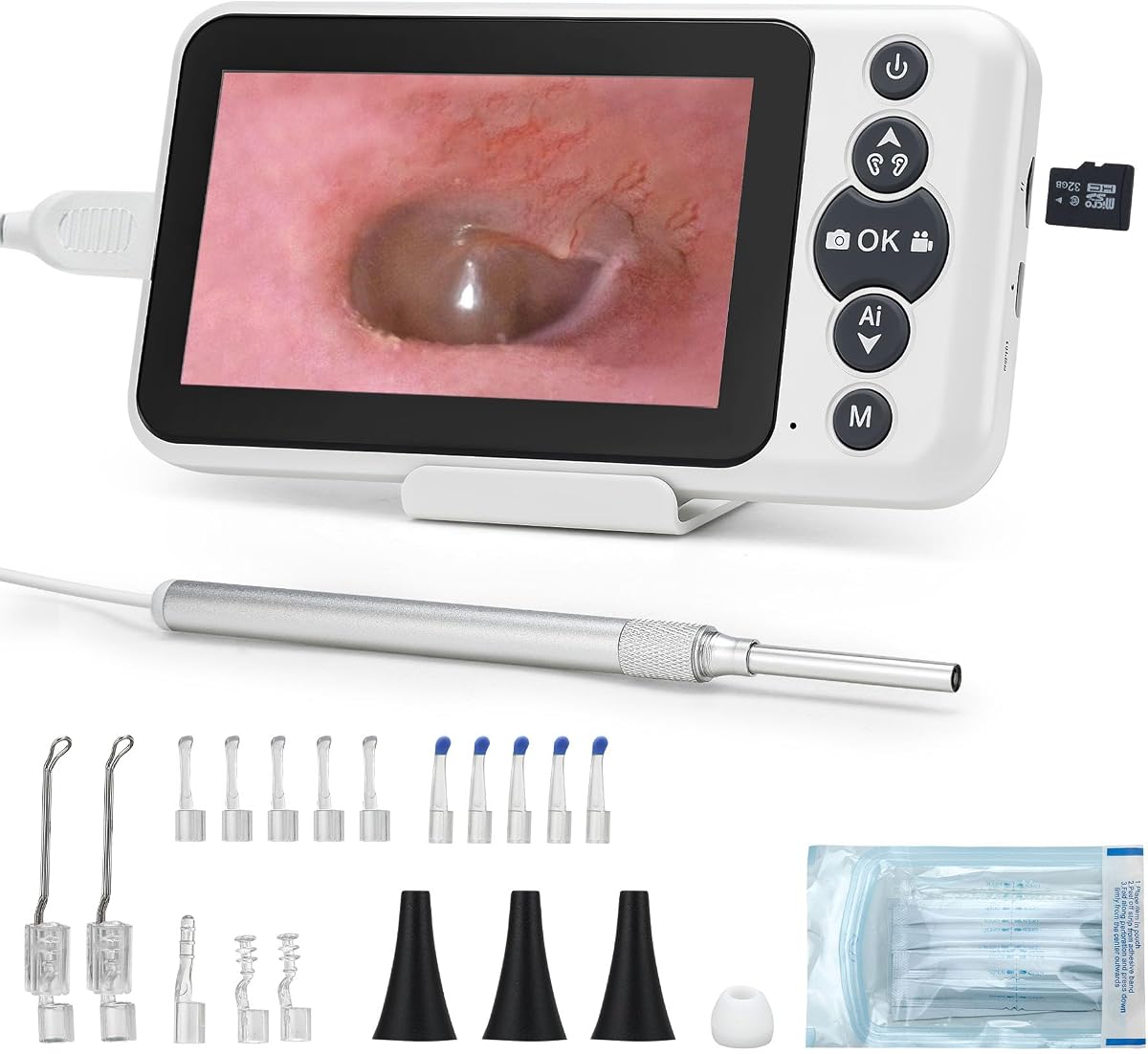
The Anykit Digital Otoscope stands out with its large 4.5-inch HD screen, allowing users to view their ear canal directly without needing a smartphone app. This feature makes it ideal for those who prefer a plug-and-play experience without technical setup.
We may earn a commission when you buy through this link, at no additional cost to you.
Its intelligent directional gyroscope ensures that images remain stable even if your hand moves during inspection. The 6 adjustable LED lights provide excellent illumination, helping you see fine details like wax buildup or irritation clearly.
While the device does not include a charging adapter, the included 32GB card offers ample storage for recording videos and photos. The protective covers and soft silicone earpicks add a layer of safety for users concerned about damaging the ear canal.
This otoscope is perfect for families who want a reliable tool for home ear checks. Its combination of stability, screen quality, and safety features makes it a top choice for regular monitoring.
The gyroscope technology prevents image flipping, ensuring a consistent view throughout the inspection process for better accuracy.
Included specula and ear spoons provide various options for removing wax safely without additional purchases.
We may earn a commission when you buy through this link, at no additional cost to you.
This Otoscope with Light simplifies home ear care by eliminating the need for app downloads or Bluetooth pairing. Users can turn it on and immediately see a 720P view on the built-in IPS screen.
We may earn a commission when you buy through this link, at no additional cost to you.
The design focuses on ease of use, making it suitable for grandparents or children who might struggle with complex technology. The slim 3.9mm lens allows for comfortable insertion while the LED lights ensure the canal is well-lit.
While it lacks the ultra-high resolution of premium models, the clear visibility is sufficient for checking wax buildup. The USB-C charging ensures the device is ready quickly without long waits between uses.
For households looking for an affordable and straightforward solution, this model delivers solid performance without unnecessary features or costs.
Power on and view immediately with no software installation required for immediate results.
USB-C charging keeps the device powered efficiently for repeated inspections.
We may earn a commission when you buy through this link, at no additional cost to you.
This Digital Otoscope is designed for users who want to utilize their smartphones for viewing. It supports both iOS and Android devices, offering flexibility for different households.
We may earn a commission when you buy through this link, at no additional cost to you.
The split-screen mode allows you to compare the live view with a saved image, which is useful for tracking changes over time. The 0.15-inch ultra-fine lens ensures minimal discomfort during insertion.
However, Android users must confirm OTG support before purchasing. Without a built-in screen, it relies on phone connectivity which may not suit all users.
This model is a strong choice for tech-savvy families who want to save on hardware costs while maintaining good visual quality.
Use your existing phone as a monitor to reduce additional hardware costs.
Split-screen mode makes it easy to compare current and past ear conditions.
We may earn a commission when you buy through this link, at no additional cost to you.
The ScopeAround Otoscope features a bright 4.5-inch IPS display that delivers clear images even in varied lighting conditions. Its gyroscope keeps the video steady during use.
We may earn a commission when you buy through this link, at no additional cost to you.
Included accessories like a sturdy stand free up your hands, making it easier to inspect ears while holding the device. The 32GB card supports long-term storage of visual records.
While slightly heavier than app-connected versions, the trade-off is a more self-contained system. The FSA HSA eligibility adds financial value for many users.
This model is ideal for families who need a reliable, hands-free friendly option for regular ear health checks.
The included stand allows for stable viewing while both hands manage the ear canal.
IPS technology ensures clear visibility from different angles without color distortion.
We may earn a commission when you buy through this link, at no additional cost to you.
The BEBIRD R1 offers a 1080P HD camera that captures detailed images of the ear canal. It includes additional kits for nose and throat checks, expanding its utility beyond just ears.
We may earn a commission when you buy through this link, at no additional cost to you.
The intelligent visible app allows real-time viewing on smartphones with both iOS and Android support. This connectivity helps in sharing images with doctors easily.
Setup requires Wi-Fi connection and app installation which may be a hurdle for some users. However, the high resolution and versatility make up for this minor inconvenience.
This tool is best for those who want a single device for multiple ENT checks at home with high-quality visuals.
Use different kits to check nose throat and ears with one camera device.
1080P resolution ensures every detail of the canal is visible clearly.
We may earn a commission when you buy through this link, at no additional cost to you.
The Bebird Ultra 2K sets the standard for premium ear care with its 2K camera resolution and near-zero delay transmission via 5G Wi-Fi. This ensures smooth real-time viewing without lag.
We may earn a commission when you buy through this link, at no additional cost to you.
Unique features include visual tweezers that allow precise grasping of wax without scraping, and a visual dropper for medication delivery. These tools offer a level of control unmatched by basic scoops.
The higher cost is justified by the advanced technology and extended 24-month warranty. It represents a significant upgrade for those seeking professional-grade care at home.
For users willing to invest in top-tier quality, this device provides superior visibility and safety features for ear maintenance.
Visual tweezers and droppers enhance safety and accuracy during ear care routines.
5G chip ensures fast and stable data transfer to your mobile device.
We may earn a commission when you buy through this link, at no additional cost to you.
This D39R model focuses on comfort with painless tweezers that gently grasp debris instead of scraping the canal walls. The flexible silicone tube adapts well to different ear canal shapes.
We may earn a commission when you buy through this link, at no additional cost to you.
It includes bonus inspection tools for checking teeth nasal passages and scalp. The storage case keeps all accessories organized for easy transport and safe keeping.
While the resolution is standard, the ergonomic design ensures safe use for sensitive ears. It is particularly helpful for those who find traditional scoops uncomfortable.
Ideal for families needing a versatile and comfortable kit, this model balances functionality with user-friendly design features.
Tweezers provide a gentle alternative to scraping for sensitive ear canals.
The included case ensures all tips and tools stay together and clean.
We may earn a commission when you buy through this link, at no additional cost to you.
Privacy is a key advantage here as this otoscope does not require Wi-Fi or app pairing. All data stays locally on the included memory card, ensuring your visual records remain private.
We may earn a commission when you buy through this link, at no additional cost to you.
The 3000mAh battery provides 4 to 5 hours of continuous use, which is significantly longer than typical models. The 6-axis gyroscope keeps the image upright and steady during inspections.
The included portable carry case makes it easy to store and transport the device safely. This setup is perfect for users who prioritize data security and long battery life.
For those concerned about digital privacy, this model offers a secure and reliable solution for home ear monitoring.
No internet connection means your personal health data never leaves the device.
Large battery capacity supports long inspection sessions without frequent charging.
We may earn a commission when you buy through this link, at no additional cost to you.
This product entry currently lacks specific details in our dataset. Please visit the link to view current descriptions and images.
We may earn a commission when you buy through this link, at no additional cost to you.
Verifying the exact model is important before purchase to ensure it meets your needs. Features may change over time for this ASIN.
We recommend checking the seller's page for updated photos and compatibility information.
Ensure you review the latest customer feedback to confirm performance and quality standards.
Check the product page for exact screen size and camera type.
Recent customer feedback helps ensure the product quality is consistent.
We may earn a commission when you buy through this link, at no additional cost to you.
This product entry currently lacks specific details in our dataset. Please visit the link to view current descriptions and images.
We may earn a commission when you buy through this link, at no additional cost to you.
Verifying the exact model is important before purchase to ensure it meets your needs. Features may change over time for this ASIN.
We recommend checking the seller's page for updated photos and compatibility information.
Ensure you review the latest customer feedback to confirm performance and quality standards.
Check the product page for exact screen size and camera type.
Recent customer feedback helps ensure the product quality is consistent.
We may earn a commission when you buy through this link, at no additional cost to you.
Selecting the right digital otoscope depends on your specific needs for clarity, connectivity, and ease of use.
Some otoscopes feature built-in screens, allowing you to view the ear canal without using a smartphone. Others rely on app connectivity to transmit images to your device. Built-in screens are generally more user-friendly for those who dislike pairing devices, while app-based models may be more versatile for sharing photos with doctors.
Choose a built-in screen if you prefer simplicity or an app model if you want to leverage your existing phone.
Resolution determines the clarity of the image you see inside your ear. Higher resolutions like 2K or 1080P provide detailed views of wax and ear drum health. Lower resolutions like 720P are sufficient for general checks but may miss fine details.
For detailed inspection, prioritize models with at least 1080P resolution to ensure clear visuals.
Some models require Wi-Fi or Bluetooth to connect to an app which may introduce latency or privacy concerns. Standalone devices with internal storage allow you to view photos without internet access. This is useful if you want to keep your health data private.
Select standalone models if privacy is a top priority for your health data usage.
Look for otoscopes that include protective covers and soft silicone tips to prevent injury during insertion. Some tools feature depth stops or flexible tubes to avoid over-insertion. These features are critical for ensuring safety, especially when using the device on children.
Always verify that the device includes protective accessories to minimize risk to the ear canal.
A long-lasting battery ensures you can perform multiple inspections without frequent charging. Models with 3000mAh capacities offer several hours of continuous use. Quick charging options like USB-C are also beneficial for keeping the device ready when needed.
Prioritize models with high capacity batteries for uninterrupted ear care sessions.
A good otoscope kit should include various tips like spoons and tweezers for different cleaning needs. Some sets offer bonus tools for examining the nose or throat. Memory cards and carrying cases add value by supporting storage and organization.
Check the package contents to ensure you have all necessary tools for comprehensive ear care.
Gyroscopes help stabilize the camera feed, preventing images from flipping or shaking when you move your hand. This technology is especially helpful for precise viewing inside the narrow ear canal. Without it, maintaining a steady image can be challenging.
Look for gyroscope-enabled models to ensure a smooth and stable viewing experience.
Consider how intuitive the controls are and whether the setup requires technical steps. Devices that turn on and display images immediately are easier for non-tech users. Apps with simple interfaces help reduce frustration during use.
Choose user-friendly interfaces if you want a hassle-free experience for regular use.
Before using the otoscope, ensure the camera lens is clean and free of dust. Attach a protective cover or tip securely to the probe to avoid scratches inside the ear canal.
Turn on the device and wait for the screen to display a live feed. Gently insert the probe into the ear canal while holding the device steadily to observe wax or blockages.
After use, wipe the probe with a soft cloth and store it in the provided case. Keep the memory card safe if you want to access photos later for reference.
Yes, many models are safe for children when used with protective covers and gentle tips. Always ensure the device is handled by an adult to prevent accidental over-insertion. Follow the manufacturer's age guidelines carefully.
Not all devices require a smartphone. Some models come with built-in screens for direct viewing. Others connect via Wi-Fi or Bluetooth to your phone for image display and storage.
Use a soft, dry cloth to wipe the lens gently. Avoid harsh chemicals that might damage the coating. Keep the device stored in a case to protect it from dust and dirt between uses.
Using a digital otoscope helps you see before cleaning which reduces risks. However, avoid aggressive scraping. Use the provided tools gently and consult a doctor if you experience pain or discomfort.
Most modern otoscopes use USB-C charging cables. The battery life varies by model but often lasts several hours on a single charge. Always check the indicator light to know the charge status.
Yes, many models allow you to save photos or videos to a memory card. You can then transfer these files to a computer to share with your healthcare provider for professional advice.
The Anykit Digital Otoscope offers the best overall experience with its large built-in screen and gyroscope stabilization for clear views.
If budget is a priority, the Otoscope with Light No App Needed provides simple functionality without requiring a smartphone setup or pairing.
Always verify current prices and product details before purchasing to ensure you select the model that best fits your home care needs.