
TP-Link ER605
4.4Editor score
Five Gigabit ports
USB WAN support
Advanced security
Compare the top load balancing routers for 2026 to optimize bandwidth, ensure failover, and secure your business or home network with expert reviews.
Finding the right load balancing router ensures your network stays online even if one internet connection fails. These devices distribute traffic across multiple WAN ports to maximize speed and reliability for any environment.
We evaluated ten top models based on port flexibility, security features, VPN support, and ease of management. Each product was analyzed to determine how well it handles high traffic and multiple connections.
Every pick highlights specific strengths and ideal use cases for businesses or power users. Remember that availability and costs can change, so verify current listings before making a final purchasing decision today.
4.4Editor score

4.7Editor score

4.0Editor score
This side-by-side comparison highlights key specifications across all ten models to help you identify the best fit for your network needs and budget requirements.


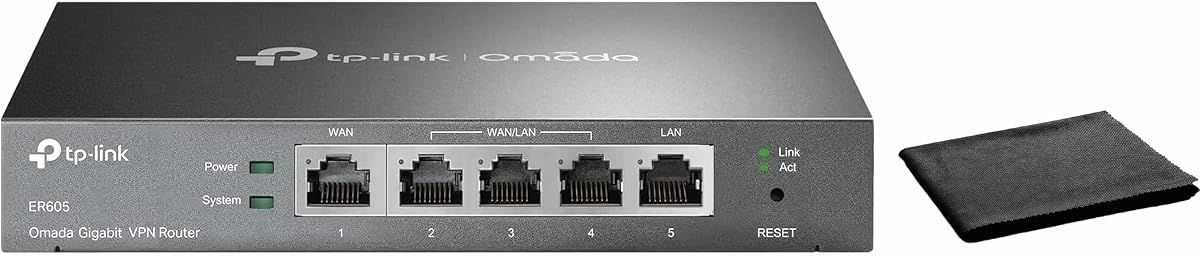

The TP-Link ER605 is a cost-effective entry point for businesses needing basic load balancing without breaking the bank. It earns a solid 4.4 rating for delivering reliable multi-WAN performance in a compact form factor.
We may earn a commission when you buy through this link, at no additional cost to you.
Its five Gigabit ports allow you to connect up to three ISPs plus LAN devices. The USB WAN feature enables mobile broadband backup using 4G/3G modems for uninterrupted connectivity during outages.
While it lacks advanced cloud management, the SPI Firewall and VPN support keep your data safe. The trade-off is a simpler interface that may require more manual setup for complex networks.
This model is ideal for small offices or home labs needing immediate redundancy. It balances affordability with essential features like OpenVPN and IPsec tunnels effectively.
With one WAN, two WAN/LAN, and two LAN ports, plus a USB port, this router adapts easily to various internet line setups.
DoS defense, IP filtering, and 20 VPN connections ensure your network remains protected against common threats and unauthorized access.
We may earn a commission when you buy through this link, at no additional cost to you.
The ER7206 targets professional environments with up to 700 clients and 100 VPN connections. Its 4.5 rating reflects robust performance and seamless integration into the Omada SDN ecosystem.
We may earn a commission when you buy through this link, at no additional cost to you.
It features a unique SFP WAN port alongside Gigabit Ethernet, enabling fiber connections. The Omada SDN controller allows centralized cloud management across multiple sites efficiently.
Managing large networks becomes easier with centralized access and real-time monitoring. However, non-SDN devices may require firmware upgrades to fully utilize advanced routing capabilities.
Choose this router if you need scalability for medium-sized businesses. Its ability to handle high traffic loads and multiple site connections stands out.
Omada SDN compatibility means you can manage gateways, APs, and switches from a single interface for streamlined network control.
With support for up to 150,000 devices and 700 clients, this router scales well for expanding business environments.
We may earn a commission when you buy through this link, at no additional cost to you.
The Cudy R700 stands out for its full OpenWRT support, unlocking advanced customization for power users. It maintains a 4.4 rating due to its versatile load balancing and failover capabilities.
We may earn a commission when you buy through this link, at no additional cost to you.
With five Gigabit ports, you can connect up to five ISPs for maximum redundancy. WireGuard and OpenVPN support ensure secure site-to-site tunneling and remote access.
The TR-069 support enables remote management by ISPs. While OpenWRT provides flexibility, it can add complexity for those preferring plug-and-play simplicity.
This router is perfect for tech-savvy users who need granular control. Its focus on business continuity and VLAN segmentation is impressive.
Full OpenWRT support allows custom firewall rules and VLAN policies for advanced network management and segmentation.
Automatic failover ensures instant traffic rerouting if a connection drops, keeping your business online without interruption.
We may earn a commission when you buy through this link, at no additional cost to you.
The Alta Labs Route10 pushes the envelope with 10 Gigabit wired routing and a Qualcomm quad-core processor. Its 4.0 rating reflects its high-end specs and enterprise-grade features.
We may earn a commission when you buy through this link, at no additional cost to you.
Two SFP+ ports and four 2.5Gb ports deliver extreme throughput. PoE+ support allows powering APs directly, simplifying wiring for networks.
It requires pairing with separate APs since it has no built-in Wi-Fi. This makes it ideal for existing setups needing powerful wired core routing.
Ideal for high-performance environments like pro audio studios or heavy data centers. Its hardware acceleration handles complex routing tasks effortlessly.
High-performance CPU ensures low latency and consistent multi-gigabit performance even with heavy traffic loads.
Integrated PoE+ output reduces the need for additional power adapters by powering compatible devices via Ethernet.
We may earn a commission when you buy through this link, at no additional cost to you.
The Omada ER7412-M2 offers incredible port flexibility with two 2.5G ports and support for up to 11 WAN connections. It holds a 4.5 rating for advanced security and multi-gigabit speed.
We may earn a commission when you buy through this link, at no additional cost to you.
Its IPS/IDS and DPI features provide deep packet inspection. This ensures malicious traffic is blocked effectively before reaching internal networks.
The sheer number of ports is useful for service providers but might be overkill for small offices. It shines in high-density network scenarios.
Select this if you need multi-gigabit throughput across multiple ISPs. Its Omada compatibility ensures seamless network expansion.
DPI, IDS, and IPS features offer granular security control against sophisticated network threats and unauthorized access.
Two 2.5G ports ensure you can utilize faster internet speeds without bottlenecking your internal LAN traffic.
We may earn a commission when you buy through this link, at no additional cost to you.
The TP-Link TL-R470T+ is a budget-friendly choice for environments where Gigabit isn't strictly required. Its 4.2 rating reflects reliability and straightforward multi-WAN support.
We may earn a commission when you buy through this link, at no additional cost to you.
It includes built-in lightning protection to safeguard connected equipment from surges. This is particularly useful for outdoor installations or areas prone to storms.
The 100M ports limit it to slower internet plans but suffice for basic tasks. It supports PPPoE server for managing client accounts.
Perfect for small internet cafes or budget offices needing basic redundancy. Its simplicity reduces the learning curve for administrators.
PPPoeE server allows extensive client account and network management for administrators handling multiple user access.
Lightning protection ensures hardware longevity by reducing the risk of electrical surges affecting your network devices.
We may earn a commission when you buy through this link, at no additional cost to you.
The TP-Link TL-R480T+ is one of the simplest load balancing solutions available. With a 4.2 rating, it offers basic functionality for users needing immediate failover.
We may earn a commission when you buy through this link, at no additional cost to you.
Its compact case fits easily into small office spaces. Configurable WAN/LAN ports allow flexible setups without dedicated ports for each function.
It lacks modern Gigabit speeds and advanced features. This model suits legacy systems or extremely budget-conscious users.
Consider this for small setups where Gigabit isn't necessary. It provides essential redundancy without complexity or high cost.
Smaller case provides a cost-effective solution for small offices needing efficient networking without bulk.
Three configurable WAN/LAN ports allow flexible network design without dedicated slots for every connection.
We may earn a commission when you buy through this link, at no additional cost to you.
The TP-Link ER-605 offers modern cloud monitoring capabilities for remote management. Its 4.3 rating highlights ease of use and robust bandwidth management tools.
We may earn a commission when you buy through this link, at no additional cost to you.
Centralized cloud monitoring provides real-time status updates from anywhere. The Omada app compatibility simplifies configuration significantly.
Dual WAN ports may limit redundancy compared to others. However, bandwidth management ensures critical apps get priority during congestion.
Ideal for small businesses needing remote visibility. Its compact design and easy setup make deployment straightforward.
Cloud monitoring offers real-time status checks from anywhere to simplify network maintenance without onsite visits.
QoS settings optimize performance for critical applications ensuring business tasks remain fast during peak times.
We may earn a commission when you buy through this link, at no additional cost to you.
The Ubiquiti EdgeRouter 4 is a favorite among advanced users for its fanless and powerful design. It earns a 4.6 rating for reliability and flexible hardware specifications.
We may earn a commission when you buy through this link, at no additional cost to you.
Its fanless construction ensures silent operation. The SFP port adds fiber connectivity options for future-proofing networks.
Setup requires knowledge of CLI or UniFi Network Controller. It lacks a built-in web GUI for initial setup compared to others.
Best for experienced users wanting complete control. Its hardware quality and silent operation are excellent for office environments.
Fanless design ensures silent operation making it perfect for quiet office environments without distracting noise.
Desk, wall, and rack mount options provide installation flexibility to fit various space requirements easily.
We may earn a commission when you buy through this link, at no additional cost to you.
The Omada Fusion 2.5G represents the future of load balancing routers with a touchscreen interface. It holds a 4.7 rating for its innovative design and high-speed ports.
We may earn a commission when you buy through this link, at no additional cost to you.
Its touchscreen allows quick on-site troubleshooting without a laptop. Bluetooth pairing simplifies the initial setup process significantly.
The 2.5G ports provide headroom for faster internet speeds. License-free cloud access ensures all features are available immediately.
Choose this for modern setups needing speed and convenience. Its innovation makes it a top recommendation for forward-looking users.
A 2.51-inch touchscreen offers instant insights into traffic and health scores without needing a laptop.
Bluetooth simplifies initial setup by allowing easy device discovery and adoption through the Omada app.
We may earn a commission when you buy through this link, at no additional cost to you.
Selecting the right router depends on your port needs, performance requirements, and management preferences.
More WAN ports allow for more internet connections to balance load and redundancy. Ensure the router supports your desired number of ISPs.
Choose a model with enough ports to meet your current and future redundancy needs without exceeding your budget.
Gigabit ports are standard but 2.5G or 10G ports provide future-proofing for high-speed internet plans. Check the port speeds match your internet plan.
Prioritize routers with port speeds that match or exceed your internet connection to avoid bottlenecks.
Look for SPI Firewall, DoS defense, and IPS/IDS to protect your network from attacks. Strong security keeps your data safe.
Ensure the router includes essential security suites to protect against common network threats.
Support for protocols like OpenVPN, WireGuard, or IPsec ensures secure remote access. Choose protocols that match your security setup.
Verify supported VPN protocols to enable secure remote access for your business network.
Cloud management or a touchscreen interface simplifies monitoring and troubleshooting. Select an interface that fits your team's technical skills.
Choose a management tool that provides the visibility you need without complicating daily tasks.
Automatic failover ensures traffic reroutes instantly when a connection drops. Check that load balancing is automatic rather than manual.
Ensure the router offers automatic failover and load balancing for seamless operation without manual intervention.
Support for SDN or expansion options allows your network to grow. Verify if the device integrates with other ecosystem products.
Pick a router that supports growth through ecosystem integration and expansion capabilities.
Start by connecting your primary internet modem to the WAN port. Then connect secondary ISPs if supported and configure the failover settings.
Update firmware regularly to ensure security patches and performance improvements are applied to your network.
Monitor bandwidth usage via the dashboard or app to detect bottlenecks and adjust QoS settings as needed.
Load balancing distributes internet traffic across multiple connections to maximize speed and prevent single-point failures. This ensures better performance and reliability for users.
You need separate subscriptions for each connection you want to balance. Ensure each ISP provides compatible access for your router setup.
No, it manages wired traffic. For better Wi-Fi, pair it with dedicated access points or a mesh system for coverage.
Navigate to WAN settings and enable failover options. Set primary and secondary priorities so traffic switches automatically if the main link drops.
Yes, you can mix different ISPs as long as they use compatible connection types like PPPoE or Static IP. Configure each WAN port accordingly.
Traffic instantly reroutes to active connections. This prevents downtime for websites or services depending on internet access.
Cloud monitoring helps remote troubleshooting but isn't mandatory. Local monitoring works if you access the router directly on your network.
Standard Ethernet cables work for Gigabit connections. For 2.5G or higher, ensure you use Cat5e or Cat6 cables for full speed.
The Omada Fusion 2.5G and Alta Labs Route10 lead in innovation and performance for users needing speed and advanced monitoring.
Prioritize port speeds and failover automation based on your specific business or home requirements to ensure seamless connectivity.
Always check current prices and availability before buying to ensure you get the best deal on the right model for your needs.