
Sonnet Breakaway Box 850 T5
4.5Editor score
850W power supply included
Built-in Thunderbolt 5 dock
Triple wide GPU support
Discover the top Egpu Enclosures for 2026. We compare Thunderbolt 5 and USB4 docks for laptops, Macs, and handhelds to boost graphics performance.
External GPU enclosures transform thin laptops into powerful desktop workstations. They allow you to connect high-performance graphics cards via Thunderbolt or USB4 ports. This upgrade is essential for creators, gamers, and AI enthusiasts needing extra power.
We evaluated ten leading eGPU models based on compatibility, power delivery, and cooling efficiency. Our analysis includes detailed specs, real-world performance notes, and user feedback. We focus on enclosures that support the latest Thunderbolt 5 and USB4 standards.
Each pick highlights specific strengths like AI readiness or compact design. Prices fluctuate often so verify current deals before buying. These reviews help you choose the right enclosure for your specific workflow and budget needs.
4.5Editor score

4.0Editor score
5.0Editor score
This table provides a side-by-side look at all ten top-rated eGPU enclosures. Compare power supplies, connectivity options, and form factors to find the perfect match for your laptop or handheld device.


The Razer Core X V2 sets a new standard for external graphics performance. With Thunderbolt 5 support, it offers 80Gbps bandwidth for smooth gaming and creative workflows. This enclosure is built to handle demanding NVIDIA and AMD GPUs with ease.
We may earn a commission when you buy through this link, at no additional cost to you.
Its modular design lets you install ATX power supplies and wide graphics cards effortlessly. The 140W USB-C charging keeps your laptop powered while using the external GPU. Active cooling ensures sustained performance under heavy loads.
While it does not include a graphics card, the tool-free installation makes swapping components simple. The steel chassis provides durability and effective heat dissipation. Users should note that macOS with M1 chips is not supported.
This is the ideal choice for Windows users needing a robust upgrade path. It balances raw power with connectivity features well. If you want a reliable and future-proof enclosure for professional tasks, this model stands out.
The ultra-fast bandwidth ensures minimal latency during high-demand tasks.
The 140W PD output handles heavy charging loads for modern laptops.
We may earn a commission when you buy through this link, at no additional cost to you.
Sonnet delivers near-desktop power with this massive Thunderbolt 5 enclosure. The included 850W power supply handles even the most power-hungry graphics cards without issues. It is designed for professionals who need maximum GPU acceleration.
We may earn a commission when you buy through this link, at no additional cost to you.
Its dock feature adds significant value by including extra USB ports and Ethernet connectivity. The variable-speed fan ensures quiet operation during lighter tasks while ramping up for heavy workloads. This makes it versatile for both office and gaming use.
The enclosure supports triple wide GPUs which are often needed for high-end rendering. Intel Thunderbolt certification guarantees stable connections with Windows 11 laptops. Setup is straightforward and the build quality feels premium and durable.
If budget is less of a concern, this model offers unmatched features. It combines a power supply and dock into one unit. For creators seeking reliability and expandability, the Breakaway Box 850 T5 is a top tier investment.
The dock integration simplifies your desk setup significantly.
Temperature control keeps your GPU running safely under stress.
We may earn a commission when you buy through this link, at no additional cost to you.
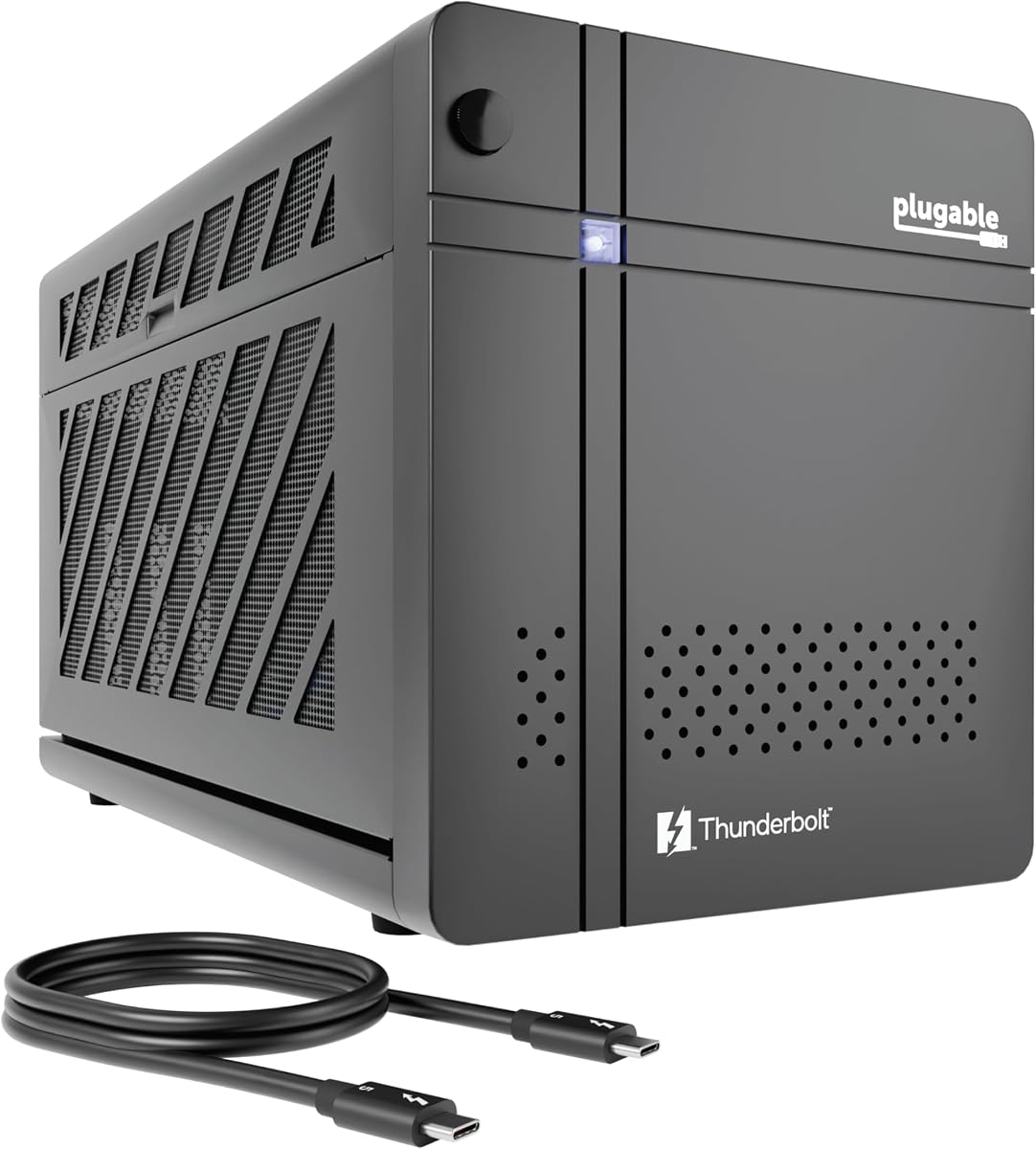
Plugable introduces a unique enclosure designed specifically for AI enthusiasts. It supports models like Llama 3 locally, ensuring data privacy. The 850W ATX 3.1 power supply provides ample power for high-end graphics cards used in training.
We may earn a commission when you buy through this link, at no additional cost to you.
This dock includes 96W host charging which is excellent for laptops. The inclusion of Ethernet and downstream Thunderbolt ports enhances connectivity. It is built to meet IT department standards with TAA compliance and lifetime support.
While not primarily for gaming, its bandwidth and power make it versatile. The secure system ensures sensitive prompts and results stay on your perimeter. Users value the privacy and control this setup offers over cloud solutions.
For developers and privacy-conscious users, this is an ideal pick. It balances performance with security features. If you need a dedicated machine for offline AI tasks, this enclosure delivers exactly what is needed efficiently.
Run sensitive models locally without exposing data to the cloud.
The power system grows with your workflow needs over time.
We may earn a commission when you buy through this link, at no additional cost to you.
This compact enclosure is designed for portability and ease of use. It includes a 240W power supply which is sufficient for many mid-range cards. The aluminum shell offers robust protection while remaining lightweight for travel.
We may earn a commission when you buy through this link, at no additional cost to you.
The kit comes with a carrying case making it perfect for commuters. You get a Thunderbolt 4 cable and all necessary connectors. Setup is quick with a single cable connection to boost graphics power instantly.
While it cannot fit the widest GPUs, it supports common lengths and heights. The 85W charging keeps your laptop powered during tasks. It is a great solution for those who move between locations frequently.
If you need a portable setup that fits in a bag, this is a strong choice. It balances size with necessary power features. For students or mobile workers, this enclosure provides a reliable boost where needed.
The included case ensures safe transport for your components.
Single cable connection simplifies your workflow significantly.
We may earn a commission when you buy through this link, at no additional cost to you.
This mini enclosure is tailored for gaming handhelds like the ROG Ally. It supports USB4 and Thunderbolt interfaces seamlessly. The controller module ensures stable data transfer for gaming and rendering tasks.
We may earn a commission when you buy through this link, at no additional cost to you.
Flexibility is key here as it supports various power supply types. You can use SFX or DC adapters based on your needs. The 85W PD charging supports turbo modes directly through the connection.
It works with Windows Linux and macOS systems widely. The additional USB ports let you attach peripherals easily. This hub functionality adds value beyond just graphics performance.
Handheld owners will appreciate the portability and compatibility focus. It bridges the gap between portable and desktop experiences. If you want to expand your handheld capabilities, this model offers the right tools.
Optimized connections ensure low latency during mobile play.
Choose power options that fit your specific setup needs.
We may earn a commission when you buy through this link, at no additional cost to you.
The VK-Y900 offers a cost effective entry into external graphics. It supports both Thunderbolt and USB4 interfaces widely. The controller ensures stable data transfer for most applications and tasks.
We may earn a commission when you buy through this link, at no additional cost to you.
It includes dual Thunderbolt ports for charging and display. The 85W pass-through keeps your laptop powered efficiently. Users appreciate the clean single cable solution for desk setups.
This model supports running AI models via TinyGPU on Macs. While not for gaming on those specific chips, it helps developers. The PCB quality ensures good conductivity and long-term reliability.
If you are looking for a budget friendly solution, this works well. It covers basic needs without unnecessary costs. For hobbyists and general users, it provides solid performance and reliable support.
Access desktop graphics power without breaking the budget.
From AI tasks to general creative workflows.
We may earn a commission when you buy through this link, at no additional cost to you.
Sonnet provides a reliable option for those with Thunderbolt 3 systems. The 750W power supply handles high-end cards with ease. It is one of the few enclosures that still supports Macs effectively.
We may earn a commission when you buy through this link, at no additional cost to you.
The connectivity includes Ethernet and multiple USB ports for peripherals. This makes it a functional hub as well as a graphics booster. It supports a wide range of NVIDIA and AMD GPU models.
Users note that task times cut down significantly with GPU acceleration. It is suitable for editing rendering and animation workflows. The design is robust and built to handle long-term use.
If you have an older Mac or laptop with TB3, this is ideal. It brings significant performance boosts to those machines. For existing TB3 owners, upgrading to this model is a smart move.
Few options support macOS so this stands out.
Built for consistent performance in creative environments.
We may earn a commission when you buy through this link, at no additional cost to you.
This mini enclosure is a basic solution for DIY enthusiasts. It supports Thunderbolt 3 and USB4 interfaces. The certified controller ensures stable and efficient expansion for your system.
We may earn a commission when you buy through this link, at no additional cost to you.
You will need to provide your own power supply which adds complexity. However, this keeps the unit small and versatile. It can act as a hub to attach additional devices.
It is important to check your system compatibility before purchase. Not all Type-C ports support the required protocols. If your system matches, it provides a lightweight way to add graphics power.
For tech-savvy users who have spare power supplies, this works. It is a budget friendly way to get an external GPU. Just be ready to handle the setup details yourself.
Minimal footprint for desks with limited space.
Attach extra peripherals through the dock ports.
We may earn a commission when you buy through this link, at no additional cost to you.
MINISFORUM offers a dual-mode dock with both USB4 and OCuLink. This gives you flexible transfer speeds depending on your host. The dedicated hardware switch allows instant mode changes.
We may earn a commission when you buy through this link, at no additional cost to you.
The M.2 NVMe slot adds unique storage capabilities. You can keep project files directly on the dock for easy access. This enhances workflow synchronization between different host devices.
A built-in re-drive booster stabilizes data transfer during high bandwidth tasks. This minimizes latency which is critical for 8K rendering and inference. It works well with various power supplies including SFX and ATX.
If you want future-proof features, this model stands out. It balances storage and graphics capabilities. For advanced users who want control over their workflow, this dock delivers unique functionality.
Switch between docking and pure GPU performance easily.
Store files locally for faster access and sync.
We may earn a commission when you buy through this link, at no additional cost to you.
This complete kit provides everything you need to get started. It includes a 240W external power supply and all cables. The aluminum shell is durable yet lightweight for portability.
We may earn a commission when you buy through this link, at no additional cost to you.
It supports Thunderbolt 4 3 and USB4 connections. The carrying case protects the enclosure during transit. You can connect one cable to boost graphics power instantly for editing or gaming.
The design fits standard graphics cards up to certain dimensions. While not for the largest cards, it covers common options. The multiple interfaces provide charging and display options easily.
For those wanting a ready-to-go solution, this is excellent. It avoids the need for separate purchases. If you need a straightforward setup with a good warranty, this option is reliable.
No extra shopping needed to use the dock.
Connect and use with minimal configuration steps.
We may earn a commission when you buy through this link, at no additional cost to you.
Selecting the right eGPU enclosure depends on your laptop's ports and your specific needs. We outline key factors to consider to ensure compatibility and performance.
Check if your laptop supports Thunderbolt 5 4 or USB4. These protocols determine the maximum data transfer speed. Ensure the enclosure matches your device's capabilities for full performance.
Matching the protocol is critical to avoid bandwidth bottlenecks.
Graphics cards require significant power. Choose an enclosure with a PSU that meets your GPU's wattage requirements. Some units include the PSU while others require you to buy one separately.
Sufficient wattage ensures stable performance without crashes.
Not all enclosures fit all graphics cards. Verify the internal dimensions support the length and width of your card. Also check if your GPU type is supported by the enclosure.
Proper fit prevents physical damage and poor cooling.
Some enclosures work only with Windows while others support macOS. Ensure the product explicitly supports your operating system. This is especially important for Mac users with M series chips.
Compatibility guarantees the drivers will install correctly.
Consider where you will use the enclosure. Desktop models are larger but offer more power. Portable units are smaller but may have lower wattage limits.
Choose based on whether you need mobility or raw power.
High-performance GPUs generate heat. Look for enclosures with active cooling fans to maintain stable temperatures. Good ventilation prevents thermal throttling during long sessions.
Effective cooling keeps your hardware running at peak speeds.
Many docks include extra ports like USB or Ethernet. These features can replace separate hubs. Check which ports you need for your peripherals and displays.
Extra ports simplify your workspace by reducing clutter.
Prices vary widely based on features and power. Determine if you need advanced docking or just raw graphics power. Compare total costs including any separate power supplies.
Balancing cost with features helps you get the best value.
Start by installing your GPU and power supply if required. Follow the manufacturer instructions carefully to avoid electrical issues. Ensure all connections are secure before powering up.
Install the necessary drivers on your host computer before connecting. This usually includes specific software from your GPU vendor. A stable driver setup prevents compatibility errors.
Keep the enclosure in a well-ventilated area. Regularly clean dust from vents to maintain cooling efficiency. Proper care extends the lifespan of your hardware significantly.
Not all laptops support external GPUs. You need a port that supports Thunderbolt or USB4 protocols. Check your laptop specs to confirm compatibility before purchasing an enclosure.
Most modern Macs with M1 chips do not support eGPUs. Older Intel Macs can work with specific enclosures. Always verify macOS compatibility in the product details.
It depends on the model. Some enclosures include a power supply while others do not. Check the product description to see if a PSU is included.
Performance gains vary by task but can be significant for gaming and rendering. Expect near-desktop speeds if the connection is stable. Throttling may occur with slower protocols.
Some models are designed for handhelds like the ROG Ally. Ensure the enclosure supports USB4 or Thunderbolt on handhelds. Check specific compatibility lists before buying.
Yes many enclosures allow for GPU swaps. However check dimensions and power limits before buying a new card. Some units use tool-free installation for easier upgrades.
Thunderbolt 5 offers higher bandwidth speeds like 80Gbps. This reduces data bottlenecks between your laptop and the GPU. It is better for high-resolution displays and AI tasks.
We have covered ten top eGPU enclosures suitable for various needs. From the Razer Core X V2 for performance to portable options for handhelds. Each offers unique strengths depending on your setup.
Prioritize compatibility and power requirements when choosing a model. Ensure your laptop supports the necessary protocols for smooth operation. This will save time and prevent hardware issues.
Prices for these products change frequently due to demand. Always check current listings for the best deals before purchasing. Investing in the right enclosure transforms your computing experience effectively.