
QNAP TL-D1600S
4.5Editor score
16 Bay SATA JBOD
Includes PCIe SATA card
High performance desktop use
Finding the right storage solution for your data needs can be challenging. A 16 Bay NAS Enclosure offers massive capacity for home labs and businesses. We review the best options available today to help you make an informed decision.
We compared products based on drive compatibility, network speed, build quality, and expansion options. Our list includes rackmount units, desktop enclosures, and hybrid NAS systems. Each entry provides detailed specs and real-world usage insights for potential buyers.
Each pick highlights key features, pros, cons, and ideal use cases for different users. Prices and availability change frequently so check the latest offers before buying. Read on to discover which enclosure fits your specific storage requirements best.
4.5Editor score
4.3Editor score

4.5Editor score
As an Amazon Associate we earn from qualifying purchases.
The following table compares all ten products side by side. It highlights key specifications like bay count, interface type, and specific features to help you quickly identify the right model.


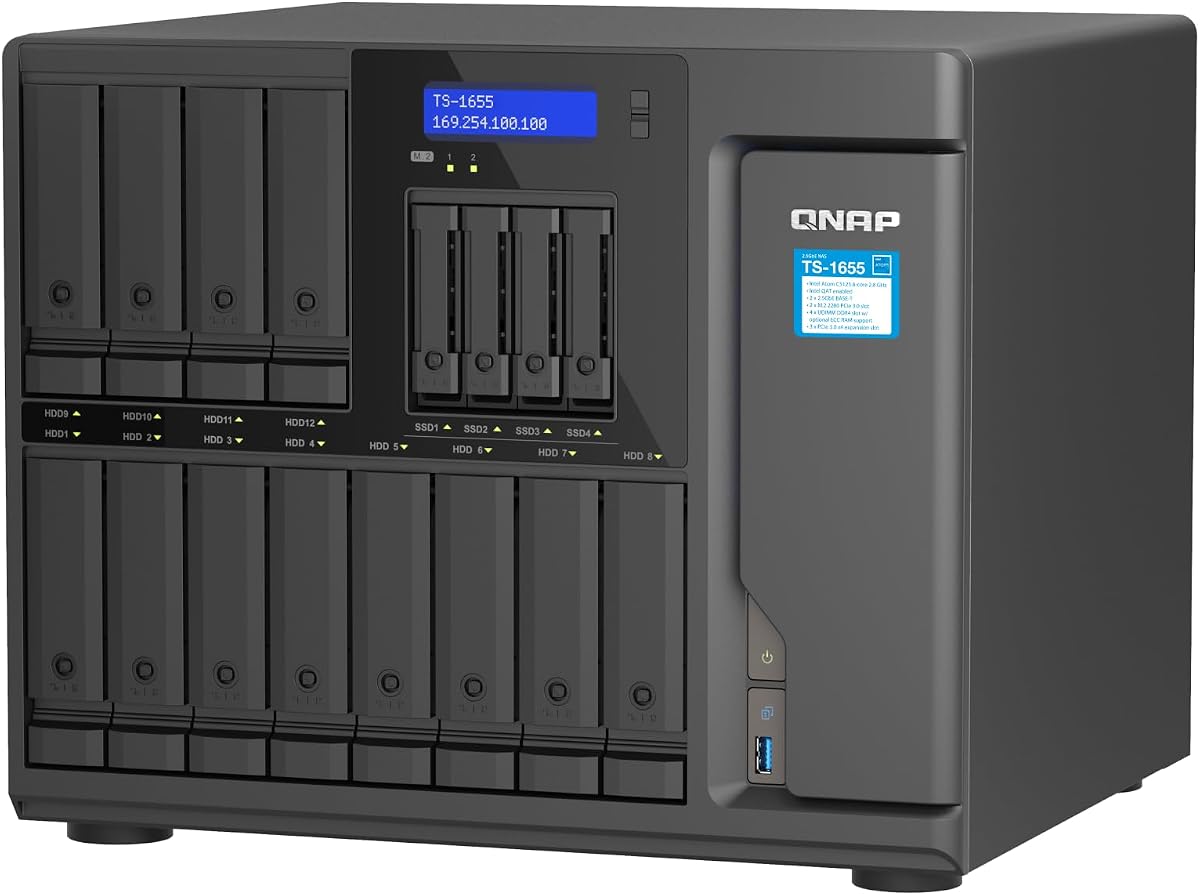
This QNAP TS-1655-8G-US is a robust 16 Bay Hybrid NAS designed for demanding environments. It holds a strong rating from users due to its balance of capacity and performance. The Intel Atom processor ensures smooth operation even with multiple virtual machines running.
We may earn a commission when you buy through this link, at no additional cost to you.
The standout quality lies in its hybrid drive support. You can mix 3.5 inch and 2.5 inch drives for optimized storage pools. The dual 2.5GbE network ports allow for faster file transfers compared to standard 1GbE units. Additionally the M.2 NVMe slots offer SSD caching to speed up frequent access tasks.
One trade-off is the initial setup complexity. Configuring the RAID and cache layers requires some familiarity with NAS systems. However this is standard for high performance units. The build quality is solid ensuring reliability for long-term use.
This unit is ideal for small to medium businesses or power users needing fast access to large datasets. If you need a scalable and fast storage server this is a top recommendation.
The ability to use both 3.5 and 2.5 inch drives maximizes your hardware investment. You can use SSDs in the 2.5 bays for OS or apps while storing data on larger HDDs.
With ECC memory support and a strong processor this NAS handles critical workloads well. It is built to run 24/7 without issues making it safe for business data.
We may earn a commission when you buy through this link, at no additional cost to you.
The Synology RS4021xs+ stands out as a premium rackmount solution for heavy workloads. It delivers exceptional performance with its 8-core Intel processor and high-speed read capabilities. Users praise its reliability and the comprehensive Synology DiskStation Manager software.
We may earn a commission when you buy through this link, at no additional cost to you.
Key strengths include the redundant power supplies which protect against power failures in server rooms. The PCIe expansion slots allow you to add M.2 NVMe cache or high bandwidth network cards later. This flexibility makes it a future-proof choice for growing IT needs.
The main drawback is the high cost compared to desktop alternatives. It is designed for professional environments where uptime is critical. The complexity of rack mounting also requires specific IT skills or hardware.
This NAS is best for businesses that need enterprise-grade storage and networking. If budget is secondary to performance and reliability this unit is unmatched in the category.
Dual power supplies ensure that your data remains accessible even if one power source fails. This is essential for business continuity and uninterrupted server operations.
The PCIe slots give you the freedom to upgrade networking or storage features without replacing the whole unit. This supports long-term scalability for your infrastructure.
We may earn a commission when you buy through this link, at no additional cost to you.
The QNAP TL-D1600S offers a cost-effective way to add massive storage to an existing PC or NAS. It is a pure JBOD enclosure meaning it provides drive slots without processing power. This makes it a great choice for users who already have a capable host system.
We may earn a commission when you buy through this link, at no additional cost to you.
Its primary benefit is the included PCIe SATA interface card. This allows direct connection to the motherboard for high performance data transfers. The enclosure supports both 3.5 and 2.5 inch drives giving you flexibility in drive selection.
The trade-off is that it requires a separate computer to function. It does not have its own OS like a full NAS. However for those needing raw storage capacity at a low price this is a smart option.
This enclosure is perfect for expanding local storage on a workstation or file server. If you want simple high capacity storage without extra computing costs this is a top pick.
Having the PCIe card included means you save money and effort finding a compatible adapter. It ensures full compatibility with the enclosure for stable performance.
Support for both standard and small form factor drives allows for customized builds. You can mix SSDs and HDDs to optimize performance and cost.
We may earn a commission when you buy through this link, at no additional cost to you.
The Synology DX1222 is designed to expand storage for compatible Synology DiskStation units. It integrates smoothly into the existing software environment allowing easy management. Users appreciate how quickly they can configure new storage in minutes using DSM tools.
We may earn a commission when you buy through this link, at no additional cost to you.
This expansion unit supports seamless scaling for growing storage needs. It allows you to add capacity without needing a new system. The 5-year warranty provides peace of mind regarding long-term reliability and support.
The limitation is that it only works with selected Synology models. You cannot use it with other brands or non-compatible systems. However for Synology owners it is a perfect way to grow storage efficiently.
If you already own a supported Synology NAS this is the best way to add bays. It simplifies storage expansion without technical headaches or compatibility issues.
The unified tools in DSM allow you to manage the expansion unit as if it were part of the main NAS. This simplifies monitoring and maintenance tasks significantly.
With a 5-year warranty Synology backs this unit with strong support. This reduces risk and ensures you have help if issues arise.
We may earn a commission when you buy through this link, at no additional cost to you.
The Generic ZhenLoong Full Tower is a robust chassis for building a custom NAS server. It supports various motherboard sizes and offers plenty of room for components. This allows users to tailor the hardware to their exact performance and capacity needs.
We may earn a commission when you buy through this link, at no additional cost to you.
Its key feature is the hot swap drive bays. You can remove and replace drives without shutting down the system. This is vital for uptime in always-on server environments. The case also supports multiple GPUs for specialized computing tasks.
The main downside is the shipping duration which can take up to 40 days. Additionally you must assemble the hardware yourself. This requires technical expertise and patience to ensure proper configuration.
This tower is ideal for DIY enthusiasts who want total control over their build. If you need a flexible and large case for a custom NAS this fits the bill.
With support for EEB and EATX motherboards you can use high-end server parts. The expansion slots allow for networking cards or GPUs to boost power.
Hot swap bays let you maintain the system without downtime. This is crucial for businesses that cannot afford to stop running services.
We may earn a commission when you buy through this link, at no additional cost to you.
The Asustor Lockerstor 10 Gen3 is a high-performance NAS that prioritizes speed. While it has 10 bays its network features are advanced. It supports dual 10GbE ports allowing for massive data throughput within your network.
We may earn a commission when you buy through this link, at no additional cost to you.
Standout features include the USB4 40Gbps port and ECC RAM support. These allow for fast external storage and reliable server operation. It is built for creative workflows and virtualization environments that need bandwidth.
The trade-off is the lower bay count compared to 16 Bay options. However for those who need network speed over raw drive count this excels. It balances performance with a modern feature set.
This NAS is best for studios or IT teams needing fast access to files. If network speed is your priority this unit offers excellent value for performance.
The dual 10GbE ports support link aggregation for faster file transfers. This is essential for environments with heavy data traffic and multiple users.
USB4 40Gbps connectivity allows for connecting ultra-fast external drives. This bridges the gap between internal storage and external backup devices.
We may earn a commission when you buy through this link, at no additional cost to you.
The Synology DS3622xs+ is a solid diskstation designed for business use. It offers strong performance with its 6-core Xeon processor and high read speeds. Users value its ability to scale storage as needs grow.
We may earn a commission when you buy through this link, at no additional cost to you.
Key strengths include support for NVMe SSD cache and virtualization. This allows for faster application performance without buying all new hardware. It is also expandable to 36 bays using expansion units.
One downside is the mixed user rating. Some may find the setup or software learning curve steep. However the hardware reliability and feature set remain competitive for its class.
This unit is ideal for businesses needing a scalable server system. If you plan to grow your storage over time this provides a solid foundation.
Scaling to 36 bays allows for massive capacity without a new chassis. This helps future proof your storage investments as data grows.
NVMe SSD cache accelerates frequently accessed data. This improves responsiveness for databases and virtual machines running on the system.
We may earn a commission when you buy through this link, at no additional cost to you.
The QNAP TL-R1600PES-RP-US is a rackmount JBOD designed for space-constrained environments. Its short depth design makes it easy to install in smaller cabinets. It supports massive storage capacity for enterprise needs.
We may earn a commission when you buy through this link, at no additional cost to you.
It features redundant power supplies which are vital for server reliability. The Mini-SAS HD interface provides high bandwidth for data transfers. This unit is great for expanding a QNAP NAS without taking up too much room.
The main trade-off is that rails are not included in the box. You must purchase them separately for rack installation. Also proper cabling is needed for full functionality.
This enclosure is perfect for small server rooms or offices needing scale. If space is limited but capacity is critical this is a great solution.
The short depth design helps in cabinets with limited depth. It simplifies installation in crowded racks where other units might not fit.
Dual power supplies mean the unit stays online even during power issues. This ensures your data remains accessible and safe at all times.
We may earn a commission when you buy through this link, at no additional cost to you.
The CENMATE Aluminum 12 Bay is a fast external storage option for desktop use. It supports 2.5 and 3.5 inch drives for flexible capacity. Users praise its tool-free design and USB 3.0 speed.
We may earn a commission when you buy through this link, at no additional cost to you.
Its key benefits include effective cooling fans and aluminum build. This keeps drives safe during high use. Daisy chain support allows you to connect multiple units for massive total capacity.
The main drawback is the fan noise which might bother quiet spaces. Also it lacks RAID capabilities so drives are independent. This is fine for backups or simple storage needs.
This enclosure is best for personal or enterprise use needing fast access. If you want a simple expandable drive box this is a strong choice.
You can connect up to three devices in a chain. This lets you scale storage to 720TB without needing a new enclosure.
USB 3.0 offers speeds up to 5Gbps for quick file moves. This is much faster than older USB versions for large media files.
We may earn a commission when you buy through this link, at no additional cost to you.
This QNAP TS-1655-8G-US model promises long-term availability for critical projects. It features an 8-core Atom processor for stable performance over time. Users appreciate the flexibility to upgrade RAM and storage options later.
We may earn a commission when you buy through this link, at no additional cost to you.
Key features include dual M.2 NVMe slots and strong network ports. This supports caching and fast local access. It is built for environments where stability and support longevity are essential.
The trade-off is the initial setup time required to configure all features. Casual users may find the system too technical. However for power users it offers excellent control.
This NAS is best for organizations needing a stable long-term server. If longevity and performance are key this model is a safe bet.
QNAP ensures long-term availability for certain models. This guarantees spare parts and support for years so your investment lasts.
M.2 NVMe slots allow for SSD caching to speed up daily tasks. This boosts performance for demanding apps and virtualization workloads.
We may earn a commission when you buy through this link, at no additional cost to you.
Selecting the right enclosure requires balancing capacity performance and budget. This guide helps you understand the key factors to consider.
The interface determines how fast data moves between drives and computer. USB 3.0 offers decent speed while SATA via PCIe provides faster internal access. Mini-SAS HD is used for high-end rackmount units. Choose based on your host system capabilities.
Check how many bays you need and if they support 2.5 or 3.5 inch drives. Some units support only 3.5 inch for cost efficiency. Others support mixed sizes for flexible building. Verify physical limits before buying.
NAS enclosures may run their own OS or act as a JBOD. Those with OS like Synology or QNAP handle logic internally. JBOD models need a host computer to manage RAID. Decide based on your setup needs.
Network speed affects how fast files access remotely. Units with 1GbE are standard but 2.5GbE or 10GbE are better for teams. Ensure the unit has enough ports for your network design. Link aggregation helps maximize speed.
Reliable power and cooling are vital for drive safety. Look for redundant power supplies in rackmount units. Fans should cool drives without excessive noise. Good build materials help heat dissipation.
A good warranty protects your investment from defects. Check how many years of coverage and what it includes. Manufacturer support quality varies so review customer service options. Strong support simplifies troubleshooting.
Your needs may grow so scalability is important. Some units allow adding expansion trays or daisy chaining. Others have PCIe slots for adding cards. Choose an enclosure that fits your future growth.
Price varies widely from basic boxes to enterprise servers. Set a budget that includes drives and accessories. Sometimes a higher upfront cost saves money later on speed and reliability. Balance immediate needs with long-term value.
Always check drive compatibility before inserting hard drives into the enclosure. Align the connectors correctly to avoid damage during installation. Use the provided tools to lock drives securely in place.