
Crucial P310 1TB SSD
4.7Editor score
Up to 7100MB/s read speeds
Broad laptop and desktop compatibility
Includes Acronis recovery software
This comprehensive guide compares the top Crucial Internal NVME SSD models to help you choose the right storage solution for your specific computing needs and
Choosing the right internal storage is critical for modern computing performance. An NVME SSD offers significantly faster data access than traditional drives, making it essential for gaming, creative work, and daily productivity tasks on both laptops and desktops.
We have evaluated the latest Crucial Internal NVME SSD offerings based on performance metrics, compatibility, and value. Our analysis focuses on real-world speed capabilities, reliability features, and how each model fits into different user scenarios ranging from casual use to professional workflows.
Each selection below highlights key strengths and potential limitations to guide your decision. Please note that availability and pricing can fluctuate over time, so verify current details before making a purchase to ensure you get the best deal available at the moment.
4.7Editor score
4.8Editor score

4.6Editor score
The following table provides a side-by-side comparison of all selected Crucial Internal NVME SSD models. Review the specifications and ratings to understand how each drive performs relative to others in the lineup for your specific use case.


The Crucial P310 1TB SSD stands out as a compelling option for users seeking high performance without breaking the bank. With a rating of 4.7 stars from numerous buyers, it delivers on its promise of up to 7100MB/s read speeds, making it a strong contender in the budget-friendly Gen4 category.
We may earn a commission when you buy through this link, at no additional cost to you.
Key strengths include its wide compatibility across laptops, desktops, and even handheld gaming consoles like ROG Ally and Lenovo Legion Go. This versatility ensures you can upgrade various devices with a single drive model. Additionally, the inclusion of Acronis Data Recovery Software adds significant value for data migration and protection.
Honest trade-offs involve the use of QLC NAND which might offer slightly lower endurance compared to TLC options, and the lack of a dedicated heatsink which may require aftermarket cooling for sustained heavy workloads. These are acceptable for most casual and mainstream gaming users.
This drive is ideal for budget-conscious gamers and home users who need fast boot times and smooth multitasking. The final recommendation is that it offers the best balance of price and performance for entry-level Gen4 NVMe needs.
Users can experience up to 7100MB/s read speeds which rivals higher-end drives while costing significantly less.
The drive is specifically validated for popular handheld devices ensuring stable performance in portable gaming scenarios.
We may earn a commission when you buy through this link, at no additional cost to you.
For PlayStation 5 owners looking to expand storage, the Crucial P310 2280 1TB SSD with Heatsink is a top choice. It holds a 4.7 rating and specifically meets the PS5 storage requirements for capacity and speed, making it ready for immediate use.
We may earn a commission when you buy through this link, at no additional cost to you.
The main advantage is the integrated heatsink which ensures the drive maintains peak performance during long gaming sessions by preventing thermal throttling. It delivers the same up to 7100MB/s read speeds as the standard model but in a form factor optimized for console internal slots.
Trade-offs include a slightly higher cost due to the added cooling solution and a minimal increase in length that fits most slots but requires checking specific system clearance. These are minor inconveniences for the guaranteed compatibility and thermal stability.
This model is the best recommendation for PS5 users who want a hassle-free upgrade without needing extra cooling hardware. It provides peace of mind with its built-in thermal management and proven reliability.
Designed specifically to meet the strict specs required for internal expansion on modern gaming consoles like PS5.
The attached heatsink keeps temperatures low ensuring consistent speeds even during extended play.
We may earn a commission when you buy through this link, at no additional cost to you.
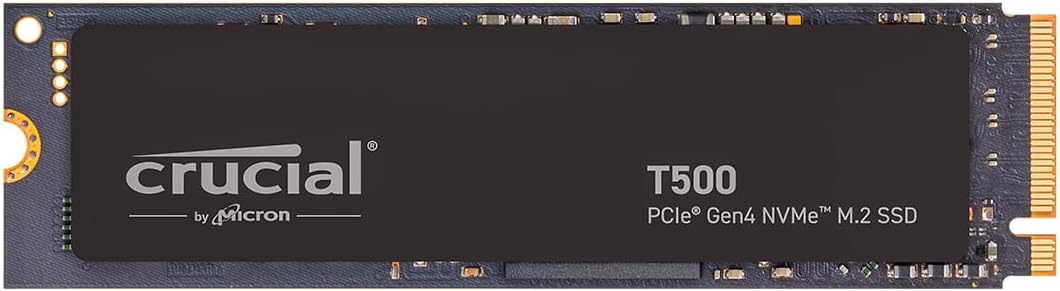
The Crucial T500 1TB SSD earns our Editor's Choice award with a 4.8 rating and superior specs for power users. It features TLC NAND which offers better endurance and sustained performance compared to QLC alternatives, making it suitable for heavy workloads.
We may earn a commission when you buy through this link, at no additional cost to you.
Standout features include the inclusion of one month of Adobe Creative Cloud which adds real value for creatives, and optimizations for Microsoft DirectStorage that can make games load up to 16% faster. The read speeds of up to 7300MB/s also edge out the P310.
Trade-offs involve a higher price point and a lack of a dedicated heatsink version for PS5 expansion. These are acceptable because the drive is fast enough for most PC gaming and creative needs without needing console-specific optimization.
We recommend this drive for anyone prioritizing speed and creative tools in a single purchase. It represents the best overall balance of performance, reliability, and value for PC gamers and professionals.
The included software bundle and TLC NAND make it ideal for rendering and content creation workflows.
DirectStorage support allows for faster asset loading in games that utilize this modern technology.
We may earn a commission when you buy through this link, at no additional cost to you.
The Crucial P310 2TB SSD offers double the storage of the standard model while maintaining the same impressive performance metrics. With a 4.7 rating, it provides a reliable solution for users who need to store large libraries of games and media without upgrading to a new platform.
We may earn a commission when you buy through this link, at no additional cost to you.
Key benefits include the same up to 7100MB/s read speeds as the 1TB version ensuring no performance penalty for higher capacity. It uses 3D NAND technology which ensures robust reliability and endurance for daily use in desktop and laptop environments.
Trade-offs include the higher initial cost compared to smaller capacities and the lack of the software bundles found on other models. These are acceptable for users who prioritize raw storage space over extra add-ons.
This drive is recommended for users needing extensive local storage for large media files or game collections. It delivers consistent performance and reliability at a capacity that fits most modern storage needs.
With 2TB available, users can store hundreds of games and large video files without constant management.
The speed remains identical to the 1TB variant ensuring fast access to all stored content.
We may earn a commission when you buy through this link, at no additional cost to you.
The Crucial P510 1TB SSD brings the latest PCIe Gen5 technology to a more accessible price point. With a 4.7 rating and speeds up to 11000MB/s, it offers a massive leap over Gen4 drives for users with compatible hardware.
We may earn a commission when you buy through this link, at no additional cost to you.
Major strengths include the inclusion of Adobe Creative Cloud software and TLC NAND which ensures better endurance than previous entry-level Gen5 drives. It serves as an affordable upgrade path for those looking to future-proof their storage investments.
Trade-offs involve the requirement for a Gen5 compatible motherboard and potential for higher heat generation requiring good case airflow. These are standard for early adoption of new storage interfaces.
This drive is recommended for tech enthusiasts who want bleeding edge speeds without waiting for prices to drop further. It offers the best entry point into the Gen5 ecosystem.
Delivers up to 11000MB/s which significantly outpaces the previous generation standards.
Investing in Gen5 ensures compatibility with the latest system updates and future hardware upgrades.
We may earn a commission when you buy through this link, at no additional cost to you.
The Crucial T710 1TB SSD represents the pinnacle of performance with a 4.6 rating and speeds up to 14900MB/s. Designed for power users, it combines raw speed with professional features like hardware encryption for secure data handling.
We may earn a commission when you buy through this link, at no additional cost to you.
Key features include the highest read speeds available in the lineup and robust security with TCG Opal support. It is engineered specifically for scenarios where data integrity and speed are critical such as enterprise workstations and high-end gaming rigs.
Trade-offs include a premium price tag and the necessity for adequate cooling to prevent throttling under sustained loads. These are acceptable trade-offs for professionals who rely on consistent peak performance.
This drive is best for users who need the fastest possible storage and advanced security features. It justifies its cost through superior performance and reliability for critical workloads.
With nearly 15000MB/s read speeds data transfer times are minimized for maximum productivity.
Hardware encryption protects sensitive data ensuring compliance and safety for professional users.
We may earn a commission when you buy through this link, at no additional cost to you.
The Crucial E100 480GB SSD is a budget-friendly option for those with minimal storage needs. It holds a 4.5 rating and delivers up to 4700MB/s read speeds which is still a massive upgrade over traditional hard drives.
We may earn a commission when you buy through this link, at no additional cost to you.
Major strengths include its compact size fitting perfectly in ultrabooks and small form factor PCs. It provides Gen4 performance at a lower cost point making it ideal for secondary drives or basic system upgrades.
Trade-offs involve lower capacity and slower speeds compared to higher-end models. These are acceptable for users who primarily use cloud storage or external drives for bulk media files.
This drive is recommended for budget builds and office PCs where cost efficiency is paramount. It offers reliable performance for everyday computing tasks without unnecessary expense.
Even at lower price points, users can still access modern NVMe speeds without compromising reliability.
The smaller form factor ensures compatibility with a wide range of portable and compact devices.
We may earn a commission when you buy through this link, at no additional cost to you.
The Crucial P310 1TB Micron QLC variant serves as a reliable standard option for everyday computing. With a 4.6 rating, it uses 232L Micron QLC NAND which offers a good balance of cost and reliability for general users.
We may earn a commission when you buy through this link, at no additional cost to you.
Key features include standard Gen4 speeds compatible with most modern systems and the trusted reputation of Micron manufacturing. It provides a solid upgrade path for those seeking to replace aging storage without breaking the bank.
Trade-offs include lower endurance compared to TLC drives due to QLC technology and lack of software bundles. These are acceptable for typical read-heavy daily usage patterns.
This drive is recommended for general users who want a dependable upgrade. It provides good value for those who primarily read data rather than write large amounts frequently.
Backed by Micron's quality control this drive offers confidence in daily use and data retention.
Designed to fit standard M.2 slots ensuring easy installation in most laptops and desktops.
We may earn a commission when you buy through this link, at no additional cost to you.
The Crucial T500 1TB Heatsink SSD combines the best of high-end Gen4 performance with console-ready features. Holding a 4.8 rating it uses TLC NAND for endurance and includes a built-in heatsink for thermal stability during heavy gaming.
We may earn a commission when you buy through this link, at no additional cost to you.
Standout features include the PS5 certification ensuring compliance with storage specs and the inclusion of Adobe Creative Cloud software. This makes it a versatile drive for both gaming consoles and PC content creation.
Trade-offs involve a higher cost due to the heatsink and premium NAND technology. These are acceptable given the dual use case for PC and console users.
This drive is recommended for users needing a high-performance option for both console and PC. It offers peace of mind with thermal management and top tier reliability.
Works seamlessly in both desktops and consoles providing versatility for multi-device users.
The built-in heatsink ensures sustained speeds without throttling during long gaming sessions.
We may earn a commission when you buy through this link, at no additional cost to you.
The Crucial T700 1TB SSD delivers top Gen5 performance with a 4.6 rating and speeds up to 11700MB/s. It is optimized for both Intel and Ryzen platforms making it accessible to a wide range of high-end PC users.
We may earn a commission when you buy through this link, at no additional cost to you.
Major strengths include robust compatibility across modern chipsets and a reliable 5-year warranty for peace of mind. It ensures smooth multitasking and faster loading times for demanding modern games.
Trade-offs include higher cost and the requirement for Gen5 compatible hardware. These are expected for premium performance drives.
This drive is recommended for hardcore gamers and professionals seeking high throughput. It offers a balance of speed and reliability for demanding workflows.
Designed for gamers who demand the fastest possible load times and responsiveness.
Ensures users can utilize this drive across both major Intel and AMD hardware platforms.
We may earn a commission when you buy through this link, at no additional cost to you.
Selecting the right Crucial Internal NVME SSD requires understanding key factors like speed, capacity, and compatibility to match your system needs.
Ensure the PCIe generation matches your motherboard slot for optimal performance. Using a Gen5 drive in a Gen4 slot caps speeds, while older slots may limit the potential of newer drives.
Check your system specs before buying to avoid bottlenecks and ensure full speed utilization.
Evaluate your storage needs based on your typical file sizes and usage patterns. Gamers may need 2TB for large libraries while basic users might suffice with 480GB or 1TB.
Choose capacity that allows for growth without frequent upgrades or external storage reliance.
TLC NAND generally offers better endurance than QLC NAND making it better for write-heavy workloads. QLC is more budget-friendly and sufficient for standard read-heavy tasks.
Select TLC if you plan on heavy data writing or editing large video files frequently.
High performance drives generate more heat which can lead to throttling. Consider if your device includes a controller heatsink or if the drive comes with one.
Ensure the drive fits within the physical constraints of your chassis for safe thermal management.
Confirm that the drive is compatible with your device whether it is a laptop, desktop, or gaming console. Some drives have specific optimizations for systems like PlayStation 5.
Verify dimensions and slot requirements to ensure a physical fit within your system.
Some models include software like Acronis cloning or Adobe Creative Cloud which add value for creators. Check if these extras justify any price difference over standard models.
Look for included software that helps simplify migration or enhances your workflow.
Review the warranty terms to ensure long-term peace of mind. Most Crucial drives offer multi-year coverage but it is important to verify the specifics.
Opt for models with better warranty terms if you rely on the drive for professional work.
Balance your budget against performance needs. Entry-level Gen4 drives are excellent for most users while Gen5 drives are for those needing maximum speed.
Focus on getting the best value within your price range rather than chasing the highest speed possible.
Install your Crucial Internal NVME SSD by connecting it to the M.2 slot on your motherboard and securing it with a screw. Ensure the connector is properly aligned to avoid damage during installation.
Use the included software tools or system utilities to initialize the drive and format it for use. This step prepares the storage for your operating system and data files.
Maintain the health of your SSD by keeping your system cool and avoiding excessive writes. Ensure your computer has good airflow and avoid unnecessary full capacity usage to prolong its lifespan.
The Crucial T710 1TB SSD is the fastest model in the lineup with read speeds up to 14900MB/s. It is designed for power users who need maximum throughput for demanding professional workloads and high-end gaming.
Yes, the Crucial P310 2280 1TB SSD with Heatsink meets the PS5 specifications and is optimized for console expansion. Other models may work but require verifying capacity and slot dimensions before purchase.
Not always. Many motherboards include a heatsink for M.2 slots. However, high-performance models like the T710 benefit from cooling solutions to maintain peak speeds during sustained workloads.
Most of these drives are compatible with laptops that have an available M.2 NVMe slot. You should verify your laptop's manual for slot dimensions and supported PCIe generations before upgrading.
Some models include Acronis Data Recovery Software for data migration. Higher-tier models often come with a one-month Adobe Creative Cloud subscription to support creative workflows.
Many of these drives are backward compatible with older PCIe generations but will operate at reduced speeds. Always check your system specs to ensure you can utilize the drive's full potential.
Choose capacity based on your storage needs. Gamers often prefer 2TB to store large libraries. while basic users may find 480GB or 1TB sufficient for OS and common applications.
Yes, most Crucial Internal NVME SSDs come with a limited warranty ranging from 3 to 5 years depending on the model. Check the specific product details for exact terms and coverage.
Choosing the best Crucial Internal NVME SSD depends on your specific performance and budget requirements. Whether you need the cost-effective P310 or the high-speed T710 there is a model suited for every user scenario.
Prioritize capacity and thermal management based on your workload. Gamers should consider PS5-ready models while creatives benefit from the added software bundles and faster write speeds.
Remember to verify current pricing and availability before purchasing as market conditions can change. Always ensure your system compatibility to get the most out of your new storage upgrade.