
TP-Link AC1200 WiFi Extender Dual Band 5GHz/2.4GHz (RE315)
4.2Editor score
Simple one-touch connection
Up to 1500 sq ft coverage
Fast ethernet port included
This guide compares the top easy to install WiFi extenders for 2026, featuring models from TP-Link, NETGEAR, and others with simple setup options.
Finding a reliable wireless signal booster that does not require technical expertise is essential for modern homes. We focus on models that offer intuitive setup processes like WPS pairing and user-friendly mobile apps to ensure anyone can get started quickly without frustration.
Our team evaluated ten top-rated extenders based on setup speed, coverage area, compatibility with existing routers, and overall performance. We prioritized devices that deliver strong signals to dead zones while maintaining a straightforward installation experience for all users.
Each pick highlights specific strengths such as mesh compatibility or port options to help you choose the right fit for your space. Please note that availability and pricing can change frequently, so verify current details on the retailer site before making a final purchase decision.
4.2Editor score

4.1Editor score

4.2Editor score
Below is a side-by-side comparison of all ten models we reviewed. Each entry lists key specifications to help you quickly identify the right unit for your home network needs and installation preferences.


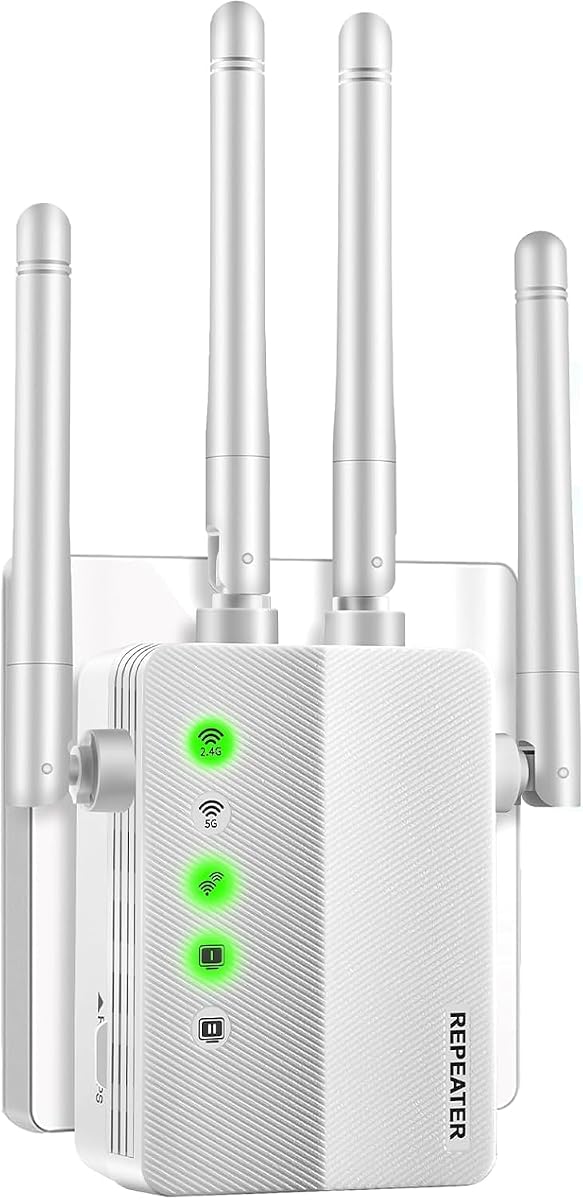


This model stands out as the top budget choice for those needing basic coverage without breaking the bank. It carries a solid rating from users who appreciate its straightforward installation via the Tether app or WPS button.
We may earn a commission when you buy through this link, at no additional cost to you.
The dual band architecture delivers up to 1200 Mbps total bandwidth which handles everyday streaming and browsing comfortably. Adaptive Path Selection ensures the device connects to the strongest signal automatically reducing lag during movement across rooms.
While it lacks the newest WiFi 6 standards it performs reliably for standard households. The lack of compatibility with Deco systems is a trade-off but acceptable for users with standard routers.
Buyers seeking a cost-effective way to eliminate dead zones will find this unit a sensible investment. It offers strong security features and easy management making it ideal for general home use.
This extender delivers strong coverage at a fraction of the cost of premium models.
The Tether app guides you through optimal placement for maximum signal strength.
We may earn a commission when you buy through this link, at no additional cost to you.
This unit steps up the performance with AC1900 speeds and a wider coverage area than the budget option. It is rated highly by users needing to cover larger rooms or floors with consistent connectivity.
We may earn a commission when you buy through this link, at no additional cost to you.
The three external antennas allow for precise signal direction while the gigabit port ensures wired devices get full speed. Smart Adaptive Roaming keeps your connection stable as you move between different parts of the home.
One limitation is the incompatibility with Deco systems but it works well with most standard routers. The AP mode feature adds versatility allowing you to use existing wired connections for wireless access.
If you need more bandwidth and wider reach this model provides a robust solution. It balances speed and range effectively while maintaining the easy setup process TP-Link is known for.
AC1900 speeds ensure high quality streaming and downloads without buffering interruptions.
Access Point mode lets you turn wired ports into wireless hotspots easily.
We may earn a commission when you buy through this link, at no additional cost to you.
This extender earns its top pick status by bringing the latest WiFi 6 standard to your network. It offers excellent capacity for many devices and a large coverage area suitable for bigger homes.
We may earn a commission when you buy through this link, at no additional cost to you.
Beamforming technology directs signals to connected devices rather than broadcasting broadly which improves reliability. The two high-gain antennas ensure strong signal reach up to 2400 square feet while supporting up to 64 devices.
While it works with older routers maximizing its speed requires a compatible WiFi 6 router. The EasyMesh compatibility makes it a good choice for expanding a mesh network without changing your whole system.
Users who want the best combination of speed coverage and modern features will appreciate this model. It represents a smart investment for those planning to upgrade their home network infrastructure soon.
Newer protocol provides better efficiency and speed especially in crowded network environments.
Beamforming focuses the signal directly at your devices for a stronger connection.
We may earn a commission when you buy through this link, at no additional cost to you.
NETGEAR brings a solid option with simple setup tools like the Nighthawk app and WPS pairing. It aims to eliminate dead zones in common areas like bedrooms and garages efficiently.
We may earn a commission when you buy through this link, at no additional cost to you.
The design is straightforward with a single Ethernet port for connecting devices like game consoles or smart TVs. It works with almost any gateway from major providers ensuring broad usability for typical subscribers.
The Fast Ethernet port limits wired throughput compared to Gigabit options on higher end models. Users prioritizing ultra fast wired connections might prefer alternatives but this works well for standard streaming needs.
This unit is a good mid-range choice for those who trust the NETGEAR brand. Its ease of setup and universal compatibility make it a hassle free addition to most home networks.
Connects seamlessly to routers from Xfinity, Spectrum, and other major providers.
The app walks you through placement and configuration step by step.
We may earn a commission when you buy through this link, at no additional cost to you.
This model shows a remarkably high user satisfaction score due to its simplicity and effectiveness. It offers a wall plug design that saves outlet space while delivering dual band coverage.
We may earn a commission when you buy through this link, at no additional cost to you.
It supports multiple modes including Repeater and AP mode which adds flexibility for different network needs. The device supports standard security protocols ensuring your data remains safe from unauthorized access.
While it lacks the extensive features of big brand models it does the core job well. The high rating suggests users find it reliable and easy to use without technical headaches.
For those seeking a no fuss solution with high reported success this is a strong candidate. The compact form factor ensures it fits anywhere without looking obtrusive in your home.
The wall plug style keeps your outlets free for other devices.
Users consistently rate this unit highly for ease of use and signal strength.
We may earn a commission when you buy through this link, at no additional cost to you.
This EX5000 model mirrors the EX6120 but focuses on core functionality and ease of use. It is popular for its app guided setup which simplifies the process for non tech savvy users.
We may earn a commission when you buy through this link, at no additional cost to you.
It provides consistent performance for streaming and browsing in areas with weak signals. Automatic firmware updates ensure the device stays secure without requiring manual intervention from the user.
The limitation is the lack of Gigabit speed on the wired port which might affect high speed connections. Still it offers a stable extension for wireless devices throughout your home.
If you prefer NETGEAR tools and need a reliable extension this unit fits the bill. Its automatic updates and security features make it a low maintenance choice for many households.
The Nighthawk app simplifies monitoring and managing your network settings.
Firmware updates happen automatically to keep security always up to date.
We may earn a commission when you buy through this link, at no additional cost to you.
This extender is specifically useful for those already invested in the TP-Link OneMesh ecosystem. It allows you to create a unified network with a single name and seamless roaming.
We may earn a commission when you buy through this link, at no additional cost to you.
Its compact size means it does not block adjacent outlets which is a common issue with bulkier extenders. The setup via Tether app is quick and guides you to the best spot.
The coverage is smaller than larger models so it may not suit huge homes without multiple units. However for small apartments or offices it provides excellent value and connectivity.
Choose this if you want an integrated network experience without complex configuration. It keeps your connection stable and easy to manage with minimal effort.
Works seamlessly with other OneMesh devices for a single network name.
Fits neatly into outlets without blocking access to nearby sockets.
We may earn a commission when you buy through this link, at no additional cost to you.
This model offers an accessible entry into WiFi 6 technology for those upgrading from older gear. It provides robust performance with a good coverage area for medium sized homes.
We may earn a commission when you buy through this link, at no additional cost to you.
Beamforming ensures signals stay strong even through obstacles. The Gigabit port makes it suitable for connecting high-speed wired devices like PCs or consoles.
While it lacks Deco compatibility it works well with EasyMesh routers and standard networks. It strikes a nice balance between advanced tech and reasonable pricing for many users.
Ideal for buyers who want modern standards without paying premium prices. It delivers reliable connectivity and smart features to improve your daily internet experience.
WiFi 6 tech brings better performance for multiple connected devices.
Gigabit port ensures your wired connections stay fast and lag free.
We may earn a commission when you buy through this link, at no additional cost to you.
This extender boasts impressive claims and a perfect user rating suggesting it meets high expectations. The 1-Tap setup simplifies installation making it accessible to everyone immediately.
We may earn a commission when you buy through this link, at no additional cost to you.
It supports four modes including Bridge and Router which offers great flexibility for different setups. The multiple external antennas help direct signals where needed most for strong coverage.
While coverage claims depend on your environment the device handles many devices smoothly. It prioritizes security and stability ensuring you can work or stream without interruptions.
Those looking for a versatile booster with high reported satisfaction will find it compelling. The ease of setup and security features make it a strong option for modern homes.
One tap setup connects you in seconds with just a button press.
Choose between Repeater, AP, or Bridge modes to fit your needs.
We may earn a commission when you buy through this link, at no additional cost to you.
This premium model introduces WiFi 7 technology for those seeking the absolute latest in network speed and stability. It is designed to work with next-gen routers for maximum benefit.
We may earn a commission when you buy through this link, at no additional cost to you.
Multi-Link Operation allows devices to use multiple bands simultaneously reducing latency significantly. Four antennas ensure strong coverage up to 2400 square feet supporting high bandwidth activities like 8K streaming.
It requires a WiFi 7 router to fully utilize its features which adds to the total cost. However for early adopters it offers unmatched performance and reliability.
Investors in future tech will find this unit worth the price. It sets a new standard for speed and efficiency making it a top choice for high-end setups.
WiFi 7 brings massive improvements in bandwidth and reduced latency.
Combines multiple bands for faster and more stable connections.
We may earn a commission when you buy through this link, at no additional cost to you.
Selecting the right extender involves checking compatibility setup type and coverage needs. This guide breaks down the key factors to help you make an informed decision.
Look for units that offer WPS button pairing or dedicated mobile apps for guided setup. These options eliminate the need to log into complex web interfaces making the process faster and less prone to errors.
Prioritize models with intuitive setup guides to ensure you can get connected quickly.
Check the square footage rating to ensure the extender matches your space. A unit rated for 1500 sq ft may work well for a single floor but a larger home might need a higher rated model.
Choose an extender that covers your dead zones comfortably without leaving gaps.
WiFi 6 or newer standards offer better performance for many connected devices. While older models work fine for basic browsing newer standards ensure your network handles modern traffic efficiently.
Opt for WiFi 6 if you have many smart devices to maintain speed and stability.
Ensure the extender works with your existing router brand and protocols. Some mesh brands require their own extenders so check for EasyMesh or OneMesh compatibility if you need seamless roaming.
Verify your router supports the extender to avoid setup issues.
If you need to connect devices via cable check for an Ethernet port. Gigabit ports provide faster wired connections compared to Fast Ethernet which limits speed for high demand devices.
Select a unit with a Gigabit port for gaming consoles or PCs.
External antennas allow for adjusting signal direction while internal antennas save space. Beamforming technology focuses the signal to your device rather than broadcasting blindly for better efficiency.
Look for adjustable external antennas to optimize signal placement in your home.
Secure protocols like WPA3 protect your network from unauthorized access. Advanced security features help keep your data safe especially when connecting multiple devices to the extended network.
Ensure the extender supports current security standards for safety.
Prices range from affordable basic models to premium high-speed units. Determine your must have features first to find the best balance between cost and performance for your needs.
Set a realistic budget that covers essential features without overspending.
To install place the extender halfway between your router and the weak signal area. Use the provided app or WPS button to connect it to your network following the on screen instructions.
Once connected check the signal indicator lights to ensure they show a strong connection. You can use the app to adjust placement if the lights indicate a weak link to the main router.
Regularly update the firmware via the app to keep performance optimal and secure. Keep the device clean and free from dust to ensure proper heat dissipation and long term reliability.
Most modern extenders are designed for simple installation without technical expertise. You can typically use a WPS button or a dedicated mobile app to guide you through the process step by step ensuring anyone can set them up easily.
Generally yes most extenders support universal compatibility with standard routers. However if you use a specific mesh system like Deco you must check for compatible models to ensure seamless network integration.
Wireless extenders may slightly reduce speed due to signal splitting but they improve coverage significantly. Modern dual band models minimize this effect allowing you to maintain acceptable speeds even in remote areas.
For best results place the extender halfway between the router and the dead zone. If it is too far it will receive a weak signal to repeat so finding the right middle spot is crucial for performance.
Not all extenders are compatible with mesh systems unless they support specific protocols like EasyMesh. Check the product details to confirm it works with your mesh brand to avoid connectivity issues.
Most units feature LED lights that change color based on signal strength. You can also test the speed on your device or use the app to verify the connection quality to the main router.
We have reviewed ten options ranging from budget friendly to high end models. The TP-Link AC1200 and RE615X offer excellent value while the BE3200 leads in future tech.
Prioritize ease of setup and compatibility with your existing network to ensure a smooth experience. Consider your coverage needs and whether you require gigabit ports for wired devices.
Prices and availability change frequently so please check current details on the retailer site before buying. We hope this guide helps you find the right extender for your home needs.